DJ TechTools
  • Blog
    • DJ Gear
      • DIY Projects
      • Gear Reviews
      • New Products
      • Controllerism
    • Techniques + Tips
      • Beginner DJ
      • Advanced DJ
      • Producer
      • Finger Drummer
    • News + Culture
      • Editorials + Opinions
      • Artist Interviews
      • Performances + Routines
      • How I Play
    • DJ Software Tutorials
      • Serato Tips
        • Traktor Tips
      • CDJ Tips
      • Ableton Live Tips
  • Store
    • Run by real DJs, not a corporation
    • DJ Controllers
      • Midi Fighter Twister
      • Midi Fighter Spectra
      • Midi Fighter 64
      • View All
    • Accessories
      • Chroma USB Drive for DJs
      • Chroma Caps
      • Chroma Cables Audio
      • Chroma Cables USB-A
      • Chroma Cables: USB-C
      • DJTT Gift Card
      • Midi Fighter T-Shirt
      • Keyboard Covers
      • Earplugs by V-Moda
    • Production Gear
    • Soundcards & Mixers
  • Community
    • Popular Forums
      • General Discussion
      • Buy & Sell
      • Reviews
      • Mixes
      • Music Production
      • Show Your Setup
      • Off Topic
    • Handy Links
      • New Posts
      • Private Messages
      • Register
      • Search
    • Midi Maps
      • Traktor
      • Ableton
      • Serato DJ
      • Midi Fighter 3D
      • Midi Fighter Twister
      • Midi Fighter Spectra
  • Midi Fighter
  • Chroma
No Result
View All Result
DJ TechTools
  • Blog
    • DJ Gear
      • DIY Projects
      • Gear Reviews
      • New Products
      • Controllerism
    • Techniques + Tips
      • Beginner DJ
      • Advanced DJ
      • Producer
      • Finger Drummer
    • News + Culture
      • Editorials + Opinions
      • Artist Interviews
      • Performances + Routines
      • How I Play
    • DJ Software Tutorials
      • Serato Tips
        • Traktor Tips
      • CDJ Tips
      • Ableton Live Tips
  • Store
    • Run by real DJs, not a corporation
    • DJ Controllers
      • Midi Fighter Twister
      • Midi Fighter Spectra
      • Midi Fighter 64
      • View All
    • Accessories
      • Chroma USB Drive for DJs
      • Chroma Caps
      • Chroma Cables Audio
      • Chroma Cables USB-A
      • Chroma Cables: USB-C
      • DJTT Gift Card
      • Midi Fighter T-Shirt
      • Keyboard Covers
      • Earplugs by V-Moda
    • Production Gear
    • Soundcards & Mixers
  • Community
    • Popular Forums
      • General Discussion
      • Buy & Sell
      • Reviews
      • Mixes
      • Music Production
      • Show Your Setup
      • Off Topic
    • Handy Links
      • New Posts
      • Private Messages
      • Register
      • Search
    • Midi Maps
      • Traktor
      • Ableton
      • Serato DJ
      • Midi Fighter 3D
      • Midi Fighter Twister
      • Midi Fighter Spectra
  • Midi Fighter
  • Chroma
No Result
View All Result
DJ TechTools

VCI-100SE + Traktor Pro = sweetness!

Ean Golden by Ean Golden
November 10, 2008
in Controllerism, DJ Software, Traktor Tips, VCI-100 SE / Arcade
Reading Time: 5 mins read
0
VCI-100SE + Traktor Pro = sweetness!
133
VIEWS
Post on FacebookTweet thisUpvote on Reddit

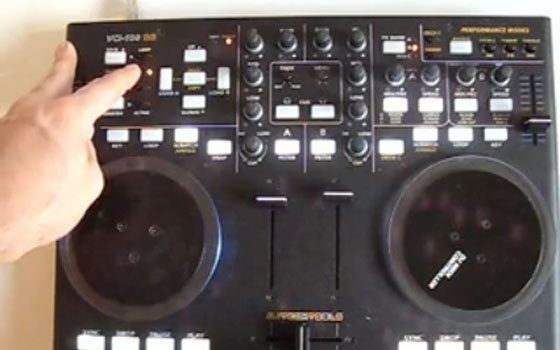
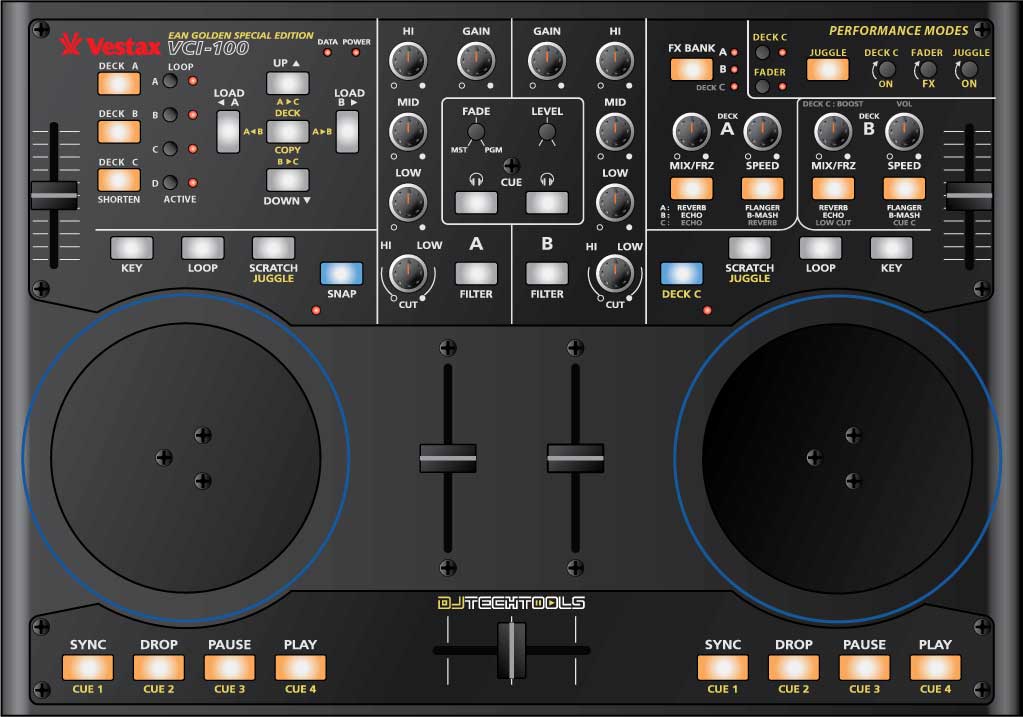
12 months ago I set out to create a mapping for our readers that would tap into the hidden powers of Traktor 3 without requiring a giant controller interface. Using the VCI-100 as a template, I designed a layout that made working with controllerism creative, fun and straight forward by combining many functions on single buttons knobs and faders. That work caught the eye of Vestax and became the VCI-100 special edition controller, which 100 lucky people own today. After that limited run sold out almost immediately we created a firmware upgrade kit and overlay package that allowed regular VCI-100’s to upgrade their own controllers and get the special edition performance.

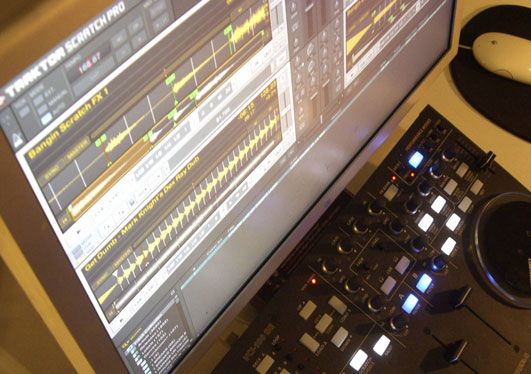
With Traktor Pro, Native instruments has included many of our custom features including direct FX selection and dual filters into their software directly. This allowed me to duplicate and even improve on all of the functions that we created for Traktor 3 but with one major difference. The new mapping will work with every single VCI-100 out there including firmware versions 1.2 and 1.3! That means if you own ANY VCI-100, you can download the TSI file and try out our performance concepts of our VCI-100SE layout for free.

GET THE TSI FILES

You can immediately download the basic TSI file which matches our Traktor 3 overlays here in this post:

http://djtechtools.com/forum/showthread.php?p=29478#post29478

I also recommend you sign up on the TSI beta list bellow. Once signed up, you will receive a download link via email for the newest high performance TSI files and notification of when basic updates are made.

Traktor Pro midi mappings

(Required fields are bold)


Installation

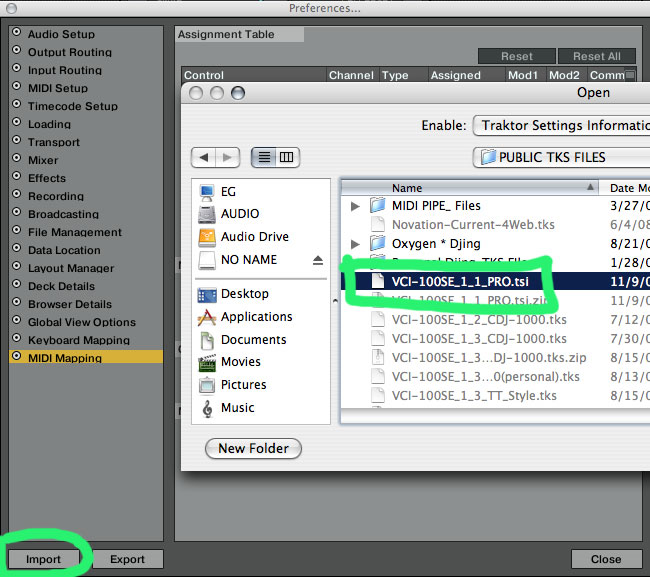
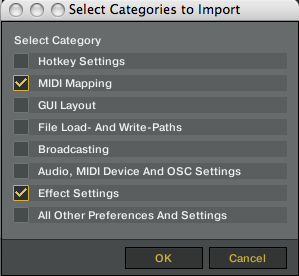
You want to import the TSI file inside Traktor’s prefrences window under midi mapping. The files contains the midi mapping and effects settings that match the VCI-100SE. Its important that you load both so the FX slots match up. You do not need to load any other settings.
Cool new Stuff

  • you can use 4 FX at one time on each deck with direct access to all of them
  • visual indication if an effect is on
  • deck C control is expanded to all deck controls
  • deck copy ALWAYS works
  • juggle mode and fader fx mode can be used at the same time
  • all modes are more obvious visually when engaged
  • all VCI-100 owners can use the file
  • always on filters!
  • you can enable/disable fader FX above the faders
  • pitch bending is working much better in CDJ/JOG mode
  • You can now shorten and lengthen loops in the loop section
  • SCRATCH/JUGGLE are now SCRATCH/CDJ-JOG


Overlays


If you enjoy the TSI and want to have your VCI-100 properly labeled then check out our overlays in the store. They are back in stock but going fast so get one while you can. In the mean time check out the image bellow for a complete list of the functions.
Known Bugs if using firmware 1.2

  • The Flanger ON button on Deck B controls Deck A Cue
  • The B-Masher On button on Deck B also controls Juggle mode
  • The Cue C monitor is the same and Cue B

these are NOT bugs with our Special Edition mapping but a hardware issue that has been in the VCI-100 in firmware versions 1.2 and 1.1

this is a brand new file so there are chances that you may find errors. If so please please report them here where you can contribute your own changes and ideas on how to make these mappings better.

What about Firmware 1.3?

We managed to duplicate almost all of the SE functions in PRO using the 1.2 firmware but there are still a few things that 1.3 uniquely offers. For example, the freeze function at the top of the faders and knobs is not possible in pro without 1.3. The problem of duplicated buttons (mentioned above) was also fixed in 1.3. Those that have an SE or recently upgraded will get the full SE performance on the effects section. Remember you can always switch back and forth using the technique found in this video.

The TSI file is backwards compatible so we will continue to support the 1.3 firmware in our TSI files in the coming months but eventually 1.3 will be phased out as I work with NI to implement all the unique functionality directly into the software.

 

Tags: ControllerismFirmware UpgradeNative InstrumentsTipsTraktor ProTSIupgrade kitVCI-100SE
Share1Tweet1Share
Previous Post

how do I work this thing?

Next Post

VCI-100 Pro Edition Video

Related Posts

A screenshot of the 2.91 version of the Midi Fighter Utility software in Dark Mode
Midi Fighter

Midi Fighter Utility 2.91 Is Out; Our Biggest Update in Years

June 1, 2026
A Prime 4+ and a Kontrol S3 intercut against eachother over a black background
Breaking News

InMusic just bought Native Instruments. So what now for Traktor?

May 8, 2026
Traktor MX2: Native Instruments’ New 2-Channel Controller
DJ Gear Announcements

Traktor MX2: Native Instruments’ New 2-Channel Controller

October 8, 2025
Load More
Next Post
VCI-100 Pro Edition Video

VCI-100 Pro Edition Video

Want to reach DJTT's audience here?

Shoot an email to advertising@djtechtools.com

DJTT ads
DJTT newsletter
Midi Fighter
Chat with us
  • ABOUT DJTT
  • CONTACT
  • PRIVACY
  • MIDI FIGHTER HELP
  • ABOUT DJTT
  • JOBS
  • CONTACT US
  • ADVERTISE
  • PRIVACY POLICY
  • ACCESSIBILITY STATEMENT

© 2024 DJ Techtools all rights reserved by DJ TechTools on all content unless otherwise noted.

No Result
View All Result
  • Blog
    • DJ Gear
      • DIY Projects
      • Gear Reviews
      • New Products
      • Controllerism
    • Techniques + Tips
      • Beginner DJ
      • Advanced DJ
      • Producer
      • Finger Drummer
    • News + Culture
      • Editorials + Opinions
      • Artist Interviews
      • Performances + Routines
      • How I Play
    • DJ Software Tutorials
      • Serato Tips
      • CDJ Tips
      • Ableton Live Tips
  • Store
    • Run by real DJs, not a corporation
    • DJ Controllers
      • Midi Fighter Twister
      • Midi Fighter Spectra
      • Midi Fighter 64
      • View All
    • Accessories
      • Chroma USB Drive for DJs
      • Chroma Caps
      • Chroma Cables Audio
      • Chroma Cables USB-A
      • Chroma Cables: USB-C
      • DJTT Gift Card
      • Midi Fighter T-Shirt
      • Keyboard Covers
      • Earplugs by V-Moda
    • Production Gear
    • Soundcards & Mixers
  • Community
    • Popular Forums
      • General Discussion
      • Buy & Sell
      • Reviews
      • Mixes
      • Music Production
      • Show Your Setup
      • Off Topic
    • Handy Links
      • New Posts
      • Private Messages
      • Register
      • Search
    • Midi Maps
      • Traktor
      • Ableton
      • Serato DJ
      • Midi Fighter 3D
      • Midi Fighter Twister
      • Midi Fighter Spectra
  • Midi Fighter
  • Chroma

© 2024 DJ Techtools all rights reserved by DJ TechTools on all content unless otherwise noted.

This website uses cookies. By continuing to use this website you are giving consent to cookies being used. Visit our Privacy and Cookie Policy.