DJ TechTools
  • Blog
    • DJ Gear
      • DIY Projects
      • Gear Reviews
      • New Products
      • Controllerism
    • Techniques + Tips
      • Beginner DJ
      • Advanced DJ
      • Producer
      • Finger Drummer
    • News + Culture
      • Editorials + Opinions
      • Artist Interviews
      • Performances + Routines
      • How I Play
    • DJ Software Tutorials
      • Serato Tips
        • Traktor Tips
      • CDJ Tips
      • Ableton Live Tips
  • Store
    • Run by real DJs, not a corporation
    • DJ Controllers
      • Midi Fighter Twister
      • Midi Fighter Spectra
      • Midi Fighter 64
      • View All
    • Accessories
      • Chroma USB Drive for DJs
      • Chroma Caps
      • Chroma Cables Audio
      • Chroma Cables USB-A
      • Chroma Cables: USB-C
      • DJTT Gift Card
      • Midi Fighter T-Shirt
      • Keyboard Covers
      • Earplugs by V-Moda
    • Production Gear
    • Soundcards & Mixers
  • Community
    • Popular Forums
      • General Discussion
      • Buy & Sell
      • Reviews
      • Mixes
      • Music Production
      • Show Your Setup
      • Off Topic
    • Handy Links
      • New Posts
      • Private Messages
      • Register
      • Search
    • Midi Maps
      • Traktor
      • Ableton
      • Serato DJ
      • Midi Fighter 3D
      • Midi Fighter Twister
      • Midi Fighter Spectra
  • Midi Fighter
  • Chroma
No Result
View All Result
DJ TechTools
  • Blog
    • DJ Gear
      • DIY Projects
      • Gear Reviews
      • New Products
      • Controllerism
    • Techniques + Tips
      • Beginner DJ
      • Advanced DJ
      • Producer
      • Finger Drummer
    • News + Culture
      • Editorials + Opinions
      • Artist Interviews
      • Performances + Routines
      • How I Play
    • DJ Software Tutorials
      • Serato Tips
        • Traktor Tips
      • CDJ Tips
      • Ableton Live Tips
  • Store
    • Run by real DJs, not a corporation
    • DJ Controllers
      • Midi Fighter Twister
      • Midi Fighter Spectra
      • Midi Fighter 64
      • View All
    • Accessories
      • Chroma USB Drive for DJs
      • Chroma Caps
      • Chroma Cables Audio
      • Chroma Cables USB-A
      • Chroma Cables: USB-C
      • DJTT Gift Card
      • Midi Fighter T-Shirt
      • Keyboard Covers
      • Earplugs by V-Moda
    • Production Gear
    • Soundcards & Mixers
  • Community
    • Popular Forums
      • General Discussion
      • Buy & Sell
      • Reviews
      • Mixes
      • Music Production
      • Show Your Setup
      • Off Topic
    • Handy Links
      • New Posts
      • Private Messages
      • Register
      • Search
    • Midi Maps
      • Traktor
      • Ableton
      • Serato DJ
      • Midi Fighter 3D
      • Midi Fighter Twister
      • Midi Fighter Spectra
  • Midi Fighter
  • Chroma
No Result
View All Result
DJ TechTools

4 Song Cue Point Juggle

Ean Golden by Ean Golden
April 18, 2010
in Advanced DJ Tips, Controllerism, DJ Software, How-To Video Tutorials, Midi Fighter, Traktor Tips, Video Posts
Reading Time: 3 mins read
0
4 Song Cue Point Juggle
75
VIEWS
Post on FacebookTweet thisUpvote on Reddit

On friday we published a reader submitted video, which demonstrated video clip juggling in Ableton Live using a 4×4 grids of buttons. His unique layout inspired me to try a new way of working in Traktor Pro, with 4 deck of cue points triggered on a single controller. The results speak for themselves, this concept is a lot of fun, easy to understand and very expressive. I spent just a few hours working out a basic proof of concept (above), in the hopes of inspiring you to take it further.  Read on for the MP3’s and the mapping file from thr video plus information on how you can use them both to win your own Midi-Fighter.

THE CONTEST


Take the mapping file and mp3’s bellow and combine them into your own cue point driven remix using ANY software and ANY hardware. Add a video of your performance as a video response to my cue point juggle demonstration. In one month’s time (may 18th), I will personally pick one winner that submits the most creative performance and post that video here on Dj TechTools. The winner will also receive a free midi-fighter controller (which are currently sold out until may 30th due to high demand)

THE RULES

  • You can use any mapping or controller
  • You must use the 4 songs provided bellow
  • You can use my cue points or choose your own
  • The performance must be created and recorded for this contest.
  • You can use any software but the remix must be played live (not sequenced)
  • You must add your video as a response to this video before may 16th

THE SOUNDS
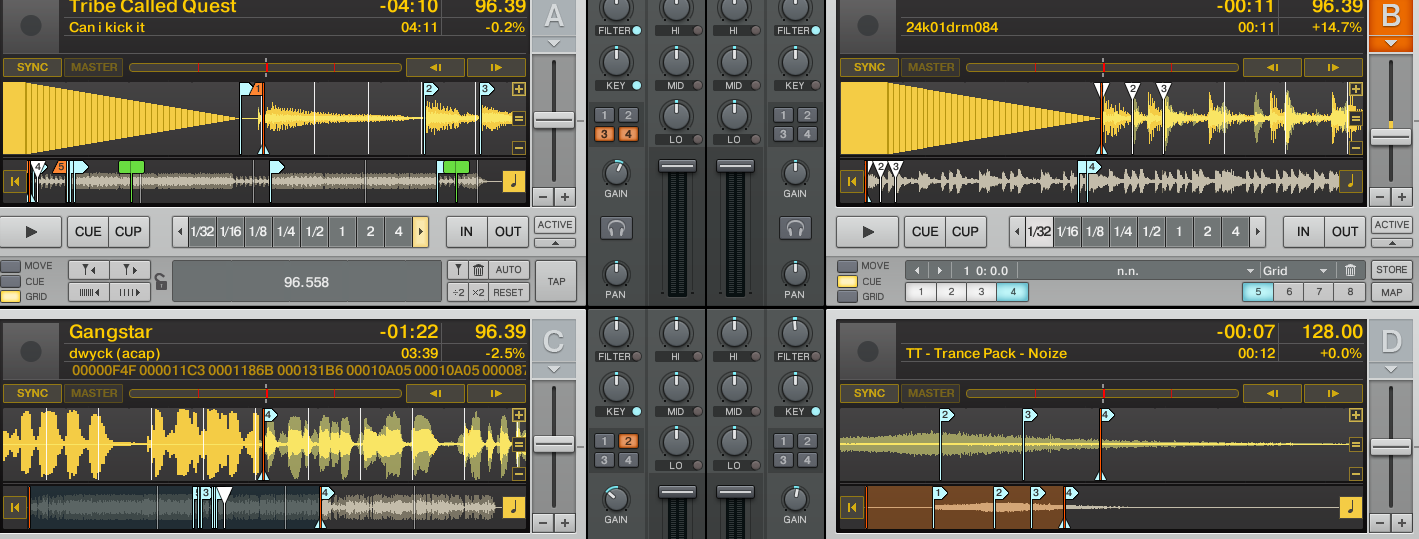

Here are the 4 tracks I used in the video at the top of this post. They contain stripes and cue points for Traktor Pro.

A: Tribe Called Quest “Can I Kick it?”

B: Classic Drum Loop

C: Gangstar “Dwyck”

D: Custom Noise

THE MAPPING

Its amazing how the simple stuff is sometimes the best for the job. Having 4 songs laid out in a sequenced order above each other makes it easy and intuitive to work together all 4 tracks. Trying to maintain this timing with 2 hands is significantly harder.  The mapping bellow is built for the midi-fighter but should work for any controller sending out general midi drum notes (you may need to change your controllers midi channel to 3)

Download the Midi-Fighter Mapping for Traktor Pro 1.24 and up


Tags: 4 deck juggleContestCue Pointsean goldenmappingMidi Fighterroutine
Share1Tweet1Share
Previous Post

Visual Controllerism

Next Post

Review: Namba Gear Lil Namba Remix Backpack

Related Posts

Use your Midi Fighter Twister as an Audio-Reactive Visualizer
Ableton Live Tips

Use your Midi Fighter Twister as an Audio-Reactive Visualizer

June 23, 2025
Control an entire studio with Midi Fighter Spectra (like Mad Zach)
Finger Drumming

Control an entire studio with Midi Fighter Spectra (like Mad Zach)

May 9, 2025
Make your own DIY finger drumming routine with Midi Fighter 64 and Ableton
Ableton Live Tips

Make your own DIY finger drumming routine with Midi Fighter 64 and Ableton

July 11, 2024
Load More
Next Post
Review: Namba Gear Lil Namba Remix Backpack

Review: Namba Gear Lil Namba Remix Backpack

Want to reach DJTT's audience here?

Shoot an email to advertising@djtechtools.com

DJTT ads
DJTT newsletter
Midi Fighter
Chat with us
  • ABOUT DJTT
  • CONTACT
  • PRIVACY
  • MIDI FIGHTER HELP
  • ABOUT DJTT
  • JOBS
  • CONTACT US
  • ADVERTISE
  • PRIVACY POLICY
  • ACCESSIBILITY STATEMENT

© 2024 DJ Techtools all rights reserved by DJ TechTools on all content unless otherwise noted.

No Result
View All Result
  • Blog
    • DJ Gear
      • DIY Projects
      • Gear Reviews
      • New Products
      • Controllerism
    • Techniques + Tips
      • Beginner DJ
      • Advanced DJ
      • Producer
      • Finger Drummer
    • News + Culture
      • Editorials + Opinions
      • Artist Interviews
      • Performances + Routines
      • How I Play
    • DJ Software Tutorials
      • Serato Tips
      • CDJ Tips
      • Ableton Live Tips
  • Store
    • Run by real DJs, not a corporation
    • DJ Controllers
      • Midi Fighter Twister
      • Midi Fighter Spectra
      • Midi Fighter 64
      • View All
    • Accessories
      • Chroma USB Drive for DJs
      • Chroma Caps
      • Chroma Cables Audio
      • Chroma Cables USB-A
      • Chroma Cables: USB-C
      • DJTT Gift Card
      • Midi Fighter T-Shirt
      • Keyboard Covers
      • Earplugs by V-Moda
    • Production Gear
    • Soundcards & Mixers
  • Community
    • Popular Forums
      • General Discussion
      • Buy & Sell
      • Reviews
      • Mixes
      • Music Production
      • Show Your Setup
      • Off Topic
    • Handy Links
      • New Posts
      • Private Messages
      • Register
      • Search
    • Midi Maps
      • Traktor
      • Ableton
      • Serato DJ
      • Midi Fighter 3D
      • Midi Fighter Twister
      • Midi Fighter Spectra
  • Midi Fighter
  • Chroma

© 2024 DJ Techtools all rights reserved by DJ TechTools on all content unless otherwise noted.

This website uses cookies. By continuing to use this website you are giving consent to cookies being used. Visit our Privacy and Cookie Policy.