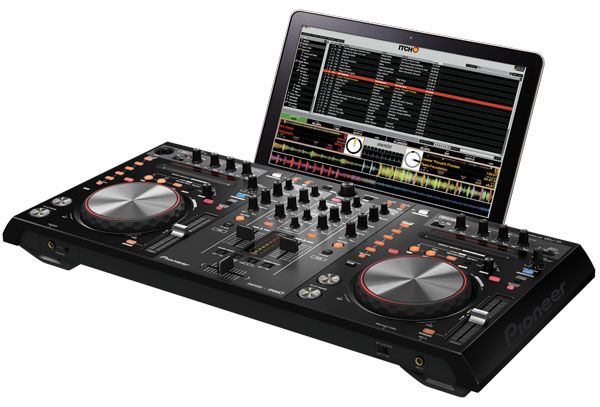
Jumping on the momentum that yesterday’s leak produced, the full details and official announcements have come from the Pioneer, Serato Audio, and Traktor camps. Our complete lack of factual information has been remedied: the Pioneer DDJ-T1 will arrive in February 2011 with a price tag of $1299/£899, while the DDJ-S1 will be released in March for a heavier $1599 / £1099. We’ve got all of the solid facts and specifications, along with better pictures of these new controllers – keep reading.
DDJ-S1 ($1599/£1099)
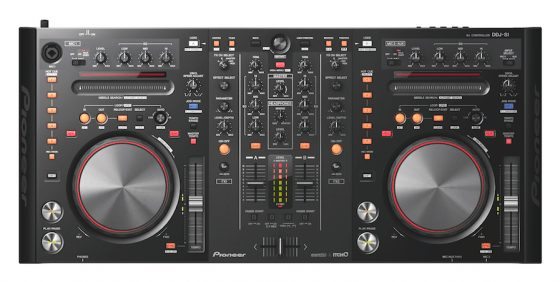
Those of you who had keen eyes on our the leaked image of the DDJ-S1 in our previous post noticed that there was a Serato ITCH logo printed on it- and we’re sad to say that all indications point to the fact that the S1 isn’t going to act as a SSL box, leaving dedicated Scratch Live users in the dust again when it comes to providing a one-stop piece of kit. The S1 is clearly designed for a two deck mixing style, and while it does have a Mic and Mic2/Aux input, they’re not treated like independent channels whatsoever.
Despite the lack of four decks, there are a number of nice features on the unit, including buttons for instant doubling of tracks from one deck to the other, a needle strip search with a red LED progress bar (“Playing Address feature”) above it, a alphabetical search function using the same needle strip control, and a beat grid adjust that is mapped as a shift-function for the jog wheels.
Additional facts from the Pioneer DDJ-S1 product sheet:
1. Familiar Pioneer control surface offers DJs instantly recognizable and responsive controls
The controller has excellent operability thanks to the similarity in layout to other professional Pioneer DJ equipment. The master and channel level meters are placed together centrally on the unit, helping DJs to monitor the level of the master and each channel while adjusting the volume. The controller also has an effect control area, so you can add Serato ITCH’s DJ FX to your mix.
2. Laptop dock
The dock allows you to position the laptop under the controller, for optimized performance space and visual reference.
3. Includes a Playing Address feature that allows DJs to visually confirm the position of a song
Track song progression on a unique LED display, so you know exactly where you are while DJing. The controller also includes a “Needle Drop” search function, allowing you to quickly skip through a song to a preferred playback point.
4. Plug and play connection
You can connect the controller and computer with just a USB cable*1, so you can truly “plug and play”. Since all of the buttons and knobs have already been assigned DJ software functions, it’s easy to start DJing without any complicated settings.
5. Designed specifically for Serato ITCH software with advanced Pioneer features
The controller offers tight integration with Serato ITCH software. Added controls include an alphabetic search function for quick song selection from large music collections and a slip mode for looping, reversing, and scratching without changing the song tempo.
6. Multiple input and output options
The controller is equipped with various inputs and outputs, including balanced XLR input/output (1 each) for connecting professional PA equipment.*2
7. High quality design for a clear and powerful DJ sound
Pioneer has utilized technologies developed from its professional DJ equipment, including Pioneer mixer audio circuitry, to ensure high quality sound. This, coupled with audio characteristics optimized for Serato ITCH software, complete the superior sound design of the DDJ-S1.
8. Other features
• Each channel fader and cross fader employ a lock mechanism to prevent the knob from slipping
• Built-in audio interface
• Both microphone inputs are equipped with a talk-over function to lower the music volume when receiving voice input from the microphone.
*1 Some functions are limited. Furthermore, depending on the power supply of the USB port of the computer, the controller of may not operate on bus power. If this occurs, connect the included AC adapter.
*2 Devices to amplify sounds such as microphone, amplifier, or speaker.
DDJ-T1 ($1299/£899)
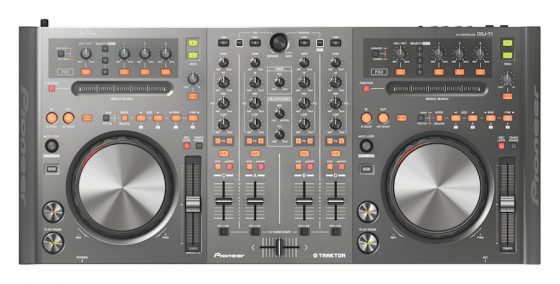
In a clear move to put it in the same league as the S4, Pioneer’s four-channel T1 controller for Traktor will be paired with its own version of Traktor- with control over all four decks. In addition, the layout of the controller does a good job of following the layout of Traktor- the FX units look nearly identical their digital counterparts in the software.
Unlike the S1, the DDJ-T1 feels lacking in visual feedback. There are no VU meters for each individual track, and no handy needle search LED to let DJs know where we are in the song. Not a serious setback, especially considering that your laptop is right behind the controller (it slides right under!) but still features that we’d expect in both models.
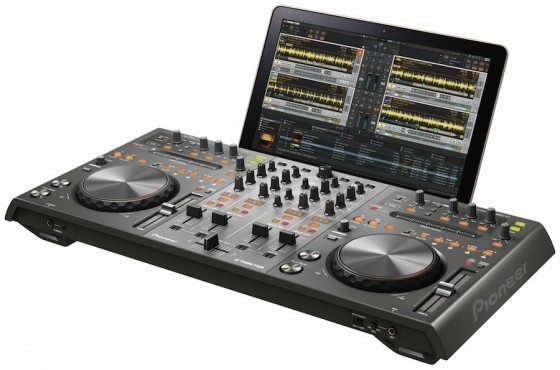
Facts from the official Pioneer DDJ-T1 product sheet:
- Plug-and-Play USB Connectivity – All buttons and knobs have been pre-assigned, so users can quickly connect the controller to their laptops by USB cable and start their performances without having to adjust any complicated settings. Additionally, the DDJ-T1 can be powered through the laptop’s USB port.*1
- Included TRAKTOR DJ Software – Includes Pioneer DDJ-T1 Edition TRAKTOR DJ software. This popular software is loaded with original functionality, including four-channel deck control and a channel fader start function, which makes it easier for DJs to create exact cue starts.*2
- Specially Designed User Interface – The controller layout and TRAKTOR software interface are identical, ensuring ease-of-use and precise control. The DDJ-T1 is modeled after the proven design of the professional Pioneer DJ player and mixer and integrates 115mm jog dials, accurate search functionality to quickly find playback points, a load button for song data and a master synch button for beat matching across four channels.
- Highest-Quality Sound – The controller is optimized for the TRAKTOR DJ software and incorporates technology from Pioneer’s professional line of DJ equipment to ensure the highest quality sound output that DJs have come to expect from Pioneer products.
Additional Features include:
- Proprietary lock mechanism called the P-LOCK Fader Cap designed to prevent fader caps from slipping.*3
- Premiere built-in sound card.
*1 Some functions are limited. Furthermore, depending on the power supply of the USB port of the computer, the controller of may not operate on bus power. If this occurs, connection of the included AC adapter. is required.
*2 A function to start playback from a user-specified point.
*3 Patent pending.
Keep an eye on DJTechTools as we adventure to NAMM this weekend- we’ll give you a much closer look at these units and other exciting products that have yet to be announced.