DJ TechTools
  • Blog
    • DJ Gear
      • DIY Projects
      • Gear Reviews
      • New Products
      • Controllerism
    • Techniques + Tips
      • Beginner DJ
      • Advanced DJ
      • Producer
      • Finger Drummer
    • News + Culture
      • Editorials + Opinions
      • Artist Interviews
      • Performances + Routines
      • How I Play
    • DJ Software Tutorials
      • Serato Tips
        • Traktor Tips
      • CDJ Tips
      • Ableton Live Tips
  • Store
    • Run by real DJs, not a corporation
    • DJ Controllers
      • Midi Fighter Twister
      • Midi Fighter Spectra
      • Midi Fighter 64
      • View All
    • Accessories
      • Chroma USB Drive for DJs
      • Chroma Caps
      • Chroma Cables Audio
      • Chroma Cables USB-A
      • Chroma Cables: USB-C
      • DJTT Gift Card
      • Midi Fighter T-Shirt
      • Keyboard Covers
      • Earplugs by V-Moda
    • Production Gear
    • Soundcards & Mixers
  • Community
    • Popular Forums
      • General Discussion
      • Buy & Sell
      • Reviews
      • Mixes
      • Music Production
      • Show Your Setup
      • Off Topic
    • Handy Links
      • New Posts
      • Private Messages
      • Register
      • Search
    • Midi Maps
      • Traktor
      • Ableton
      • Serato DJ
      • Midi Fighter 3D
      • Midi Fighter Twister
      • Midi Fighter Spectra
  • Midi Fighter
  • Chroma
No Result
View All Result
DJ TechTools
  • Blog
    • DJ Gear
      • DIY Projects
      • Gear Reviews
      • New Products
      • Controllerism
    • Techniques + Tips
      • Beginner DJ
      • Advanced DJ
      • Producer
      • Finger Drummer
    • News + Culture
      • Editorials + Opinions
      • Artist Interviews
      • Performances + Routines
      • How I Play
    • DJ Software Tutorials
      • Serato Tips
        • Traktor Tips
      • CDJ Tips
      • Ableton Live Tips
  • Store
    • Run by real DJs, not a corporation
    • DJ Controllers
      • Midi Fighter Twister
      • Midi Fighter Spectra
      • Midi Fighter 64
      • View All
    • Accessories
      • Chroma USB Drive for DJs
      • Chroma Caps
      • Chroma Cables Audio
      • Chroma Cables USB-A
      • Chroma Cables: USB-C
      • DJTT Gift Card
      • Midi Fighter T-Shirt
      • Keyboard Covers
      • Earplugs by V-Moda
    • Production Gear
    • Soundcards & Mixers
  • Community
    • Popular Forums
      • General Discussion
      • Buy & Sell
      • Reviews
      • Mixes
      • Music Production
      • Show Your Setup
      • Off Topic
    • Handy Links
      • New Posts
      • Private Messages
      • Register
      • Search
    • Midi Maps
      • Traktor
      • Ableton
      • Serato DJ
      • Midi Fighter 3D
      • Midi Fighter Twister
      • Midi Fighter Spectra
  • Midi Fighter
  • Chroma
No Result
View All Result
DJ TechTools

Dub FX – Traktor Performance Inside Look

Ean Golden by Ean Golden
May 29, 2011
in Advanced DJ Tips, Controllerism, How-To Video Tutorials, Video Posts
Reading Time: 5 mins read
0
Dub FX – Traktor Performance Inside Look
191
VIEWS
Post on FacebookTweet thisUpvote on Reddit

We love this guy! In the video above, he absolutely slays a street corner performance with amazing passion, true wisdom, and a creative use of technology- what more could you want?! We asked Dub FX about some of the important details and analyzed the video for a blow-by-blow analysis of exactly how it is done!  As if that was not enough, DJTT has secured an exclusive video screencapture showing the Traktor screen throughout his entire performance so you can watch how everything is put together – without the fancy video editing.

EQUIPEMENT LIST

  • Traktor Kontrol S4
  • Traktor Scratch Pro 2
  • Shure Beta 58 (mic)
  • BOSS GT10b Bass FX processor (vocal bass effect)
  • BOSS SYB5 Bass synthesizer pedal
  • BOSS RC50 Loop station

BASIC SETTINGS

  1. In the first part of the video, the mic is routed through the Bass FX unit and into the rear of the S4 (mic input).
  2. Deck D is set to live input and the mic is being routed into Traktor there.
  3. Traktor is in “internal” or “master” tempo mode, where all loops and decks sync to one master tempo.
  4. There is a master metronome that is probably playing through speakers so Dub FX can time his first loop to the master clock.
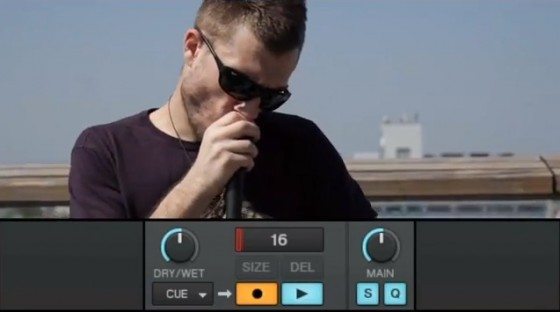
  5. The loop recorder is set to record from a “CUE” input – or whichever deck is cued into the headphones.
  6. The loop recorder is beat matched to the internal tractor clock and all loops stay in time with each other.

FIRST VOCAL PASS
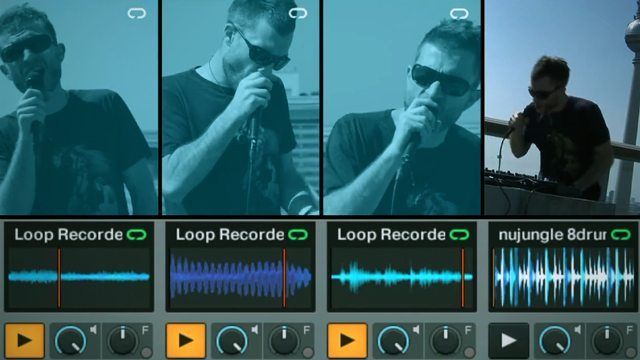
  1. Using the loop recorder’s “overdub” function he records three passes of vocals, creating a basic music bed.
  2. These vocals are being processed by his BOSS GT10b Bass FX processor
  3. This recorded loop is then copied into a sample deck using a MIDI macro.

” The GT10b is an amazing toy which is where most of the magic is created. The FX are almost infinite ranging from EQ, Compression, Delay, Reverb to crazy stuff like Pitch Shifter and Vibrato. By programing the GT10, I can manipulate the sound of my voice by using different FX and changing the order in which they run, to further the manipulation. Once I have a sound that I like, I can also use the two control pedals and volume pedal to automate the FX. For example, when I swap between my two characters (Monsoon-the deep rapping voice and Lyric -the higher rapping voice) I am just using the volume pedal to change the pitch of my voice with the pitch shifter.”

“I started out with the GT06 nearly 10 years ago and over time I have perfected the sounds I use today in the GT10b. Now I have over 30 different patches I have programmed and use in my live show.”

KICK IN THE DRUMS
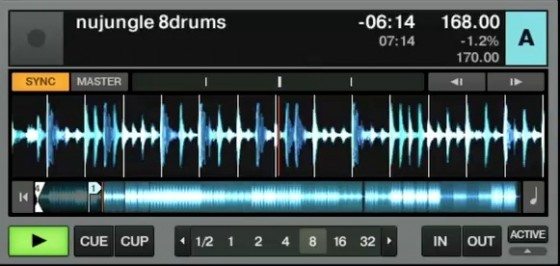
  1. He now triggers a jungle drum track loaded in Deck A.
  2. That deck is synced to the master clock so the drums automatically jump in time with the recorded vocal loops.
  3. Now he starts to filter the loop back in so it can be heard.
  4. Later some drum fills will be added using the Beat Masher effect in FX unit 1.

BIG UP THE BASS
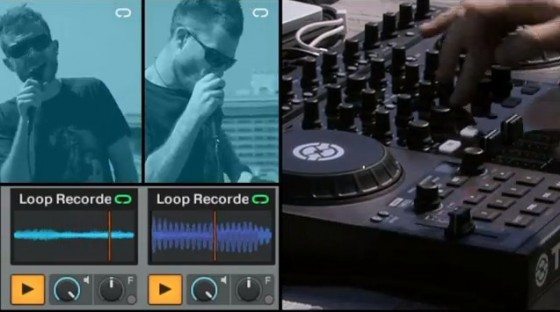
  1. Now comes Dub FX signature vocal part- a big wobble bass produced only by his voice (and some great effects)
  2. No, I am sorry to report kids, you can’t produce that sound with Traktor alone.
  3. Here Dub FX is using the BOSS SYB5 Bass synthesizer pedal to modulate his voice. He explains:

“I also have a BOSS SYB5 Bass synthesizer pedal which runs into the GT10 as a send return. This is a great pedal as it takes the pitch of my voice and creates a synth sound in the same pitch that I’m singing. I also have an EV5 volume pedal which controls the cut off frequency of the SYB5. Once I have chosen the type of synth I want to use I can run it through the GT10b’s Amp modeller, distortion and so on to create a huge bass sound!”

  • The bass loop is recorded in Traktor but is also recorded on his loop pedal (BOSS RC50 Loop station) and continues to play through the Audio Input even though the bass loop is muted. This appears to be largely for “visual effect”

“The last bit of the magic is the BOSS RC50 Loop station. This is an awesome piece of gear as it samples whatever I play through it in real time just by hitting the record button with my feet. There is a little bit of skill involved because if you don’t press record at exactly the right time the loop can go out of sync when you try to loop it. I can record three different samples and play them together or separately and I can add to each pattern as well. So usually I put a beat on 1, some harmonies on 2 and a bass on 3. This allows me to separate the 3 core elements in my composition to change the dynamics and the way the music flows. “

EXPRESSION
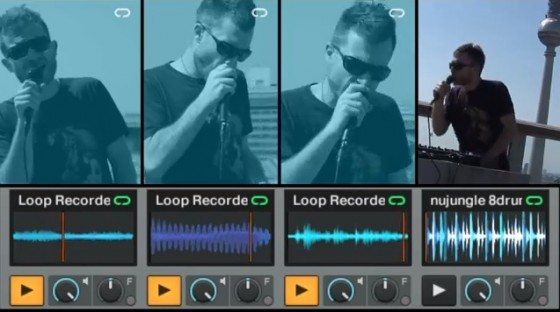
  1. At this point the live recording is over and Dub FX starts to freestyle over his new music layer.
  2. A few sample deck mutes provide a transition.
  3. The beat masher effect is used for a beat fill.
  4. And then a big jog wheel spin back ends the video with a “rewind selector!”

WATCH ALONG

To take a closer look at the performance, watch this video and see if you can follow the steps above in real time!


BASIC SET UP

Tags: Ableton Live Tipsdub fxdubfxExplainedhow toloop recordingperformanceS4traktor s4Traktor Tipsvocalvocal bass
Share2Tweet1Share
Previous Post

DIY Laptop Stands

Next Post

A Closer Look at… Max For Live

Related Posts

Make your own DIY finger drumming routine with Midi Fighter 64 and Ableton
Ableton Live Tips

Make your own DIY finger drumming routine with Midi Fighter 64 and Ableton

July 11, 2024
traktor-pro plus 3.8 pattern player controls
Dj and Production Tutorials

Review: Traktor Pro Plus 3.8 – After 8 months, is the subscription worth it?

April 20, 2023
Breaking the Four by Four: a primer on playing in odd time signatures with drum machines
Production Tips

Breaking the Four by Four: a primer on playing in odd time signatures with drum machines

August 31, 2022
Load More
Next Post
A Closer Look at… Max For Live

A Closer Look at... Max For Live

Want to reach DJTT's audience here?

Shoot an email to advertising@djtechtools.com

DJTT ads
DJTT newsletter
Midi Fighter
Chat with us
  • ABOUT DJTT
  • CONTACT
  • PRIVACY
  • MIDI FIGHTER HELP
  • ABOUT DJTT
  • JOBS
  • CONTACT US
  • ADVERTISE
  • PRIVACY POLICY
  • ACCESSIBILITY STATEMENT

© 2024 DJ Techtools all rights reserved by DJ TechTools on all content unless otherwise noted.

No Result
View All Result
  • Blog
    • DJ Gear
      • DIY Projects
      • Gear Reviews
      • New Products
      • Controllerism
    • Techniques + Tips
      • Beginner DJ
      • Advanced DJ
      • Producer
      • Finger Drummer
    • News + Culture
      • Editorials + Opinions
      • Artist Interviews
      • Performances + Routines
      • How I Play
    • DJ Software Tutorials
      • Serato Tips
      • CDJ Tips
      • Ableton Live Tips
  • Store
    • Run by real DJs, not a corporation
    • DJ Controllers
      • Midi Fighter Twister
      • Midi Fighter Spectra
      • Midi Fighter 64
      • View All
    • Accessories
      • Chroma USB Drive for DJs
      • Chroma Caps
      • Chroma Cables Audio
      • Chroma Cables USB-A
      • Chroma Cables: USB-C
      • DJTT Gift Card
      • Midi Fighter T-Shirt
      • Keyboard Covers
      • Earplugs by V-Moda
    • Production Gear
    • Soundcards & Mixers
  • Community
    • Popular Forums
      • General Discussion
      • Buy & Sell
      • Reviews
      • Mixes
      • Music Production
      • Show Your Setup
      • Off Topic
    • Handy Links
      • New Posts
      • Private Messages
      • Register
      • Search
    • Midi Maps
      • Traktor
      • Ableton
      • Serato DJ
      • Midi Fighter 3D
      • Midi Fighter Twister
      • Midi Fighter Spectra
  • Midi Fighter
  • Chroma

© 2024 DJ Techtools all rights reserved by DJ TechTools on all content unless otherwise noted.

This website uses cookies. By continuing to use this website you are giving consent to cookies being used. Visit our Privacy and Cookie Policy.