DJ TechTools
  • Blog
    • DJ Gear
      • DIY Projects
      • Gear Reviews
      • New Products
      • Controllerism
    • Techniques + Tips
      • Beginner DJ
      • Advanced DJ
      • Producer
      • Finger Drummer
    • News + Culture
      • Editorials + Opinions
      • Artist Interviews
      • Performances + Routines
      • How I Play
    • DJ Software Tutorials
      • Serato Tips
        • Traktor Tips
      • CDJ Tips
      • Ableton Live Tips
  • Store
    • Run by real DJs, not a corporation
    • DJ Controllers
      • Midi Fighter Twister
      • Midi Fighter Spectra
      • Midi Fighter 64
      • View All
    • Accessories
      • Chroma USB Drive for DJs
      • Chroma Caps
      • Chroma Cables Audio
      • Chroma Cables USB-A
      • Chroma Cables: USB-C
      • DJTT Gift Card
      • Midi Fighter T-Shirt
      • Keyboard Covers
      • Earplugs by V-Moda
    • Production Gear
    • Soundcards & Mixers
  • Community
    • Popular Forums
      • General Discussion
      • Buy & Sell
      • Reviews
      • Mixes
      • Music Production
      • Show Your Setup
      • Off Topic
    • Handy Links
      • New Posts
      • Private Messages
      • Register
      • Search
    • Midi Maps
      • Traktor
      • Ableton
      • Serato DJ
      • Midi Fighter 3D
      • Midi Fighter Twister
      • Midi Fighter Spectra
  • Midi Fighter
  • Chroma
No Result
View All Result
DJ TechTools
  • Blog
    • DJ Gear
      • DIY Projects
      • Gear Reviews
      • New Products
      • Controllerism
    • Techniques + Tips
      • Beginner DJ
      • Advanced DJ
      • Producer
      • Finger Drummer
    • News + Culture
      • Editorials + Opinions
      • Artist Interviews
      • Performances + Routines
      • How I Play
    • DJ Software Tutorials
      • Serato Tips
        • Traktor Tips
      • CDJ Tips
      • Ableton Live Tips
  • Store
    • Run by real DJs, not a corporation
    • DJ Controllers
      • Midi Fighter Twister
      • Midi Fighter Spectra
      • Midi Fighter 64
      • View All
    • Accessories
      • Chroma USB Drive for DJs
      • Chroma Caps
      • Chroma Cables Audio
      • Chroma Cables USB-A
      • Chroma Cables: USB-C
      • DJTT Gift Card
      • Midi Fighter T-Shirt
      • Keyboard Covers
      • Earplugs by V-Moda
    • Production Gear
    • Soundcards & Mixers
  • Community
    • Popular Forums
      • General Discussion
      • Buy & Sell
      • Reviews
      • Mixes
      • Music Production
      • Show Your Setup
      • Off Topic
    • Handy Links
      • New Posts
      • Private Messages
      • Register
      • Search
    • Midi Maps
      • Traktor
      • Ableton
      • Serato DJ
      • Midi Fighter 3D
      • Midi Fighter Twister
      • Midi Fighter Spectra
  • Midi Fighter
  • Chroma
No Result
View All Result
DJ TechTools

A Closer Look at… Max For Live

Chris Cartledge by Chris Cartledge
May 31, 2011
in Ableton Live Tips, DJ Software
Reading Time: 4 mins read
0
A Closer Look at… Max For Live
145
VIEWS
Post on FacebookTweet thisUpvote on Reddit

Many of you use Ableton Live to DJ because of its flexibility, but conversely many of you have tried it and been turned off by its limitations in some aspects. Max For Live promises to turn the Live experience into a near infinitely expandable tool, delivering the faculties to do more or less anything you want inside Ableton’s already highly adjustable DAW.

THE FIXER

First things first, let’s take a look at how one of the biggest names in professional DJing uses Max For Live in his performance. Richie Hawtin has a Max For Live device that allows him to save Live sets in their entirety as patches, and switch between them on the fly.

One of the biggest shortcomings of Live from a DJing perspective is its inability to play its audio backwards, and so it stands to reason that one of the most exciting Max For Live patches is the Ms Pinky Revised patch from Scott Wardle. Scott designed Ms Pinky, the long standing indie DVS system, within Max/MSP; he’s thus been able to transfer the concepts he developed into Live and create scratchable Live clips. You’ll need Ms Pinky and a healthy like for manual setup to give it a go (Ms Pinky vinyl and standalone software can be picked up from mspinky.com), but it’s a proof of concept that if you were hoping that The Bridge would integrate Scratch Live and Live a little better when it came to scratching, you definitely need to give a try!

COMMUNITY

There’s a general community and DIY bent to Max For Live. The beauty of a Max For Live solution is that it can be created with a very specific focus – so rather than watering down a concept to provide passable functionality for a lot of users, it can be perfect for a few. Very few Max For Live devices could be seen as well rounded commercial products in their own right, but they combine proof of concept with indie sensibilities to provide solutions. With that in mind, it’s also ideally suited to collaborative and iterative work.

Scott tells us: “I’ve created a toolbox of add-on code objects to the M4L environment that are specially targeted for DJ’s. […] Users are free to take what I’ve created [after purchase] as just a starting point in making new devices that could also scratch video, for example, or combine scratching with synthesis and MIDI processing in some new fashion which I the developer could never imagine.”

The premier website for Max For Live devices and collaborations, maxforlive.com, is a thriving site with iteratively developed devices appearing all the time and an active community.

MORE THAN SKIN DEEP
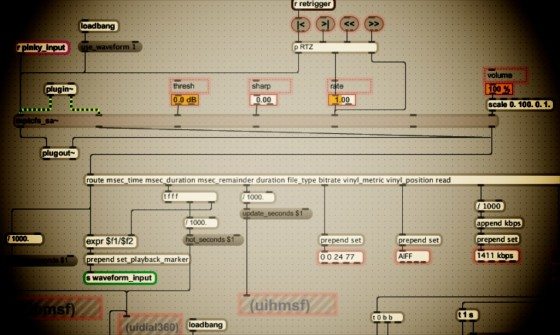
Max For Live integrates directly into Live’s API, which gives us direct control over Live’s actual capabilities as opposed to the GUI layer. This means we can do things we can’t do in Live alone, such as access the clip titles. We spoke to Dennis Fischer, DJ and product specialist at Ableton who along with DJing partner Jeff Milligan has developed a set up which uses Max For Live to tie everything together, including some creative solutions to DJing and performing:

“We use Mixed in Key to pre-analyse the tracks, then have a Max For Live device that takes the Mixed in Key information and switches a scale plugin to let everything that’s MIDI in the set automatically match the key of the tracks we play. That’s pretty cool because you don’t have to worry about keys any more.”

“When I first achieved what I wanted to do, it opened up a whole world of possibilities” Dennis Fischer, Ableton Product Specialist

Dennis also has some advice about how to approach learning Max For Live: “When you want to build something you should have a project in mind, like ‘I want to build an FX sequencer’, or something. Then it’s pretty easy to learn, because you want to achieve something. The tutorials are pretty good, but without a project in mind it’s harder to learn.”

He continues, “The first thing I wanted to do with Max For Live was build the functionality to use my MIDI controller to scroll up and down in the browser and load presets. It’s not possible with just Live because it’s all keyboard shortcuts, but with Max For Live and the aka.keyboard extension I just had a MIDI converter to keyboard shortcuts. When I first achieved what I wanted to do, it opened up a whole world of possibilities.”

THE DECIDER

The ‘point’ of Max For Live isn’t to provide off the shelf expansions to Live, it’s to enable the experimental, adventurous and visionary to personalise, tweak and turn a piece of software that mostly fits their needs into one that plays to their every whim. If that sounds like you (maybe you’re the guy who spends more time messing with Traktor Pro modifiers than with the decks themselves!), then Max For Live could be right up your street. If you’re a “switch on and make the best of it” kind of person… maybe less so. In any case, there’s a free 30 day trial of Max For Live to allow you to make up your own mind.

What devices would you like to make in Max For Live – or if you already have, or have favourites, what are they? Let us know in the comments!

Handy Links:

Ableton’s Max For Live page (including free trial)

Maxforlive.com (the Max For Live devices repository)

Mspinky.com (Vinyl control within Live)

Tags: AbletonAbleton Live Tipsindependentmax for livems pinkyRitchie Hawtin
Share1Tweet1Share
Previous Post

Dub FX – Traktor Performance Inside Look

Next Post

DJ TechTools needs help.

Related Posts

Ableton launches Live 12 Suite rent-to-own plan – and it’s not a subscription
Ableton

Ableton launches Live 12 Suite rent-to-own plan – and it’s not a subscription

October 1, 2025
Control an entire studio with Midi Fighter Spectra (like Mad Zach)
Finger Drumming

Control an entire studio with Midi Fighter Spectra (like Mad Zach)

May 9, 2025
How I Play: Hybrasil’s DAWless live techno setup
How I Play

How I Play: Hybrasil’s DAWless live techno setup

October 3, 2024
Load More
Next Post
DJ TechTools needs help.

DJ TechTools needs help.

Want to reach DJTT's audience here?

Shoot an email to advertising@djtechtools.com

DJTT ads
DJTT newsletter
Midi Fighter
Chat with us
  • ABOUT DJTT
  • CONTACT
  • PRIVACY
  • MIDI FIGHTER HELP
  • ABOUT DJTT
  • JOBS
  • CONTACT US
  • ADVERTISE
  • PRIVACY POLICY
  • ACCESSIBILITY STATEMENT

© 2024 DJ Techtools all rights reserved by DJ TechTools on all content unless otherwise noted.

No Result
View All Result
  • Blog
    • DJ Gear
      • DIY Projects
      • Gear Reviews
      • New Products
      • Controllerism
    • Techniques + Tips
      • Beginner DJ
      • Advanced DJ
      • Producer
      • Finger Drummer
    • News + Culture
      • Editorials + Opinions
      • Artist Interviews
      • Performances + Routines
      • How I Play
    • DJ Software Tutorials
      • Serato Tips
      • CDJ Tips
      • Ableton Live Tips
  • Store
    • Run by real DJs, not a corporation
    • DJ Controllers
      • Midi Fighter Twister
      • Midi Fighter Spectra
      • Midi Fighter 64
      • View All
    • Accessories
      • Chroma USB Drive for DJs
      • Chroma Caps
      • Chroma Cables Audio
      • Chroma Cables USB-A
      • Chroma Cables: USB-C
      • DJTT Gift Card
      • Midi Fighter T-Shirt
      • Keyboard Covers
      • Earplugs by V-Moda
    • Production Gear
    • Soundcards & Mixers
  • Community
    • Popular Forums
      • General Discussion
      • Buy & Sell
      • Reviews
      • Mixes
      • Music Production
      • Show Your Setup
      • Off Topic
    • Handy Links
      • New Posts
      • Private Messages
      • Register
      • Search
    • Midi Maps
      • Traktor
      • Ableton
      • Serato DJ
      • Midi Fighter 3D
      • Midi Fighter Twister
      • Midi Fighter Spectra
  • Midi Fighter
  • Chroma

© 2024 DJ Techtools all rights reserved by DJ TechTools on all content unless otherwise noted.

This website uses cookies. By continuing to use this website you are giving consent to cookies being used. Visit our Privacy and Cookie Policy.