DJ TechTools
  • Blog
    • DJ Gear
      • DIY Projects
      • Gear Reviews
      • New Products
      • Controllerism
    • Techniques + Tips
      • Beginner DJ
      • Advanced DJ
      • Producer
      • Finger Drummer
    • News + Culture
      • Editorials + Opinions
      • Artist Interviews
      • Performances + Routines
      • How I Play
    • DJ Software Tutorials
      • Serato Tips
        • Traktor Tips
      • CDJ Tips
      • Ableton Live Tips
  • Store
    • Run by real DJs, not a corporation
    • DJ Controllers
      • Midi Fighter Twister
      • Midi Fighter Spectra
      • Midi Fighter 64
      • View All
    • Accessories
      • Chroma USB Drive for DJs
      • Chroma Caps
      • Chroma Cables Audio
      • Chroma Cables USB-A
      • Chroma Cables: USB-C
      • DJTT Gift Card
      • Midi Fighter T-Shirt
      • Keyboard Covers
      • Earplugs by V-Moda
    • Production Gear
    • Soundcards & Mixers
  • Community
    • Popular Forums
      • General Discussion
      • Buy & Sell
      • Reviews
      • Mixes
      • Music Production
      • Show Your Setup
      • Off Topic
    • Handy Links
      • New Posts
      • Private Messages
      • Register
      • Search
    • Midi Maps
      • Traktor
      • Ableton
      • Serato DJ
      • Midi Fighter 3D
      • Midi Fighter Twister
      • Midi Fighter Spectra
  • Midi Fighter
  • Chroma
No Result
View All Result
DJ TechTools
  • Blog
    • DJ Gear
      • DIY Projects
      • Gear Reviews
      • New Products
      • Controllerism
    • Techniques + Tips
      • Beginner DJ
      • Advanced DJ
      • Producer
      • Finger Drummer
    • News + Culture
      • Editorials + Opinions
      • Artist Interviews
      • Performances + Routines
      • How I Play
    • DJ Software Tutorials
      • Serato Tips
        • Traktor Tips
      • CDJ Tips
      • Ableton Live Tips
  • Store
    • Run by real DJs, not a corporation
    • DJ Controllers
      • Midi Fighter Twister
      • Midi Fighter Spectra
      • Midi Fighter 64
      • View All
    • Accessories
      • Chroma USB Drive for DJs
      • Chroma Caps
      • Chroma Cables Audio
      • Chroma Cables USB-A
      • Chroma Cables: USB-C
      • DJTT Gift Card
      • Midi Fighter T-Shirt
      • Keyboard Covers
      • Earplugs by V-Moda
    • Production Gear
    • Soundcards & Mixers
  • Community
    • Popular Forums
      • General Discussion
      • Buy & Sell
      • Reviews
      • Mixes
      • Music Production
      • Show Your Setup
      • Off Topic
    • Handy Links
      • New Posts
      • Private Messages
      • Register
      • Search
    • Midi Maps
      • Traktor
      • Ableton
      • Serato DJ
      • Midi Fighter 3D
      • Midi Fighter Twister
      • Midi Fighter Spectra
  • Midi Fighter
  • Chroma
No Result
View All Result
DJ TechTools

Hercules DJControlWave: 100% Wireless Bluetooth DJ Controller for iPad

Dan White by Dan White
January 7, 2014
in Breaking News, DJ Gear Announcements, News, News + Culture
Reading Time: 2 mins read
0
Hercules DJControlWave: 100% Wireless Bluetooth DJ Controller for iPad
114
VIEWS
Post on FacebookTweet thisUpvote on Reddit

Hercules has a booth at the Consumer Electronics Show this year, and is one of the few companies that shows products at both CES and NAMM, despite the two conventions being just a few weeks apart. They’re showing a brand new product, the DJControlWave controller, a wireless controller for iPad DJ softwares. Have a look at the unveiling video below and then scroll down for more specifics on the product itself:

CONTROL LAYOUT
hecules-djcontrol-wave

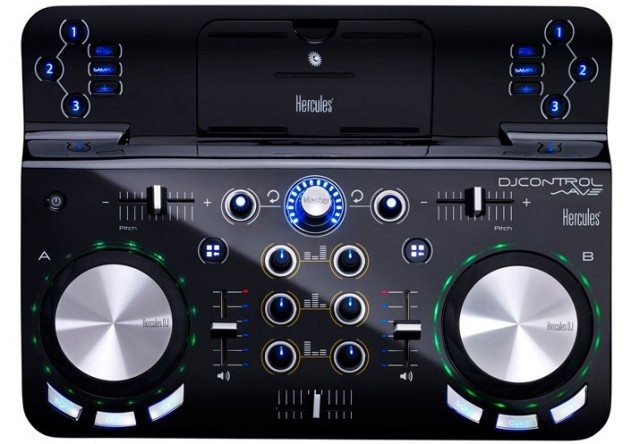
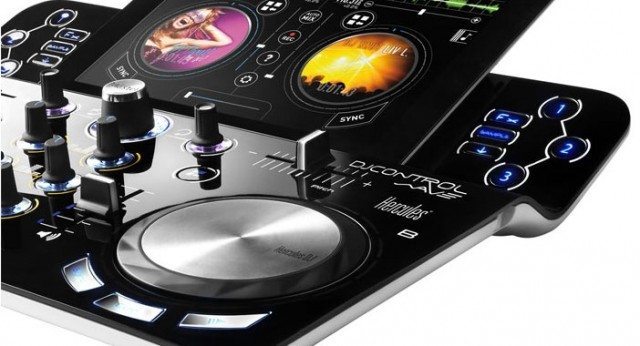
The DJControlWave has a control layout that feels similar to the Pioneer DDJ-WeGO – small and compact, with controls and lights that focus prominently around the 4″ capacitive touch jogwheels (notice the curved Sync, Cue, and Play buttons at the bottom of the jogs). Two channels of control, a crossfader, and three EQ knobs are the expected controls, but there’s also a master volume control knob, flanked by loop encoders and horizontal pitch faders at the top of each deck.
djcontrol-wave-hercules-closeup

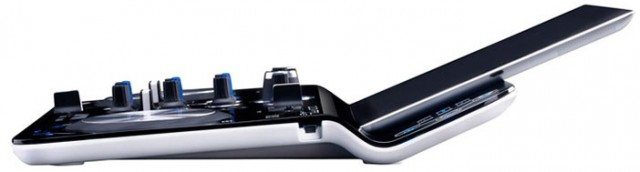
Above the transport layer is a second angled layer that the iPad rests on into – this is where the Bluetooth 3.0 module is located. The numbered labels to each side control FX, cue points, and samples. All of the controls seem to have a simple blue LED backlight,

WIRELESS AND RECHARGEABLE – BUT NO SOUNDCARD
dj-control-wave-profile

The DJControlWave is just a wireless controller for iPad software, so there’s no soundcard or audio interface on the hardware itself. The only port is a USB charging port, used to recharge the battery which can last up to 8 hours. The controller  also has a standard Bluetooth pairing range, meaning that you can pick up the iPad and continue to use it with the controller up to 10 meters (32 feet) away. The only issue is that since there’s no sound card, the iPad will continue to needs to be plugged into the sound system  – or you’ll need to pair it to a wireless Bluetooth speaker.

DJControlWave works out of the box with DJUCED for both iOS and for Mac/PC desktops – Hercules’ own DJ software that works very similarly to Algoriddim’s djay. The controller will be available starting Spring 2014, with a MSRP of $299.99.

Learn more about the DJControlWave on Hercules’ site.
Tags: battery powered controllersbluetoothCES 2014DJControlWaveDJUCEDherculesipadwireless
Share1Tweet1Share
Previous Post

WeeklyBeats: Make A Track Every Week Of 2014

Next Post

Tools For Interacting With The Crowd During A DJ Set

Related Posts

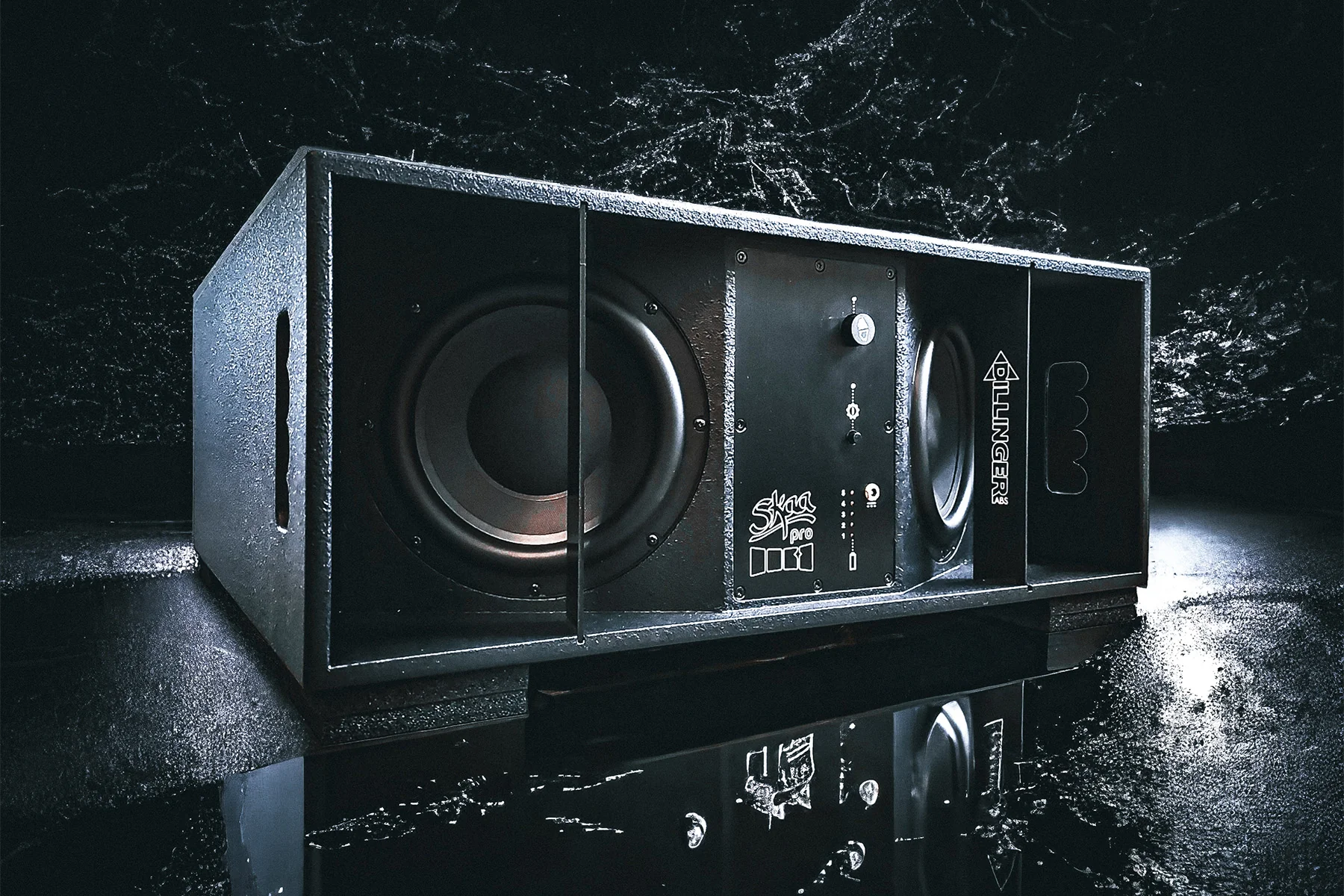
Death From Below: meet the first SKAA Pro battery-powered subwoofer
DJ Gear

Death From Below: meet the first SKAA Pro battery-powered subwoofer

December 11, 2023
Hercules DJ InpulseT7 at NAMM 2023
NAMM 2023

Hercules DJControl Inpulse T7: a motorized Serato DJ controller for $700?

April 13, 2023
Weird DJ Gear: the underrated, the odd, and the ones that made history.
DJ History

Weird DJ Gear: the underrated, the odd, and the ones that made history.

June 28, 2021
Load More
Next Post
Tools For Interacting With The Crowd During A DJ Set

Tools For Interacting With The Crowd During A DJ Set

Want to reach DJTT's audience here?

Shoot an email to advertising@djtechtools.com

DJTT ads
DJTT newsletter
Midi Fighter
Chat with us
  • ABOUT DJTT
  • CONTACT
  • PRIVACY
  • MIDI FIGHTER HELP
  • ABOUT DJTT
  • JOBS
  • CONTACT US
  • ADVERTISE
  • PRIVACY POLICY
  • ACCESSIBILITY STATEMENT

© 2024 DJ Techtools all rights reserved by DJ TechTools on all content unless otherwise noted.

No Result
View All Result
  • Blog
    • DJ Gear
      • DIY Projects
      • Gear Reviews
      • New Products
      • Controllerism
    • Techniques + Tips
      • Beginner DJ
      • Advanced DJ
      • Producer
      • Finger Drummer
    • News + Culture
      • Editorials + Opinions
      • Artist Interviews
      • Performances + Routines
      • How I Play
    • DJ Software Tutorials
      • Serato Tips
      • CDJ Tips
      • Ableton Live Tips
  • Store
    • Run by real DJs, not a corporation
    • DJ Controllers
      • Midi Fighter Twister
      • Midi Fighter Spectra
      • Midi Fighter 64
      • View All
    • Accessories
      • Chroma USB Drive for DJs
      • Chroma Caps
      • Chroma Cables Audio
      • Chroma Cables USB-A
      • Chroma Cables: USB-C
      • DJTT Gift Card
      • Midi Fighter T-Shirt
      • Keyboard Covers
      • Earplugs by V-Moda
    • Production Gear
    • Soundcards & Mixers
  • Community
    • Popular Forums
      • General Discussion
      • Buy & Sell
      • Reviews
      • Mixes
      • Music Production
      • Show Your Setup
      • Off Topic
    • Handy Links
      • New Posts
      • Private Messages
      • Register
      • Search
    • Midi Maps
      • Traktor
      • Ableton
      • Serato DJ
      • Midi Fighter 3D
      • Midi Fighter Twister
      • Midi Fighter Spectra
  • Midi Fighter
  • Chroma

© 2024 DJ Techtools all rights reserved by DJ TechTools on all content unless otherwise noted.

This website uses cookies. By continuing to use this website you are giving consent to cookies being used. Visit our Privacy and Cookie Policy.