DJ TechTools
  • Blog
    • DJ Gear
      • DIY Projects
      • Gear Reviews
      • New Products
      • Controllerism
    • Techniques + Tips
      • Beginner DJ
      • Advanced DJ
      • Producer
      • Finger Drummer
    • News + Culture
      • Editorials + Opinions
      • Artist Interviews
      • Performances + Routines
      • How I Play
    • DJ Software Tutorials
      • Serato Tips
        • Traktor Tips
      • CDJ Tips
      • Ableton Live Tips
  • Store
    • Run by real DJs, not a corporation
    • DJ Controllers
      • Midi Fighter Twister
      • Midi Fighter Spectra
      • Midi Fighter 64
      • View All
    • Accessories
      • Chroma USB Drive for DJs
      • Chroma Caps
      • Chroma Cables Audio
      • Chroma Cables USB-A
      • Chroma Cables: USB-C
      • DJTT Gift Card
      • Midi Fighter T-Shirt
      • Keyboard Covers
      • Earplugs by V-Moda
    • Production Gear
    • Soundcards & Mixers
  • Community
    • Popular Forums
      • General Discussion
      • Buy & Sell
      • Reviews
      • Mixes
      • Music Production
      • Show Your Setup
      • Off Topic
    • Handy Links
      • New Posts
      • Private Messages
      • Register
      • Search
    • Midi Maps
      • Traktor
      • Ableton
      • Serato DJ
      • Midi Fighter 3D
      • Midi Fighter Twister
      • Midi Fighter Spectra
  • Midi Fighter
  • Chroma
No Result
View All Result
DJ TechTools
  • Blog
    • DJ Gear
      • DIY Projects
      • Gear Reviews
      • New Products
      • Controllerism
    • Techniques + Tips
      • Beginner DJ
      • Advanced DJ
      • Producer
      • Finger Drummer
    • News + Culture
      • Editorials + Opinions
      • Artist Interviews
      • Performances + Routines
      • How I Play
    • DJ Software Tutorials
      • Serato Tips
        • Traktor Tips
      • CDJ Tips
      • Ableton Live Tips
  • Store
    • Run by real DJs, not a corporation
    • DJ Controllers
      • Midi Fighter Twister
      • Midi Fighter Spectra
      • Midi Fighter 64
      • View All
    • Accessories
      • Chroma USB Drive for DJs
      • Chroma Caps
      • Chroma Cables Audio
      • Chroma Cables USB-A
      • Chroma Cables: USB-C
      • DJTT Gift Card
      • Midi Fighter T-Shirt
      • Keyboard Covers
      • Earplugs by V-Moda
    • Production Gear
    • Soundcards & Mixers
  • Community
    • Popular Forums
      • General Discussion
      • Buy & Sell
      • Reviews
      • Mixes
      • Music Production
      • Show Your Setup
      • Off Topic
    • Handy Links
      • New Posts
      • Private Messages
      • Register
      • Search
    • Midi Maps
      • Traktor
      • Ableton
      • Serato DJ
      • Midi Fighter 3D
      • Midi Fighter Twister
      • Midi Fighter Spectra
  • Midi Fighter
  • Chroma
No Result
View All Result
DJ TechTools

DJ With Spotify: Pacemaker iPad App Review

Dan White by Dan White
February 5, 2014
in DJ Software, DJ Software Tips, iOS DJ Tips, News + Culture, Reviews
Reading Time: 4 mins read
0
DJ With Spotify: Pacemaker iPad App Review
199
VIEWS
Post on FacebookTweet thisUpvote on Reddit

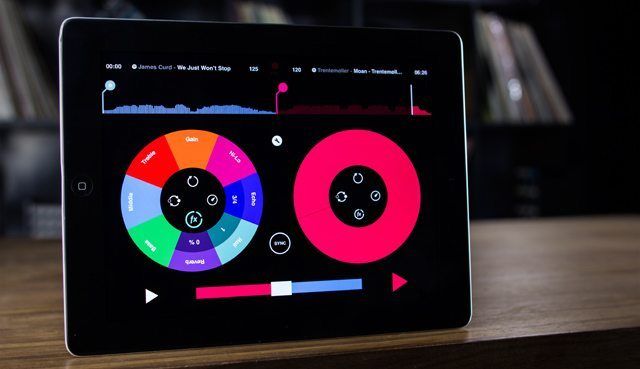
Makers of the now-defunct Pacemaker DJ hardware are back with a brand new iPad application that breaks down one of the biggest barriers in DJ applications, making it possible to stream music directly from a major streaming service, Spotify. Targeted at users who already use Spotfiy but with enough features to make experienced DJs happy, you’re likely to see Pacemaker at a house party near you very soon. Get the full details on the app in today’s article and video.

MIXING FROM SPOTIFY
spotify-dj

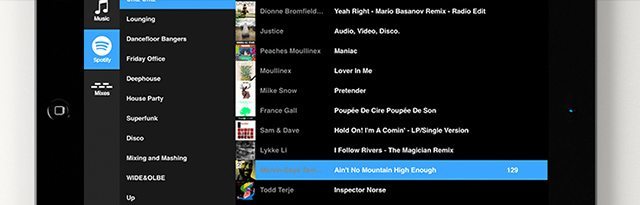
Streaming music from the cloud has always been a heavily requested feature, especially among new, younger DJs who already have a subscription music service that they’re paying for. Yes, previous DJ apps and desktop softwares have integrated Deezer, Soundcloud, and other single-serving services, but none have cracked open the massive libraries of streaming service majors like Rdio or Spotify.

Pacemaker finally makes this a reality – a few things to note on streaming:

  • Spotify has a 20 million track library
  • You’ll need Spotify Premium ($9.99/month) – Pacemaker comes with a 10-day trial
  • Recording is disabled when streaming tracks from Spotify (copyright issues)

(DJ Software History: Probably the largest streaming music library for DJs was early in Virtual DJ’s testing of streaming tracks from the cloud. The search engine allegedly searched directly on YouTube to stream music and audio, but had to replace it with streaming from Grooveshark due to copyright issues.)

DJ FEATURES

Screen Shot 2014-02-04 at Feb 4.58.39 PM

The Pacemaker app isn’t just another casual DJing application with a painfully limited feature set that slowly gets improved over time. There’s a full array of DJ-friendly features that make it easy, fun, and interesting to mix – something that we’d expect considering the Pacemaker team’s unique hardware background.

There’s the usual requisite DJ controls – including tempo adjustment, nudge/pitch bend, and EQ. No grid adjustment if the auto-detection fails (yet!).In terms of audio routing, you can pre-cue by using a headphone splitter and splitting the output in the preferences. Simple, but it does the trick for the types of situations in which you’d likely use this app.

The full DJ feature set includes:

  • Reverb
  • Echo
  • Hi-Lo (filter)
  • Roll
  • Beatskip (beat jump / move)
  • Loop (including a granular loop-build feature that’s really fun)

To unlock all the DJ features, you’ll either need to pay $1.99 for each feature beyond a basic control, or you can spend $10 to unlock the entire thing. This keeps it free to try for casual users – but effectively means it’s a $10 app for anyone who wants to use it to realistically DJ with.

TONIUM PACEMAKER TO PACEMAKER + SPOTIFY
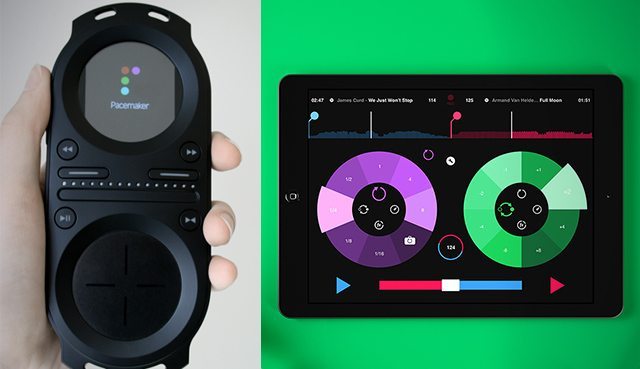
The old Tonium Pacemaker hardware (left) and new iPad app (right)

We were able to talk to the cofounders of Pacemaker, Olof Berglöf and Jonas Norberg, to find out how they landed this partnership with Spotify. The company started with the Tonium Pacemaker hardware, which launched in 2008. Prior to that, the Pacemaker team had met with Spotify, but the two companies went totally different directions – Spotify launched to incredible success, and the Tonium project went under.

In 2011 the Pacemaker original founders negotiated to buy back the intellectual property from the failed hardware venture. During negotiations with the bankruptcy manager, Blackberry called and asked the team to build them a Pacemaker app for their  Playbook tablet.

We quickly realized that [building the Blackberry app] was a very good start for us. It’s better to be a small fish in a small pond than a small fish in a big ocean. We decided to take all of this [intellectual property] from Pacemaker and port it to a tablet. We started to speak to Spotify back then. They weren’t too excited about the Blackberry Playbook […] I think they needed something bigger.

After launching on Blackberry devices, the Pacemaker team was constantly-but-politely nagging Spotify (they’re both based in Stockholm) – starting to catch their attention with early design sketches for an iOS app.
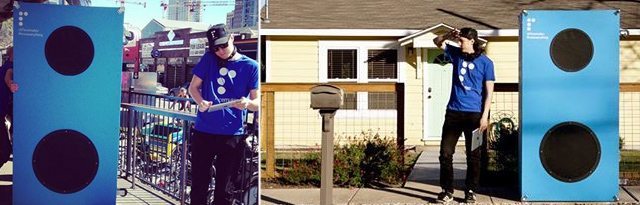
Pacemaker's SXSW speaker - demoing an early iOS version of the app
Pacemaker’s SXSW speaker – demoing an early iOS version of the app

The Pacemaker team ended up at SXSW last year, pushing around a huge blue speaker and showing an early version of Pacemaker for the iPad. On the morning of their departure, slightly hung over and waiting for their flight at the Austin airport, the team spotted Spotify founder and CEO Daniel Ek.

I took the iPad and went to him […] I quickly did a crazy DJ set with Michael Buble and something else strange, which I think he thought was fun. I showed him the business model with in-app purchases, and he loved it. [..] We invited him into the beta, and after that the relationship picked up speed.

Spotify ended up putting their own team of engineers on the project to begin integration and has managed much of the difficult negotiations with labels, making it possible to have the full-featured Spotify library integration present in the  app at launch.

Interested? Grab Pacemaker on the App Store here. 
Tags: cloud djingdj appdj with spotifyIOSipadpacemakerspotifystreaming music library
Share2Tweet1Share
Previous Post

NI Updates Controller Editor: S2/S4/X1 MK2 & Z1 Support

Next Post

Is Pioneer Working On A New DJ Turntable?

Related Posts

Rekordox Spotify
Breaking News

Spotify (finally) slides into Rekordbox, Serato, and Algoriddim djay (again) – for better or worse?

September 24, 2025
DJ Pro Tips for Digital Crate Digging on Beatport, Bandcamp, Soundcloud, Spotify, Juno Download, and QoBuz
DJ Music Library Tips

DJ Pro Tips for Digital Crate Digging on Beatport, Bandcamp, Soundcloud, Spotify, Juno Download, and QoBuz

February 24, 2023
The Beatport Plan: a $10/mo subscription to DJ from your browser with full track playback
News

The Beatport Plan: a $10/mo subscription to DJ from your browser with full track playback

December 23, 2021
Load More
Next Post
Is Pioneer Working On A New DJ Turntable?

Is Pioneer Working On A New DJ Turntable?

Want to reach DJTT's audience here?

Shoot an email to advertising@djtechtools.com

DJTT ads
DJTT newsletter
Midi Fighter
Chat with us
  • ABOUT DJTT
  • CONTACT
  • PRIVACY
  • MIDI FIGHTER HELP
  • ABOUT DJTT
  • JOBS
  • CONTACT US
  • ADVERTISE
  • PRIVACY POLICY
  • ACCESSIBILITY STATEMENT

© 2024 DJ Techtools all rights reserved by DJ TechTools on all content unless otherwise noted.

No Result
View All Result
  • Blog
    • DJ Gear
      • DIY Projects
      • Gear Reviews
      • New Products
      • Controllerism
    • Techniques + Tips
      • Beginner DJ
      • Advanced DJ
      • Producer
      • Finger Drummer
    • News + Culture
      • Editorials + Opinions
      • Artist Interviews
      • Performances + Routines
      • How I Play
    • DJ Software Tutorials
      • Serato Tips
      • CDJ Tips
      • Ableton Live Tips
  • Store
    • Run by real DJs, not a corporation
    • DJ Controllers
      • Midi Fighter Twister
      • Midi Fighter Spectra
      • Midi Fighter 64
      • View All
    • Accessories
      • Chroma USB Drive for DJs
      • Chroma Caps
      • Chroma Cables Audio
      • Chroma Cables USB-A
      • Chroma Cables: USB-C
      • DJTT Gift Card
      • Midi Fighter T-Shirt
      • Keyboard Covers
      • Earplugs by V-Moda
    • Production Gear
    • Soundcards & Mixers
  • Community
    • Popular Forums
      • General Discussion
      • Buy & Sell
      • Reviews
      • Mixes
      • Music Production
      • Show Your Setup
      • Off Topic
    • Handy Links
      • New Posts
      • Private Messages
      • Register
      • Search
    • Midi Maps
      • Traktor
      • Ableton
      • Serato DJ
      • Midi Fighter 3D
      • Midi Fighter Twister
      • Midi Fighter Spectra
  • Midi Fighter
  • Chroma

© 2024 DJ Techtools all rights reserved by DJ TechTools on all content unless otherwise noted.

This website uses cookies. By continuing to use this website you are giving consent to cookies being used. Visit our Privacy and Cookie Policy.