DJ TechTools
  • Blog
    • DJ Gear
      • DIY Projects
      • Gear Reviews
      • New Products
      • Controllerism
    • Techniques + Tips
      • Beginner DJ
      • Advanced DJ
      • Producer
      • Finger Drummer
    • News + Culture
      • Editorials + Opinions
      • Artist Interviews
      • Performances + Routines
      • How I Play
    • DJ Software Tutorials
      • Serato Tips
        • Traktor Tips
      • CDJ Tips
      • Ableton Live Tips
  • Store
    • Run by real DJs, not a corporation
    • DJ Controllers
      • Midi Fighter Twister
      • Midi Fighter Spectra
      • Midi Fighter 64
      • View All
    • Accessories
      • Chroma USB Drive for DJs
      • Chroma Caps
      • Chroma Cables Audio
      • Chroma Cables USB-A
      • Chroma Cables: USB-C
      • DJTT Gift Card
      • Midi Fighter T-Shirt
      • Keyboard Covers
      • Earplugs by V-Moda
    • Production Gear
    • Soundcards & Mixers
  • Community
    • Popular Forums
      • General Discussion
      • Buy & Sell
      • Reviews
      • Mixes
      • Music Production
      • Show Your Setup
      • Off Topic
    • Handy Links
      • New Posts
      • Private Messages
      • Register
      • Search
    • Midi Maps
      • Traktor
      • Ableton
      • Serato DJ
      • Midi Fighter 3D
      • Midi Fighter Twister
      • Midi Fighter Spectra
  • Midi Fighter
  • Chroma
No Result
View All Result
DJ TechTools
  • Blog
    • DJ Gear
      • DIY Projects
      • Gear Reviews
      • New Products
      • Controllerism
    • Techniques + Tips
      • Beginner DJ
      • Advanced DJ
      • Producer
      • Finger Drummer
    • News + Culture
      • Editorials + Opinions
      • Artist Interviews
      • Performances + Routines
      • How I Play
    • DJ Software Tutorials
      • Serato Tips
        • Traktor Tips
      • CDJ Tips
      • Ableton Live Tips
  • Store
    • Run by real DJs, not a corporation
    • DJ Controllers
      • Midi Fighter Twister
      • Midi Fighter Spectra
      • Midi Fighter 64
      • View All
    • Accessories
      • Chroma USB Drive for DJs
      • Chroma Caps
      • Chroma Cables Audio
      • Chroma Cables USB-A
      • Chroma Cables: USB-C
      • DJTT Gift Card
      • Midi Fighter T-Shirt
      • Keyboard Covers
      • Earplugs by V-Moda
    • Production Gear
    • Soundcards & Mixers
  • Community
    • Popular Forums
      • General Discussion
      • Buy & Sell
      • Reviews
      • Mixes
      • Music Production
      • Show Your Setup
      • Off Topic
    • Handy Links
      • New Posts
      • Private Messages
      • Register
      • Search
    • Midi Maps
      • Traktor
      • Ableton
      • Serato DJ
      • Midi Fighter 3D
      • Midi Fighter Twister
      • Midi Fighter Spectra
  • Midi Fighter
  • Chroma
No Result
View All Result
DJ TechTools

FX Snapshot: The Traktor Feature You’ve Never Heard Of

Ryan Dejaegher by Ryan Dejaegher
January 4, 2015
in DJ Software Tips, DJ Techniques / Tips, Native Instruments, Traktor DJ, Traktor Tips
Reading Time: 3 mins read
0
Traktor Snapshot
277
VIEWS
Post on FacebookTweet thisUpvote on Reddit

Today we’re going to talk about a feature in Traktor that you may not be aware of, ” FX snapshot” (Note: this has nothing to do with selfies). In the latest version of Traktor Pro 2 it is somewhat hidden. We’re going to show you where to find it, how it works, and how it can speed up your FX workflow in Traktor. If you find yourself relying on a few common effects and settings then you’ll want to keep reading. Traktor’s FX have always been one of the strengths of Native Instruments DJ software. When used properly they can be a great way to help you easily make transitions or make creative tempo changes. A quick overview of Traktor’s FX snapshot feature:

  • What does it do? It changes the default settings for any effect in Traktor
  • How do you use it? Simple. Adjust the FX knobs/buttons to your desired settings, then click “Save Snapshot”
  • Why should you use it? Easily save your favourite settings, no mapping required.

Traktor FX Snapshot

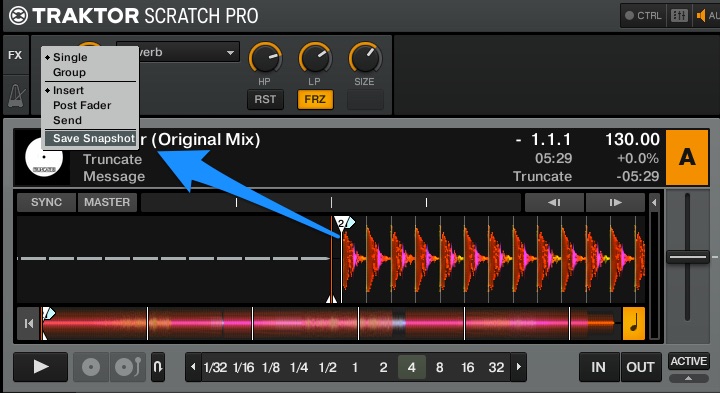
The snapshot feature allows you to save the default parameter settings for effects when they are either loaded or reset. You can find it by clicking any of the FX bank numbers located in the left corner of bank. This will display a drop down menu and at the bottom you’ll see “Save Snapshot”. Traktor Snapshot This feature works in both the group and single FX mode. To use the feature all you need to do is adjust the FX knobs and buttons (on/off) to your desired position. In single mode you can even adjust the main dry/wet knob and on/off button. Once you’ve got everything where you want, you can now click the number in your FX bank, and click “Save Snapshot”.  The next time you load up that particular effect, all the knobs/buttons will automatically load to your saved settings.
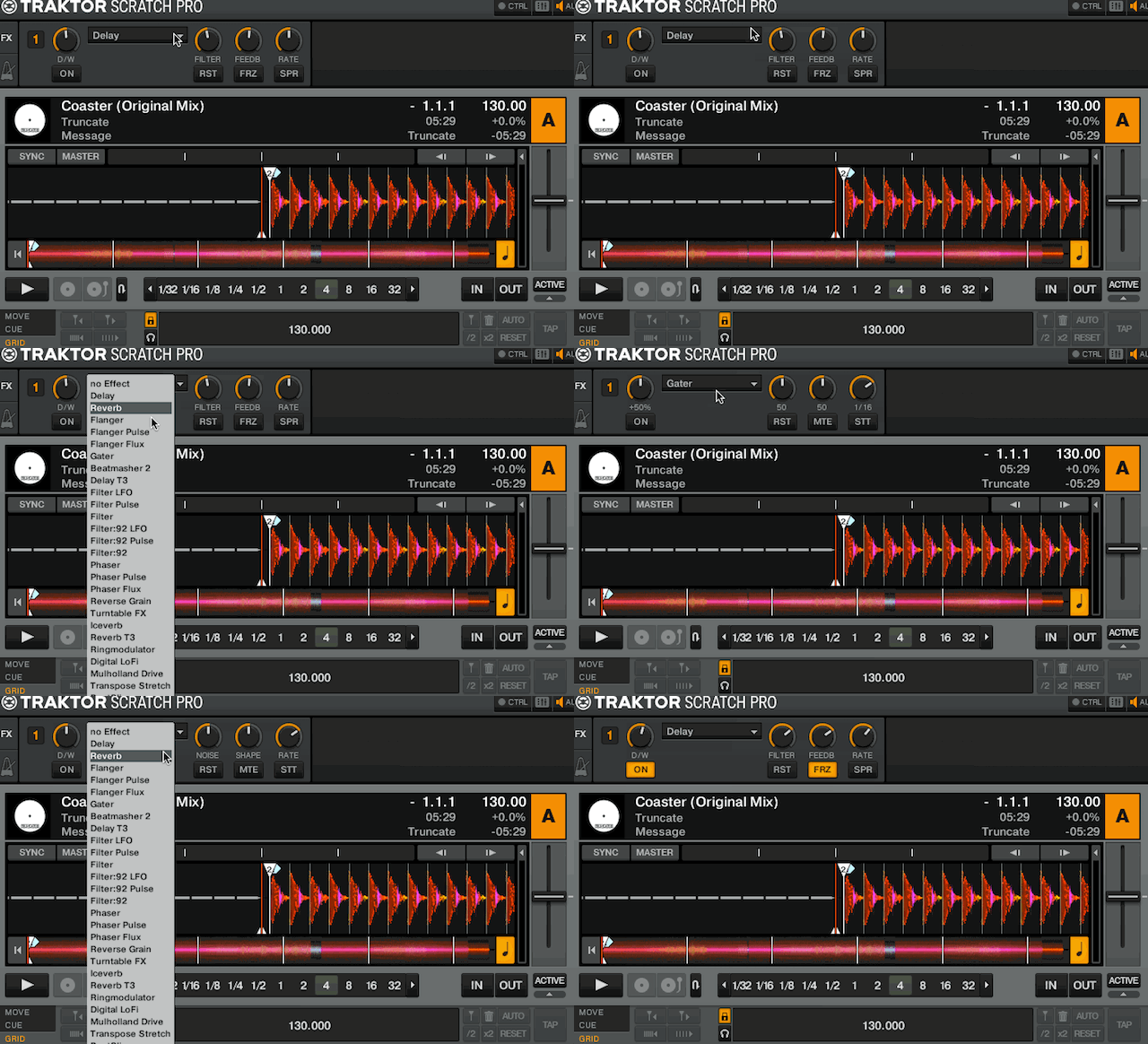
Traktor Delay Snapshot
Loading the Delay with my saved snapshot settings

If you can’t be bothered with mapping this is an easy way to create your own FX presets without going into Traktor’s controller manager. However, if mappings ARE your thing – there are a couple cool ways to utilize this in a mapping. If you map the snapshot button this could help you save a cool FX combination that you stumbled upon by accident. Instead of trying to remember the exact settings for a later time, you can just save it with the click of a button. Using the FX snapshot can also help you save time when making mappings. Instead of having all these commands for FX presets, you can save a snapshot with the settings you want then simply map one command to load a particular effect (echo freeze anyone?).
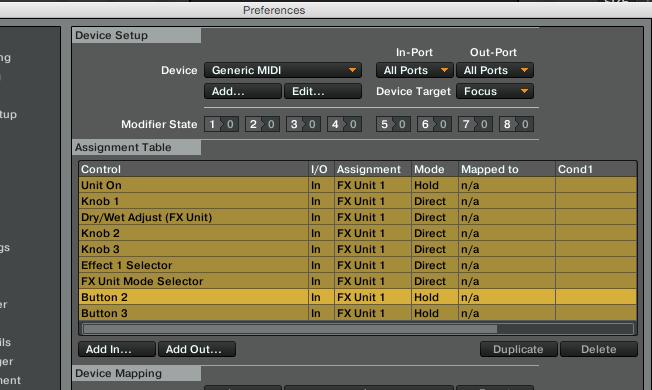
Echo Freeze
All the commands you need for one FX preset. It can be easier.

Keep in mind you can only save one snapshot per effect. And although you can easily save single FX with the dry/wet already on, you may not want to do that so that you can still adjust settings before activating the effect.

Over to You: Your Favorite FX Snapshot.

Now that you’ve seen how easy it can be to create your own FX presets, finish this article and tell us your favourite FX preset that people can use to save a snapshot for their default setting.

  1. Name the effect (group or single mode), and the knob/button values. It may also help to give context (good for certain genres or transitions).
  2. Vote up your favourite FX snapshot!
Tags: FXhidden featureNative Instrumentssnapshottips and trickstraktor pro 2transitionsworkflow
Share2Tweet2Share
Previous Post

Kontrol S8 Bags, Backpacks, Cases – Community Design Project!

Next Post

Casio XW-DJ1 + XW-PD1: Millennium Falcon DJ Controllers

Related Posts

DJ Gear Announcements

Traktor MX2: Native Instruments’ New 2-Channel Controller

October 8, 2025
How I Play: Hybrasil’s DAWless live techno setup
How I Play

How I Play: Hybrasil’s DAWless live techno setup

October 3, 2024
Traktor Pro 4: Generate stem separated tracks from your library in this new update
Breaking News

Traktor Pro 4: Generate stem separated tracks from your library in this new update

July 17, 2024
Load More
Next Post
Casio XW-DJ1 + XW-PD1: Millennium Falcon DJ Controllers

Casio XW-DJ1 + XW-PD1: Millennium Falcon DJ Controllers

Want to reach DJTT's audience here?

Shoot an email to advertising@djtechtools.com

DJTT ads
DJTT newsletter
Midi Fighter
Chat with us
  • ABOUT DJTT
  • CONTACT
  • PRIVACY
  • MIDI FIGHTER HELP
  • ABOUT DJTT
  • JOBS
  • CONTACT US
  • ADVERTISE
  • PRIVACY POLICY
  • ACCESSIBILITY STATEMENT

© 2024 DJ Techtools all rights reserved by DJ TechTools on all content unless otherwise noted.

No Result
View All Result
  • Blog
    • DJ Gear
      • DIY Projects
      • Gear Reviews
      • New Products
      • Controllerism
    • Techniques + Tips
      • Beginner DJ
      • Advanced DJ
      • Producer
      • Finger Drummer
    • News + Culture
      • Editorials + Opinions
      • Artist Interviews
      • Performances + Routines
      • How I Play
    • DJ Software Tutorials
      • Serato Tips
      • CDJ Tips
      • Ableton Live Tips
  • Store
    • Run by real DJs, not a corporation
    • DJ Controllers
      • Midi Fighter Twister
      • Midi Fighter Spectra
      • Midi Fighter 64
      • View All
    • Accessories
      • Chroma USB Drive for DJs
      • Chroma Caps
      • Chroma Cables Audio
      • Chroma Cables USB-A
      • Chroma Cables: USB-C
      • DJTT Gift Card
      • Midi Fighter T-Shirt
      • Keyboard Covers
      • Earplugs by V-Moda
    • Production Gear
    • Soundcards & Mixers
  • Community
    • Popular Forums
      • General Discussion
      • Buy & Sell
      • Reviews
      • Mixes
      • Music Production
      • Show Your Setup
      • Off Topic
    • Handy Links
      • New Posts
      • Private Messages
      • Register
      • Search
    • Midi Maps
      • Traktor
      • Ableton
      • Serato DJ
      • Midi Fighter 3D
      • Midi Fighter Twister
      • Midi Fighter Spectra
  • Midi Fighter
  • Chroma

© 2024 DJ Techtools all rights reserved by DJ TechTools on all content unless otherwise noted.

This website uses cookies. By continuing to use this website you are giving consent to cookies being used. Visit our Privacy and Cookie Policy.