DJ TechTools
  • Blog
    • DJ Gear
      • DIY Projects
      • Gear Reviews
      • New Products
      • Controllerism
    • Techniques + Tips
      • Beginner DJ
      • Advanced DJ
      • Producer
      • Finger Drummer
    • News + Culture
      • Editorials + Opinions
      • Artist Interviews
      • Performances + Routines
      • How I Play
    • DJ Software Tutorials
      • Serato Tips
        • Traktor Tips
      • CDJ Tips
      • Ableton Live Tips
  • Store
    • Run by real DJs, not a corporation
    • DJ Controllers
      • Midi Fighter Twister
      • Midi Fighter Spectra
      • Midi Fighter 64
      • View All
    • Accessories
      • Chroma USB Drive for DJs
      • Chroma Caps
      • Chroma Cables Audio
      • Chroma Cables USB-A
      • Chroma Cables: USB-C
      • DJTT Gift Card
      • Midi Fighter T-Shirt
      • Keyboard Covers
      • Earplugs by V-Moda
    • Production Gear
    • Soundcards & Mixers
  • Community
    • Popular Forums
      • General Discussion
      • Buy & Sell
      • Reviews
      • Mixes
      • Music Production
      • Show Your Setup
      • Off Topic
    • Handy Links
      • New Posts
      • Private Messages
      • Register
      • Search
    • Midi Maps
      • Traktor
      • Ableton
      • Serato DJ
      • Midi Fighter 3D
      • Midi Fighter Twister
      • Midi Fighter Spectra
  • Midi Fighter
  • Chroma
No Result
View All Result
DJ TechTools
  • Blog
    • DJ Gear
      • DIY Projects
      • Gear Reviews
      • New Products
      • Controllerism
    • Techniques + Tips
      • Beginner DJ
      • Advanced DJ
      • Producer
      • Finger Drummer
    • News + Culture
      • Editorials + Opinions
      • Artist Interviews
      • Performances + Routines
      • How I Play
    • DJ Software Tutorials
      • Serato Tips
        • Traktor Tips
      • CDJ Tips
      • Ableton Live Tips
  • Store
    • Run by real DJs, not a corporation
    • DJ Controllers
      • Midi Fighter Twister
      • Midi Fighter Spectra
      • Midi Fighter 64
      • View All
    • Accessories
      • Chroma USB Drive for DJs
      • Chroma Caps
      • Chroma Cables Audio
      • Chroma Cables USB-A
      • Chroma Cables: USB-C
      • DJTT Gift Card
      • Midi Fighter T-Shirt
      • Keyboard Covers
      • Earplugs by V-Moda
    • Production Gear
    • Soundcards & Mixers
  • Community
    • Popular Forums
      • General Discussion
      • Buy & Sell
      • Reviews
      • Mixes
      • Music Production
      • Show Your Setup
      • Off Topic
    • Handy Links
      • New Posts
      • Private Messages
      • Register
      • Search
    • Midi Maps
      • Traktor
      • Ableton
      • Serato DJ
      • Midi Fighter 3D
      • Midi Fighter Twister
      • Midi Fighter Spectra
  • Midi Fighter
  • Chroma
No Result
View All Result
DJ TechTools

Using Pioneer CDJs in HID mode with Serato DJ/Scratch Live

Ryan Dejaegher by Ryan Dejaegher
March 5, 2015
in Basic DJ Tips, DJ Techniques / Tips, Pioneer, Serato
Reading Time: 5 mins read
0
Pioneer CDJ HID Serato DJ
569
VIEWS
Post on FacebookTweet thisUpvote on Reddit

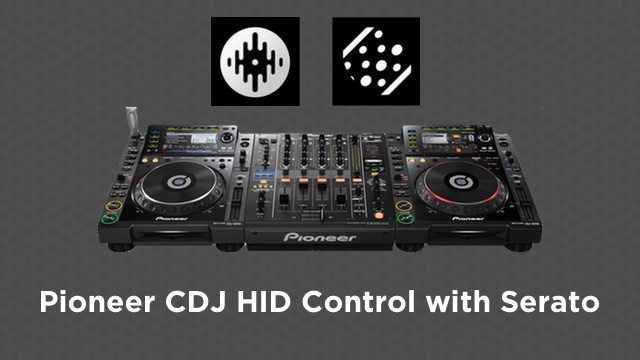
Earlier this week we looked at how Traktor DJs can have a plug and play setup with Pioneer CDJs in HID mode. Today Ryan Dejaegher is going to show Serato DJ and Scratch Live DJs how they can use CDJs in HID mode. The control is quite similar between Traktor and Serato but there are some notable differences in the models that are supported and the hardware required.


Which Pioneer CDJ models are HID compatible?
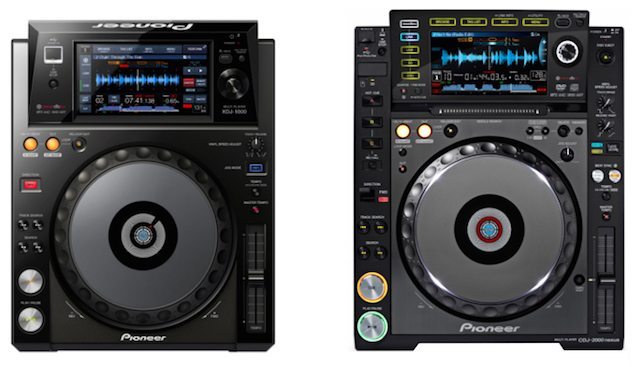
Pioneer XDJ 1000 and CDJ 2000 Nexus

A major plus for Serato users is support for more CDJ models compared to Traktor. Serato DJ supports advanced HID control for these Pioneer CDJs:

  • CDJ 350
  • CDJ 850
  • CDJ 900/Nexus
  • CDJ 2000/Nexus
  • XDJ 1000 (check out our review!)

The list varies slightly for Serato users that are running Scratch Live:

  • CDJ 350
  • CDJ 400
  • CDJ 850
  • CDJ 900
  • CDJ 2000/Nexus

The good news for Serato users is that Pioneer and Serato appear to have a solid relationship. Most CDJ models had HID support in Serato before Traktor. Most recently the XDJ 1000 had HID support for Serato immediately upon release. That means people waiting for the inevitable XDJ 2000 can probably count on Serato HID support.

Pioneer CDJ 2000 HID Setup

There are a few things that need to be done to ensure smooth operation with your CDJs and Serato. First, DJs will want to make sure the CDJs are running the latest firmware. Although this tutorial focuses on the CDJ 2000, DJs can find the latest firmware for all Serato supported CDJs at Pioneer Support. Highlight the CDJ of choice and select “Software Download” to find the latest firmware.

If the CDJ 2000s aren’t running the latest firmware, follow this guide to update the firmware on your CDJ 2000s. The next step is to download and install the latest version of Serato DJ or Scratch Live software. Once the CDJ firmware and Serato software have been updated, we can move on to the hardware setup.

Serato DJ/Scratch Live Hardware Setup
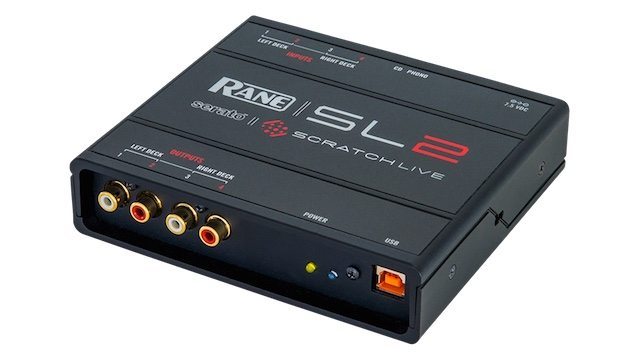
Rane SL2

One of the downsides to using CDJs in HID mode with Serato is that DJs still need a Serato compatible soundcard, mixer, or DJ controller (not accessory) connected to unlock the Serato software and HID support.

For DJs using Serato DJ there are alot of options for Serato DJ enabled hardware and mixers, especially after the announcement of the Club Kit expansion at NAMM 2015. Club Kit will unlock Serato DJ and enable Serato DVS support for the internal soundcards of popular mixers such as the Pioneer DJM 850, DJM 900 Nexus, and the Xone DB2/DB4. For all Serato DJ enabled hardware check out the hardware section for Serato DJ.

With Scratch Live there are fewer options. DJs are limited to Rane soundcards (SL1, SL2, SL3, SL4) and mixers (Rane TTM57 SL, Rane 61/62/68). However most Rane hardware with the exception of the SL1 and TTM57 SL are supported in Serato DJ, so Scratch Live DJs can make the switch when they are ready.

To use the CDJs in HID mode, Serato hardware will need to be connected first. After the hardware has been connected, DJs will be able to assign the CDJs to decks in Serato DJ/Scratch Live. Make sure the CDJs are connected by USB and that the HID setting is set to “Advanced” on each CDJ, this can be done from the Menu/Utility on the CDJ 2000s.
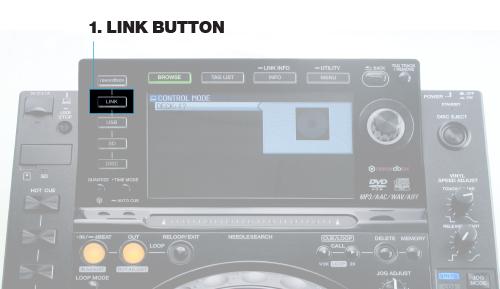
Serato DJ Link

Now click “Link” on the CDJs and select “USB MIDI”. Rotate the encoder to choose a deck (Deck 1, Deck 2 etc.), once you’ve selected the desired deck, press the encoder and the CDJ will automatically be setup with Serato DJ/Scratch Live, nothing to map or configure. DJs can now view the track waveform, browse/load tracks from their Serato library, and control all of Serato’s main functions such as tempo, looping, and hot cues.
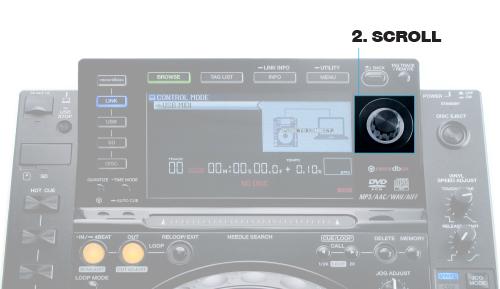
Serato DJ 2

HID Showdown: Traktor vs. Serato

There are a couple big differences when it comes to an HID setup with Traktor and Serato. Serato requires Serato DJ enabled hardware to unlock the software and HID support, while Traktor lets DJs use the CDJs soundcards and doesn’t require a Traktor soundcard or mixer. This makes Serato DJ less plug and play for club DJs because they’ll still need to setup a Serato soundcard and share/switch the same soundcard in a multi DJ lineup (check out Eans trick for switching DJs when sharing a soundcard). People have been working with soundcards for a long time now so it’s not a huge deal, but its always nice to declutter and reduce the amount of cables and gear in a booth.

The HID controls are very similar with Traktor and Serato with a few minor differences. On the CDJ 2000s there is no sync control for Serato. The direction on the CDJ 2000 will activate Serato’s reverse/censor function, with Traktor this control is inactive. The CDJs can’t be remapped with Serato, whereas Traktor gives you the ability to modify the default HID mapping to suit your workflow.

The last thing to note is the difference in supported hardware. Serato has repeatedly beat Traktor to the punch when it comes to HID support and supports more Pioneer CDJs models. The brand new Pioneer XDJ-1000 was announced with Serato HID support upon release and so far there is no word on Traktor support. For DJs that are looking for the most hardware options and best future support for advanced HID control, Serato DJ is the way to go.

What CDJs do you use? What would be your dream CDJ or software setup?

Let us know in the comments below!
Tags: Advanced HIDHIDpioneer cdjPioneer CDJ 2000 NexusPioneer CDJ 900Pioneer CDJ 900 Nexuspioneer cdj-2000pioneer DJPioneer XDJ 1000Rane mixerrane soundcardserato DJserato DJ controllersSerato DJ Hardwareserato scratch liveSerato soundcard
Share4Tweet3Share
Previous Post

Attention DJTT Community: What Do You Want To Learn?

Next Post

Why New DJs Should Start on Vinyl

Related Posts

The DJM-V5 from AlphaTheta: 3 channels, 4-band EQ, V10 sound – no Beat FX or crossfader.
Breaking News

The DJM-V5 from AlphaTheta: 3 channels, 4-band EQ, V10 sound – no Beat FX or crossfader.

January 20, 2026
Rekordox Spotify
Breaking News

Spotify (finally) slides into Rekordbox, Serato, and Algoriddim djay (again) – for better or worse?

September 24, 2025
CDJ-3000x player by AlphaTheta
Breaking News

The CDJ-3000X is here: an iterative upgrade of the media player for $3,000 / £2,399

September 9, 2025
Load More
Next Post
Why New DJs Should Start on Vinyl

Why New DJs Should Start on Vinyl

Want to reach DJTT's audience here?

Shoot an email to advertising@djtechtools.com

DJTT ads
DJTT newsletter
Midi Fighter
Chat with us
  • ABOUT DJTT
  • CONTACT
  • PRIVACY
  • MIDI FIGHTER HELP
  • ABOUT DJTT
  • JOBS
  • CONTACT US
  • ADVERTISE
  • PRIVACY POLICY
  • ACCESSIBILITY STATEMENT

© 2024 DJ Techtools all rights reserved by DJ TechTools on all content unless otherwise noted.

No Result
View All Result
  • Blog
    • DJ Gear
      • DIY Projects
      • Gear Reviews
      • New Products
      • Controllerism
    • Techniques + Tips
      • Beginner DJ
      • Advanced DJ
      • Producer
      • Finger Drummer
    • News + Culture
      • Editorials + Opinions
      • Artist Interviews
      • Performances + Routines
      • How I Play
    • DJ Software Tutorials
      • Serato Tips
      • CDJ Tips
      • Ableton Live Tips
  • Store
    • Run by real DJs, not a corporation
    • DJ Controllers
      • Midi Fighter Twister
      • Midi Fighter Spectra
      • Midi Fighter 64
      • View All
    • Accessories
      • Chroma USB Drive for DJs
      • Chroma Caps
      • Chroma Cables Audio
      • Chroma Cables USB-A
      • Chroma Cables: USB-C
      • DJTT Gift Card
      • Midi Fighter T-Shirt
      • Keyboard Covers
      • Earplugs by V-Moda
    • Production Gear
    • Soundcards & Mixers
  • Community
    • Popular Forums
      • General Discussion
      • Buy & Sell
      • Reviews
      • Mixes
      • Music Production
      • Show Your Setup
      • Off Topic
    • Handy Links
      • New Posts
      • Private Messages
      • Register
      • Search
    • Midi Maps
      • Traktor
      • Ableton
      • Serato DJ
      • Midi Fighter 3D
      • Midi Fighter Twister
      • Midi Fighter Spectra
  • Midi Fighter
  • Chroma

© 2024 DJ Techtools all rights reserved by DJ TechTools on all content unless otherwise noted.

This website uses cookies. By continuing to use this website you are giving consent to cookies being used. Visit our Privacy and Cookie Policy.