DJ TechTools
  • Blog
    • DJ Gear
      • DIY Projects
      • Gear Reviews
      • New Products
      • Controllerism
    • Techniques + Tips
      • Beginner DJ
      • Advanced DJ
      • Producer
      • Finger Drummer
    • News + Culture
      • Editorials + Opinions
      • Artist Interviews
      • Performances + Routines
      • How I Play
    • DJ Software Tutorials
      • Serato Tips
        • Traktor Tips
      • CDJ Tips
      • Ableton Live Tips
  • Store
    • Run by real DJs, not a corporation
    • DJ Controllers
      • Midi Fighter Twister
      • Midi Fighter Spectra
      • Midi Fighter 64
      • View All
    • Accessories
      • Chroma USB Drive for DJs
      • Chroma Caps
      • Chroma Cables Audio
      • Chroma Cables USB-A
      • Chroma Cables: USB-C
      • DJTT Gift Card
      • Midi Fighter T-Shirt
      • Keyboard Covers
      • Earplugs by V-Moda
    • Production Gear
    • Soundcards & Mixers
  • Community
    • Popular Forums
      • General Discussion
      • Buy & Sell
      • Reviews
      • Mixes
      • Music Production
      • Show Your Setup
      • Off Topic
    • Handy Links
      • New Posts
      • Private Messages
      • Register
      • Search
    • Midi Maps
      • Traktor
      • Ableton
      • Serato DJ
      • Midi Fighter 3D
      • Midi Fighter Twister
      • Midi Fighter Spectra
  • Midi Fighter
  • Chroma
No Result
View All Result
DJ TechTools
  • Blog
    • DJ Gear
      • DIY Projects
      • Gear Reviews
      • New Products
      • Controllerism
    • Techniques + Tips
      • Beginner DJ
      • Advanced DJ
      • Producer
      • Finger Drummer
    • News + Culture
      • Editorials + Opinions
      • Artist Interviews
      • Performances + Routines
      • How I Play
    • DJ Software Tutorials
      • Serato Tips
        • Traktor Tips
      • CDJ Tips
      • Ableton Live Tips
  • Store
    • Run by real DJs, not a corporation
    • DJ Controllers
      • Midi Fighter Twister
      • Midi Fighter Spectra
      • Midi Fighter 64
      • View All
    • Accessories
      • Chroma USB Drive for DJs
      • Chroma Caps
      • Chroma Cables Audio
      • Chroma Cables USB-A
      • Chroma Cables: USB-C
      • DJTT Gift Card
      • Midi Fighter T-Shirt
      • Keyboard Covers
      • Earplugs by V-Moda
    • Production Gear
    • Soundcards & Mixers
  • Community
    • Popular Forums
      • General Discussion
      • Buy & Sell
      • Reviews
      • Mixes
      • Music Production
      • Show Your Setup
      • Off Topic
    • Handy Links
      • New Posts
      • Private Messages
      • Register
      • Search
    • Midi Maps
      • Traktor
      • Ableton
      • Serato DJ
      • Midi Fighter 3D
      • Midi Fighter Twister
      • Midi Fighter Spectra
  • Midi Fighter
  • Chroma
No Result
View All Result
DJ TechTools

iTunes 12.2 Update Causes Issues With Rekordbox, Traktor, Serato

Dan White by Dan White
July 3, 2015
in Breaking News, DJ Music Library Tips, News
Reading Time: 3 mins read
0
iTunes 12.2 Update Causes Issues With Rekordbox, Traktor, Serato
89
VIEWS
Post on FacebookTweet thisUpvote on Reddit

DJs should always be hesitant to update to a new version of any software that they depend on, from system updates to new firmware. Today, we’ve learned that a brand new version of iTunes (12.2) has started causing major issues with all major DJ software.

Why Is iTunes Changing? 

For a lot of DJs, iTunes is a fundamental tool used for organizing and cataloging massive quantities of music, but the integration of the just-launched Apple Music streaming service has increased the amount of bloat and focused the app’s features further away from a local music file manager.

XML Database Link Issues
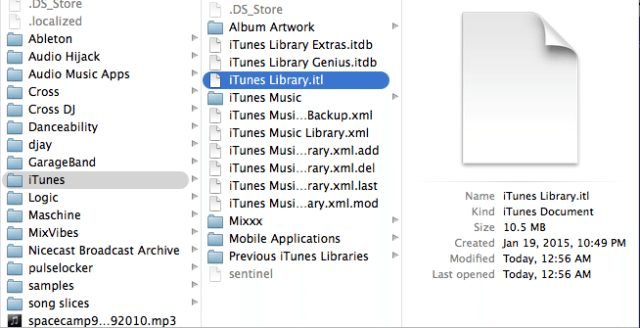
Screen Shot 2015-07-03 at Jul 3.23.27 PM
The iTunes Library files in Finder

With the new version of iTunes, one of the biggest issues showing up is related to a major change in how files are categorized and accessed. Reports from various forms have confirmed that this is causing issues for DJ softwares that access it. On Pioneer’s forums, Rekordbox users report being unable to reliably load iTunes files and folders. A Pioneer rep has issued a response:

It should be working, but with some users, we’ve found you need to refresh a couple of times (click the reload icon to the right of the iTunes label on the left window), other users have needed to simply wait a couple of minutes.

Engineers are working to improve this behaviour and your patience is appreciated. Please be aware you can always drag-and-drop playlists into rekordbox manually to re-create them if the sync isn’t working properly for you, or you can use the Sync Manager which acts as a one-way sync/import from iTunes.

On Native Instruments’ Traktor forums, we’ve seen at least one Windows 8 user who has reported that their new iTunes update has broken the integration completely. (Has anyone else seen a similar issue? Let us know in the comments..)

Serato users are seeing problems of their own – as Joe Moore on the Serato forums writes:

  • iTunes playlists are now not collapsible
  • Mobile applications in iTunes now appear in the Serato library with yellow warning icons next to them
  • If you disable the new setting in iTunes’ advanced preferences “Share iTunes Library XML with other applications”, the iTunes library will not load in Serato DJ, even with “Show iTunes Library” enabled in Serato’s Setup

At the same time, we’ve seen a number of reports of mixed up song metadata (artwork, file/song associations) – this post does a good job of summarizing it:

“… there are numerous reports that suggest iTunes 12.2 is scrambling huge music libraries owned by iTunes users. One Mashable reporter said that iTunes is now showing random collections of albums with tunes from other artists, album artwork is mixed up beyond recognition and more. “Arctic Monkeys’ album art is displayed while Elliot Smith is listed as the artist,” the report said. “Meanwhile, when I clicked on The Beatles’ “And Your Bird Can Sing,” an Arctic Monkeys song played.”

Apple Music Backup: Not Good For DJs?

iTunes now has a feature that allows you to upload your entire library onto Apple Music’s global backup/streaming service (similar to Google Music), allowing you to access it from everywhere. If Apple Music sees a song that it recognizes, it won’t upload the file, but instead will allow you access to their own copy of the file.

What this means is:

  • If you lose all of your music and rely on the iTunes cloud backup, all of the matched files will be DRM locked – which will make it impossible to load them into a DJ software.
  • If you sync your iTunes library across devices using the same tool, the same applies – DRM files.
  • This won’t break your songs that don’t have a match in Apple Music

So far it seems like all of the major DJ software developers are aware of the headaches being caused by the new iTunes update – so for now we have to wait for fixes from them and from Apple to smooth things out.

Have you experienced any issues with the new version of iTunes and your DJ software? Let us know in the comments.
Tags: 12.2Apple MusiciTuneslibrariesrekordboxseratoTraktor Tips
Share1Tweet1Share
Previous Post

3 No-Fail Ways To Record Your Live DJ Set This Weekend

Next Post

Why Every DJ (Even Big Names) Need Spontaneity In Their Sets

Related Posts

The DJM-V5 from AlphaTheta: 3 channels, 4-band EQ, V10 sound – no Beat FX or crossfader.
Breaking News

The DJM-V5 from AlphaTheta: 3 channels, 4-band EQ, V10 sound – no Beat FX or crossfader.

January 20, 2026
Rekordox Spotify
Breaking News

Spotify (finally) slides into Rekordbox, Serato, and Algoriddim djay (again) – for better or worse?

September 24, 2025
CDJ-3000x player by AlphaTheta
Breaking News

The CDJ-3000X is here: an iterative upgrade of the media player for $3,000 / £2,399

September 9, 2025
Load More
Next Post
Why Every DJ (Even Big Names) Need Spontaneity In Their Sets

Why Every DJ (Even Big Names) Need Spontaneity In Their Sets

Want to reach DJTT's audience here?

Shoot an email to advertising@djtechtools.com

DJTT ads
DJTT newsletter
Midi Fighter
Chat with us
  • ABOUT DJTT
  • CONTACT
  • PRIVACY
  • MIDI FIGHTER HELP
  • ABOUT DJTT
  • JOBS
  • CONTACT US
  • ADVERTISE
  • PRIVACY POLICY
  • ACCESSIBILITY STATEMENT

© 2024 DJ Techtools all rights reserved by DJ TechTools on all content unless otherwise noted.

No Result
View All Result
  • Blog
    • DJ Gear
      • DIY Projects
      • Gear Reviews
      • New Products
      • Controllerism
    • Techniques + Tips
      • Beginner DJ
      • Advanced DJ
      • Producer
      • Finger Drummer
    • News + Culture
      • Editorials + Opinions
      • Artist Interviews
      • Performances + Routines
      • How I Play
    • DJ Software Tutorials
      • Serato Tips
      • CDJ Tips
      • Ableton Live Tips
  • Store
    • Run by real DJs, not a corporation
    • DJ Controllers
      • Midi Fighter Twister
      • Midi Fighter Spectra
      • Midi Fighter 64
      • View All
    • Accessories
      • Chroma USB Drive for DJs
      • Chroma Caps
      • Chroma Cables Audio
      • Chroma Cables USB-A
      • Chroma Cables: USB-C
      • DJTT Gift Card
      • Midi Fighter T-Shirt
      • Keyboard Covers
      • Earplugs by V-Moda
    • Production Gear
    • Soundcards & Mixers
  • Community
    • Popular Forums
      • General Discussion
      • Buy & Sell
      • Reviews
      • Mixes
      • Music Production
      • Show Your Setup
      • Off Topic
    • Handy Links
      • New Posts
      • Private Messages
      • Register
      • Search
    • Midi Maps
      • Traktor
      • Ableton
      • Serato DJ
      • Midi Fighter 3D
      • Midi Fighter Twister
      • Midi Fighter Spectra
  • Midi Fighter
  • Chroma

© 2024 DJ Techtools all rights reserved by DJ TechTools on all content unless otherwise noted.

This website uses cookies. By continuing to use this website you are giving consent to cookies being used. Visit our Privacy and Cookie Policy.