DJ TechTools
  • Blog
    • DJ Gear
      • DIY Projects
      • Gear Reviews
      • New Products
      • Controllerism
    • Techniques + Tips
      • Beginner DJ
      • Advanced DJ
      • Producer
      • Finger Drummer
    • News + Culture
      • Editorials + Opinions
      • Artist Interviews
      • Performances + Routines
      • How I Play
    • DJ Software Tutorials
      • Serato Tips
        • Traktor Tips
      • CDJ Tips
      • Ableton Live Tips
  • Store
    • Run by real DJs, not a corporation
    • DJ Controllers
      • Midi Fighter Twister
      • Midi Fighter Spectra
      • Midi Fighter 64
      • View All
    • Accessories
      • Chroma USB Drive for DJs
      • Chroma Caps
      • Chroma Cables Audio
      • Chroma Cables USB-A
      • Chroma Cables: USB-C
      • DJTT Gift Card
      • Midi Fighter T-Shirt
      • Keyboard Covers
      • Earplugs by V-Moda
    • Production Gear
    • Soundcards & Mixers
  • Community
    • Popular Forums
      • General Discussion
      • Buy & Sell
      • Reviews
      • Mixes
      • Music Production
      • Show Your Setup
      • Off Topic
    • Handy Links
      • New Posts
      • Private Messages
      • Register
      • Search
    • Midi Maps
      • Traktor
      • Ableton
      • Serato DJ
      • Midi Fighter 3D
      • Midi Fighter Twister
      • Midi Fighter Spectra
  • Midi Fighter
  • Chroma
No Result
View All Result
DJ TechTools
  • Blog
    • DJ Gear
      • DIY Projects
      • Gear Reviews
      • New Products
      • Controllerism
    • Techniques + Tips
      • Beginner DJ
      • Advanced DJ
      • Producer
      • Finger Drummer
    • News + Culture
      • Editorials + Opinions
      • Artist Interviews
      • Performances + Routines
      • How I Play
    • DJ Software Tutorials
      • Serato Tips
        • Traktor Tips
      • CDJ Tips
      • Ableton Live Tips
  • Store
    • Run by real DJs, not a corporation
    • DJ Controllers
      • Midi Fighter Twister
      • Midi Fighter Spectra
      • Midi Fighter 64
      • View All
    • Accessories
      • Chroma USB Drive for DJs
      • Chroma Caps
      • Chroma Cables Audio
      • Chroma Cables USB-A
      • Chroma Cables: USB-C
      • DJTT Gift Card
      • Midi Fighter T-Shirt
      • Keyboard Covers
      • Earplugs by V-Moda
    • Production Gear
    • Soundcards & Mixers
  • Community
    • Popular Forums
      • General Discussion
      • Buy & Sell
      • Reviews
      • Mixes
      • Music Production
      • Show Your Setup
      • Off Topic
    • Handy Links
      • New Posts
      • Private Messages
      • Register
      • Search
    • Midi Maps
      • Traktor
      • Ableton
      • Serato DJ
      • Midi Fighter 3D
      • Midi Fighter Twister
      • Midi Fighter Spectra
  • Midi Fighter
  • Chroma
No Result
View All Result
DJ TechTools

3 No-Fail Ways To Record Your Live DJ Set This Weekend

Ean Golden by Ean Golden
July 2, 2015
in Basic DJ Tips, DJ Techniques / Tips
Reading Time: 4 mins read
0
3 No-Fail Ways To Record Your Live DJ Set This Weekend
836
VIEWS
Post on FacebookTweet thisUpvote on Reddit

Chances are that you are going out this weekend (or staying in) to play a gig. Recording your set should be a no brainer:  it’s great for learning, promotion, and posterity. However most DJs show up and, in the stress of the moment, skip the recording process because it feels too complicated. Here are 3 dead simple ways to record your live DJ set this weekend.

USE THE USB CONNECTION ON THE MIXER

These days, most mixers are digital and allow any computer to be connected to the mixer via USB. This means that up to four channels of audio can come out of your PC to the mixer, and almost always one stereo channel can come back from the mixer to your computer at the same time!

This means the master output of the mixer can be streaming to your computer in real time, in digital, for the best quality recording possible. Often you can set it to the record out – this is better because it bypasses any adjustments of the master

Since the DJM-900 is a popular mixer with this feature, make sure you have Pioneer’s audio drivers installed on your laptop – which gives you this handy interface to customize the audio flow. Notice that I have the audio output set to send the record output to the DJ software which is independent of the master, or the booth levels. This means loud recordings even if either of those get turned down for room levels.
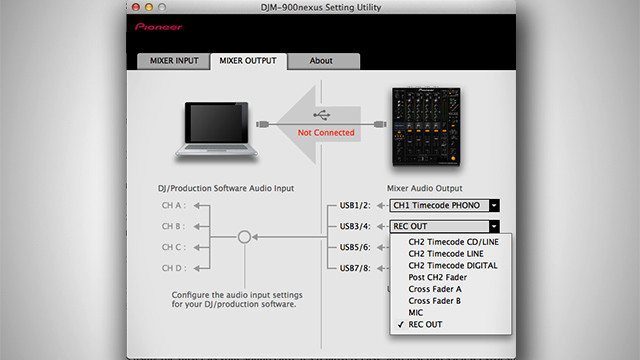
djm-900

If you’re using the mixer as your sound card, it’s relatively easy, and just takes a few extra steps.

For DJs that are mixing on CDJs or records, you can still bring a laptop and use this feature by recording directly into Ableton, Quicktime, or some other DAW

Use An Input On Your Sound Card

For DJs that are not using the club’s digital mixer as a sound card, but bringing their own sound card to the booth – you can also record your set in the same way. The only disadvantage to the first option is that the mix will have gone through two analogue to digital, passes which starts to degrade the signal a bit.

Ean recently posted a video on audio routing and he covered how to record with a mixer and external soundcard (jump to 9:37):

Every mixer should have an analogue record output that is almost always a RCA out. If that does not exist, then there should be two pairs of master outputs. One is usually XLR (sent to the house speakers) and one is RCA (use this for record outs out). Even if all of these outputs are taken (which they might be), you have one last emergency resort:

  1. Use the effects send output (usually a pair of 1/4″)
  2. Turn the effects all the way on, and apply them to the master channel.

This method will work well, and with analogue mixers take into account the special distortion characteristics that they have. The disadvantage is some data loss with the Analogue/Digital conversions, and using the master output can mean variable levels since the right room level might not be the ideal recording volume.

If your soundcard doesn’t have any spare inputs for recording you can always use the line input on your laptop if it has one. You’ll need a RCA to 3.5mm cable going from the record output on the mixer to the input on your laptop. Then you can use a free audio editing program like Audacity to record the mix. Internal laptop soundcards aren’t the most ideal for recording but it’s better than nothing.

Record to Your Phone
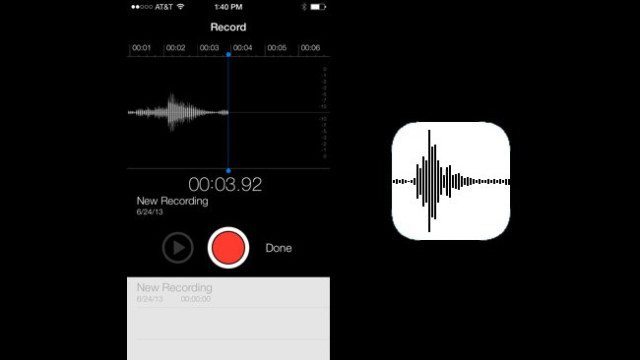
record-iphone

Many DJs aren’t carrying around their laptops with them – so we needed a super easy way for DJs to record their sets without bringing any extra gear. Good news: you already have a computer in your pocket right now!

Recording to a phone is relatively easy – but in order to get the signal flow working right, you’ll want to buy an special adapter cable that has two elements:

  • Attenuator: reduces the line-level audio signal which is too loud for a phones mic-input
  • Mic Adapter: makes your phone think that you’ve plugged in a mic/headphone combo device and passes signal into the phone on the Mic channel

Note: using a normal 3.5mm to RCA cable here will likely not work correctly.

Here’s a great $30 cable option that has a 3.5mm male plug on one side and 3 male RCAs on the other side.

Connect the cable to your mixer’s record out (as in the sound card method above) and open any app that records audio. On iPhones, Voice Memo app comes with your phone. On Android, try one of these apps recommended by Lifehacker.

Very importantly, remember to put your phone into airplane mode, or else your recording might get interrupted by an incoming call or text!

BONUS: You actually can then use this same connector for any app – want to call a friend and play your mix for them live? Want to record DJ audio for a video on Periscope or Snapchat? This cable works for both.
Tags: dj setIphonepioneer DJM-900recordingUSB
Share7Tweet4Share
Previous Post

Limited Edition Green Midi Fighter Twisters

Next Post

iTunes 12.2 Update Causes Issues With Rekordbox, Traktor, Serato

Related Posts

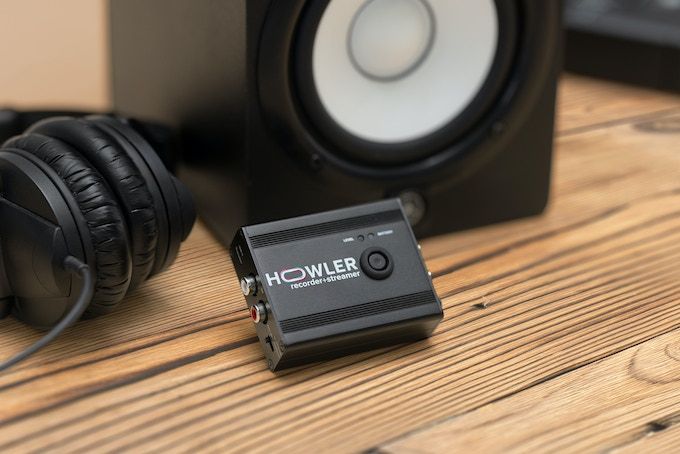
Meet Howler, a 2-in-1 device that records + livestreams high-quality audio from any source
News

Meet Howler, a 2-in-1 device that records + livestreams high-quality audio from any source

November 4, 2022
Move Your iTunes Playlists To Any USB Drive
DJ Music Library Tips

Move Your iTunes Playlists To Any USB Drive

July 26, 2018
Practice DJing
Basic DJ Tips

How To Practice DJing When You’re Not At A Gig

May 1, 2017
Load More
Next Post
iTunes 12.2 Update Causes Issues With Rekordbox, Traktor, Serato

iTunes 12.2 Update Causes Issues With Rekordbox, Traktor, Serato

Want to reach DJTT's audience here?

Shoot an email to advertising@djtechtools.com

DJTT ads
DJTT newsletter
Midi Fighter
Chat with us
  • ABOUT DJTT
  • CONTACT
  • PRIVACY
  • MIDI FIGHTER HELP
  • ABOUT DJTT
  • JOBS
  • CONTACT US
  • ADVERTISE
  • PRIVACY POLICY
  • ACCESSIBILITY STATEMENT

© 2024 DJ Techtools all rights reserved by DJ TechTools on all content unless otherwise noted.

No Result
View All Result
  • Blog
    • DJ Gear
      • DIY Projects
      • Gear Reviews
      • New Products
      • Controllerism
    • Techniques + Tips
      • Beginner DJ
      • Advanced DJ
      • Producer
      • Finger Drummer
    • News + Culture
      • Editorials + Opinions
      • Artist Interviews
      • Performances + Routines
      • How I Play
    • DJ Software Tutorials
      • Serato Tips
      • CDJ Tips
      • Ableton Live Tips
  • Store
    • Run by real DJs, not a corporation
    • DJ Controllers
      • Midi Fighter Twister
      • Midi Fighter Spectra
      • Midi Fighter 64
      • View All
    • Accessories
      • Chroma USB Drive for DJs
      • Chroma Caps
      • Chroma Cables Audio
      • Chroma Cables USB-A
      • Chroma Cables: USB-C
      • DJTT Gift Card
      • Midi Fighter T-Shirt
      • Keyboard Covers
      • Earplugs by V-Moda
    • Production Gear
    • Soundcards & Mixers
  • Community
    • Popular Forums
      • General Discussion
      • Buy & Sell
      • Reviews
      • Mixes
      • Music Production
      • Show Your Setup
      • Off Topic
    • Handy Links
      • New Posts
      • Private Messages
      • Register
      • Search
    • Midi Maps
      • Traktor
      • Ableton
      • Serato DJ
      • Midi Fighter 3D
      • Midi Fighter Twister
      • Midi Fighter Spectra
  • Midi Fighter
  • Chroma

© 2024 DJ Techtools all rights reserved by DJ TechTools on all content unless otherwise noted.

This website uses cookies. By continuing to use this website you are giving consent to cookies being used. Visit our Privacy and Cookie Policy.