DJ TechTools
  • Blog
    • DJ Gear
      • DIY Projects
      • Gear Reviews
      • New Products
      • Controllerism
    • Techniques + Tips
      • Beginner DJ
      • Advanced DJ
      • Producer
      • Finger Drummer
    • News + Culture
      • Editorials + Opinions
      • Artist Interviews
      • Performances + Routines
      • How I Play
    • DJ Software Tutorials
      • Serato Tips
        • Traktor Tips
      • CDJ Tips
      • Ableton Live Tips
  • Store
    • Run by real DJs, not a corporation
    • DJ Controllers
      • Midi Fighter Twister
      • Midi Fighter Spectra
      • Midi Fighter 64
      • View All
    • Accessories
      • Chroma USB Drive for DJs
      • Chroma Caps
      • Chroma Cables Audio
      • Chroma Cables USB-A
      • Chroma Cables: USB-C
      • DJTT Gift Card
      • Midi Fighter T-Shirt
      • Keyboard Covers
      • Earplugs by V-Moda
    • Production Gear
    • Soundcards & Mixers
  • Community
    • Popular Forums
      • General Discussion
      • Buy & Sell
      • Reviews
      • Mixes
      • Music Production
      • Show Your Setup
      • Off Topic
    • Handy Links
      • New Posts
      • Private Messages
      • Register
      • Search
    • Midi Maps
      • Traktor
      • Ableton
      • Serato DJ
      • Midi Fighter 3D
      • Midi Fighter Twister
      • Midi Fighter Spectra
  • Midi Fighter
  • Chroma
No Result
View All Result
DJ TechTools
  • Blog
    • DJ Gear
      • DIY Projects
      • Gear Reviews
      • New Products
      • Controllerism
    • Techniques + Tips
      • Beginner DJ
      • Advanced DJ
      • Producer
      • Finger Drummer
    • News + Culture
      • Editorials + Opinions
      • Artist Interviews
      • Performances + Routines
      • How I Play
    • DJ Software Tutorials
      • Serato Tips
        • Traktor Tips
      • CDJ Tips
      • Ableton Live Tips
  • Store
    • Run by real DJs, not a corporation
    • DJ Controllers
      • Midi Fighter Twister
      • Midi Fighter Spectra
      • Midi Fighter 64
      • View All
    • Accessories
      • Chroma USB Drive for DJs
      • Chroma Caps
      • Chroma Cables Audio
      • Chroma Cables USB-A
      • Chroma Cables: USB-C
      • DJTT Gift Card
      • Midi Fighter T-Shirt
      • Keyboard Covers
      • Earplugs by V-Moda
    • Production Gear
    • Soundcards & Mixers
  • Community
    • Popular Forums
      • General Discussion
      • Buy & Sell
      • Reviews
      • Mixes
      • Music Production
      • Show Your Setup
      • Off Topic
    • Handy Links
      • New Posts
      • Private Messages
      • Register
      • Search
    • Midi Maps
      • Traktor
      • Ableton
      • Serato DJ
      • Midi Fighter 3D
      • Midi Fighter Twister
      • Midi Fighter Spectra
  • Midi Fighter
  • Chroma
No Result
View All Result
DJ TechTools

Traktor 2.9 + Stem Decks Launch: Details + Videos

Dan White by Dan White
August 3, 2015
in DJ Software Tips, Stems, Traktor Tips
Reading Time: 5 mins read
0
Traktor 2.9 + Stem Decks Launch: Details + Videos
147
VIEWS
Post on FacebookTweet thisUpvote on Reddit

This morning Native Instruments is launching the Traktor 2.9 update, which is the first software on the market to use their new Stems audio file format. The update is free for all Traktor users and is rolling out in Service Center now. Read more about the update and watch them in action inside.

Traktor 2.9 Update: Key Features
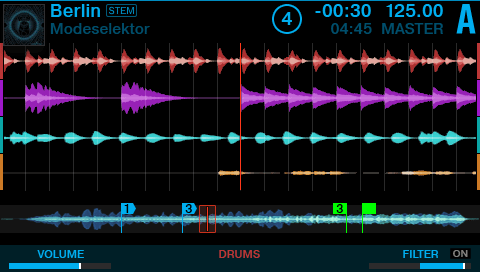
Stem Decks are now supported in Traktor 2.9

Here’s the rundown of the main new features in Traktor 2.9. We’ve only had access to the software for a few hours, but here are the major new features in the new update to Native Instruments’ DJ software so far:

  • Stem Decks: This is the new “deck flavor” that you can set any of the four decks to. In our testing you’re only able to view the Stem view when you have a compatible controller plugged in – by default, it just looks like a normal track deck. In order to load Stems into a Stem Deck, you have to analyze them first – so make sure you do that before loading some in on-the-fly.
  • Stem Display Support For Controllers: The Kontrol S8 and Kontrol D2 units have 4-stem visualization of Stem Decks on the built-in displays, and the buttons above and below the displays control the sub-mix elements of the Stems – including volume, filters, and FX sends.
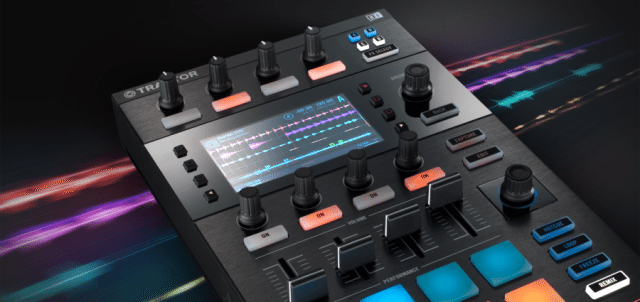
Traktor 2.9 Stem Decks
Stem Decks breakdown diplays are now visible on S8s and D2s
  • Stem Controls in MIDI Mappings: For other controllers, the MIDI mappings for Stem Decks and Remix decks have been combined – now referred to as “Sub-Mix” controls in Traktor’s controller manager. If you had MIDI Mappings for Remix Deck mix controls previous to this update, those controls are now automatically mapped to the Deck Common Sub-mix controls.
  • Performance Optimizations: The use of Stem decks requires more CPU power, so NI has apparently implemented a number of  performance optimizations to reduce the overall CPU load. According to NI “These optimizations can be enjoyed even when not playing Stem files […] CPU savings will vary depending on the computer and operating system in use. Most of the optimizations were done around DSP (such as the output limiter), the audio graph (Traktor’s internal audio mixer), and waveform rendering.”

Want to see more of Stems in action? Ean’s put out a brand new performance video on Facebook with a Kontrol S8, Kontrol D2, and two Roland AIRA production machines, the TR-8 and System One:

Testing a new way of djing: STEMS

Posted by Ean Golden on Monday, August 3, 2015

One important other thing to note: there are a few issues with Traktor 2.9 that NI has admitted to out of the gate. A big one for many users might be that there’s no longer official support for OS X 10.8 (Mountain Lion) – and users on that OS might experience high CPU load when loading tracks.

There’s another note that we’ve never seen before in the Readme file included with Traktor 2.9 all about using Traktor on two screens:

When moving the TRAKTOR GUI TO to a secondary screen, the CPU load increases significantly.

MIDI Mapping Stem Decks

If you don’t have a controller that has Stem Decks functionality built into it, you’re a bit out of luck in terms of viewing Stem Decks. There’s no way to control individual Stems that we’ve found so far from just the computer mixer screen – it seems to rely on the heads up display on controllers.

That being said, you can still MIDI map Stem decks easily – Ean shot a video a few months back that we’re releasing now showing how it can be done with a Midi Fighter Twister:

We’ve put together a mapping for the Midi Fighter Twister available here on Maps.DJTechtools.com and you can also watch it in action in this video by our own Matias:

Who Is Selling Stems?

One of the biggest questions is: where will we be able to get Stem Decks? Six major online retailers are signing on starting today: Beatport, Bleep, Juno, Traxsource, whatpeopleplay, and Wasabeat. We’ve seen individual Stem tracks range in price from $2.99 to $3.49. If you want a free set of Stems, the ones used in the performance video at the top of the article are available here.

We asked NI about the continued rollout of content – they shared with us that:

“Today over 600 Stems tracks are available from partnering online music stores, with new Stems releases coming out every week. When the Stem Creator Tool comes out in a few weeks, the number of Stem releases should again increase rapidly.”
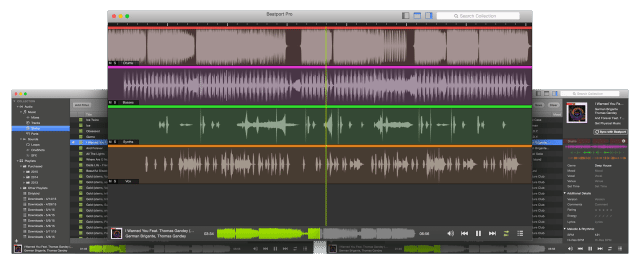
beatport-pro-mac-stems
Stem files in the Beatport Pro desktop app

Interestingly enough the Beatport Pro desktop software will soon have complete compatibility with Stems files, allowing you to quickly check out each element/track of the Stem file with ease – as well as check out the individual Stem files of tracks that you’re considering purchasing.

Twister / Kontrol S8 / D2 / F1 Discounts

twister-stems-discount

To celebrate the launch of Traktor 2.9 and Stems, both Native Instruments and DJTT are offering discounts on Stem Deck-ready controllers. They’re significant discounts that are super rare on these controllers – all with stock ready in the DJTT store if this is enticing to you:

  • Midi Fighter Twister: $20 off – $219 with coupon code NISTEMS2015 at checkout
  • Kontrol D2: $100 off – $399
  • Kontrol S8: $200 off – $999
  • Kontrol F1: $50 off – $149

Stems In Action

Have you had a chance to use Traktor’s new update yet? What are your experiences? Let others know in the comments below! 

Tags: kontrol D2Kontrol F1kontrol s8midi fighter twisterNative Instrumentsstem deckstraktor 2.9Traktor Tipsupdate
Share1Tweet1Share
Previous Post

Phaser Effect + CDJ Cue/Scratch Technique: Throwback Tutorial

Next Post

Pioneer MIDI Mixer Teased for Rekordbox DJ?

Related Posts

A screenshot of the 2.91 version of the Midi Fighter Utility software in Dark Mode
Midi Fighter

Midi Fighter Utility 2.91 Is Out; Our Biggest Update in Years

June 1, 2026
A Prime 4+ and a Kontrol S3 intercut against eachother over a black background
Breaking News

InMusic just bought Native Instruments. So what now for Traktor?

May 8, 2026
Traktor MX2: Native Instruments’ New 2-Channel Controller
DJ Gear Announcements

Traktor MX2: Native Instruments’ New 2-Channel Controller

October 8, 2025
Load More
Next Post
Pioneer MIDI Mixer?

Pioneer MIDI Mixer Teased for Rekordbox DJ?

Want to reach DJTT's audience here?

Shoot an email to advertising@djtechtools.com

DJTT ads
DJTT newsletter
Midi Fighter
Chat with us
  • ABOUT DJTT
  • CONTACT
  • PRIVACY
  • MIDI FIGHTER HELP
  • ABOUT DJTT
  • JOBS
  • CONTACT US
  • ADVERTISE
  • PRIVACY POLICY
  • ACCESSIBILITY STATEMENT

© 2024 DJ Techtools all rights reserved by DJ TechTools on all content unless otherwise noted.

No Result
View All Result
  • Blog
    • DJ Gear
      • DIY Projects
      • Gear Reviews
      • New Products
      • Controllerism
    • Techniques + Tips
      • Beginner DJ
      • Advanced DJ
      • Producer
      • Finger Drummer
    • News + Culture
      • Editorials + Opinions
      • Artist Interviews
      • Performances + Routines
      • How I Play
    • DJ Software Tutorials
      • Serato Tips
      • CDJ Tips
      • Ableton Live Tips
  • Store
    • Run by real DJs, not a corporation
    • DJ Controllers
      • Midi Fighter Twister
      • Midi Fighter Spectra
      • Midi Fighter 64
      • View All
    • Accessories
      • Chroma USB Drive for DJs
      • Chroma Caps
      • Chroma Cables Audio
      • Chroma Cables USB-A
      • Chroma Cables: USB-C
      • DJTT Gift Card
      • Midi Fighter T-Shirt
      • Keyboard Covers
      • Earplugs by V-Moda
    • Production Gear
    • Soundcards & Mixers
  • Community
    • Popular Forums
      • General Discussion
      • Buy & Sell
      • Reviews
      • Mixes
      • Music Production
      • Show Your Setup
      • Off Topic
    • Handy Links
      • New Posts
      • Private Messages
      • Register
      • Search
    • Midi Maps
      • Traktor
      • Ableton
      • Serato DJ
      • Midi Fighter 3D
      • Midi Fighter Twister
      • Midi Fighter Spectra
  • Midi Fighter
  • Chroma

© 2024 DJ Techtools all rights reserved by DJ TechTools on all content unless otherwise noted.

This website uses cookies. By continuing to use this website you are giving consent to cookies being used. Visit our Privacy and Cookie Policy.