DJ TechTools
  • Blog
    • DJ Gear
      • DIY Projects
      • Gear Reviews
      • New Products
      • Controllerism
    • Techniques + Tips
      • Beginner DJ
      • Advanced DJ
      • Producer
      • Finger Drummer
    • News + Culture
      • Editorials + Opinions
      • Artist Interviews
      • Performances + Routines
      • How I Play
    • DJ Software Tutorials
      • Serato Tips
        • Traktor Tips
      • CDJ Tips
      • Ableton Live Tips
  • Store
    • Run by real DJs, not a corporation
    • DJ Controllers
      • Midi Fighter Twister
      • Midi Fighter Spectra
      • Midi Fighter 64
      • View All
    • Accessories
      • Chroma USB Drive for DJs
      • Chroma Caps
      • Chroma Cables Audio
      • Chroma Cables USB-A
      • Chroma Cables: USB-C
      • DJTT Gift Card
      • Midi Fighter T-Shirt
      • Keyboard Covers
      • Earplugs by V-Moda
    • Production Gear
    • Soundcards & Mixers
  • Community
    • Popular Forums
      • General Discussion
      • Buy & Sell
      • Reviews
      • Mixes
      • Music Production
      • Show Your Setup
      • Off Topic
    • Handy Links
      • New Posts
      • Private Messages
      • Register
      • Search
    • Midi Maps
      • Traktor
      • Ableton
      • Serato DJ
      • Midi Fighter 3D
      • Midi Fighter Twister
      • Midi Fighter Spectra
  • Midi Fighter
  • Chroma
No Result
View All Result
DJ TechTools
  • Blog
    • DJ Gear
      • DIY Projects
      • Gear Reviews
      • New Products
      • Controllerism
    • Techniques + Tips
      • Beginner DJ
      • Advanced DJ
      • Producer
      • Finger Drummer
    • News + Culture
      • Editorials + Opinions
      • Artist Interviews
      • Performances + Routines
      • How I Play
    • DJ Software Tutorials
      • Serato Tips
        • Traktor Tips
      • CDJ Tips
      • Ableton Live Tips
  • Store
    • Run by real DJs, not a corporation
    • DJ Controllers
      • Midi Fighter Twister
      • Midi Fighter Spectra
      • Midi Fighter 64
      • View All
    • Accessories
      • Chroma USB Drive for DJs
      • Chroma Caps
      • Chroma Cables Audio
      • Chroma Cables USB-A
      • Chroma Cables: USB-C
      • DJTT Gift Card
      • Midi Fighter T-Shirt
      • Keyboard Covers
      • Earplugs by V-Moda
    • Production Gear
    • Soundcards & Mixers
  • Community
    • Popular Forums
      • General Discussion
      • Buy & Sell
      • Reviews
      • Mixes
      • Music Production
      • Show Your Setup
      • Off Topic
    • Handy Links
      • New Posts
      • Private Messages
      • Register
      • Search
    • Midi Maps
      • Traktor
      • Ableton
      • Serato DJ
      • Midi Fighter 3D
      • Midi Fighter Twister
      • Midi Fighter Spectra
  • Midi Fighter
  • Chroma
No Result
View All Result
DJ TechTools

Why Stem Deck Waveforms Don’t Show In Traktor

Dan White by Dan White
August 5, 2015
in Breaking News, DJ Software Tips, Traktor Tips
Reading Time: 2 mins read
0
Stem Deck waveform traktor GPU
238
VIEWS
Post on FacebookTweet thisUpvote on Reddit

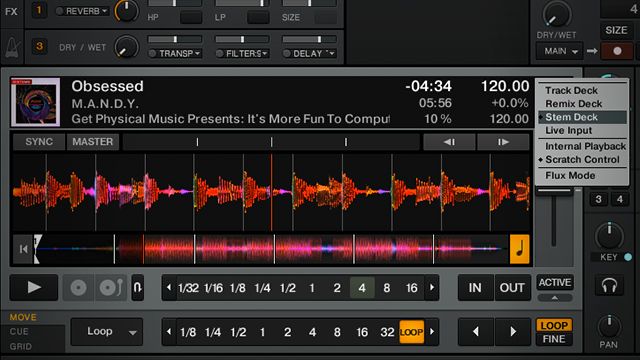
It’s been a full week of Stem-related news, starting with the launch of Stem Decks + Traktor 2.9 on Monday and our launch of a Midi Fighter Twister mapping yesterday. One of the biggest questions people have asked has been “Why can’t I see the individual Stems in Traktor?” so we decided we would reach out directly to Native Instruments and find out. Learn more about how waveforms, GPUs, and CPUs all play into the state of Stem Deck displays.

STEM DECKS = GPU HARDWARE REQUIRED
6a00d834515fca69e201287663224d970c

Apparently, in order to process the individual Stem Deck files, Native Instruments is drawing independent Stem waveforms for each deck. What that means is that there are now four waveforms being processed on the fly for a single deck – which could end up being 16 waveforms at once if all four decks are in Stem Deck mode.

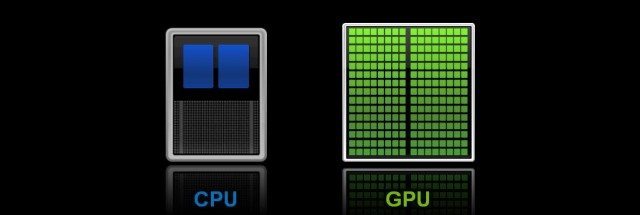
According to Native Instruments, this becomes a big issue for your computer’s processor – meaning it’s best farmed out to your graphics processor – but Traktor’s interface is all rendered on the CPU. Here’s what they write:

Graphic rendering of the individual Stem tracks is currently only possible on the displays of the TRAKTOR KONTROL S8 / D2 controllers since those graphics are rendered via the computer’s GPU (Graphics Processing Unit). However, unlike the TRAKTOR KONTROL S8 / D2, the TRAKTOR GUI is not rendered on the GPU. Instead, it is rendered on the computer’s CPU. Rendering four waveforms per Stem Deck increases the CPU load drastically and leads to performance issues (audio crackling, distorsions, unresponsive software interface).

Native Instruments is currently testing ways to either reduce the CPU usage of the waveform drawing or utilize the GPU, thus allowing the display and interaction with Stems in the TRAKTOR software.

So even though you can control and MIDI map any DJ controller to individual Stems, you can’t see the heads up display of what’s happening.

WORKAROUND: MIDI VU METERING

What Native Instruments hasn’t taken into account in their response is another temporary workaround to allow MIDI controllers to display some visual feedback from a Stem Deck. It’s possible to MIDI-map the VU meters in Traktor from any Deck (Track Decks, Remix Deck slots, and Stem Deck slots) to your LEDs on your DJ controller.

In the DJTT MIDI mapping for the Twister and Stem Decks, we’ve done exactly that to give some sense of “what’s playing” and it works very well! Learn how to map VU meters yourself in this tutorial:


Tags: kontrol D2kontrol s8midi fighter twisterstem decksTraktor Tips
Share2Tweet1Share
Previous Post

3 Ableton Reverb Techniques: In The Studio With Mad Zach

Next Post

First Look: Pioneer’s DJM-S9 Mixer, PC-X10 Cartridges + Gold Plated Gear

Related Posts

Use your Midi Fighter Twister as an Audio-Reactive Visualizer
Ableton Live Tips

Use your Midi Fighter Twister as an Audio-Reactive Visualizer

June 23, 2025
Midi Fighter Twister controlling Traktor Pro 4 Stem decks
DJ Techniques / Tips

Ean’s powerful Midi Fighter Twister mapping for Traktor Pro 4’s Stems + Pattern Player

July 17, 2024
Serato Stems mixes
Serato DJ

Serato Stems: what DJs are doing with real-time stem separation added to Serato DJ

October 11, 2022
Load More
Next Post
First Look: Pioneer’s DJM-S9 Mixer, PC-X10 Cartridges + Gold Plated Gear

First Look: Pioneer's DJM-S9 Mixer, PC-X10 Cartridges + Gold Plated Gear

Want to reach DJTT's audience here?

Shoot an email to advertising@djtechtools.com

DJTT ads
DJTT newsletter
Midi Fighter
Chat with us
  • ABOUT DJTT
  • CONTACT
  • PRIVACY
  • MIDI FIGHTER HELP
  • ABOUT DJTT
  • JOBS
  • CONTACT US
  • ADVERTISE
  • PRIVACY POLICY
  • ACCESSIBILITY STATEMENT

© 2024 DJ Techtools all rights reserved by DJ TechTools on all content unless otherwise noted.

No Result
View All Result
  • Blog
    • DJ Gear
      • DIY Projects
      • Gear Reviews
      • New Products
      • Controllerism
    • Techniques + Tips
      • Beginner DJ
      • Advanced DJ
      • Producer
      • Finger Drummer
    • News + Culture
      • Editorials + Opinions
      • Artist Interviews
      • Performances + Routines
      • How I Play
    • DJ Software Tutorials
      • Serato Tips
      • CDJ Tips
      • Ableton Live Tips
  • Store
    • Run by real DJs, not a corporation
    • DJ Controllers
      • Midi Fighter Twister
      • Midi Fighter Spectra
      • Midi Fighter 64
      • View All
    • Accessories
      • Chroma USB Drive for DJs
      • Chroma Caps
      • Chroma Cables Audio
      • Chroma Cables USB-A
      • Chroma Cables: USB-C
      • DJTT Gift Card
      • Midi Fighter T-Shirt
      • Keyboard Covers
      • Earplugs by V-Moda
    • Production Gear
    • Soundcards & Mixers
  • Community
    • Popular Forums
      • General Discussion
      • Buy & Sell
      • Reviews
      • Mixes
      • Music Production
      • Show Your Setup
      • Off Topic
    • Handy Links
      • New Posts
      • Private Messages
      • Register
      • Search
    • Midi Maps
      • Traktor
      • Ableton
      • Serato DJ
      • Midi Fighter 3D
      • Midi Fighter Twister
      • Midi Fighter Spectra
  • Midi Fighter
  • Chroma

© 2024 DJ Techtools all rights reserved by DJ TechTools on all content unless otherwise noted.

This website uses cookies. By continuing to use this website you are giving consent to cookies being used. Visit our Privacy and Cookie Policy.