DJ TechTools
  • Blog
    • DJ Gear
      • DIY Projects
      • Gear Reviews
      • New Products
      • Controllerism
    • Techniques + Tips
      • Beginner DJ
      • Advanced DJ
      • Producer
      • Finger Drummer
    • News + Culture
      • Editorials + Opinions
      • Artist Interviews
      • Performances + Routines
      • How I Play
    • DJ Software Tutorials
      • Serato Tips
        • Traktor Tips
      • CDJ Tips
      • Ableton Live Tips
  • Store
    • Run by real DJs, not a corporation
    • DJ Controllers
      • Midi Fighter Twister
      • Midi Fighter Spectra
      • Midi Fighter 64
      • View All
    • Accessories
      • Chroma USB Drive for DJs
      • Chroma Caps
      • Chroma Cables Audio
      • Chroma Cables USB-A
      • Chroma Cables: USB-C
      • DJTT Gift Card
      • Midi Fighter T-Shirt
      • Keyboard Covers
      • Earplugs by V-Moda
    • Production Gear
    • Soundcards & Mixers
  • Community
    • Popular Forums
      • General Discussion
      • Buy & Sell
      • Reviews
      • Mixes
      • Music Production
      • Show Your Setup
      • Off Topic
    • Handy Links
      • New Posts
      • Private Messages
      • Register
      • Search
    • Midi Maps
      • Traktor
      • Ableton
      • Serato DJ
      • Midi Fighter 3D
      • Midi Fighter Twister
      • Midi Fighter Spectra
  • Midi Fighter
  • Chroma
No Result
View All Result
DJ TechTools
  • Blog
    • DJ Gear
      • DIY Projects
      • Gear Reviews
      • New Products
      • Controllerism
    • Techniques + Tips
      • Beginner DJ
      • Advanced DJ
      • Producer
      • Finger Drummer
    • News + Culture
      • Editorials + Opinions
      • Artist Interviews
      • Performances + Routines
      • How I Play
    • DJ Software Tutorials
      • Serato Tips
        • Traktor Tips
      • CDJ Tips
      • Ableton Live Tips
  • Store
    • Run by real DJs, not a corporation
    • DJ Controllers
      • Midi Fighter Twister
      • Midi Fighter Spectra
      • Midi Fighter 64
      • View All
    • Accessories
      • Chroma USB Drive for DJs
      • Chroma Caps
      • Chroma Cables Audio
      • Chroma Cables USB-A
      • Chroma Cables: USB-C
      • DJTT Gift Card
      • Midi Fighter T-Shirt
      • Keyboard Covers
      • Earplugs by V-Moda
    • Production Gear
    • Soundcards & Mixers
  • Community
    • Popular Forums
      • General Discussion
      • Buy & Sell
      • Reviews
      • Mixes
      • Music Production
      • Show Your Setup
      • Off Topic
    • Handy Links
      • New Posts
      • Private Messages
      • Register
      • Search
    • Midi Maps
      • Traktor
      • Ableton
      • Serato DJ
      • Midi Fighter 3D
      • Midi Fighter Twister
      • Midi Fighter Spectra
  • Midi Fighter
  • Chroma
No Result
View All Result
DJ TechTools

3 Techniques For Using DJM-900NXS2’s EQ-Based Effects

Dan White by Dan White
April 4, 2016
in Advanced DJ Tips, DJ Techniques / Tips, How-To Video Tutorials
Reading Time: 2 mins read
0
DJM-900NXS2 Frequency FX
645
VIEWS
Post on FacebookTweet thisUpvote on Reddit

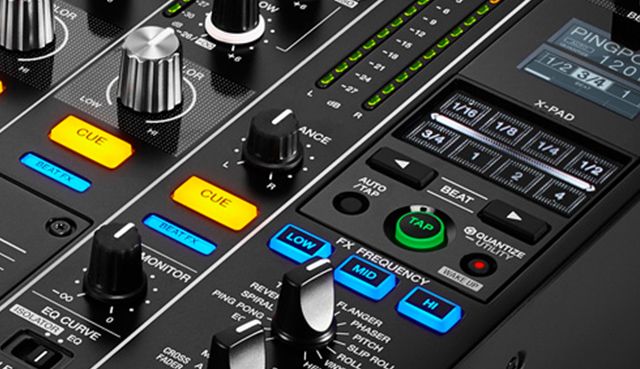
On Pioneer’s new DJM-900NXS2, the Beat FX section has a powerful new tool: three EQ frequency selector buttons that allow the chosen effect to be isolated to the lows, mids, or highs. Today we explore three different ideas for how DJs can take advantage of this new feature set – watch the full video inside.

EQ-Based Effect Techniques On The DJM-900NXS2

Want a great deal on a DJM-900NXS2?
Chat with our live chat agents in the DJTT store here.

Here’s a brief rundown of the ways we found that the DJM-900NXS2’s frequency FX worked well:

  • Echo / Ping Pong / Spiral / Helix: All of these effects can quickly get overwhelming if the low end is being effected, so deselecting it will make for a much cleaner output.
  • Phaser: Applying a Phaser just to the low end (when there’s a great bassline) and manipulating the XY strip gives a DJ the ability to distort the sound, making it way more filthy without the cheesy typical phaser LFO sound. (Note: This can get out of hand quickly, so make sure you watch your levels!) 
  • Reverb: When Reverb is selected, the XY pad turns into a filter control for the final output of the effect. Use this to create sweeps or quickly add a bit of flourish on snares, claps, or hats. This actually exists on the original DJM-900NXS  as well, it’s just less obvious.

Worth noting that EQ-based effects were first introduced on Pioneer gear with the DJM-2000, but those tend to be incredibly rare to find in DJ booths. The 900s are much more common – and will likely continue to be in the future.

Want more Pioneer tutorials? Here’s two more tutorials about DJM effects: 

  • Using the DJM-900’s Spiral Effect
  • “Scratching” With the DJM-900’s Noise Effect

Check out the tracks we played in this video:
  • JM – Who’s Next
  • Longshanks – Dawn Wall
  • Claude VonStroke – R2 Knows (Instrumental White Label)
  • Thabo Getsome – The Sound (Sacha Robotti’s Wobbly Remix)
Tags: beat FXdjm-900nxs2effectseqisolationpioneer djmTutorial
Share5Tweet3Share
Previous Post

Brand New Serato DJ 3.0 Update: Android Nexus, Real Vinyl DVS

Next Post

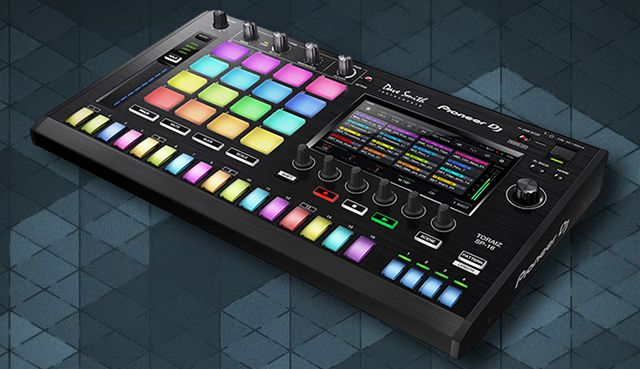
TORAIZ SP-16: Pioneer DJ’s First Sampler, Syncs With CDJs

Related Posts

A quick way to add stutter/cut FX in Ableton Live
Ableton Live Tips

A quick way to add stutter/cut FX in Ableton Live

August 13, 2020
Embracing Lockdown
Artist Features

Embracing Lockdown: How DJs + producers are protecting their mental well-being

March 26, 2020
4 simple things DJs and producers can do to thrive in isolation
Business of DJing

4 simple things DJs and producers can do to thrive in isolation

March 19, 2020
Load More
Next Post
TORAIZ SP-16: Pioneer DJ’s First Sampler, Syncs With CDJs

TORAIZ SP-16: Pioneer DJ's First Sampler, Syncs With CDJs

Want to reach DJTT's audience here?

Shoot an email to advertising@djtechtools.com

DJTT ads
DJTT newsletter
Midi Fighter
Chat with us
  • ABOUT DJTT
  • CONTACT
  • PRIVACY
  • MIDI FIGHTER HELP
  • ABOUT DJTT
  • JOBS
  • CONTACT US
  • ADVERTISE
  • PRIVACY POLICY
  • ACCESSIBILITY STATEMENT

© 2024 DJ Techtools all rights reserved by DJ TechTools on all content unless otherwise noted.

No Result
View All Result
  • Blog
    • DJ Gear
      • DIY Projects
      • Gear Reviews
      • New Products
      • Controllerism
    • Techniques + Tips
      • Beginner DJ
      • Advanced DJ
      • Producer
      • Finger Drummer
    • News + Culture
      • Editorials + Opinions
      • Artist Interviews
      • Performances + Routines
      • How I Play
    • DJ Software Tutorials
      • Serato Tips
      • CDJ Tips
      • Ableton Live Tips
  • Store
    • Run by real DJs, not a corporation
    • DJ Controllers
      • Midi Fighter Twister
      • Midi Fighter Spectra
      • Midi Fighter 64
      • View All
    • Accessories
      • Chroma USB Drive for DJs
      • Chroma Caps
      • Chroma Cables Audio
      • Chroma Cables USB-A
      • Chroma Cables: USB-C
      • DJTT Gift Card
      • Midi Fighter T-Shirt
      • Keyboard Covers
      • Earplugs by V-Moda
    • Production Gear
    • Soundcards & Mixers
  • Community
    • Popular Forums
      • General Discussion
      • Buy & Sell
      • Reviews
      • Mixes
      • Music Production
      • Show Your Setup
      • Off Topic
    • Handy Links
      • New Posts
      • Private Messages
      • Register
      • Search
    • Midi Maps
      • Traktor
      • Ableton
      • Serato DJ
      • Midi Fighter 3D
      • Midi Fighter Twister
      • Midi Fighter Spectra
  • Midi Fighter
  • Chroma

© 2024 DJ Techtools all rights reserved by DJ TechTools on all content unless otherwise noted.

This website uses cookies. By continuing to use this website you are giving consent to cookies being used. Visit our Privacy and Cookie Policy.