DJ TechTools
  • Blog
    • DJ Gear
      • DIY Projects
      • Gear Reviews
      • New Products
      • Controllerism
    • Techniques + Tips
      • Beginner DJ
      • Advanced DJ
      • Producer
      • Finger Drummer
    • News + Culture
      • Editorials + Opinions
      • Artist Interviews
      • Performances + Routines
      • How I Play
    • DJ Software Tutorials
      • Serato Tips
        • Traktor Tips
      • CDJ Tips
      • Ableton Live Tips
  • Store
    • Run by real DJs, not a corporation
    • DJ Controllers
      • Midi Fighter Twister
      • Midi Fighter Spectra
      • Midi Fighter 64
      • View All
    • Accessories
      • Chroma USB Drive for DJs
      • Chroma Caps
      • Chroma Cables Audio
      • Chroma Cables USB-A
      • Chroma Cables: USB-C
      • DJTT Gift Card
      • Midi Fighter T-Shirt
      • Keyboard Covers
      • Earplugs by V-Moda
    • Production Gear
    • Soundcards & Mixers
  • Community
    • Popular Forums
      • General Discussion
      • Buy & Sell
      • Reviews
      • Mixes
      • Music Production
      • Show Your Setup
      • Off Topic
    • Handy Links
      • New Posts
      • Private Messages
      • Register
      • Search
    • Midi Maps
      • Traktor
      • Ableton
      • Serato DJ
      • Midi Fighter 3D
      • Midi Fighter Twister
      • Midi Fighter Spectra
  • Midi Fighter
  • Chroma
No Result
View All Result
DJ TechTools
  • Blog
    • DJ Gear
      • DIY Projects
      • Gear Reviews
      • New Products
      • Controllerism
    • Techniques + Tips
      • Beginner DJ
      • Advanced DJ
      • Producer
      • Finger Drummer
    • News + Culture
      • Editorials + Opinions
      • Artist Interviews
      • Performances + Routines
      • How I Play
    • DJ Software Tutorials
      • Serato Tips
        • Traktor Tips
      • CDJ Tips
      • Ableton Live Tips
  • Store
    • Run by real DJs, not a corporation
    • DJ Controllers
      • Midi Fighter Twister
      • Midi Fighter Spectra
      • Midi Fighter 64
      • View All
    • Accessories
      • Chroma USB Drive for DJs
      • Chroma Caps
      • Chroma Cables Audio
      • Chroma Cables USB-A
      • Chroma Cables: USB-C
      • DJTT Gift Card
      • Midi Fighter T-Shirt
      • Keyboard Covers
      • Earplugs by V-Moda
    • Production Gear
    • Soundcards & Mixers
  • Community
    • Popular Forums
      • General Discussion
      • Buy & Sell
      • Reviews
      • Mixes
      • Music Production
      • Show Your Setup
      • Off Topic
    • Handy Links
      • New Posts
      • Private Messages
      • Register
      • Search
    • Midi Maps
      • Traktor
      • Ableton
      • Serato DJ
      • Midi Fighter 3D
      • Midi Fighter Twister
      • Midi Fighter Spectra
  • Midi Fighter
  • Chroma
No Result
View All Result
DJ TechTools

How to pick a DJ needle for Serato

Ean Golden by Ean Golden
October 15, 2006
in Basic DJ Tips, DJ Equipment / Accessories, Serato Tips
Reading Time: 4 mins read
0
How to pick a DJ needle for Serato
349
VIEWS
Post on FacebookTweet thisUpvote on Reddit

No matter what DJ software you use, there is one common variable that vinyl-emulation systems all rely on: needles. Normally, needles are the last things on your mind. Fidelity and cartridge specs are sometimes thought to be a trivial factor in the performance of the software. The common opinion is that, “As long as you have a good strong signal, then it does not matter what needle you use.” Although that is partially true, any regular user of multiple DJ carts will tell you that they all seem to feel or respond differently. That is, of course, a subjective observation and is dependent on a lot of variables that are hard to nail down. Now to further confuse the ranks of DJs, Ortofon has released a new DJ cartridge specifically aimed at the digital DJ market called the DigiTrack, which Ortofon claims to be a superior cartridge designed specifically for the digital realm. But what exactly makes one DJ cartridge better than the other? And how can we get optimal performance out of the needles we already have?

COMMON FREQUENCY

All control records contain a constant tone that transmits position and speed information to the computer. This tone usually sits between 1 and 2 kHz (midrange). As you speed the record up or down, either by adjusting the pitch or manually moving the record or platter, the tone is lowered or raised, and the computer interpolates those changes. The tone is right smack in the middle of the frequency range, and just about any needle on the market is going to be able to effectively pick it up during normal playback. When you slow down, scratch or speed up the record (backspins), however, the frequency range that the needle must pick up gets significantly wider. So although most needles are equal under normal playback scenarios, DJs who perform a lot of record manipulation may benefit from needles with a better frequency response, specifically a needle that handles the lower frequencies better, because that’s where most of the movement information ends up. It’s almost impossible to move the record fast enough to produce a tone above 16 kHz, so needles boasting higher frequency responses probably won’t do you much good. One important feature of a DJ cartridge that will affect its frequency range is the type of diamond used on the needle itself.


DIAMONDS IN THE ROUGH

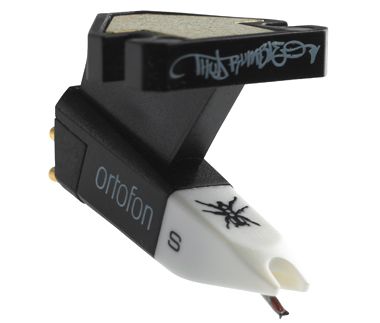
There are two kinds of diamond tips on DJ needles, and some models are made with both of those options, elliptical and spherical. These models are conveniently marked with an E or S at the end of the model name. Spherical needles are more rounded and sit higher in the record groove, so they don’t pick up the higher frequencies that sit on the bottom.

A good example of an elliptical needle would be the Ortofon Night-Club E (black with yellow tips). Although it picks up those lovely sparkling highs we all love, it can tear apart your favorite records. Elliptical needles sit lower in the groove, but because of their shape, they will rub against the walls of the groove and wear out the records and needles more rapidly, especially if everything is not aligned perfectly. You won’t notice that as quickly with standard records, but when using control records, performance will quickly degrade. Unless you can afford to replace your control records every few weeks, I would stick with a spherical needle.


THIS ONE GOES TO 11

The louder and stronger the tone, the more clearly it will be read by the computer — especially in live situations where it needs to overpower rumble and interference. You may be able to turn up the gains on some digital interfaces, but then you are raising the level of the control signal and the outside noise together. Better to start off with a strong signal in the first place. Needles are rated in mV for their output levels, and listed above are some of the loudest needles on the market and their respective frequency responses. All of those needles are spherical, and all list prices are for the mounting versions that require head shells.


THE LITTLE THINGS

How can you ensure that your needles are working as well as possible? Reduce rumble by isolating the turntables or turning down your monitors. Clean your control vinyl before every gig using Gruv Glide (www.gruvglide.com). Remove lint and dust from the records and the needle with a proper brush, not your hands! Dust builds up rapidly and can wreak hell on the control signal, so make a habit of cleaning every few songs. Align and adjust the cartridge according to the manufacturing specs so that you get the best signal possible. Don’t overweigh or turn in the carts at extreme angles. The contacts between the tone arm and the needle cartridge are a common problem area. Don’t lick the contacts! Reseating the cartridge will help fix contact problems, but licking them will only make it worse over time. Instead, use an eraser to clean the contacts on both the turntable and the cartridge. The common No. 2 pencil will work fine.

Most importantly, get yourself a good, loud cartridge on which you can afford to replace the needles. You might be better off buying new control records more frequently than spending the extra money on high-priced cartridges. The new DigiTrack does have a few key features that should translate into good tracking, but is it worth the price? Ultimately, you have to be the judge. Try it out in the store, and if you can’t tell the difference, then the answer may just be no.



Tags: dj performance tricksDj TutorialsRemix ColumnseratoTips
Share3Tweet2Share
Previous Post

Advanced CDJ-1000 Techniques

Next Post

M-AUDIO TORQ TIPS

Related Posts

The DJM-V5 from AlphaTheta: 3 channels, 4-band EQ, V10 sound – no Beat FX or crossfader.
Breaking News

The DJM-V5 from AlphaTheta: 3 channels, 4-band EQ, V10 sound – no Beat FX or crossfader.

January 20, 2026
66% of Serato just got bought: but not by AlphaTheta
Breaking News

66% of Serato just got bought: but not by AlphaTheta

April 1, 2025
PLX-CRSS12: Pioneer DJ finally made a hybrid turntable + motorized DVS controller
Breaking News

PLX-CRSS12: Pioneer DJ finally made a hybrid turntable + motorized DVS controller

August 1, 2023
Load More
Next Post
M-AUDIO TORQ TIPS

M-AUDIO TORQ TIPS

Want to reach DJTT's audience here?

Shoot an email to advertising@djtechtools.com

DJTT ads
DJTT newsletter
Midi Fighter
Chat with us
  • ABOUT DJTT
  • CONTACT
  • PRIVACY
  • MIDI FIGHTER HELP
  • ABOUT DJTT
  • JOBS
  • CONTACT US
  • ADVERTISE
  • PRIVACY POLICY
  • ACCESSIBILITY STATEMENT

© 2024 DJ Techtools all rights reserved by DJ TechTools on all content unless otherwise noted.

No Result
View All Result
  • Blog
    • DJ Gear
      • DIY Projects
      • Gear Reviews
      • New Products
      • Controllerism
    • Techniques + Tips
      • Beginner DJ
      • Advanced DJ
      • Producer
      • Finger Drummer
    • News + Culture
      • Editorials + Opinions
      • Artist Interviews
      • Performances + Routines
      • How I Play
    • DJ Software Tutorials
      • Serato Tips
      • CDJ Tips
      • Ableton Live Tips
  • Store
    • Run by real DJs, not a corporation
    • DJ Controllers
      • Midi Fighter Twister
      • Midi Fighter Spectra
      • Midi Fighter 64
      • View All
    • Accessories
      • Chroma USB Drive for DJs
      • Chroma Caps
      • Chroma Cables Audio
      • Chroma Cables USB-A
      • Chroma Cables: USB-C
      • DJTT Gift Card
      • Midi Fighter T-Shirt
      • Keyboard Covers
      • Earplugs by V-Moda
    • Production Gear
    • Soundcards & Mixers
  • Community
    • Popular Forums
      • General Discussion
      • Buy & Sell
      • Reviews
      • Mixes
      • Music Production
      • Show Your Setup
      • Off Topic
    • Handy Links
      • New Posts
      • Private Messages
      • Register
      • Search
    • Midi Maps
      • Traktor
      • Ableton
      • Serato DJ
      • Midi Fighter 3D
      • Midi Fighter Twister
      • Midi Fighter Spectra
  • Midi Fighter
  • Chroma

© 2024 DJ Techtools all rights reserved by DJ TechTools on all content unless otherwise noted.

This website uses cookies. By continuing to use this website you are giving consent to cookies being used. Visit our Privacy and Cookie Policy.