DJ TechTools
  • Blog
    • DJ Gear
      • DIY Projects
      • Gear Reviews
      • New Products
      • Controllerism
    • Techniques + Tips
      • Beginner DJ
      • Advanced DJ
      • Producer
      • Finger Drummer
    • News + Culture
      • Editorials + Opinions
      • Artist Interviews
      • Performances + Routines
      • How I Play
    • DJ Software Tutorials
      • Serato Tips
        • Traktor Tips
      • CDJ Tips
      • Ableton Live Tips
  • Store
    • Run by real DJs, not a corporation
    • DJ Controllers
      • Midi Fighter Twister
      • Midi Fighter Spectra
      • Midi Fighter 64
      • View All
    • Accessories
      • Chroma USB Drive for DJs
      • Chroma Caps
      • Chroma Cables Audio
      • Chroma Cables USB-A
      • Chroma Cables: USB-C
      • DJTT Gift Card
      • Midi Fighter T-Shirt
      • Keyboard Covers
      • Earplugs by V-Moda
    • Production Gear
    • Soundcards & Mixers
  • Community
    • Popular Forums
      • General Discussion
      • Buy & Sell
      • Reviews
      • Mixes
      • Music Production
      • Show Your Setup
      • Off Topic
    • Handy Links
      • New Posts
      • Private Messages
      • Register
      • Search
    • Midi Maps
      • Traktor
      • Ableton
      • Serato DJ
      • Midi Fighter 3D
      • Midi Fighter Twister
      • Midi Fighter Spectra
  • Midi Fighter
  • Chroma
No Result
View All Result
DJ TechTools
  • Blog
    • DJ Gear
      • DIY Projects
      • Gear Reviews
      • New Products
      • Controllerism
    • Techniques + Tips
      • Beginner DJ
      • Advanced DJ
      • Producer
      • Finger Drummer
    • News + Culture
      • Editorials + Opinions
      • Artist Interviews
      • Performances + Routines
      • How I Play
    • DJ Software Tutorials
      • Serato Tips
        • Traktor Tips
      • CDJ Tips
      • Ableton Live Tips
  • Store
    • Run by real DJs, not a corporation
    • DJ Controllers
      • Midi Fighter Twister
      • Midi Fighter Spectra
      • Midi Fighter 64
      • View All
    • Accessories
      • Chroma USB Drive for DJs
      • Chroma Caps
      • Chroma Cables Audio
      • Chroma Cables USB-A
      • Chroma Cables: USB-C
      • DJTT Gift Card
      • Midi Fighter T-Shirt
      • Keyboard Covers
      • Earplugs by V-Moda
    • Production Gear
    • Soundcards & Mixers
  • Community
    • Popular Forums
      • General Discussion
      • Buy & Sell
      • Reviews
      • Mixes
      • Music Production
      • Show Your Setup
      • Off Topic
    • Handy Links
      • New Posts
      • Private Messages
      • Register
      • Search
    • Midi Maps
      • Traktor
      • Ableton
      • Serato DJ
      • Midi Fighter 3D
      • Midi Fighter Twister
      • Midi Fighter Spectra
  • Midi Fighter
  • Chroma
No Result
View All Result
DJ TechTools

Super Knobs

Ean Golden by Ean Golden
April 2, 2008
in Ableton Live Tips, Advanced DJ Tips, DIY Project Tutorials, How-To Video Tutorials
Reading Time: 3 mins read
0
Super Knobs
240
VIEWS
Post on FacebookTweet thisUpvote on Reddit

With a limited number of physical knobs to control an ever increasing number of software goodies you need to find a way to get more out of your control surface. Using a single knob to control more than one parameter is one of the best ways to do that. A good example of this is the effects section of my VCI-100SE. Each effect in Traktor has 4 knobs and 4 buttons but my vci-100 only offers 2 knobs per effect. How can this be effective? Super knobs!

First check out this video in which Moldover explains his use of super knobs among other things. Here you can see how each part of the knob kicks in a different effect or sound. This is the most complicated way of accomplishing the goal and requires advanced midi translators, Reaktor or max msp to accomplish. Don’t fret there are some easier ways to try it out at home.

[youtube]http://www.youtube.com/watch?v=L2McDeSKiOU&feature=related[/youtube]

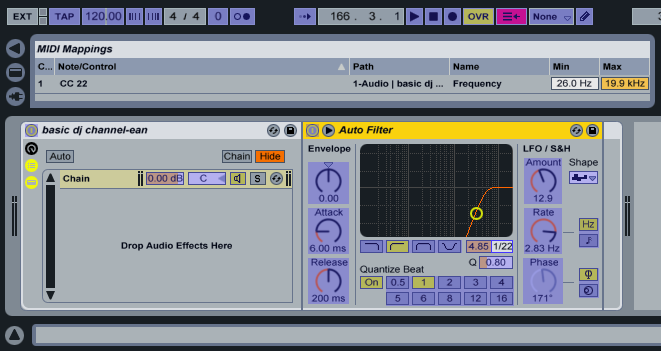
In Ableton you can easily assign several knobs to different functions and have them react in stages, kicking in different effects as you slowly increase the knob. A simple goal for example might be spicing up the basic low cut filter. Cutting out the bass and sweeping up a filter until there is no more sound is a tried and true digital dj trick but you can seriously improve it by adding several other effects to the top of the sweep!
superknob_filter.png

First you need to assign your knob to the frequency function of a hi pass filter in Ableton. All the settings are stock to begin with. You can use the “Cut O move H” preset of the auto filter for this example but lower the resonance.
superknob_filter_echjo.png

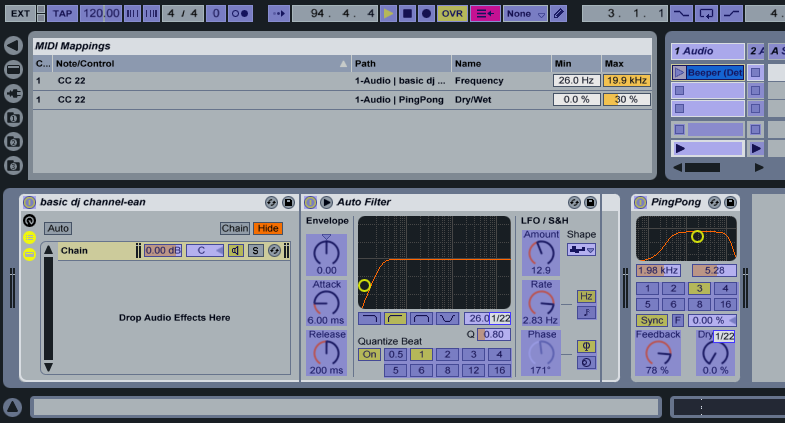
Next lets add a basic ping pong delay to our effect chain. Here I am going to assign the same knob to the dry/wet mix. Just leaving that assignment as-is will double up the effects, so I have a filter and echo working at the same time all the way through the sweep. Thats not what I want. The delay should only kick in at the top of the sweep when all those bright high frequencies are twinkling so the low end does not get messy. To do this, all you have to do is lower the max setting. For this example 30% is a good place to start. Bingo, now you have a delay that kicks in at the top but you may notice the volume drops a lot and the track looses a little energy. No, problem- just add one more effect!
super-knob_filter_echo_comp.png

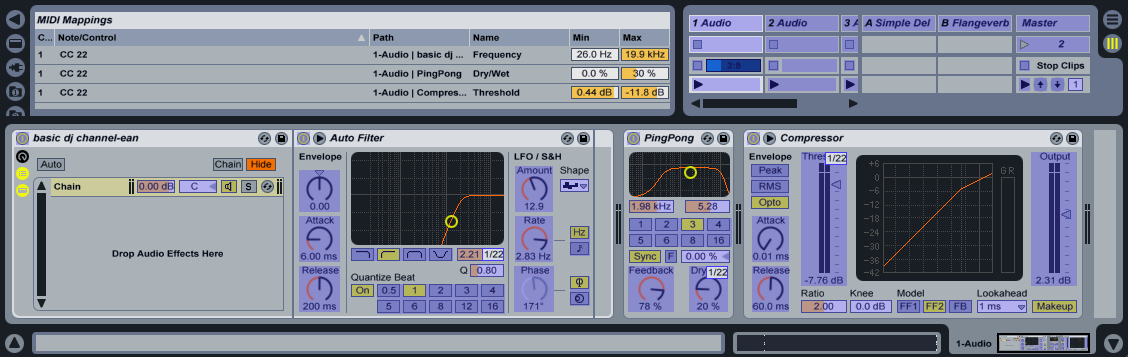
Now I will add a basic compressor to raise the volume when the bass is lost. Assign the same knob to the threshold and see how it works. Right off the bat, its all wrong. The compressor starts all the way on and then is compressing less as the effect increases. We need to reverse that action. Again using the min/max functions I am going to flip the values so the min is higher than the maximum. Match the values in the photo to the left to get a good starting place and then adjust them to your liking.

There you go, now you have a very expressive low cut filter that wont get old after a few uses. If you don’t use Albeton for djing check out this post which will show you how to use the effects in Ableton while djing through another program. Next I will explore some uses of super knobs in other dj software like Traktor and Deck A Dance.
Tags: ControllerismDj TutorialsSuper KnobTipsVideo Tutorials
Share2Tweet1Share
Previous Post

The Forum is UP!

Next Post

Help Design our Logo and Win 3 Prizes!

Related Posts

Use your Midi Fighter Twister as an Audio-Reactive Visualizer
Ableton Live Tips

Use your Midi Fighter Twister as an Audio-Reactive Visualizer

June 23, 2025
Meet the Koala sampler app: a mobile production powerhouse, now with stems
DJ Gear

Meet the Koala sampler app: a mobile production powerhouse, now with stems

February 7, 2023
Tips for DJing in Extreme Cold: DJTT readers share their advice
DJ Techniques / Tips

Tips for DJing in Extreme Cold: DJTT readers share their advice

January 30, 2023
Load More
Next Post
Help Design our Logo and Win 3 Prizes!

Help Design our Logo and Win 3 Prizes!

Want to reach DJTT's audience here?

Shoot an email to advertising@djtechtools.com

DJTT ads
DJTT newsletter
Midi Fighter
Chat with us
  • ABOUT DJTT
  • CONTACT
  • PRIVACY
  • MIDI FIGHTER HELP
  • ABOUT DJTT
  • JOBS
  • CONTACT US
  • ADVERTISE
  • PRIVACY POLICY
  • ACCESSIBILITY STATEMENT

© 2024 DJ Techtools all rights reserved by DJ TechTools on all content unless otherwise noted.

No Result
View All Result
  • Blog
    • DJ Gear
      • DIY Projects
      • Gear Reviews
      • New Products
      • Controllerism
    • Techniques + Tips
      • Beginner DJ
      • Advanced DJ
      • Producer
      • Finger Drummer
    • News + Culture
      • Editorials + Opinions
      • Artist Interviews
      • Performances + Routines
      • How I Play
    • DJ Software Tutorials
      • Serato Tips
      • CDJ Tips
      • Ableton Live Tips
  • Store
    • Run by real DJs, not a corporation
    • DJ Controllers
      • Midi Fighter Twister
      • Midi Fighter Spectra
      • Midi Fighter 64
      • View All
    • Accessories
      • Chroma USB Drive for DJs
      • Chroma Caps
      • Chroma Cables Audio
      • Chroma Cables USB-A
      • Chroma Cables: USB-C
      • DJTT Gift Card
      • Midi Fighter T-Shirt
      • Keyboard Covers
      • Earplugs by V-Moda
    • Production Gear
    • Soundcards & Mixers
  • Community
    • Popular Forums
      • General Discussion
      • Buy & Sell
      • Reviews
      • Mixes
      • Music Production
      • Show Your Setup
      • Off Topic
    • Handy Links
      • New Posts
      • Private Messages
      • Register
      • Search
    • Midi Maps
      • Traktor
      • Ableton
      • Serato DJ
      • Midi Fighter 3D
      • Midi Fighter Twister
      • Midi Fighter Spectra
  • Midi Fighter
  • Chroma

© 2024 DJ Techtools all rights reserved by DJ TechTools on all content unless otherwise noted.

This website uses cookies. By continuing to use this website you are giving consent to cookies being used. Visit our Privacy and Cookie Policy.