
DJ TechTools
  • Blog
    • DJ Gear
      • DIY Projects
      • Gear Reviews
      • New Products
      • Controllerism
    • Techniques + Tips
      • Beginner DJ
      • Advanced DJ
      • Producer
      • Finger Drummer
    • News + Culture
      • Editorials + Opinions
      • Artist Interviews
      • Performances + Routines
      • How I Play
    • DJ Software Tutorials
      • Serato Tips
        • Traktor Tips
      • CDJ Tips
      • Ableton Live Tips
  • Store
    • Run by real DJs, not a corporation
    • DJ Controllers
      • Midi Fighter Twister
      • Midi Fighter Spectra
      • Midi Fighter 64
      • View All
    • Accessories
      • Chroma USB Drive for DJs
      • Chroma Caps
      • Chroma Cables Audio
      • Chroma Cables USB-A
      • Chroma Cables: USB-C
      • DJTT Gift Card
      • Midi Fighter T-Shirt
      • Keyboard Covers
      • Earplugs by V-Moda
    • Production Gear
    • Soundcards & Mixers
  • Community
    • Popular Forums
      • General Discussion
      • Buy & Sell
      • Reviews
      • Mixes
      • Music Production
      • Show Your Setup
      • Off Topic
    • Handy Links
      • New Posts
      • Private Messages
      • Register
      • Search
    • Midi Maps
      • Traktor
      • Ableton
      • Serato DJ
      • Midi Fighter 3D
      • Midi Fighter Twister
      • Midi Fighter Spectra
  • Midi Fighter
  • Chroma
No Result
View All Result
DJ TechTools
  • Blog
    • DJ Gear
      • DIY Projects
      • Gear Reviews
      • New Products
      • Controllerism
    • Techniques + Tips
      • Beginner DJ
      • Advanced DJ
      • Producer
      • Finger Drummer
    • News + Culture
      • Editorials + Opinions
      • Artist Interviews
      • Performances + Routines
      • How I Play
    • DJ Software Tutorials
      • Serato Tips
        • Traktor Tips
      • CDJ Tips
      • Ableton Live Tips
  • Store
    • Run by real DJs, not a corporation
    • DJ Controllers
      • Midi Fighter Twister
      • Midi Fighter Spectra
      • Midi Fighter 64
      • View All
    • Accessories
      • Chroma USB Drive for DJs
      • Chroma Caps
      • Chroma Cables Audio
      • Chroma Cables USB-A
      • Chroma Cables: USB-C
      • DJTT Gift Card
      • Midi Fighter T-Shirt
      • Keyboard Covers
      • Earplugs by V-Moda
    • Production Gear
    • Soundcards & Mixers
  • Community
    • Popular Forums
      • General Discussion
      • Buy & Sell
      • Reviews
      • Mixes
      • Music Production
      • Show Your Setup
      • Off Topic
    • Handy Links
      • New Posts
      • Private Messages
      • Register
      • Search
    • Midi Maps
      • Traktor
      • Ableton
      • Serato DJ
      • Midi Fighter 3D
      • Midi Fighter Twister
      • Midi Fighter Spectra
  • Midi Fighter
  • Chroma
No Result
View All Result
DJ TechTools

Create Your Own Black VCI-100

Ean Golden by Ean Golden
April 14, 2008
in DIY Project Tutorials, VCI-100 SE / Arcade
Reading Time: 3 mins read
0
Create Your Own Black VCI-100
321
VIEWS
Post on FacebookTweet thisUpvote on Reddit

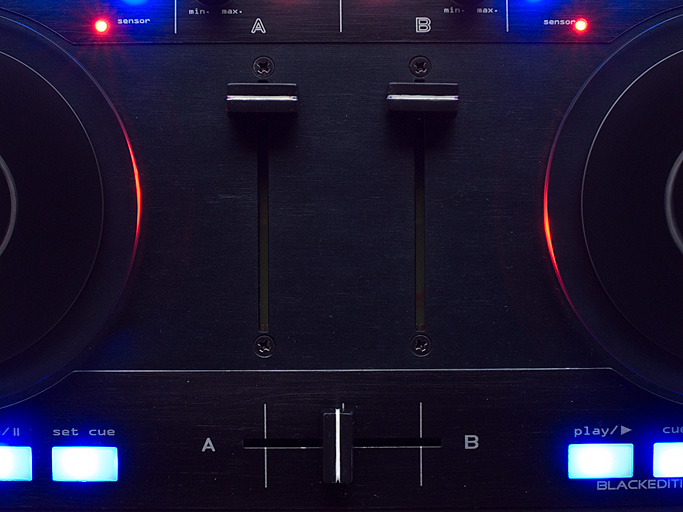
Those of you that missed out on the VCI-100SE should not feel left out, just make your own! psychoguru, a member of our brand new forum posted these stunning photos of a black VCI-100 that he basically created himself. Well technically he converted a silver VCI-100 into the black version by getting creative and leveraging his local suppliers. The process was a simple one that can be broken into 3 stages depending on how deep you want to get.

Step one: Change Color
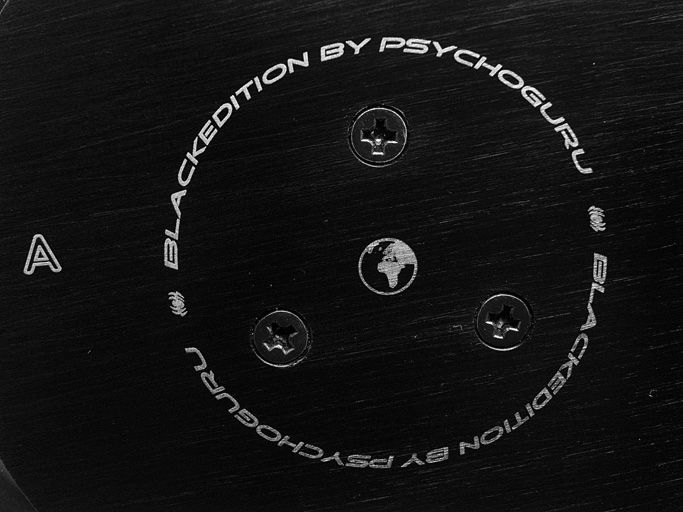
First you need to have the case sandblasted, brushed and then anodized by a local shop
Cost: 32euros

Then the plates need to be sanded, phosphatised and blackened
Cost: 35euros


afterwards he had the plates superscribed with a yag laser
Cost: 50euros

Total time for job: approx 1 week and about 2 hours to dismantle the VCI-100

Step two: Change The LED’s
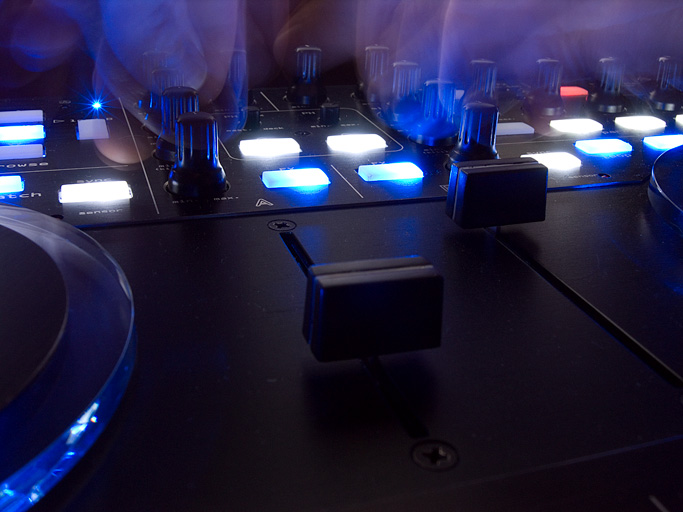
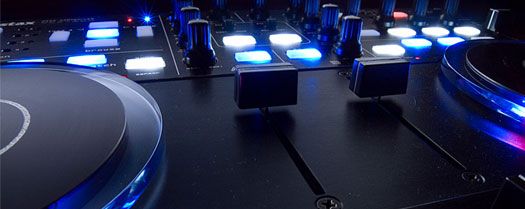
This is the more time intensive part of the project and from what I could gather it took psycho guru at least 5-8 hours to do. the upside is that you can use any combination of LED colors you want to offer a true personal customization of your vci-100.
Cost: 30€ for the LED`s

Total time for job approx 5-8 hour

Step three: Emulate the firmware
This is an optional step if you want to basically duplicate the VCI-100SE’s internal hardware functions. Its also the easiest part as we are working on a tool that will allow both Mac and PC users the ability to emulate all the firmware changes without actually updating the unit! Stay tuned as that will be available in the coming months. In the mean time, you can learn how to use Bome’s midi translator or Midi pipe and start midi-mod-ing!

Plan B:

The above method is the most expensive and certainly the most professional way of getting a clean black look without buying a new VCI-100. You can also do it the Ghetto way (aka Ean Golden’s method) and buy spray on car paint. With a bit of sanding and a good paint product you can get the black look for $20 and about 2 hours in time. I know my personal VCi-100 looks like it went through world war 2 but thats because I didn’t sand it first! Later on this month we will have the optional black upgrade plates with the VCI-100SE labeling available for purchase. Paired with the firmware emulation software you will be there- sans white LEDS for about $80.


Tags: Black VCI-100DIY Projectsmidi translatorTips
Share2Tweet2Share
Previous Post

Logo Contest Round 1

Next Post

Logo Contest

Related Posts

Meet the Koala sampler app: a mobile production powerhouse, now with stems
DJ Gear

Meet the Koala sampler app: a mobile production powerhouse, now with stems

February 7, 2023
Tips for DJing in Extreme Cold: DJTT readers share their advice
DJ Techniques / Tips

Tips for DJing in Extreme Cold: DJTT readers share their advice

January 30, 2023
Standalone DDJ-400
DIY + Hacks

Building a standalone DDJ-400 with a Raspberry Pi and Mixxx

November 5, 2020
Load More
Next Post
Logo Contest

Logo Contest

Want to reach DJTT's audience here?

Shoot an email to advertising@djtechtools.com

DJTT ads
DJTT newsletter
Midi Fighter
Chat with us
  • ABOUT DJTT
  • CONTACT
  • PRIVACY
  • MIDI FIGHTER HELP
  • ABOUT DJTT
  • JOBS
  • CONTACT US
  • ADVERTISE
  • PRIVACY POLICY
  • ACCESSIBILITY STATEMENT

© 2024 DJ Techtools all rights reserved by DJ TechTools on all content unless otherwise noted.

No Result
View All Result
  • Blog
    • DJ Gear
      • DIY Projects
      • Gear Reviews
      • New Products
      • Controllerism
    • Techniques + Tips
      • Beginner DJ
      • Advanced DJ
      • Producer
      • Finger Drummer
    • News + Culture
      • Editorials + Opinions
      • Artist Interviews
      • Performances + Routines
      • How I Play
    • DJ Software Tutorials
      • Serato Tips
      • CDJ Tips
      • Ableton Live Tips
  • Store
    • Run by real DJs, not a corporation
    • DJ Controllers
      • Midi Fighter Twister
      • Midi Fighter Spectra
      • Midi Fighter 64
      • View All
    • Accessories
      • Chroma USB Drive for DJs
      • Chroma Caps
      • Chroma Cables Audio
      • Chroma Cables USB-A
      • Chroma Cables: USB-C
      • DJTT Gift Card
      • Midi Fighter T-Shirt
      • Keyboard Covers
      • Earplugs by V-Moda
    • Production Gear
    • Soundcards & Mixers
  • Community
    • Popular Forums
      • General Discussion
      • Buy & Sell
      • Reviews
      • Mixes
      • Music Production
      • Show Your Setup
      • Off Topic
    • Handy Links
      • New Posts
      • Private Messages
      • Register
      • Search
    • Midi Maps
      • Traktor
      • Ableton
      • Serato DJ
      • Midi Fighter 3D
      • Midi Fighter Twister
      • Midi Fighter Spectra
  • Midi Fighter
  • Chroma

© 2024 DJ Techtools all rights reserved by DJ TechTools on all content unless otherwise noted.

This website uses cookies. By continuing to use this website you are giving consent to cookies being used. Visit our Privacy and Cookie Policy.