DJ TechTools
  • Blog
    • DJ Gear
      • DIY Projects
      • Gear Reviews
      • New Products
      • Controllerism
    • Techniques + Tips
      • Beginner DJ
      • Advanced DJ
      • Producer
      • Finger Drummer
    • News + Culture
      • Editorials + Opinions
      • Artist Interviews
      • Performances + Routines
      • How I Play
    • DJ Software Tutorials
      • Serato Tips
        • Traktor Tips
      • CDJ Tips
      • Ableton Live Tips
  • Store
    • Run by real DJs, not a corporation
    • DJ Controllers
      • Midi Fighter Twister
      • Midi Fighter Spectra
      • Midi Fighter 64
      • View All
    • Accessories
      • Chroma USB Drive for DJs
      • Chroma Caps
      • Chroma Cables Audio
      • Chroma Cables USB-A
      • Chroma Cables: USB-C
      • DJTT Gift Card
      • Midi Fighter T-Shirt
      • Keyboard Covers
      • Earplugs by V-Moda
    • Production Gear
    • Soundcards & Mixers
  • Community
    • Popular Forums
      • General Discussion
      • Buy & Sell
      • Reviews
      • Mixes
      • Music Production
      • Show Your Setup
      • Off Topic
    • Handy Links
      • New Posts
      • Private Messages
      • Register
      • Search
    • Midi Maps
      • Traktor
      • Ableton
      • Serato DJ
      • Midi Fighter 3D
      • Midi Fighter Twister
      • Midi Fighter Spectra
  • Midi Fighter
  • Chroma
No Result
View All Result
DJ TechTools
  • Blog
    • DJ Gear
      • DIY Projects
      • Gear Reviews
      • New Products
      • Controllerism
    • Techniques + Tips
      • Beginner DJ
      • Advanced DJ
      • Producer
      • Finger Drummer
    • News + Culture
      • Editorials + Opinions
      • Artist Interviews
      • Performances + Routines
      • How I Play
    • DJ Software Tutorials
      • Serato Tips
        • Traktor Tips
      • CDJ Tips
      • Ableton Live Tips
  • Store
    • Run by real DJs, not a corporation
    • DJ Controllers
      • Midi Fighter Twister
      • Midi Fighter Spectra
      • Midi Fighter 64
      • View All
    • Accessories
      • Chroma USB Drive for DJs
      • Chroma Caps
      • Chroma Cables Audio
      • Chroma Cables USB-A
      • Chroma Cables: USB-C
      • DJTT Gift Card
      • Midi Fighter T-Shirt
      • Keyboard Covers
      • Earplugs by V-Moda
    • Production Gear
    • Soundcards & Mixers
  • Community
    • Popular Forums
      • General Discussion
      • Buy & Sell
      • Reviews
      • Mixes
      • Music Production
      • Show Your Setup
      • Off Topic
    • Handy Links
      • New Posts
      • Private Messages
      • Register
      • Search
    • Midi Maps
      • Traktor
      • Ableton
      • Serato DJ
      • Midi Fighter 3D
      • Midi Fighter Twister
      • Midi Fighter Spectra
  • Midi Fighter
  • Chroma
No Result
View All Result
DJ TechTools

Native Instruments Audio 8 Review

Ean Golden by Ean Golden
April 29, 2008
in DJ Equipment / Accessories, Traktor Tips
Reading Time: 3 mins read
0
Native Instruments Audio 8 Review
72
SHARES
3.6k
VIEWS
Post on FacebookTweet thisUpvote on Reddit

Native Instruments has a impressive record in the software department but their hardware products have less of a history. So when the audio 8 was released many months ago, I was speculative, and held off giving it a try due to the fact that I had already identified several good sound card options. One thing that remains elusive though, is a reasonably priced, high quality sound card that supports direct phonograph inputs. With more and more people using Ms. Pinky, Deck a Dance and tools for Ableton Live time code control, Phono inputs are a good thing to have around.

The scoop

The card, as did most others in our $200 round up, works well with a good computer at lower latencies. It proved also to be reliable in live use without causing any problems or breaking up. The going rate is around $399 with some retailers including an upgrade to Traktor 3.0 for free. Overall the latency, size, and build quality is comparable to the Presonus Firebox which is priced around $299 these days. So what exactly does that extra $100 buy you?
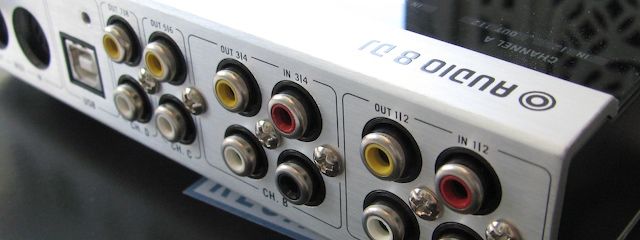
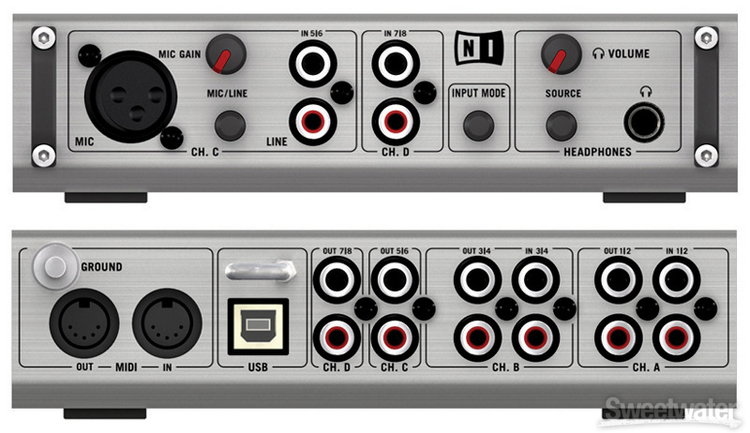
} Multiple phono inputs on the back so you don’t have to buy phono-line level converters which can run about $50 each. Keep in mind though you could always get time code control from CD players and run those signals into just about any sound card out there.

} Very Hand Female RCA jacks. As I have mentioned in the past its way easier to hi-jack the RCA’s from a clubs CD players than to run your own lines into a mixer. Just hope and pray your system does not crash if CD’s are your only back up. That could end up being an awkward silence filled by the sound of cable scrambling and boos.

] Signal Indicators on the top of the Audio 8 can quickly tell you if audio is coming out of the box to help problem solve if you don’t hear anything through the speakers.

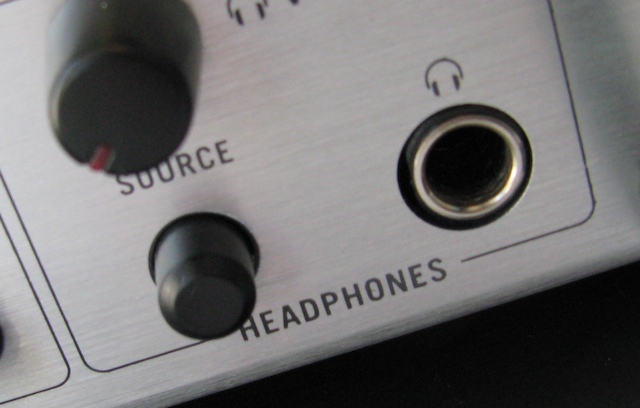
} Headphone Jack that includes a level pot and source button that can quickly switch between one of the inputs and a pre-set output.

} one of a kind multi-core cables that make re-connecting your set up a breeze. Be warned that this is a bulky set of cables, and not something I would pack in my gig bag. They are however great for plugging in your home setup so that when you take your sound card out you can easily plug it back in with a minimum of effort. Instead of finding the right place for 6 sets of phono/line cables, you just plug in 2 sets of clearly marked and color coded cables into the sound card.

} 4 inputs and 4 outputs so you can connect 2 turntables and 2 cd players to 4 decks in Traktor and route all 4 outputs to a hardware mixer.
You should know

} None of the inputs route directly to the outputs so if you want to run a drum machine or back up CD player into a PA through the sound card that would not be possible. You can however route any of the inputs through Traktor for processing and then out but that would introduce some degree of latency.

}its a bit heavy for the size but then again your not packing for a 60 mile hike so a few extra pounds should not make or break anything.

}it works well with Deck A Dance and I had no problems controlling both decks with a variety of time code vinyls.

Conclusion

All in all I cant really say anything bad about the Audio 8, its well built and easy to use. There are very few sound cards that have been built specifically for a dj out there and this one certainly fits our needs well.It also allows you to incorporate vinyl control into Traktor 3 after they discontinued support of the final scratch interface. I have been trying to slowly work in some record control into my sets after all these years and its been nice to have that option with the audio 8. 2 giant platters of pitch control is great but centralizing all your transport controls in one compact place still works a lot better for everything else.

Tags: Audio 8Dj EquipmentNative InstrumentsReviewSound Cards
Share29Tweet18Share
Previous Post

FX Fundamentals- Filters

Next Post

Who actually did invent DVS?

Related Posts

A Prime 4+ and a Kontrol S3 intercut against eachother over a black background
Breaking News

InMusic just bought Native Instruments. So what now for Traktor?

May 8, 2026
Traktor MX2: Native Instruments’ New 2-Channel Controller
DJ Gear Announcements

Traktor MX2: Native Instruments’ New 2-Channel Controller

October 8, 2025
CDJ-3000x player by AlphaTheta
Breaking News

The CDJ-3000X is here: an iterative upgrade of the media player for $3,000 / £2,399

September 9, 2025
Load More
Next Post
Who actually did invent DVS?

Who actually did invent DVS?

Want to reach DJTT's audience here?

Shoot an email to advertising@djtechtools.com

DJTT ads
DJTT newsletter
Midi Fighter
Chat with us
  • ABOUT DJTT
  • CONTACT
  • PRIVACY
  • MIDI FIGHTER HELP
  • ABOUT DJTT
  • JOBS
  • CONTACT US
  • ADVERTISE
  • PRIVACY POLICY
  • ACCESSIBILITY STATEMENT

© 2024 DJ Techtools all rights reserved by DJ TechTools on all content unless otherwise noted.

No Result
View All Result
  • Blog
    • DJ Gear
      • DIY Projects
      • Gear Reviews
      • New Products
      • Controllerism
    • Techniques + Tips
      • Beginner DJ
      • Advanced DJ
      • Producer
      • Finger Drummer
    • News + Culture
      • Editorials + Opinions
      • Artist Interviews
      • Performances + Routines
      • How I Play
    • DJ Software Tutorials
      • Serato Tips
      • CDJ Tips
      • Ableton Live Tips
  • Store
    • Run by real DJs, not a corporation
    • DJ Controllers
      • Midi Fighter Twister
      • Midi Fighter Spectra
      • Midi Fighter 64
      • View All
    • Accessories
      • Chroma USB Drive for DJs
      • Chroma Caps
      • Chroma Cables Audio
      • Chroma Cables USB-A
      • Chroma Cables: USB-C
      • DJTT Gift Card
      • Midi Fighter T-Shirt
      • Keyboard Covers
      • Earplugs by V-Moda
    • Production Gear
    • Soundcards & Mixers
  • Community
    • Popular Forums
      • General Discussion
      • Buy & Sell
      • Reviews
      • Mixes
      • Music Production
      • Show Your Setup
      • Off Topic
    • Handy Links
      • New Posts
      • Private Messages
      • Register
      • Search
    • Midi Maps
      • Traktor
      • Ableton
      • Serato DJ
      • Midi Fighter 3D
      • Midi Fighter Twister
      • Midi Fighter Spectra
  • Midi Fighter
  • Chroma

© 2024 DJ Techtools all rights reserved by DJ TechTools on all content unless otherwise noted.

This website uses cookies. By continuing to use this website you are giving consent to cookies being used. Visit our Privacy and Cookie Policy.