DJ TechTools
  • Blog
    • DJ Gear
      • DIY Projects
      • Gear Reviews
      • New Products
      • Controllerism
    • Techniques + Tips
      • Beginner DJ
      • Advanced DJ
      • Producer
      • Finger Drummer
    • News + Culture
      • Editorials + Opinions
      • Artist Interviews
      • Performances + Routines
      • How I Play
    • DJ Software Tutorials
      • Serato Tips
        • Traktor Tips
      • CDJ Tips
      • Ableton Live Tips
  • Store
    • Run by real DJs, not a corporation
    • DJ Controllers
      • Midi Fighter Twister
      • Midi Fighter Spectra
      • Midi Fighter 64
      • View All
    • Accessories
      • Chroma USB Drive for DJs
      • Chroma Caps
      • Chroma Cables Audio
      • Chroma Cables USB-A
      • Chroma Cables: USB-C
      • DJTT Gift Card
      • Midi Fighter T-Shirt
      • Keyboard Covers
      • Earplugs by V-Moda
    • Production Gear
    • Soundcards & Mixers
  • Community
    • Popular Forums
      • General Discussion
      • Buy & Sell
      • Reviews
      • Mixes
      • Music Production
      • Show Your Setup
      • Off Topic
    • Handy Links
      • New Posts
      • Private Messages
      • Register
      • Search
    • Midi Maps
      • Traktor
      • Ableton
      • Serato DJ
      • Midi Fighter 3D
      • Midi Fighter Twister
      • Midi Fighter Spectra
  • Midi Fighter
  • Chroma
No Result
View All Result
DJ TechTools
  • Blog
    • DJ Gear
      • DIY Projects
      • Gear Reviews
      • New Products
      • Controllerism
    • Techniques + Tips
      • Beginner DJ
      • Advanced DJ
      • Producer
      • Finger Drummer
    • News + Culture
      • Editorials + Opinions
      • Artist Interviews
      • Performances + Routines
      • How I Play
    • DJ Software Tutorials
      • Serato Tips
        • Traktor Tips
      • CDJ Tips
      • Ableton Live Tips
  • Store
    • Run by real DJs, not a corporation
    • DJ Controllers
      • Midi Fighter Twister
      • Midi Fighter Spectra
      • Midi Fighter 64
      • View All
    • Accessories
      • Chroma USB Drive for DJs
      • Chroma Caps
      • Chroma Cables Audio
      • Chroma Cables USB-A
      • Chroma Cables: USB-C
      • DJTT Gift Card
      • Midi Fighter T-Shirt
      • Keyboard Covers
      • Earplugs by V-Moda
    • Production Gear
    • Soundcards & Mixers
  • Community
    • Popular Forums
      • General Discussion
      • Buy & Sell
      • Reviews
      • Mixes
      • Music Production
      • Show Your Setup
      • Off Topic
    • Handy Links
      • New Posts
      • Private Messages
      • Register
      • Search
    • Midi Maps
      • Traktor
      • Ableton
      • Serato DJ
      • Midi Fighter 3D
      • Midi Fighter Twister
      • Midi Fighter Spectra
  • Midi Fighter
  • Chroma
No Result
View All Result
DJ TechTools

Some freewares I can’t live without (Mac)

nico by nico
June 4, 2008
in Basic DJ Tips, DJ Software
Reading Time: 3 mins read
0
Some freewares I can’t live without (Mac)
17
VIEWS
Post on FacebookTweet thisUpvote on Reddit

You need a lot of little tools to setup, play, organize your various musical activities. Here are some of my favorites, they are all great pieces of software that do the job well, and in an elegant way. Best of all, they are free!

Max

There is a variety of way to get music nowadays, but you probably still have the need to rip songs from CD. A good ripper is essential, and not all are created equal. You sure can rip your CDs with iTunes, but if you want to have the best ripper there is around for Mac, and hence the best sound quality, you should use Max or any other software that implements cdparanoia. Simply enable ‘cdparanoia’ as the ripper in the ‘Ripper’ tab of Max prefs.

You may think that this is too much of an hassle, if so, go read this. As a DJ, I’m assuming that you want to get the best sound you can, and this is how.

XLD

I’m trying to get all my music in Apple Lossless format. This has several advantages, notably allowing a seamless interaction with Mixed in Key and Platinum Notes (from the good folks at mixedinkey.com).

XLD is a simple but powerful and efficient converter. It takes any file you drop in it and convert it to the desired file format. It is also multithreaded, so you can easily have four or five conversions going on at the same time, which speeds things up a lot. Just select which output format you want in the prefs, and drop those files in the XLD icon in the dock.

Even the music I got in MP3 ends up in Apple Lossless, since I’m running it through Platinum Notes. I recommend that if you somehow remaster your music you should stay lossless. If you got music in MP3 format and don’t touch it, then of course, there is no need for conversion.

The Finder

Ok, so you have ripped your music, tagged it, remastered it, and it is all ready to play. What do you do now? Drop it into your collection? Hell no.

There is absolutely nothing wrong with the Traktor browser, apart from the fact that it is trying to reinvent the wheel. You just can’t beat the Finder for viewing, ordering, accessing files. If you are running 10.5, you also have Cover Flow. You will never have a broken link.

Here is how I see it: The file is the record. You add album art to it (Google Images is your friend), you polish the filename, so it has all the relevant informations, like key and BPM and whatever you care to add. You move that record from crate to crate (folder). Just like in the good old days.

Use apple-Tab to switch between Finder And Traktor, you can then grab a record, press apple-tab again, and drop it in the Traktor deck.

EasyFind

You need a search tool if you want to use the Finder, and Spotlight just doesn’t cut it, it is slow, and returns way too much irrelevant results. EasyFind is an old school search app. It is incredibly fast, it doesn’t eat up CPU, it does real realtime search, meaning it doesn’t rely on an index, and it can use regular expressions.

Let’s say you want to search for ‘Samin’ and want only music files to show:
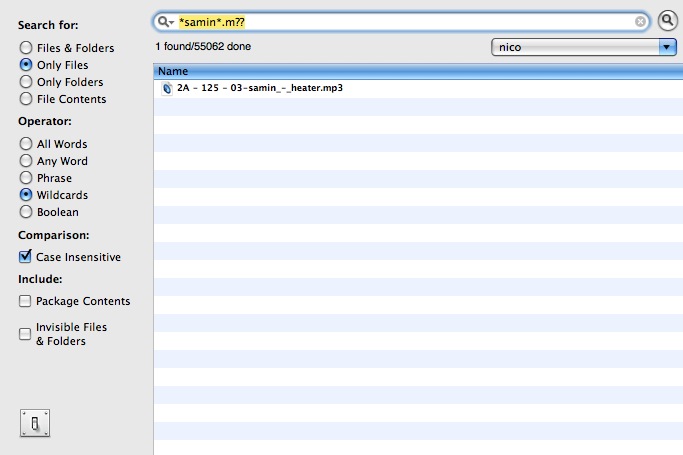
You use ‘Wildcards’ as the operator, ‘*’ means ‘anything, including nothing’, ‘?’ means ‘any single letter or number’. The ‘*samin*.m??’ then means: Look for any file that has a filename that has ‘samin’ somewhere in it, and that ends up by .m and two letters and numbers. Since both .mp3 and .m4a files fits in, you will find only those.

Of course, you don’t have to retype this everytime, just use the little magnifier pop up to get back your latest search and edit them.

Since you’ve tagged your files directly in the filename, it is then easy to look for say ‘4A’ or ‘Housez’ (yes, don’t use common words as tags, or if you must, just add a ‘z’ or a special character at the end of the word).

Tags: Dj softwareTips
ShareTweetShare
Previous Post

Touch me Baby one more Time

Next Post

Bomes Midi Pro for Mac Beta

Related Posts

A Prime 4+ and a Kontrol S3 intercut against eachother over a black background
Breaking News

InMusic just bought Native Instruments. So what now for Traktor?

May 8, 2026
Ableton launches Live 12 Suite rent-to-own plan – and it’s not a subscription
Ableton

Ableton launches Live 12 Suite rent-to-own plan – and it’s not a subscription

October 1, 2025
Rekordox Spotify
Breaking News

Spotify (finally) slides into Rekordbox, Serato, and Algoriddim djay (again) – for better or worse?

September 24, 2025
Load More
Next Post
Bomes Midi Pro for Mac Beta

Bomes Midi Pro for Mac Beta

Want to reach DJTT's audience here?

Shoot an email to advertising@djtechtools.com

DJTT ads
DJTT newsletter
Midi Fighter
Chat with us
  • ABOUT DJTT
  • CONTACT
  • PRIVACY
  • MIDI FIGHTER HELP
  • ABOUT DJTT
  • JOBS
  • CONTACT US
  • ADVERTISE
  • PRIVACY POLICY
  • ACCESSIBILITY STATEMENT

© 2024 DJ Techtools all rights reserved by DJ TechTools on all content unless otherwise noted.

No Result
View All Result
  • Blog
    • DJ Gear
      • DIY Projects
      • Gear Reviews
      • New Products
      • Controllerism
    • Techniques + Tips
      • Beginner DJ
      • Advanced DJ
      • Producer
      • Finger Drummer
    • News + Culture
      • Editorials + Opinions
      • Artist Interviews
      • Performances + Routines
      • How I Play
    • DJ Software Tutorials
      • Serato Tips
      • CDJ Tips
      • Ableton Live Tips
  • Store
    • Run by real DJs, not a corporation
    • DJ Controllers
      • Midi Fighter Twister
      • Midi Fighter Spectra
      • Midi Fighter 64
      • View All
    • Accessories
      • Chroma USB Drive for DJs
      • Chroma Caps
      • Chroma Cables Audio
      • Chroma Cables USB-A
      • Chroma Cables: USB-C
      • DJTT Gift Card
      • Midi Fighter T-Shirt
      • Keyboard Covers
      • Earplugs by V-Moda
    • Production Gear
    • Soundcards & Mixers
  • Community
    • Popular Forums
      • General Discussion
      • Buy & Sell
      • Reviews
      • Mixes
      • Music Production
      • Show Your Setup
      • Off Topic
    • Handy Links
      • New Posts
      • Private Messages
      • Register
      • Search
    • Midi Maps
      • Traktor
      • Ableton
      • Serato DJ
      • Midi Fighter 3D
      • Midi Fighter Twister
      • Midi Fighter Spectra
  • Midi Fighter
  • Chroma

© 2024 DJ Techtools all rights reserved by DJ TechTools on all content unless otherwise noted.

This website uses cookies. By continuing to use this website you are giving consent to cookies being used. Visit our Privacy and Cookie Policy.