DJ TechTools
  • Blog
    • DJ Gear
      • DIY Projects
      • Gear Reviews
      • New Products
      • Controllerism
    • Techniques + Tips
      • Beginner DJ
      • Advanced DJ
      • Producer
      • Finger Drummer
    • News + Culture
      • Editorials + Opinions
      • Artist Interviews
      • Performances + Routines
      • How I Play
    • DJ Software Tutorials
      • Serato Tips
        • Traktor Tips
      • CDJ Tips
      • Ableton Live Tips
  • Store
    • Run by real DJs, not a corporation
    • DJ Controllers
      • Midi Fighter Twister
      • Midi Fighter Spectra
      • Midi Fighter 64
      • View All
    • Accessories
      • Chroma USB Drive for DJs
      • Chroma Caps
      • Chroma Cables Audio
      • Chroma Cables USB-A
      • Chroma Cables: USB-C
      • DJTT Gift Card
      • Midi Fighter T-Shirt
      • Keyboard Covers
      • Earplugs by V-Moda
    • Production Gear
    • Soundcards & Mixers
  • Community
    • Popular Forums
      • General Discussion
      • Buy & Sell
      • Reviews
      • Mixes
      • Music Production
      • Show Your Setup
      • Off Topic
    • Handy Links
      • New Posts
      • Private Messages
      • Register
      • Search
    • Midi Maps
      • Traktor
      • Ableton
      • Serato DJ
      • Midi Fighter 3D
      • Midi Fighter Twister
      • Midi Fighter Spectra
  • Midi Fighter
  • Chroma
No Result
View All Result
DJ TechTools
  • Blog
    • DJ Gear
      • DIY Projects
      • Gear Reviews
      • New Products
      • Controllerism
    • Techniques + Tips
      • Beginner DJ
      • Advanced DJ
      • Producer
      • Finger Drummer
    • News + Culture
      • Editorials + Opinions
      • Artist Interviews
      • Performances + Routines
      • How I Play
    • DJ Software Tutorials
      • Serato Tips
        • Traktor Tips
      • CDJ Tips
      • Ableton Live Tips
  • Store
    • Run by real DJs, not a corporation
    • DJ Controllers
      • Midi Fighter Twister
      • Midi Fighter Spectra
      • Midi Fighter 64
      • View All
    • Accessories
      • Chroma USB Drive for DJs
      • Chroma Caps
      • Chroma Cables Audio
      • Chroma Cables USB-A
      • Chroma Cables: USB-C
      • DJTT Gift Card
      • Midi Fighter T-Shirt
      • Keyboard Covers
      • Earplugs by V-Moda
    • Production Gear
    • Soundcards & Mixers
  • Community
    • Popular Forums
      • General Discussion
      • Buy & Sell
      • Reviews
      • Mixes
      • Music Production
      • Show Your Setup
      • Off Topic
    • Handy Links
      • New Posts
      • Private Messages
      • Register
      • Search
    • Midi Maps
      • Traktor
      • Ableton
      • Serato DJ
      • Midi Fighter 3D
      • Midi Fighter Twister
      • Midi Fighter Spectra
  • Midi Fighter
  • Chroma
No Result
View All Result
DJ TechTools

DIY TouchScreens

BentoSan by BentoSan
June 27, 2008
in Advanced DJ Tips, Controllerism, DIY Project Tutorials
Reading Time: 4 mins read
0
DIY TouchScreens
55
VIEWS
Post on FacebookTweet thisUpvote on Reddit

There are a lot of very pricey touch screens on the market that are out of reach of most musicians, the Lemur for example will set you back around $3000- enough cash to buy several of the best dj controllers on the market. Fortunately, it is very possible to turn your existing screen into a multi touch monitor for under $50. In this article we will be looking at the different DIY methods that turn common, in-expensive equipment into touch screen interfaces.

The Wii Controller:

First lets talk about the increasingly popular method and cheapest method of turning your display into a touchscreen. This method was invented by Johnny Chung who shows off and talks about how he accomplished this in this video:

[youtube]http://www.youtube.com/watch?v=5s5EvhHy7eQ[/youtube]

This setup has a few problems with it for DJ uses, first of all it requires the Wii remote to be sitting be sitting a fair way back from your screen and Dj booths are not exactly known for their excess areas of space. This also requires the use of a IR emitting pen as was shown in the you tube video, which would not be incredibly fun to constantly pick up and put down ever time you want to use your controller over the screen because of your controllers superior haptic feedback. However it does open up the option of doing live performances that utilize the touchscreen, your audience could watch you perform on your setup if you accompany this with a projector display.

The Duct Tape approach
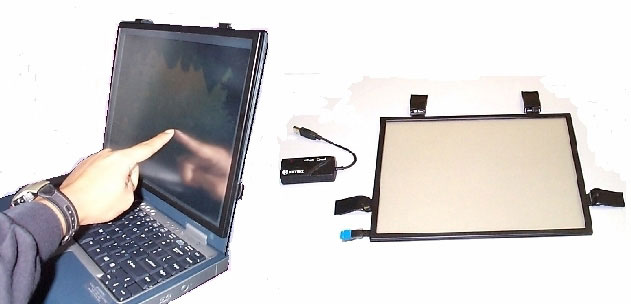
Another solution to turning your screen into a touch screen may require some brute force, duct tape and a bit more cash but just may be worth the investment. A few companies are creating screen that you can attach directly to your monitor like this one. While being more expensive than the Wii remote and not offering multi touch sensitivity this solution is far more practical for most people. This is because you can use your finger instead of an IR emitting stylus, so no picking up and putting down a pen every time you wish to go from your mixing device to your screen and recalibrating every time the Wii remote gets the tiniest bump.

This company reports the device has a maximum of 10ms latency, so it is hard to say how useful these devices could be for real time interaction with your music. However there are many things that music artists do that do not require real-time interactivity. For example, loading an mp3 up in Traktor does not have to be done in perfect real-time and nor does triggering a clip to play in Ableton, as Ableton will cue the clip to play in in time with the music.

For the Serious DIY-er.

If you are interested in a serious DIY project you might want to take a look at FTIR (frustrated total internal reflection) multi-touch technology. If you shine multiple IR LED’s into an clear acrylic sheet at the correct angle the IR light will be trapped inside of the acrylic sheet bouncing around until such a point where you touch the panel. The act of touching the panel will let the IR light escape as the light will shine onto your finger and be scattered as shown in this diagram below:

FTIR explanation © Jeff Han

Image © FTIR explanation – Jeff Han

This shows up in the camera is a white blob which can easily be tracked by software much like how the Wii remote tracks a UV emitting pen. By lining one side of the Acrylic sheet with tracing paper and using a projector to shine onto the the paper from the rear you will end up with something like out of this video:

[youtube]http://www.youtube.com/watch?v=GfdGF9yvkTM[/youtube]

For more in depth information on DIY FTIR screens check out these links:

Build Instructions PDF

TFIR Touchscreen Hardware FAQ

FTIR explanation – Jeff Han

FTIR explanation Part 2 – Jeff Han

What about Haptic Feedback?

There has been a lot of debate here at DJTT and across the Internet about the lack of haptic feedback that a touchscreen offers. Johnn Chung Lee who is best known for being the brains behind using a Wii remote to create a multi touch panel surface created this video demonstrating his “Haptic Pen”.

[youtube]http://au.youtube.com/watch?v=Sk-ExWeA03Y[/youtube]

Another implementation of Haptic feedback in a touchscreen has been achieved by Nokia which claims typing on the touchscreen feels like a real keyboard, with a physical movement in the screen followed by an audible click. You can read more about nokia’s achievement here


Tags: Tips
ShareTweetShare
Previous Post

VCI-300 Fix

Next Post

VCI-300 in Action- Tempo Trick

Related Posts

Meet the Koala sampler app: a mobile production powerhouse, now with stems
DJ Gear

Meet the Koala sampler app: a mobile production powerhouse, now with stems

February 7, 2023
Tips for DJing in Extreme Cold: DJTT readers share their advice
DJ Techniques / Tips

Tips for DJing in Extreme Cold: DJTT readers share their advice

January 30, 2023
One Thing Ableton Production Tips
Production Tips

One Thing: Super Quick Ableton Tips From Professional Producers

March 10, 2017
Load More
Next Post
VCI-300 in Action- Tempo Trick

VCI-300 in Action- Tempo Trick

Want to reach DJTT's audience here?

Shoot an email to advertising@djtechtools.com

DJTT ads
DJTT newsletter
Midi Fighter
Chat with us
  • ABOUT DJTT
  • CONTACT
  • PRIVACY
  • MIDI FIGHTER HELP
  • ABOUT DJTT
  • JOBS
  • CONTACT US
  • ADVERTISE
  • PRIVACY POLICY
  • ACCESSIBILITY STATEMENT

© 2024 DJ Techtools all rights reserved by DJ TechTools on all content unless otherwise noted.

No Result
View All Result
  • Blog
    • DJ Gear
      • DIY Projects
      • Gear Reviews
      • New Products
      • Controllerism
    • Techniques + Tips
      • Beginner DJ
      • Advanced DJ
      • Producer
      • Finger Drummer
    • News + Culture
      • Editorials + Opinions
      • Artist Interviews
      • Performances + Routines
      • How I Play
    • DJ Software Tutorials
      • Serato Tips
      • CDJ Tips
      • Ableton Live Tips
  • Store
    • Run by real DJs, not a corporation
    • DJ Controllers
      • Midi Fighter Twister
      • Midi Fighter Spectra
      • Midi Fighter 64
      • View All
    • Accessories
      • Chroma USB Drive for DJs
      • Chroma Caps
      • Chroma Cables Audio
      • Chroma Cables USB-A
      • Chroma Cables: USB-C
      • DJTT Gift Card
      • Midi Fighter T-Shirt
      • Keyboard Covers
      • Earplugs by V-Moda
    • Production Gear
    • Soundcards & Mixers
  • Community
    • Popular Forums
      • General Discussion
      • Buy & Sell
      • Reviews
      • Mixes
      • Music Production
      • Show Your Setup
      • Off Topic
    • Handy Links
      • New Posts
      • Private Messages
      • Register
      • Search
    • Midi Maps
      • Traktor
      • Ableton
      • Serato DJ
      • Midi Fighter 3D
      • Midi Fighter Twister
      • Midi Fighter Spectra
  • Midi Fighter
  • Chroma

© 2024 DJ Techtools all rights reserved by DJ TechTools on all content unless otherwise noted.

This website uses cookies. By continuing to use this website you are giving consent to cookies being used. Visit our Privacy and Cookie Policy.