DJ TechTools
  • Blog
    • DJ Gear
      • DIY Projects
      • Gear Reviews
      • New Products
      • Controllerism
    • Techniques + Tips
      • Beginner DJ
      • Advanced DJ
      • Producer
      • Finger Drummer
    • News + Culture
      • Editorials + Opinions
      • Artist Interviews
      • Performances + Routines
      • How I Play
    • DJ Software Tutorials
      • Serato Tips
        • Traktor Tips
      • CDJ Tips
      • Ableton Live Tips
  • Store
    • Run by real DJs, not a corporation
    • DJ Controllers
      • Midi Fighter Twister
      • Midi Fighter Spectra
      • Midi Fighter 64
      • View All
    • Accessories
      • Chroma USB Drive for DJs
      • Chroma Caps
      • Chroma Cables Audio
      • Chroma Cables USB-A
      • Chroma Cables: USB-C
      • DJTT Gift Card
      • Midi Fighter T-Shirt
      • Keyboard Covers
      • Earplugs by V-Moda
    • Production Gear
    • Soundcards & Mixers
  • Community
    • Popular Forums
      • General Discussion
      • Buy & Sell
      • Reviews
      • Mixes
      • Music Production
      • Show Your Setup
      • Off Topic
    • Handy Links
      • New Posts
      • Private Messages
      • Register
      • Search
    • Midi Maps
      • Traktor
      • Ableton
      • Serato DJ
      • Midi Fighter 3D
      • Midi Fighter Twister
      • Midi Fighter Spectra
  • Midi Fighter
  • Chroma
No Result
View All Result
DJ TechTools
  • Blog
    • DJ Gear
      • DIY Projects
      • Gear Reviews
      • New Products
      • Controllerism
    • Techniques + Tips
      • Beginner DJ
      • Advanced DJ
      • Producer
      • Finger Drummer
    • News + Culture
      • Editorials + Opinions
      • Artist Interviews
      • Performances + Routines
      • How I Play
    • DJ Software Tutorials
      • Serato Tips
        • Traktor Tips
      • CDJ Tips
      • Ableton Live Tips
  • Store
    • Run by real DJs, not a corporation
    • DJ Controllers
      • Midi Fighter Twister
      • Midi Fighter Spectra
      • Midi Fighter 64
      • View All
    • Accessories
      • Chroma USB Drive for DJs
      • Chroma Caps
      • Chroma Cables Audio
      • Chroma Cables USB-A
      • Chroma Cables: USB-C
      • DJTT Gift Card
      • Midi Fighter T-Shirt
      • Keyboard Covers
      • Earplugs by V-Moda
    • Production Gear
    • Soundcards & Mixers
  • Community
    • Popular Forums
      • General Discussion
      • Buy & Sell
      • Reviews
      • Mixes
      • Music Production
      • Show Your Setup
      • Off Topic
    • Handy Links
      • New Posts
      • Private Messages
      • Register
      • Search
    • Midi Maps
      • Traktor
      • Ableton
      • Serato DJ
      • Midi Fighter 3D
      • Midi Fighter Twister
      • Midi Fighter Spectra
  • Midi Fighter
  • Chroma
No Result
View All Result
DJ TechTools

Pitch Bend, Tempo Bend, Jog Bend, CD Touch Jog?

Ean Golden by Ean Golden
August 15, 2008
in Advanced DJ Tips, Traktor Tips, VCI-100 SE / Arcade
Reading Time: 4 mins read
0
Pitch Bend, Tempo Bend, Jog Bend, CD Touch Jog?
365
VIEWS
Post on FacebookTweet thisUpvote on Reddit

As Traktor and Midi controllers have evolved, the number of possible ways you can assign a jog wheel has increased dramatically. There are more than 10 ways for instance that you can slow down or speed up a song in Traktor 3.4. So which do you want to assign your jog wheel to? Lets take a look at the primary 3.

__________
Pitch Bend
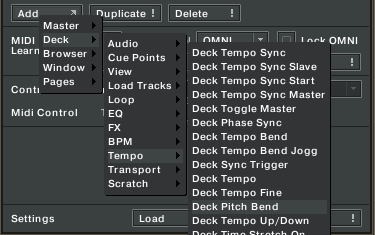
The old school standard, this bends the pitch temporarily slowing down the song with a very audible change in pitch.

pros

  • its going to sound a feel as you might be used to
  • its very adjustable with a wide range of strength from very hard to very subtle. I prefer fine for buttons

cons

  • its hard to keep track of and easy to make adjustments that will throw of your mix
  • even with key lock on you still get a very noticeable “pitch bend” sound
  • not exactly the most “precise” control of the bunch

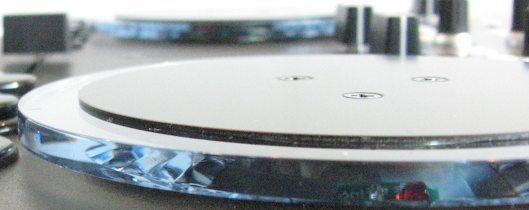
This control works best with 2 buttons or the outside of the vci-100 Jog wheel which sends two different button presses when you move it in each direction. I like to assign each to up and down with a fine setting.
____________
Tempo Bend
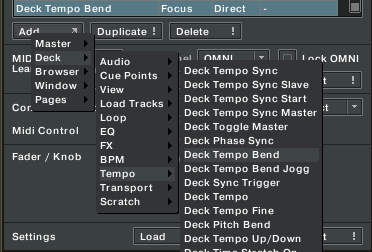
This is the more evolved version of Pitch Bend and is intended to duplicate the “ultimate” turntable form of pitch bending. In old school house days, you were not a good dj if you ever touch the platters to adjust the mix. This was considered much too un-reliable so the pros did it with the pitch sliders instead, temporarily making fast adjustments and returning the fader back to its original position. Tempo bend does the same thing, temporarily increasing the tempo without much of an audible sound.

pros

  • its more precise and has a better feel than the pitch bend
  • there is no audible change when key lock is on and just a slight one with it off

cons

  • there is just one usable setting and that is fine, if you need a more coarse adjustment your out of luck

assign the outside edges of your jog wheels to tempo bend with a pair of Jog Grips installed and thats the closest feeling to a turntable your ever going to get with a VCI-100. Take it up a notch and try assign the inside of the wheel to ” scratch/browse jog” .

___________________
DECK CD- DJ BEND
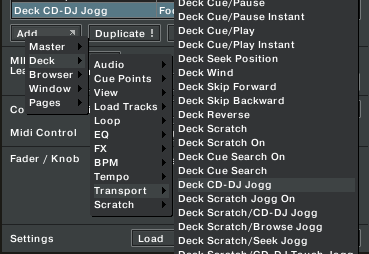
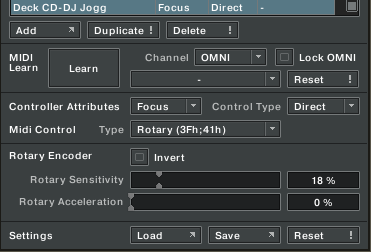
This one does not need too much explanation as it duplicates the behavior of a CDJ-1000 when in CD mode. The inside touch zone of your jog wheel scrolls through a track when not playing and pitch bends when it is. This frees up the outside edge of the wheel to do things like tempo adjustments (as I did in this TKS file).

pros

  • you get 2 good functions in one jog wheel surface
  • the pitch bending feel is more like a cd player

cons

  • if you want to reach and adjust things in nudges, like the edge of a turntable, this one is not for you
  • in order for it to work you must activate the touch sensitive zone of the jog wheel

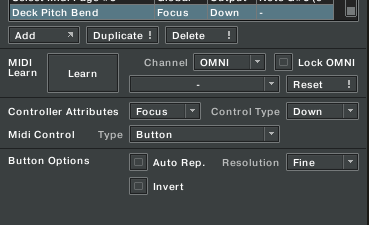
This is a good option and I have been using it for a while. Tempo bend however has given it a serious run for its money and now I really feel I may go back to using the outside edge of the wheel for a more natural feel. Make sure you match the settings bellow and adjust the sensitivity to suit:
Thoughts and Pondering in a digital world

Use midi pages to try several of these out at once. Then you can easily switch between them while mixing to get a true feeling comparison. You can also try them all out by loading the VCI-100SE TKS files here. Many of the settings may not work unless you have the 1.3 firmware but the jog wheels will work just fine for everyone.


Tags: Dj TutorialsTipsTraktor TipsVCI-100 Articles
Share3Tweet2Share
Previous Post

Arcade Buttons 2- the movie

Next Post

How to Upgrade your VCI-100 firmware

Related Posts

traktor-pro plus 3.8 pattern player controls
Dj and Production Tutorials

Review: Traktor Pro Plus 3.8 – After 8 months, is the subscription worth it?

April 20, 2023
Meet the Koala sampler app: a mobile production powerhouse, now with stems
DJ Gear

Meet the Koala sampler app: a mobile production powerhouse, now with stems

February 7, 2023
Tips for DJing in Extreme Cold: DJTT readers share their advice
DJ Techniques / Tips

Tips for DJing in Extreme Cold: DJTT readers share their advice

January 30, 2023
Load More
Next Post
How to Upgrade your VCI-100 firmware

How to Upgrade your VCI-100 firmware

Want to reach DJTT's audience here?

Shoot an email to advertising@djtechtools.com

DJTT ads
DJTT newsletter
Midi Fighter
Chat with us
  • ABOUT DJTT
  • CONTACT
  • PRIVACY
  • MIDI FIGHTER HELP
  • ABOUT DJTT
  • JOBS
  • CONTACT US
  • ADVERTISE
  • PRIVACY POLICY
  • ACCESSIBILITY STATEMENT

© 2024 DJ Techtools all rights reserved by DJ TechTools on all content unless otherwise noted.

No Result
View All Result
  • Blog
    • DJ Gear
      • DIY Projects
      • Gear Reviews
      • New Products
      • Controllerism
    • Techniques + Tips
      • Beginner DJ
      • Advanced DJ
      • Producer
      • Finger Drummer
    • News + Culture
      • Editorials + Opinions
      • Artist Interviews
      • Performances + Routines
      • How I Play
    • DJ Software Tutorials
      • Serato Tips
      • CDJ Tips
      • Ableton Live Tips
  • Store
    • Run by real DJs, not a corporation
    • DJ Controllers
      • Midi Fighter Twister
      • Midi Fighter Spectra
      • Midi Fighter 64
      • View All
    • Accessories
      • Chroma USB Drive for DJs
      • Chroma Caps
      • Chroma Cables Audio
      • Chroma Cables USB-A
      • Chroma Cables: USB-C
      • DJTT Gift Card
      • Midi Fighter T-Shirt
      • Keyboard Covers
      • Earplugs by V-Moda
    • Production Gear
    • Soundcards & Mixers
  • Community
    • Popular Forums
      • General Discussion
      • Buy & Sell
      • Reviews
      • Mixes
      • Music Production
      • Show Your Setup
      • Off Topic
    • Handy Links
      • New Posts
      • Private Messages
      • Register
      • Search
    • Midi Maps
      • Traktor
      • Ableton
      • Serato DJ
      • Midi Fighter 3D
      • Midi Fighter Twister
      • Midi Fighter Spectra
  • Midi Fighter
  • Chroma

© 2024 DJ Techtools all rights reserved by DJ TechTools on all content unless otherwise noted.

This website uses cookies. By continuing to use this website you are giving consent to cookies being used. Visit our Privacy and Cookie Policy.