DJ TechTools
  • Blog
    • DJ Gear
      • DIY Projects
      • Gear Reviews
      • New Products
      • Controllerism
    • Techniques + Tips
      • Beginner DJ
      • Advanced DJ
      • Producer
      • Finger Drummer
    • News + Culture
      • Editorials + Opinions
      • Artist Interviews
      • Performances + Routines
      • How I Play
    • DJ Software Tutorials
      • Serato Tips
        • Traktor Tips
      • CDJ Tips
      • Ableton Live Tips
  • Store
    • Run by real DJs, not a corporation
    • DJ Controllers
      • Midi Fighter Twister
      • Midi Fighter Spectra
      • Midi Fighter 64
      • View All
    • Accessories
      • Chroma USB Drive for DJs
      • Chroma Caps
      • Chroma Cables Audio
      • Chroma Cables USB-A
      • Chroma Cables: USB-C
      • DJTT Gift Card
      • Midi Fighter T-Shirt
      • Keyboard Covers
      • Earplugs by V-Moda
    • Production Gear
    • Soundcards & Mixers
  • Community
    • Popular Forums
      • General Discussion
      • Buy & Sell
      • Reviews
      • Mixes
      • Music Production
      • Show Your Setup
      • Off Topic
    • Handy Links
      • New Posts
      • Private Messages
      • Register
      • Search
    • Midi Maps
      • Traktor
      • Ableton
      • Serato DJ
      • Midi Fighter 3D
      • Midi Fighter Twister
      • Midi Fighter Spectra
  • Midi Fighter
  • Chroma
No Result
View All Result
DJ TechTools
  • Blog
    • DJ Gear
      • DIY Projects
      • Gear Reviews
      • New Products
      • Controllerism
    • Techniques + Tips
      • Beginner DJ
      • Advanced DJ
      • Producer
      • Finger Drummer
    • News + Culture
      • Editorials + Opinions
      • Artist Interviews
      • Performances + Routines
      • How I Play
    • DJ Software Tutorials
      • Serato Tips
        • Traktor Tips
      • CDJ Tips
      • Ableton Live Tips
  • Store
    • Run by real DJs, not a corporation
    • DJ Controllers
      • Midi Fighter Twister
      • Midi Fighter Spectra
      • Midi Fighter 64
      • View All
    • Accessories
      • Chroma USB Drive for DJs
      • Chroma Caps
      • Chroma Cables Audio
      • Chroma Cables USB-A
      • Chroma Cables: USB-C
      • DJTT Gift Card
      • Midi Fighter T-Shirt
      • Keyboard Covers
      • Earplugs by V-Moda
    • Production Gear
    • Soundcards & Mixers
  • Community
    • Popular Forums
      • General Discussion
      • Buy & Sell
      • Reviews
      • Mixes
      • Music Production
      • Show Your Setup
      • Off Topic
    • Handy Links
      • New Posts
      • Private Messages
      • Register
      • Search
    • Midi Maps
      • Traktor
      • Ableton
      • Serato DJ
      • Midi Fighter 3D
      • Midi Fighter Twister
      • Midi Fighter Spectra
  • Midi Fighter
  • Chroma
No Result
View All Result
DJ TechTools

Fader FX Theory

Ean Golden by Ean Golden
December 15, 2008
in Advanced DJ Tips, Controllerism, Traktor Tips, VCI-100 SE / Arcade, VCI-300 Articles
Reading Time: 3 mins read
0
Fader FX Theory
150
VIEWS
Post on FacebookTweet thisUpvote on Reddit

Djing is a visceral activity much like painting. You want to reach out, grab a tool and shape the music into your own without thinking but sometimes technology can get in the way of that process.  The VCI-100SE was originally designed to provide that kind of intuitive performance in Traktor 3. Fortunately for all of us Traktor Pro adopted many of those ideas into the software directly allowing us to take the concept much farther. I have have been working very hard to take fader fx and controllerism to the next level by solidifying those ideas into the “fader fx theory” which everyone can use in their own unique way with any controller or controls.

The Theory
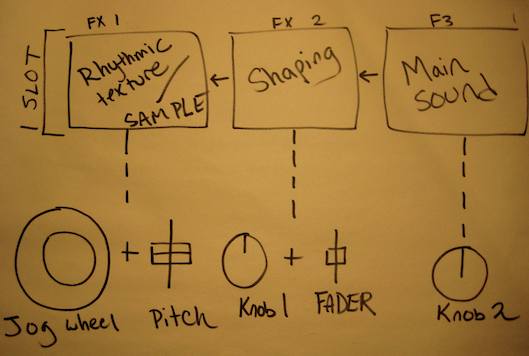
FX are looked at not as individual sounds but as a group which together can be used to shape any sound into something new. Each FX slot within that group is always associated to common dj controls surfaces like jog wheels and faders which physically represent and feel like that type of sound. By loading effects as groups that match the controllers workflow, then any group can be called up with a single press and manipulated intuitively by the dj.

by creating and following a consistent system of mapping, any dj can:

  • download a generic mapping
  • customize it with their own creative groupings
  • upload the results with the FX and midi settings
  • anyone that understands the system will be able to effortless play with your work

Watch this video for more details about how this system has been applied to the VCI-100

Load Time

After months of asking, I finally got the ability to dynamically load specific fx at the push of a button. This is what allows the theory to really work and for each of you to go in and customize the sounds to suit your own needs. There is a midi command logically labeled “effect select” which can assign any fx to a button. The trick is not to assign only one but to assign 2 or 3 to one button. Then that button always pulls up a performance group which you can quickly use with a well designed group of physical controls. If you do create your own special combinations, do the community a favor and contribute them here.

Why participate in the forum? Because your work matters and it influences these articles. This new mapping for instance has a new feature, browser scroll, that was originally created by one of our forum members HedgeHog. Way to go sir!

Get the TSI file here

Anyone with a VCI-100 can download the new TSI that incorporates this concept by signing up to our mapping list bellow. If you like the controls and want to have your vci labeled, then please come back and support our efforts by purchasing the overlays.

Traktor Pro midi mappings

(Required fields are bold)


Tags: ControllerismSuper KnobTipsTraktor TipsTSIVCI-100 Articlesvestax
Share1Tweet1Share
Previous Post

Small, Loud and Stable- AudioFire Review

Next Post

Top Dj Companies Create Universal Standard

Related Posts

Use your Midi Fighter Twister as an Audio-Reactive Visualizer
Ableton Live Tips

Use your Midi Fighter Twister as an Audio-Reactive Visualizer

June 23, 2025
traktor-pro plus 3.8 pattern player controls
Dj and Production Tutorials

Review: Traktor Pro Plus 3.8 – After 8 months, is the subscription worth it?

April 20, 2023
Meet the Koala sampler app: a mobile production powerhouse, now with stems
DJ Gear

Meet the Koala sampler app: a mobile production powerhouse, now with stems

February 7, 2023
Load More
Next Post
Top Dj Companies Create Universal Standard

Top Dj Companies Create Universal Standard

Want to reach DJTT's audience here?

Shoot an email to advertising@djtechtools.com

DJTT ads
DJTT newsletter
Midi Fighter
Chat with us
  • ABOUT DJTT
  • CONTACT
  • PRIVACY
  • MIDI FIGHTER HELP
  • ABOUT DJTT
  • JOBS
  • CONTACT US
  • ADVERTISE
  • PRIVACY POLICY
  • ACCESSIBILITY STATEMENT

© 2024 DJ Techtools all rights reserved by DJ TechTools on all content unless otherwise noted.

No Result
View All Result
  • Blog
    • DJ Gear
      • DIY Projects
      • Gear Reviews
      • New Products
      • Controllerism
    • Techniques + Tips
      • Beginner DJ
      • Advanced DJ
      • Producer
      • Finger Drummer
    • News + Culture
      • Editorials + Opinions
      • Artist Interviews
      • Performances + Routines
      • How I Play
    • DJ Software Tutorials
      • Serato Tips
      • CDJ Tips
      • Ableton Live Tips
  • Store
    • Run by real DJs, not a corporation
    • DJ Controllers
      • Midi Fighter Twister
      • Midi Fighter Spectra
      • Midi Fighter 64
      • View All
    • Accessories
      • Chroma USB Drive for DJs
      • Chroma Caps
      • Chroma Cables Audio
      • Chroma Cables USB-A
      • Chroma Cables: USB-C
      • DJTT Gift Card
      • Midi Fighter T-Shirt
      • Keyboard Covers
      • Earplugs by V-Moda
    • Production Gear
    • Soundcards & Mixers
  • Community
    • Popular Forums
      • General Discussion
      • Buy & Sell
      • Reviews
      • Mixes
      • Music Production
      • Show Your Setup
      • Off Topic
    • Handy Links
      • New Posts
      • Private Messages
      • Register
      • Search
    • Midi Maps
      • Traktor
      • Ableton
      • Serato DJ
      • Midi Fighter 3D
      • Midi Fighter Twister
      • Midi Fighter Spectra
  • Midi Fighter
  • Chroma

© 2024 DJ Techtools all rights reserved by DJ TechTools on all content unless otherwise noted.

This website uses cookies. By continuing to use this website you are giving consent to cookies being used. Visit our Privacy and Cookie Policy.