DJ TechTools
  • Blog
    • DJ Gear
      • DIY Projects
      • Gear Reviews
      • New Products
      • Controllerism
    • Techniques + Tips
      • Beginner DJ
      • Advanced DJ
      • Producer
      • Finger Drummer
    • News + Culture
      • Editorials + Opinions
      • Artist Interviews
      • Performances + Routines
      • How I Play
    • DJ Software Tutorials
      • Serato Tips
        • Traktor Tips
      • CDJ Tips
      • Ableton Live Tips
  • Store
    • Run by real DJs, not a corporation
    • DJ Controllers
      • Midi Fighter Twister
      • Midi Fighter Spectra
      • Midi Fighter 64
      • View All
    • Accessories
      • Chroma USB Drive for DJs
      • Chroma Caps
      • Chroma Cables Audio
      • Chroma Cables USB-A
      • Chroma Cables: USB-C
      • DJTT Gift Card
      • Midi Fighter T-Shirt
      • Keyboard Covers
      • Earplugs by V-Moda
    • Production Gear
    • Soundcards & Mixers
  • Community
    • Popular Forums
      • General Discussion
      • Buy & Sell
      • Reviews
      • Mixes
      • Music Production
      • Show Your Setup
      • Off Topic
    • Handy Links
      • New Posts
      • Private Messages
      • Register
      • Search
    • Midi Maps
      • Traktor
      • Ableton
      • Serato DJ
      • Midi Fighter 3D
      • Midi Fighter Twister
      • Midi Fighter Spectra
  • Midi Fighter
  • Chroma
No Result
View All Result
DJ TechTools
  • Blog
    • DJ Gear
      • DIY Projects
      • Gear Reviews
      • New Products
      • Controllerism
    • Techniques + Tips
      • Beginner DJ
      • Advanced DJ
      • Producer
      • Finger Drummer
    • News + Culture
      • Editorials + Opinions
      • Artist Interviews
      • Performances + Routines
      • How I Play
    • DJ Software Tutorials
      • Serato Tips
        • Traktor Tips
      • CDJ Tips
      • Ableton Live Tips
  • Store
    • Run by real DJs, not a corporation
    • DJ Controllers
      • Midi Fighter Twister
      • Midi Fighter Spectra
      • Midi Fighter 64
      • View All
    • Accessories
      • Chroma USB Drive for DJs
      • Chroma Caps
      • Chroma Cables Audio
      • Chroma Cables USB-A
      • Chroma Cables: USB-C
      • DJTT Gift Card
      • Midi Fighter T-Shirt
      • Keyboard Covers
      • Earplugs by V-Moda
    • Production Gear
    • Soundcards & Mixers
  • Community
    • Popular Forums
      • General Discussion
      • Buy & Sell
      • Reviews
      • Mixes
      • Music Production
      • Show Your Setup
      • Off Topic
    • Handy Links
      • New Posts
      • Private Messages
      • Register
      • Search
    • Midi Maps
      • Traktor
      • Ableton
      • Serato DJ
      • Midi Fighter 3D
      • Midi Fighter Twister
      • Midi Fighter Spectra
  • Midi Fighter
  • Chroma
No Result
View All Result
DJ TechTools

Serato gets Multi Decked

Ean Golden by Ean Golden
July 12, 2009
in Controllerism, DJ Software, Serato Tips
Reading Time: 2 mins read
0
Serato gets Multi Decked
34
VIEWS
Post on FacebookTweet thisUpvote on Reddit

About 3 months ago the boys over in Auckland took a small step forward with their ubiquitously conservative software, Serato Scratch. Along with a host of bug fixes and tweaks version 1.9 added 6 samplers, and the ability to record directly into those samplers from a MIC. While the demand for more air horn and cowbell never seems to let up, 6 simple samplers stopped just short of something great and I was happy to open my big mouth and tell them so. “Hey guys, just support deck duplication to the samplers and you have opened up a whole new world!”  One step at a time, I was told by the 7 foot tall zen dj master known as Sam at Serato.  Well, I  am happy to report they took that extra step with a brand new beta version and made their nice little samplers into something more- 6 additional decks.

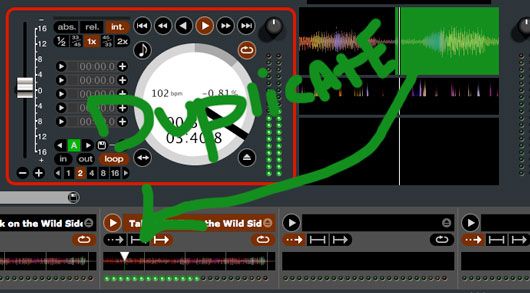
Deck Duplicate

Serato Scratch version 1.9.1 (Public Beta) adds in time duplication of either deck into a sampler.  With deck duplicate to a sampler, you effectively now have 8 decks in Serato. Admittedly you cant do much with the extra 6 decks besides play loops but its super easy to:

Beat match 2 loops
Dump one into a sampler (loop continues to run in time)
free up deck and beat match another loop
dump that into a new sampler

rinse and repeat….

So assuming that your loops and beat matching is rock solid, you could quickly build up a nice little layer of sounds or just work between 2 real and 1 virtual deck for extended mixes. Effectively using this technique is going to require some hot keys at a minimum and ideally a midi controller with faders for volume control. Each samplers audio is sent out over the same channel as a decks 1 and 2 or the master output so audio adjustments must be done with a midi controller or the mouse.

Full Deck Features

As one of our eagle eyed readers pointed out there is a tiny expansion button that allows you to reveal a host of additional features on these samplers.
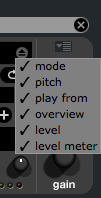
With everything checked you get nearly full deck control over each of the samplers!
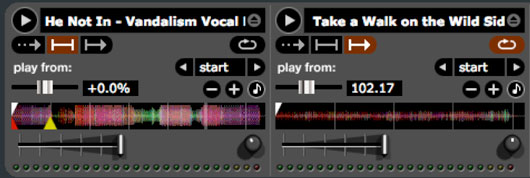
The functions are:

  • Volume
  • Gain
  • +/- 8% pitch
  • Play
  • Play Modes (Sample and Hold, Sample direct play, Sample Play/Pause)
  • Pitch bend
  • KeyLock
  • Loop On/off
  • Which cue point to start from

A Small Hitch

The only problem we can find is that there are no midi or hotkey commands for duplicating decks into each sampler. To accomplish this in the current beta (that may change) you need to drag and drop a deck with the mouse- hardly a performance oriented method.  Those small inconveniences aside, this new feature marks the start of Scratch Live’s transition away from a simple 2 deck interface. I suspect that while the features will be welcome they may wield a dangerous double sword. As die hard Serato users start to get a taste of the possibilities in controllersim they may get worked up and want more, more more!

Serato Scratch Version 1.9.1 with the new SP6 sampler is available as a public beta.

Check it out here

Tags: 1.9.1duplicatemulti deckSamplerSerato ScratchSp6Tips
ShareTweetShare
Previous Post

SCS-3d “DaScratch” Reviewed

Next Post

Streamline Your Laptop (Windows)

Related Posts

Meet the Koala sampler app: a mobile production powerhouse, now with stems
DJ Gear

Meet the Koala sampler app: a mobile production powerhouse, now with stems

February 7, 2023
Tips for DJing in Extreme Cold: DJTT readers share their advice
DJ Techniques / Tips

Tips for DJing in Extreme Cold: DJTT readers share their advice

January 30, 2023
Sequencing Serato DJ’s Sampler With Ableton Live
Advanced DJ Tips

Sequencing Serato DJ’s Sampler With Ableton Live

February 11, 2018
Load More
Next Post
Streamline Your Laptop (Windows)

Streamline Your Laptop (Windows)

Want to reach DJTT's audience here?

Shoot an email to advertising@djtechtools.com

DJTT ads
DJTT newsletter
Midi Fighter
Chat with us
  • ABOUT DJTT
  • CONTACT
  • PRIVACY
  • MIDI FIGHTER HELP
  • ABOUT DJTT
  • JOBS
  • CONTACT US
  • ADVERTISE
  • PRIVACY POLICY
  • ACCESSIBILITY STATEMENT

© 2024 DJ Techtools all rights reserved by DJ TechTools on all content unless otherwise noted.

No Result
View All Result
  • Blog
    • DJ Gear
      • DIY Projects
      • Gear Reviews
      • New Products
      • Controllerism
    • Techniques + Tips
      • Beginner DJ
      • Advanced DJ
      • Producer
      • Finger Drummer
    • News + Culture
      • Editorials + Opinions
      • Artist Interviews
      • Performances + Routines
      • How I Play
    • DJ Software Tutorials
      • Serato Tips
      • CDJ Tips
      • Ableton Live Tips
  • Store
    • Run by real DJs, not a corporation
    • DJ Controllers
      • Midi Fighter Twister
      • Midi Fighter Spectra
      • Midi Fighter 64
      • View All
    • Accessories
      • Chroma USB Drive for DJs
      • Chroma Caps
      • Chroma Cables Audio
      • Chroma Cables USB-A
      • Chroma Cables: USB-C
      • DJTT Gift Card
      • Midi Fighter T-Shirt
      • Keyboard Covers
      • Earplugs by V-Moda
    • Production Gear
    • Soundcards & Mixers
  • Community
    • Popular Forums
      • General Discussion
      • Buy & Sell
      • Reviews
      • Mixes
      • Music Production
      • Show Your Setup
      • Off Topic
    • Handy Links
      • New Posts
      • Private Messages
      • Register
      • Search
    • Midi Maps
      • Traktor
      • Ableton
      • Serato DJ
      • Midi Fighter 3D
      • Midi Fighter Twister
      • Midi Fighter Spectra
  • Midi Fighter
  • Chroma

© 2024 DJ Techtools all rights reserved by DJ TechTools on all content unless otherwise noted.

This website uses cookies. By continuing to use this website you are giving consent to cookies being used. Visit our Privacy and Cookie Policy.