DJ TechTools
  • Blog
    • DJ Gear
      • DIY Projects
      • Gear Reviews
      • New Products
      • Controllerism
    • Techniques + Tips
      • Beginner DJ
      • Advanced DJ
      • Producer
      • Finger Drummer
    • News + Culture
      • Editorials + Opinions
      • Artist Interviews
      • Performances + Routines
      • How I Play
    • DJ Software Tutorials
      • Serato Tips
        • Traktor Tips
      • CDJ Tips
      • Ableton Live Tips
  • Store
    • Run by real DJs, not a corporation
    • DJ Controllers
      • Midi Fighter Twister
      • Midi Fighter Spectra
      • Midi Fighter 64
      • View All
    • Accessories
      • Chroma USB Drive for DJs
      • Chroma Caps
      • Chroma Cables Audio
      • Chroma Cables USB-A
      • Chroma Cables: USB-C
      • DJTT Gift Card
      • Midi Fighter T-Shirt
      • Keyboard Covers
      • Earplugs by V-Moda
    • Production Gear
    • Soundcards & Mixers
  • Community
    • Popular Forums
      • General Discussion
      • Buy & Sell
      • Reviews
      • Mixes
      • Music Production
      • Show Your Setup
      • Off Topic
    • Handy Links
      • New Posts
      • Private Messages
      • Register
      • Search
    • Midi Maps
      • Traktor
      • Ableton
      • Serato DJ
      • Midi Fighter 3D
      • Midi Fighter Twister
      • Midi Fighter Spectra
  • Midi Fighter
  • Chroma
No Result
View All Result
DJ TechTools
  • Blog
    • DJ Gear
      • DIY Projects
      • Gear Reviews
      • New Products
      • Controllerism
    • Techniques + Tips
      • Beginner DJ
      • Advanced DJ
      • Producer
      • Finger Drummer
    • News + Culture
      • Editorials + Opinions
      • Artist Interviews
      • Performances + Routines
      • How I Play
    • DJ Software Tutorials
      • Serato Tips
        • Traktor Tips
      • CDJ Tips
      • Ableton Live Tips
  • Store
    • Run by real DJs, not a corporation
    • DJ Controllers
      • Midi Fighter Twister
      • Midi Fighter Spectra
      • Midi Fighter 64
      • View All
    • Accessories
      • Chroma USB Drive for DJs
      • Chroma Caps
      • Chroma Cables Audio
      • Chroma Cables USB-A
      • Chroma Cables: USB-C
      • DJTT Gift Card
      • Midi Fighter T-Shirt
      • Keyboard Covers
      • Earplugs by V-Moda
    • Production Gear
    • Soundcards & Mixers
  • Community
    • Popular Forums
      • General Discussion
      • Buy & Sell
      • Reviews
      • Mixes
      • Music Production
      • Show Your Setup
      • Off Topic
    • Handy Links
      • New Posts
      • Private Messages
      • Register
      • Search
    • Midi Maps
      • Traktor
      • Ableton
      • Serato DJ
      • Midi Fighter 3D
      • Midi Fighter Twister
      • Midi Fighter Spectra
  • Midi Fighter
  • Chroma
No Result
View All Result
DJ TechTools

Traktor Version 1.2 in Public Beta

Ean Golden by Ean Golden
July 24, 2009
in DJ Software, News, Traktor Tips
Reading Time: 4 mins read
0
Traktor Version 1.2 in Public Beta
81
VIEWS
Post on FacebookTweet thisUpvote on Reddit

Traktor Pro and Traktor Scratch Pro have graduated to version 1.2 and gained a bunch of great new features in the process. While the update does not have all the wrinkles ironed out yet, it is available to everyone as a public beta so you can go check it out for yourself. In the mean time, read on to get a list of major changes you need to know about.

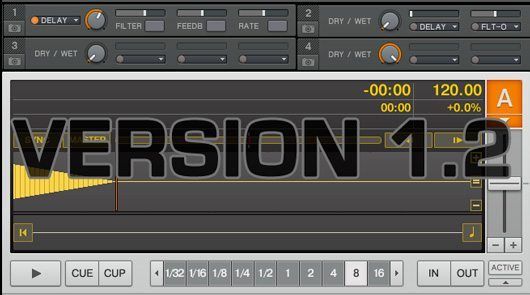
4 FX engines
Picture 4

While this may be generically used as 1 fx slot per deck (ala traktor 3) the modular aspect of these FX makes them much more powerful. Those additional 2 FX units open the doors wide open to some very creative stuff including one thing Traktor desperately needs: a dedicated sampler.

CDJ-400 Support

Picture 7

Loads of people have the CDj-400 and it would make a great controller if the platters worked well with midi. Traktor now supports the hi-res HID messages coming off the platters which means tight, Itch-like scratching may now be possible inside Traktor. Tests will be forthcoming.

Pitch Bend Progressive Sensitivity

Picture 3

One change to rule them all, one fader to make my day! Imagine for a moment if the turntable only slowed down or sped up at one speed no mater how hard you touched it. That’s basically how the pitch bend function in Traktor has worked since the begining and its been a real problem if you mix by ear. The traktor team has now introduced a much more intelligent pitch bend which gets progressively stronger the longer you touch it. While is not touch sensitive (probably not that far off) its light years ahead of the previous version.

Multible TSI files
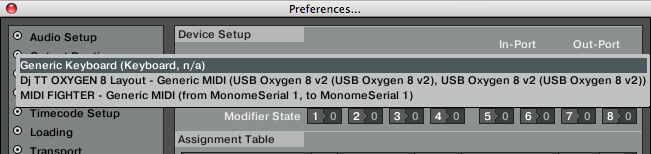
Picture 8

I was expecting merging of TSI files in this version but instead we got something even better. You can now import and edit several TSI files at once AND direct which midi controllers should control which TSI files. This now means you easilly work with several midi controllers at once without any conflicting data! Better get a USB hub pronto kids 🙂

Rad New FX
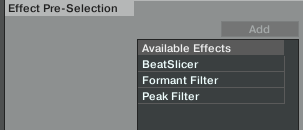
Picture 5

my samples are starting to get more and more out there thanks to some increasingly creative effects coming out of the NI department. One of the best sounding out of the box effects in the new slicer, which rhythmically re-arranges any source into cool patterns. Wondering what that sounds like? Check out my video on cue point chords in which I am using a very early alpha version of the slicer the Traktor folks kindly made me a while back.  1.2  also added a very cool sounding formant and peak filter.

Here’s to wishing..

With Serato coming out with a very robust sampler some thought that Traktor might introduce one of their own. Well, that didn’t exactly happen and probably wont happen for a little while yet either. However, as I mentioned above- you can easily dedicate one of the FX slots to a sampler and achieve basically the same results with a beat masher.

The new Controller window mixes hotkey and controller assignments and adds complexity that may confuse a lot of people. NI might consider making this window a little less confusing, although we are in no way complaining about the great new functionality. Its likely that people who may be scared away from this window may never even do any midi programing to begin with.

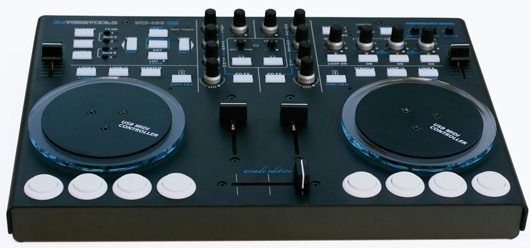
VCI-100 Owners

Your probably wondering, ohh geez- how do I control those new FX? Don’t worry I have a few ideas on how we can get the most out of the new FX units. For one- how about a dedicated sampler in the upper right hand corner of the unit where the performance functions sit?  I would look out for a new TSI that tries out a few different concepts in 3-4 weeks.

Should you Upgrade?

With each update a company releases, we all go through the same struggle; do I mess with a system that works and risk instability for the new features? Well, assuming that 1.2 is performance solid (which remains to be seen)- we  think its a solid ugrade with a lot to gain and very little to lose.That being said, don’t delete your old installation just yet! Did I mention this beta is open to all Traktor users including LE, DUO, and 3?

To sign up on the beta follow this link:

http://www.native-instruments.com/forum/showthread.php?t=90223

Here is a list of feature improvements:

* New “Elastique Pro” timestretching algorithm for best keylock quality with timecode
* Number of separate effect units increased from two to four (Pro version only)
* Adjustable “minimum playtime” for play count and history functions
* Internal EQs enabled for external mixer mode
* New track caching technology with reduced memory footprint
* Improved Tap Tempo function
* Additional effect algorithms: Beat Slicer, Formant Filter, Peak Filter (Pro version only)
* Native HID support for Pioneer CDJ-400
* Drag & Drop from decks to playlist
* New “Progressive Sensitivity” option for Pitch Bend
* Pitch Bend controller assignable to jog wheels
* Customizable Cue Play button behaviour (Instant/On Release)


Tags: 1.2betaNewsNITraktor ProTraktor Tipsupdate
Share1Tweet1Share
Previous Post

Itch Update

Next Post

VCI-100 DIY Arcade Mod

Related Posts

The DJM-V5 from AlphaTheta: 3 channels, 4-band EQ, V10 sound – no Beat FX or crossfader.
Breaking News

The DJM-V5 from AlphaTheta: 3 channels, 4-band EQ, V10 sound – no Beat FX or crossfader.

January 20, 2026
Ableton launches Live 12 Suite rent-to-own plan – and it’s not a subscription
Ableton

Ableton launches Live 12 Suite rent-to-own plan – and it’s not a subscription

October 1, 2025
Meet the TR-1000: Roland’s new analog/digital drum machine with built-in sampling
Breaking News

Meet the TR-1000: Roland’s new analog/digital drum machine with built-in sampling

October 1, 2025
Load More
Next Post
VCI-100 DIY Arcade Mod

VCI-100 DIY Arcade Mod

Want to reach DJTT's audience here?

Shoot an email to advertising@djtechtools.com

DJTT ads
DJTT newsletter
Midi Fighter
Chat with us
  • ABOUT DJTT
  • CONTACT
  • PRIVACY
  • MIDI FIGHTER HELP
  • ABOUT DJTT
  • JOBS
  • CONTACT US
  • ADVERTISE
  • PRIVACY POLICY
  • ACCESSIBILITY STATEMENT

© 2024 DJ Techtools all rights reserved by DJ TechTools on all content unless otherwise noted.

No Result
View All Result
  • Blog
    • DJ Gear
      • DIY Projects
      • Gear Reviews
      • New Products
      • Controllerism
    • Techniques + Tips
      • Beginner DJ
      • Advanced DJ
      • Producer
      • Finger Drummer
    • News + Culture
      • Editorials + Opinions
      • Artist Interviews
      • Performances + Routines
      • How I Play
    • DJ Software Tutorials
      • Serato Tips
      • CDJ Tips
      • Ableton Live Tips
  • Store
    • Run by real DJs, not a corporation
    • DJ Controllers
      • Midi Fighter Twister
      • Midi Fighter Spectra
      • Midi Fighter 64
      • View All
    • Accessories
      • Chroma USB Drive for DJs
      • Chroma Caps
      • Chroma Cables Audio
      • Chroma Cables USB-A
      • Chroma Cables: USB-C
      • DJTT Gift Card
      • Midi Fighter T-Shirt
      • Keyboard Covers
      • Earplugs by V-Moda
    • Production Gear
    • Soundcards & Mixers
  • Community
    • Popular Forums
      • General Discussion
      • Buy & Sell
      • Reviews
      • Mixes
      • Music Production
      • Show Your Setup
      • Off Topic
    • Handy Links
      • New Posts
      • Private Messages
      • Register
      • Search
    • Midi Maps
      • Traktor
      • Ableton
      • Serato DJ
      • Midi Fighter 3D
      • Midi Fighter Twister
      • Midi Fighter Spectra
  • Midi Fighter
  • Chroma

© 2024 DJ Techtools all rights reserved by DJ TechTools on all content unless otherwise noted.

This website uses cookies. By continuing to use this website you are giving consent to cookies being used. Visit our Privacy and Cookie Policy.