DJ TechTools
  • Blog
    • DJ Gear
      • DIY Projects
      • Gear Reviews
      • New Products
      • Controllerism
    • Techniques + Tips
      • Beginner DJ
      • Advanced DJ
      • Producer
      • Finger Drummer
    • News + Culture
      • Editorials + Opinions
      • Artist Interviews
      • Performances + Routines
      • How I Play
    • DJ Software Tutorials
      • Serato Tips
        • Traktor Tips
      • CDJ Tips
      • Ableton Live Tips
  • Store
    • Run by real DJs, not a corporation
    • DJ Controllers
      • Midi Fighter Twister
      • Midi Fighter Spectra
      • Midi Fighter 64
      • View All
    • Accessories
      • Chroma USB Drive for DJs
      • Chroma Caps
      • Chroma Cables Audio
      • Chroma Cables USB-A
      • Chroma Cables: USB-C
      • DJTT Gift Card
      • Midi Fighter T-Shirt
      • Keyboard Covers
      • Earplugs by V-Moda
    • Production Gear
    • Soundcards & Mixers
  • Community
    • Popular Forums
      • General Discussion
      • Buy & Sell
      • Reviews
      • Mixes
      • Music Production
      • Show Your Setup
      • Off Topic
    • Handy Links
      • New Posts
      • Private Messages
      • Register
      • Search
    • Midi Maps
      • Traktor
      • Ableton
      • Serato DJ
      • Midi Fighter 3D
      • Midi Fighter Twister
      • Midi Fighter Spectra
  • Midi Fighter
  • Chroma
No Result
View All Result
DJ TechTools
  • Blog
    • DJ Gear
      • DIY Projects
      • Gear Reviews
      • New Products
      • Controllerism
    • Techniques + Tips
      • Beginner DJ
      • Advanced DJ
      • Producer
      • Finger Drummer
    • News + Culture
      • Editorials + Opinions
      • Artist Interviews
      • Performances + Routines
      • How I Play
    • DJ Software Tutorials
      • Serato Tips
        • Traktor Tips
      • CDJ Tips
      • Ableton Live Tips
  • Store
    • Run by real DJs, not a corporation
    • DJ Controllers
      • Midi Fighter Twister
      • Midi Fighter Spectra
      • Midi Fighter 64
      • View All
    • Accessories
      • Chroma USB Drive for DJs
      • Chroma Caps
      • Chroma Cables Audio
      • Chroma Cables USB-A
      • Chroma Cables: USB-C
      • DJTT Gift Card
      • Midi Fighter T-Shirt
      • Keyboard Covers
      • Earplugs by V-Moda
    • Production Gear
    • Soundcards & Mixers
  • Community
    • Popular Forums
      • General Discussion
      • Buy & Sell
      • Reviews
      • Mixes
      • Music Production
      • Show Your Setup
      • Off Topic
    • Handy Links
      • New Posts
      • Private Messages
      • Register
      • Search
    • Midi Maps
      • Traktor
      • Ableton
      • Serato DJ
      • Midi Fighter 3D
      • Midi Fighter Twister
      • Midi Fighter Spectra
  • Midi Fighter
  • Chroma
No Result
View All Result
DJ TechTools

How to change a your LED colors

Ean Golden by Ean Golden
August 31, 2009
in Advanced DJ Tips, DIY Project Tutorials, VCI-100 SE / Arcade
Reading Time: 4 mins read
0
How to change a your LED colors
347
VIEWS
Post on FacebookTweet thisUpvote on Reddit

In-case you didn’t notice, we have a very active forum with loads of amazing posts and discussions. One of our forum members, fa5ky, published a short tutorial over there on how to change your VCI-100 LEDS to a different color (this applies to almost all equipment). It was so good we decided to post it on the blog! He writes:

You might be wondering why in the world would I take the time to do an almost purely cosmetic mod. Well in my opinion its more then cosmetic- its a major functional upgrade. I had serious problems seeing the LEDS on my regular VCI outdoors or even indoors on a sunny day. This might not seem like a serious problem but when you are jamming out, you want to be able to know what deck is playing, what effects are on etc, at a glance. The boring green and yellow that comes on VCI’s (except the SE version from djtt) are just that, boring, and they don’t have much of a contrast in a daylight setting. So I decided to switch mine to white, blue and red for their contrast and the brightness ( and droooolllzz factor). This tutorial will also come in handy if you just want to replace some dim or dead LEDS. Do this mod at your own risk as I am assuming you have some soldering experience and won’t burn up your circuit board.

REQUIRED GEAR

VCI-100
3mm LEDS
-I bought mine from ebay ($6 for 100 leds) and you can choose how many of each color you want. I went with 40 x Blue, 40 x White, and 20 x Red.
Soldering iron and a solder sucker or just a de-soldering iron
Clamp– or extra set of hands to hold the circuit board steady while you remove the LEDS

STEP 1- DIS-ASSEMBLE

First off you need to take your vci-100 apart. If you are doing the arcade mod, now is the perfect time to do this LED mod also since you already have everything dis-assembled. Here is the video on how to do the arcade mod and it basically shows you how to disassemble your VCI in a safe way.

STEP 2- DE_SOLDER

Now it’s time to de-solder your LEDs. you will want to use a clamp or the “helping hand” to keep your circuit boards firmly in place while allowing front and rear access.
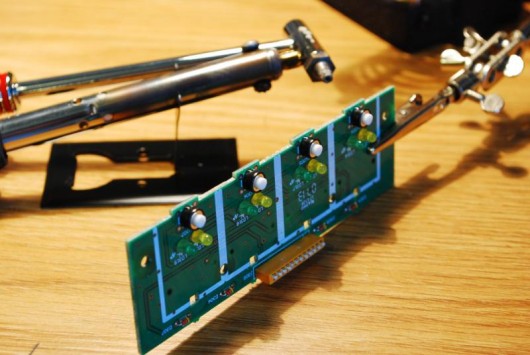
DSC_0031

First add solder to the 2 LED contacts on the back of the circuit board.

This will help evenly spread the heat between both contacts so you can remove the LED
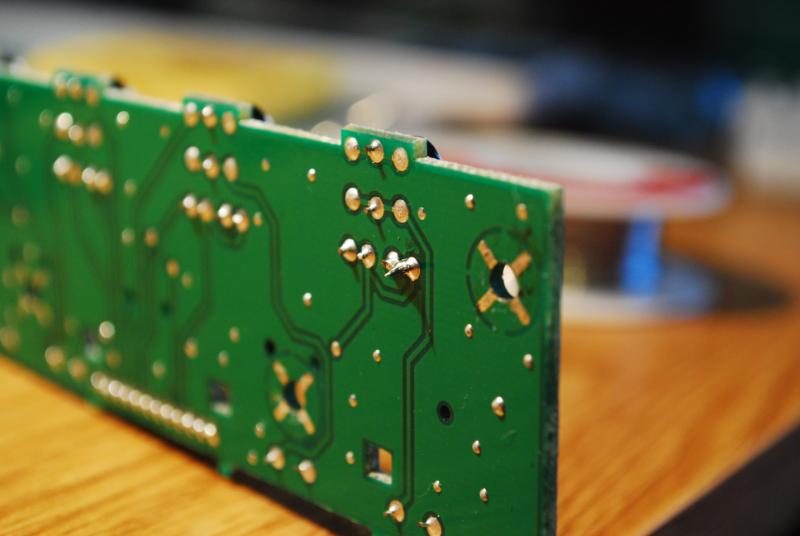
DSC_0037

While heating up the leads pull on the LED with the pliers

(don’t pull to hard or you might break the led or worst the circuit board, it should come out with some wiggling and a tiny bit of force)
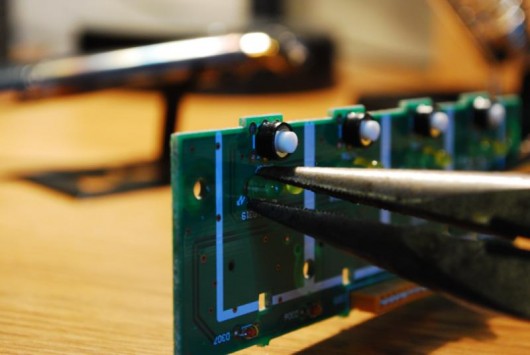
DSC_0038

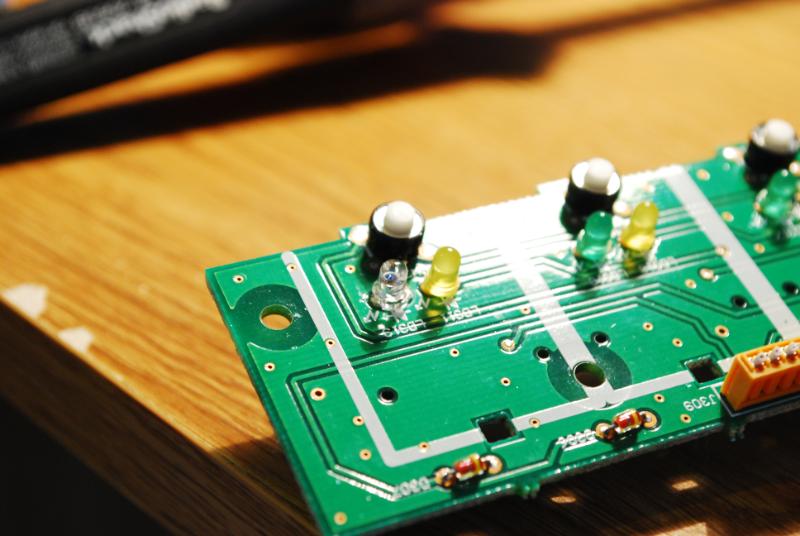
You should be left with this once the LED is removed.
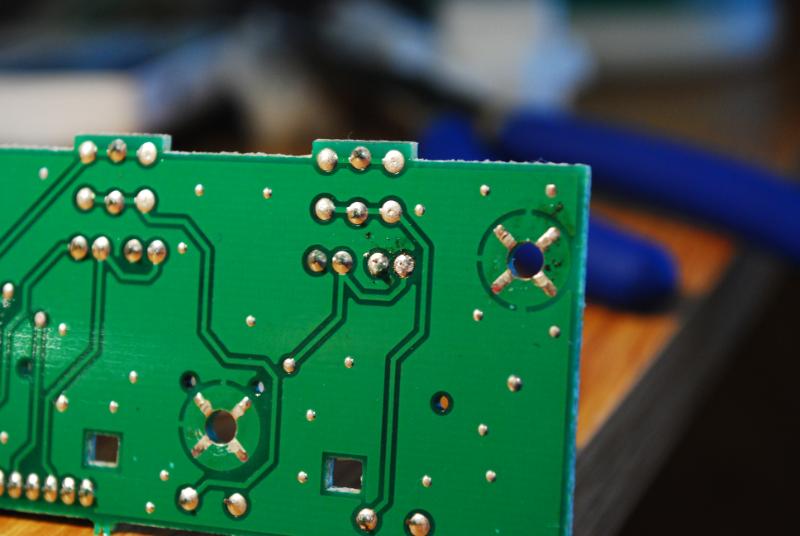
DSC_0042

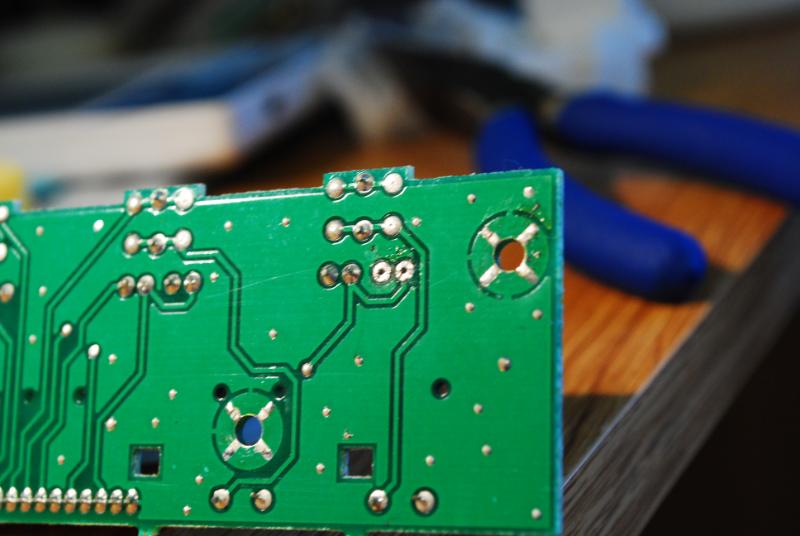
Using a solder sucker or desoldering iron suck up the remaining solder so you can put your new LED in

it should look like the picture bellow
DSC_0048

STEP 3- LED REPLACEMENT

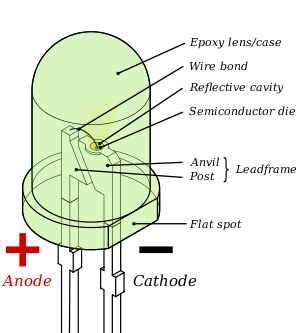
Make sure you cut the LED above small flat section, you may also want to keep the longer leg (positive) so you can identify the sorter leg (negative).Snip the led with a light amount of pressure and bend it to break, otherwise you may end up with a pinched end that is hard to insert. Make sure you have the polarities (positive and negative) correct or it wont light up. Take note of which way the positive and negatives face before you take out your original LED. The following picture will help you identify which side is what.
300px-LED_Labelled.svgDSC_0050-1

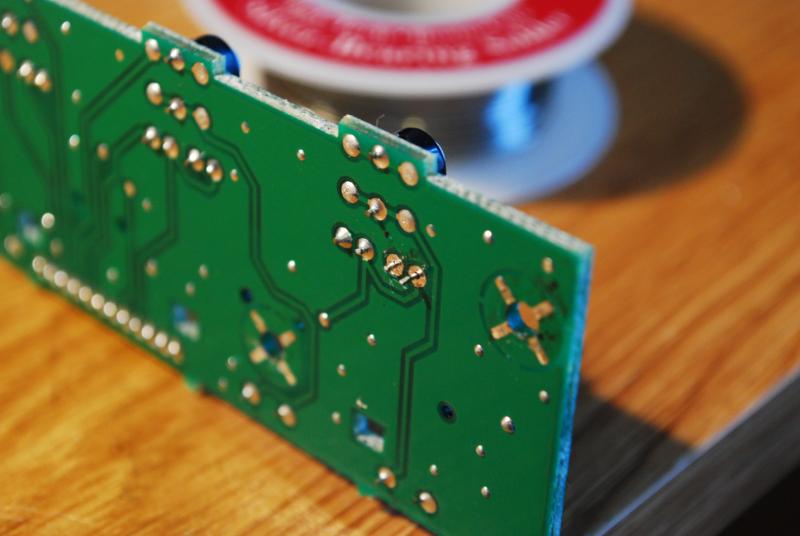
You should be able to push the LED through the bottom and easily re-solder the connection.
DSC_0051

DSC_0070

Your done- enjoy the results!

LED_Change_RED_VCI-100

Tags: ChangeDIYLEDTipsTutorial
Share3Tweet2Share
Previous Post

To Advertise or not to Advertise

Next Post

The Value of a Name

Related Posts

Meet the Koala sampler app: a mobile production powerhouse, now with stems
DJ Gear

Meet the Koala sampler app: a mobile production powerhouse, now with stems

February 7, 2023
Tips for DJing in Extreme Cold: DJTT readers share their advice
DJ Techniques / Tips

Tips for DJing in Extreme Cold: DJTT readers share their advice

January 30, 2023
Standalone DDJ-400
DIY + Hacks

Building a standalone DDJ-400 with a Raspberry Pi and Mixxx

November 5, 2020
Load More
Next Post
The Value of a Name

The Value of a Name

Want to reach DJTT's audience here?

Shoot an email to advertising@djtechtools.com

DJTT ads
DJTT newsletter
Midi Fighter
Chat with us
  • ABOUT DJTT
  • CONTACT
  • PRIVACY
  • MIDI FIGHTER HELP
  • ABOUT DJTT
  • JOBS
  • CONTACT US
  • ADVERTISE
  • PRIVACY POLICY
  • ACCESSIBILITY STATEMENT

© 2024 DJ Techtools all rights reserved by DJ TechTools on all content unless otherwise noted.

No Result
View All Result
  • Blog
    • DJ Gear
      • DIY Projects
      • Gear Reviews
      • New Products
      • Controllerism
    • Techniques + Tips
      • Beginner DJ
      • Advanced DJ
      • Producer
      • Finger Drummer
    • News + Culture
      • Editorials + Opinions
      • Artist Interviews
      • Performances + Routines
      • How I Play
    • DJ Software Tutorials
      • Serato Tips
      • CDJ Tips
      • Ableton Live Tips
  • Store
    • Run by real DJs, not a corporation
    • DJ Controllers
      • Midi Fighter Twister
      • Midi Fighter Spectra
      • Midi Fighter 64
      • View All
    • Accessories
      • Chroma USB Drive for DJs
      • Chroma Caps
      • Chroma Cables Audio
      • Chroma Cables USB-A
      • Chroma Cables: USB-C
      • DJTT Gift Card
      • Midi Fighter T-Shirt
      • Keyboard Covers
      • Earplugs by V-Moda
    • Production Gear
    • Soundcards & Mixers
  • Community
    • Popular Forums
      • General Discussion
      • Buy & Sell
      • Reviews
      • Mixes
      • Music Production
      • Show Your Setup
      • Off Topic
    • Handy Links
      • New Posts
      • Private Messages
      • Register
      • Search
    • Midi Maps
      • Traktor
      • Ableton
      • Serato DJ
      • Midi Fighter 3D
      • Midi Fighter Twister
      • Midi Fighter Spectra
  • Midi Fighter
  • Chroma

© 2024 DJ Techtools all rights reserved by DJ TechTools on all content unless otherwise noted.

This website uses cookies. By continuing to use this website you are giving consent to cookies being used. Visit our Privacy and Cookie Policy.