There’s been some discussion on DJ TechTools lately about whether or not a DJ needs to make original music to become successful. We’ll get into that more later, but in my opinion, unless you put out terrible stuff, making your own music can only help your DJ career, and it’s a lot of fun.
Besides that, today you don’t need label support or a lot of your own money to make your music available for worldwide digital sale. Some labels may be a big help with marketing, booking and physical media distribution, but a few online services now enable you to easily upload your digital music to the major download stores and keep most of the money earned in sales. Read on to learn more about 3 excellent options including; TuneCore, WaTunes and Rebeat Digital.
TUNECORE
 Before TuneCore came along, digital music distributors such as The Orchard, Snowcap and others would place your songs in iTunes, eMusic, and other such stores. But those services don’t accept all music, and they keep a fairly hefty chunk of the proceeds of your music sales. TuneCore was the first service that let anyone post their music to digital download stores that only charged fixed, up-front fees. TuneCore doesn’t take any cut of your music sales.
With TuneCore, you can upload music to 16 of the most-used online stores, including all five of the iTunes stores, Rhapsody, Amazon MP3, eMusic, IMVU, Lala, Shockhound, Amie Street, LimeWire Store and Nokia. You can also use Amazon On Demand, which uses your digital music to sell CDs that are created as people buy them, so you don’t need to press up a big batch of CDs yourself.
There are two pricing schemes with TuneCore. You can upload a single track to all the available stores for a yearly fee of $9.99. You can take music down from TuneCore at your discretion, but otherwise you’ll be charged the yearly fee.
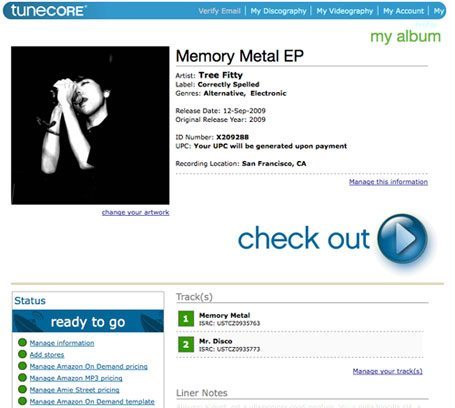 To upload an album, which TuneCore describes as a group of two or more tracks, you start with a yearly fee of $19.98 per album, then you pay $0.99 for each song and the album and $0.99 for each store you want to upload to. For example, a 10-track album that you upload to all 16 available stores would cost: $45.72 up front ($19.98 yearly fee + $9.90 for 10 songs + $15.84 for 16 stores) and $19.98 per year after the first year.
You upload your music, album art, etc. through TuneCore’s web interface, where you can also check your accounting page to see what you’ve sold and how much you’re owed. Again, TuneCore doesn’t take any cut of the sales, and the amount of money you earn for each song or album sale depends on the policies of each download store. If you don’t already have UPC and ISRC codes for your music (which are essential for processing payments), TuneCore generates them for you for free.
Some other resources you get with TuneCore include PDF guides on music marketing, mastering, publishing, mixing, copyright, vinyl and online music selling tips. You can also create a widget that lets people stream and buy your music, and you can quickly place the widget in your website, blog and all your social networking sites. Finally, you can place music videos for sale in the iTunes music store for $85 per video (less than five minutes long).
WATUNES
Just a few months old, WaTunes actually uploads anyone’s music to iTunes for free and to a few other stores for a per-album fee. Coming at the end of September, WaTunes promises a VIP service that will cost $29.95 per year. For that price you’ll be able to upload all your music to a total of 64 online locations, including iTunes, eMusic, Napster, Amazon, Rhapsody, Last FM and others. VIP members will also get free weekly iTunes Trending Reports—detailed reports on your iTunes sales, including the zip codes of the customers buying your music. (TuneCore charges $2.98 each for those reports.)
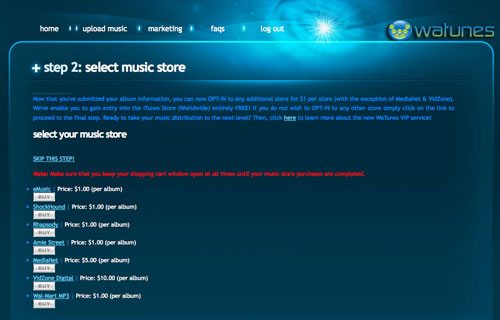 Like TuneCore, WaTunes lets you keep all the proceeds from your music sales and gives you free UPC and ISRC codes. The WaTunes music submission process is similar to TuneCore; you create an online account and upload music and images through the web interface. One difference is that WaTune requires 320kbps MP3 files, while TuneCore recommends submitting 16-bit/44.1kHz WAV files.
While the WaTunes low-cost business model may seem too good to be true, I suspect that the company has ties to or receives kickbacks from the music marketing and mastering services that it endorses. Time will tell if this young player can survive in the game and make a dent in TuneCore’s momentum.
REBEAT DIGITAL
Another fresh upstart, German company Rebeat Digital takes a little different approach. Rebeat has no annual fees, but it does have some up-front costs and takes 15% of your royalties from sales (this amount varies according to the download store’s policies). But what you get for that cut of your royalties is blanket distribution to hundreds of download sites worldwide. Rebeat’s complete store list is by far the most comprehensive and include’s the most amount of European and other non-American sites. Rebeat even includes Beatport in its list, which surprises me because Rebeat lets anyone upload music, and Beatport is known for not accepting just any music indiscriminately. Incidentally, some other sites that don’t accept blanket submissions, such as Traxsource and Dance Tracks Digital, are not on Rebeat’s list.
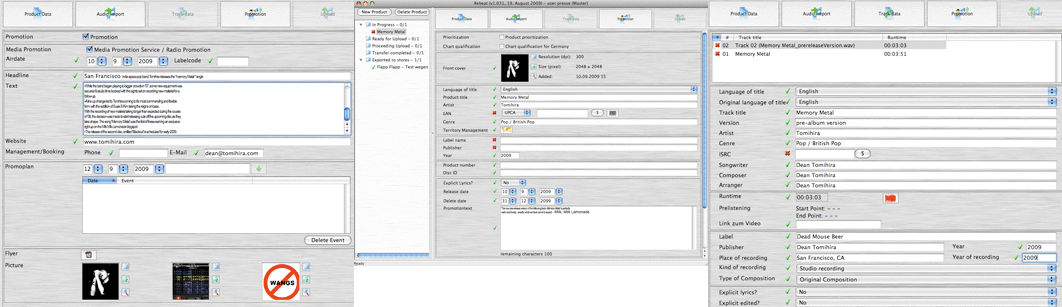
Rebeat has its own software app that you use to upload your music. The Mac/PC software costs 99 Euros and gives you permanent access to Rebeat, so you’ll only pay once for the software. (At the time of this writing, 1 euro = $1.46US.) Rebeat’s software helps you upload all your song information, album artwork, music (16-bit/44.1kHz WAVs) and shows your all your sales and accounting information.
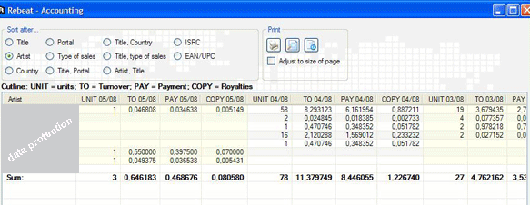
Unlike the other two services, Rebeat does charge 5 euros for UPC codes, of which you need one per album, and 1 euro for ISRC codes, of which you need one per song. There is also a one-time storage free of 1 euro per song upload. So for example, uploading a 12-track album with codes would cost: 29 euros (12 for storage and 17 for the codes). That’s a little less than what you would pay on TuneCore, and with Rebeat, you don’t have annual fees. Rebeat takes a cut of your royalties, but it does put your music in more stores than anyone else.
WHICH SERVICE IS RIGHT FOR YOU?
There are many similarities to the three services listed here. For example, they all say that it takes about 4-6 weeks (and sometimes longer) for your music to go live in all the stores they service, and they all pay monthly and say that it takes 30-45 days after the sale for your royalties to appear in your account.
All three are also purely distributors, meaning they don’t pick and choose whose music to accept, nor do they market or promote their customers. WaTunes endorses marketing/promo services for hire, and TuneCore gives you advice and will point you to promo services as well. Rebeat offers its customers’ music on a promotional basis to a network of more than 2,000 registered media and radio outlets, but Rebeat does not promote its customers directly.
TuneCore has had the longest time to work on its service, and as a result, it’s interface has the most spit-and-polish to it, as well a cool widget and plenty of information to help you sell your music. While TuneCore can put you in the most-visited online stores, it doesn’t take the blanketing approach of the others that can spread your music out even wider.
WaTunes seems to offer a great value and charges the least amount overall. It’s such a new service, however, that it’s interface is still a little rough around the edges. And it’s VIP Service hasn’t even launched yet, so we’ll just have to see how WaTunes performs.
Rebeat offers the most comprehensive worldwide digital distribution, including a high concentration in Europe. For electronic music producers who may not be counting on a huge amount of sales but want to be available in the most appreciative markets, Rebeat sounds like an attractive choice. You pay less money up front to post music and no annual fees. While Rebeat does take 15% of your royalties from sales, that’s still much less than the older guard of didgital distributosuch as The Orchard and Snowcap.
Also, Rebeat is offering a special trial version of the Rebeat Digital software to readers of DJ Tech Tools who want to check it out. This trial version will be fully functional for you to upload three of your tracks and put them into distribution. To take advantage of that offer,
1) Go to this Rebeat register page and register using this code in the CD-Key field: 104E486476. Registration will include having to send a scan of a government ID (drivers license or passport). Note: use Option B with the field for the CD key.
2) Rebeat will mail you your access codes within 1 business day.
3) Download and install the software.
4) Log-in with your codes and upload your tracks.
Send questions to support@rebeat.com