DJ TechTools
  • Blog
    • DJ Gear
      • DIY Projects
      • Gear Reviews
      • New Products
      • Controllerism
    • Techniques + Tips
      • Beginner DJ
      • Advanced DJ
      • Producer
      • Finger Drummer
    • News + Culture
      • Editorials + Opinions
      • Artist Interviews
      • Performances + Routines
      • How I Play
    • DJ Software Tutorials
      • Serato Tips
        • Traktor Tips
      • CDJ Tips
      • Ableton Live Tips
  • Store
    • Run by real DJs, not a corporation
    • DJ Controllers
      • Midi Fighter Twister
      • Midi Fighter Spectra
      • Midi Fighter 64
      • View All
    • Accessories
      • Chroma USB Drive for DJs
      • Chroma Caps
      • Chroma Cables Audio
      • Chroma Cables USB-A
      • Chroma Cables: USB-C
      • DJTT Gift Card
      • Midi Fighter T-Shirt
      • Keyboard Covers
      • Earplugs by V-Moda
    • Production Gear
    • Soundcards & Mixers
  • Community
    • Popular Forums
      • General Discussion
      • Buy & Sell
      • Reviews
      • Mixes
      • Music Production
      • Show Your Setup
      • Off Topic
    • Handy Links
      • New Posts
      • Private Messages
      • Register
      • Search
    • Midi Maps
      • Traktor
      • Ableton
      • Serato DJ
      • Midi Fighter 3D
      • Midi Fighter Twister
      • Midi Fighter Spectra
  • Midi Fighter
  • Chroma
No Result
View All Result
DJ TechTools
  • Blog
    • DJ Gear
      • DIY Projects
      • Gear Reviews
      • New Products
      • Controllerism
    • Techniques + Tips
      • Beginner DJ
      • Advanced DJ
      • Producer
      • Finger Drummer
    • News + Culture
      • Editorials + Opinions
      • Artist Interviews
      • Performances + Routines
      • How I Play
    • DJ Software Tutorials
      • Serato Tips
        • Traktor Tips
      • CDJ Tips
      • Ableton Live Tips
  • Store
    • Run by real DJs, not a corporation
    • DJ Controllers
      • Midi Fighter Twister
      • Midi Fighter Spectra
      • Midi Fighter 64
      • View All
    • Accessories
      • Chroma USB Drive for DJs
      • Chroma Caps
      • Chroma Cables Audio
      • Chroma Cables USB-A
      • Chroma Cables: USB-C
      • DJTT Gift Card
      • Midi Fighter T-Shirt
      • Keyboard Covers
      • Earplugs by V-Moda
    • Production Gear
    • Soundcards & Mixers
  • Community
    • Popular Forums
      • General Discussion
      • Buy & Sell
      • Reviews
      • Mixes
      • Music Production
      • Show Your Setup
      • Off Topic
    • Handy Links
      • New Posts
      • Private Messages
      • Register
      • Search
    • Midi Maps
      • Traktor
      • Ableton
      • Serato DJ
      • Midi Fighter 3D
      • Midi Fighter Twister
      • Midi Fighter Spectra
  • Midi Fighter
  • Chroma
No Result
View All Result
DJ TechTools

Novation Launchpad for Ableton Live

Markkus Rovito by Markkus Rovito
October 1, 2009
in Ableton Live Tips, DJ Controllers, News
Reading Time: 3 mins read
0
Novation Launchpad for Ableton Live
435
VIEWS
Post on FacebookTweet thisUpvote on Reddit

by Markkus Rovito

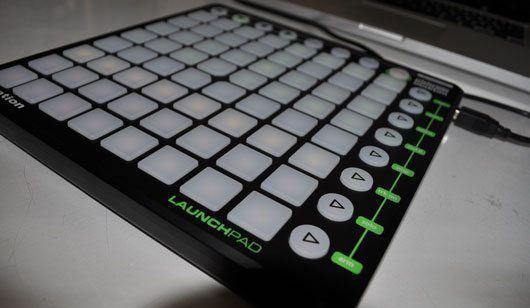
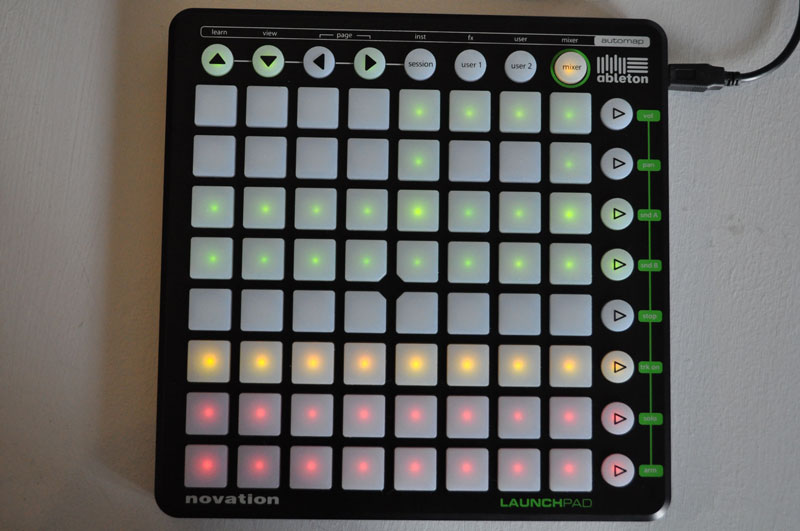
Today Novation announced a new Ableton Live controller called Launchpad, and DJ Tech Tools got  an advance look at one of the first units available. What one might consider a poor man’s APC-40, the Launchpad ($199US) anchors itself around and 8-by-8 grid of 64 buttons for launching clips and scenes from Ableton Live’s Session view, while a Mixer mode gives you ready access to track volume, pan, Send A/B amount, mute, solo and record enable. Read on to decide if you should blast off or abort mission.

MISSION: LIVE CONTROL
LaunchPad2_novationbig

The Launchpad is USB bus-powered and includes software drivers, demo Live session files and a special, limited Launchpad version of Ableton Live 8 to get you started. Of course, if you already own a full version of Ableton Live, Launchpad will work with it as well.

After installing the software and setting Launchpad as your control surface in Live, Launchpad’s pad grid in Session mode will show you the top eight clip slots of the first eight tracks in your Live Session view. If you have more tracks and clip slots in your session, use Launchpad’s directional arrow buttons to move through the software’s session view. A red rectangle in Live moves about as you scroll, showing which clips are active on the Launchpad’s grid.

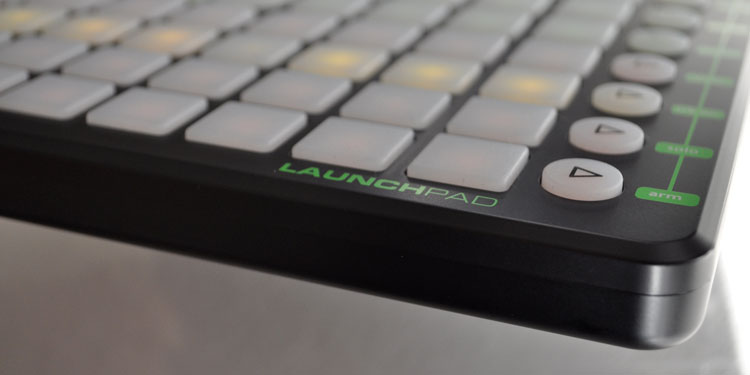
The circular Play buttons on the far right of the Launchpad launch scenes in Live, and the grid buttons launch or stop individual clips. Launchpad’s buttons are backlit with green LEDs for clips that are active, yellow (amber) LEDs for clips that are available but not playing, and unlit buttons represent empty clip slots. Just like you would do with a mouse in Live, you can use the empty clip slot to stop an active clip in the same track.

BONUS MIXER
LaunchPad5r

To compensate for its lack of “mixer” controls like faders and knobs, Launchpad features a mixer mode. Press it once, and the pad grid shows you four rows of green “reset” buttons representing the status indicators of the volume, pan and Send A/B effect levels for each track. The bottom four rows of buttons enable the stop, mute, solo and record enable functions for each track.

While still in mixer mode, the right-hand Play buttons take on different functions. The top four Play buttons in Mixer mode enter display mode for volume, pan, and send A/B levels. In those modes, the pad grid shows the volume levels, pan position and send amounts for each track and they can be adjusted with the buttons.

If you want to use Launchpad as a MIDI controller on other software, you can, but you must do it using Novation’s free Automap software. Most, but not all, MIDI software works fine with Automap, but it doesn’t play well with M-Audio’s Torq DJ software. That’s a bummer too, because Launchpad has two user customizable midi pages. Since Torq can ReWire to Ableton Live, Launchpad would have been a great controller to use in a Torq/Live set-up with some of Launchpad’s user pages mapped to extra Torq functions.

ON BOARD?
LaunchPad3r

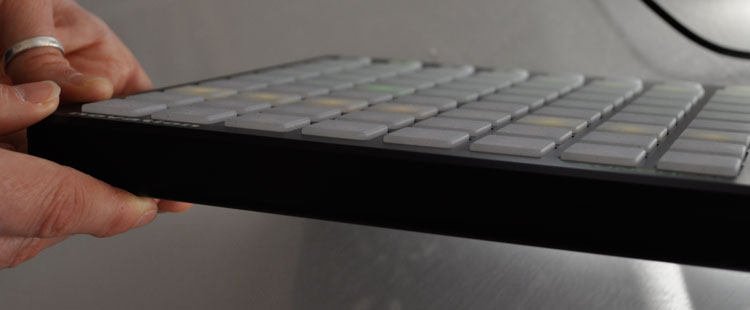
64 multi-colored buttons with fully integrated Ableton Live support for $199 including software. That’s a pretty compelling sell for a lot of folks who want easy access to Live without breaking the bank. Could the buttons feel better? Yes. Could the package be a little more sexy, like the Monome? Yes. Can you beat the per-button value for Ableton heads? Nope!  Check back later in the month for a more comprehensive review after we put the controller through more rigorous tests and see how well it works with Traktor and other DJ software.


Tags: albetonlaunchpadmonomeNewsnovation
Share4Tweet2Share
Previous Post

Itch Officially Takes on Traktor

Next Post

Our Commitment to You

Related Posts

The DJM-V5 from AlphaTheta: 3 channels, 4-band EQ, V10 sound – no Beat FX or crossfader.
Breaking News

The DJM-V5 from AlphaTheta: 3 channels, 4-band EQ, V10 sound – no Beat FX or crossfader.

January 20, 2026
Ableton launches Live 12 Suite rent-to-own plan – and it’s not a subscription
Ableton

Ableton launches Live 12 Suite rent-to-own plan – and it’s not a subscription

October 1, 2025
Meet the TR-1000: Roland’s new analog/digital drum machine with built-in sampling
Breaking News

Meet the TR-1000: Roland’s new analog/digital drum machine with built-in sampling

October 1, 2025
Load More
Next Post
Our Commitment to You

Our Commitment to You

Want to reach DJTT's audience here?

Shoot an email to advertising@djtechtools.com

DJTT ads
DJTT newsletter
Midi Fighter
Chat with us
  • ABOUT DJTT
  • CONTACT
  • PRIVACY
  • MIDI FIGHTER HELP
  • ABOUT DJTT
  • JOBS
  • CONTACT US
  • ADVERTISE
  • PRIVACY POLICY
  • ACCESSIBILITY STATEMENT

© 2024 DJ Techtools all rights reserved by DJ TechTools on all content unless otherwise noted.

No Result
View All Result
  • Blog
    • DJ Gear
      • DIY Projects
      • Gear Reviews
      • New Products
      • Controllerism
    • Techniques + Tips
      • Beginner DJ
      • Advanced DJ
      • Producer
      • Finger Drummer
    • News + Culture
      • Editorials + Opinions
      • Artist Interviews
      • Performances + Routines
      • How I Play
    • DJ Software Tutorials
      • Serato Tips
      • CDJ Tips
      • Ableton Live Tips
  • Store
    • Run by real DJs, not a corporation
    • DJ Controllers
      • Midi Fighter Twister
      • Midi Fighter Spectra
      • Midi Fighter 64
      • View All
    • Accessories
      • Chroma USB Drive for DJs
      • Chroma Caps
      • Chroma Cables Audio
      • Chroma Cables USB-A
      • Chroma Cables: USB-C
      • DJTT Gift Card
      • Midi Fighter T-Shirt
      • Keyboard Covers
      • Earplugs by V-Moda
    • Production Gear
    • Soundcards & Mixers
  • Community
    • Popular Forums
      • General Discussion
      • Buy & Sell
      • Reviews
      • Mixes
      • Music Production
      • Show Your Setup
      • Off Topic
    • Handy Links
      • New Posts
      • Private Messages
      • Register
      • Search
    • Midi Maps
      • Traktor
      • Ableton
      • Serato DJ
      • Midi Fighter 3D
      • Midi Fighter Twister
      • Midi Fighter Spectra
  • Midi Fighter
  • Chroma

© 2024 DJ Techtools all rights reserved by DJ TechTools on all content unless otherwise noted.

This website uses cookies. By continuing to use this website you are giving consent to cookies being used. Visit our Privacy and Cookie Policy.