DJ TechTools
  • Blog
    • DJ Gear
      • DIY Projects
      • Gear Reviews
      • New Products
      • Controllerism
    • Techniques + Tips
      • Beginner DJ
      • Advanced DJ
      • Producer
      • Finger Drummer
    • News + Culture
      • Editorials + Opinions
      • Artist Interviews
      • Performances + Routines
      • How I Play
    • DJ Software Tutorials
      • Serato Tips
        • Traktor Tips
      • CDJ Tips
      • Ableton Live Tips
  • Store
    • Run by real DJs, not a corporation
    • DJ Controllers
      • Midi Fighter Twister
      • Midi Fighter Spectra
      • Midi Fighter 64
      • View All
    • Accessories
      • Chroma USB Drive for DJs
      • Chroma Caps
      • Chroma Cables Audio
      • Chroma Cables USB-A
      • Chroma Cables: USB-C
      • DJTT Gift Card
      • Midi Fighter T-Shirt
      • Keyboard Covers
      • Earplugs by V-Moda
    • Production Gear
    • Soundcards & Mixers
  • Community
    • Popular Forums
      • General Discussion
      • Buy & Sell
      • Reviews
      • Mixes
      • Music Production
      • Show Your Setup
      • Off Topic
    • Handy Links
      • New Posts
      • Private Messages
      • Register
      • Search
    • Midi Maps
      • Traktor
      • Ableton
      • Serato DJ
      • Midi Fighter 3D
      • Midi Fighter Twister
      • Midi Fighter Spectra
  • Midi Fighter
  • Chroma
No Result
View All Result
DJ TechTools
  • Blog
    • DJ Gear
      • DIY Projects
      • Gear Reviews
      • New Products
      • Controllerism
    • Techniques + Tips
      • Beginner DJ
      • Advanced DJ
      • Producer
      • Finger Drummer
    • News + Culture
      • Editorials + Opinions
      • Artist Interviews
      • Performances + Routines
      • How I Play
    • DJ Software Tutorials
      • Serato Tips
        • Traktor Tips
      • CDJ Tips
      • Ableton Live Tips
  • Store
    • Run by real DJs, not a corporation
    • DJ Controllers
      • Midi Fighter Twister
      • Midi Fighter Spectra
      • Midi Fighter 64
      • View All
    • Accessories
      • Chroma USB Drive for DJs
      • Chroma Caps
      • Chroma Cables Audio
      • Chroma Cables USB-A
      • Chroma Cables: USB-C
      • DJTT Gift Card
      • Midi Fighter T-Shirt
      • Keyboard Covers
      • Earplugs by V-Moda
    • Production Gear
    • Soundcards & Mixers
  • Community
    • Popular Forums
      • General Discussion
      • Buy & Sell
      • Reviews
      • Mixes
      • Music Production
      • Show Your Setup
      • Off Topic
    • Handy Links
      • New Posts
      • Private Messages
      • Register
      • Search
    • Midi Maps
      • Traktor
      • Ableton
      • Serato DJ
      • Midi Fighter 3D
      • Midi Fighter Twister
      • Midi Fighter Spectra
  • Midi Fighter
  • Chroma
No Result
View All Result
DJ TechTools

Tempo Anchors in M-Audio Torq 1.5

Markkus Rovito by Markkus Rovito
October 7, 2009
in Basic DJ Tips, How-To Video Tutorials, Torq Tips, Video Posts
Reading Time: 2 mins read
0
Tempo Anchors in M-Audio Torq 1.5
41
VIEWS
Post on FacebookTweet thisUpvote on Reddit

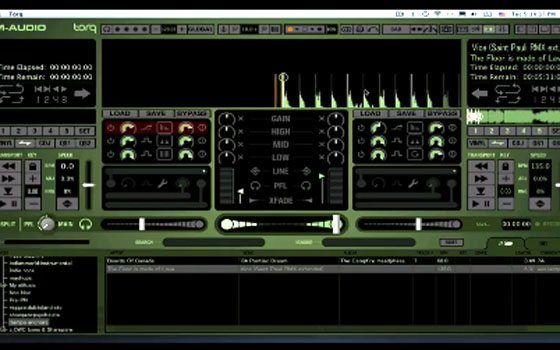
M-Audio Torq 1.5 introduced Tempo Anchors, its method for reining in songs that fluctuate in tempo. Inconsistencies in tempo can occur for a number of reasons, but Tempo Anchors may come in particularly handy for live recordings, older songs that weren’t recorded to a click track or complex tracks for which the Torq software can’t precisely detect the beat.

SYNC OR SWIM

If a song’s tempo fluctuates or Torq has trouble analyzing the tempo, then it will be more difficult to sync that song to others. Also, sometimes corrupted digital audio files will be cause a song to go out of sync or glitch because Torq will skip over a small portion of the song and then keep going. In those cases, Tempo Anchors may also help. See the video to learn how to set Tempo Anchors, which are saved in a song’s TQD file that Torq creates, so you don’t have to repeat the process more than once for a song.

A couple of things to remember about tempo anchors:

• If Torq’s automatic BPM is really far off the mark, play the song and use the Tap Tempo function by clicking in the BPM display box to get the tempo close before dropping tempo anchors.

• Always set them up before your gig — not during your gig — unless you really like to live dangerously.

• You don’t have to go crazy with them. If the auto BPM detection got pretty close to the mark, in many cases tempo fluctuations are minor, and you won’t need to drop a Tempo Anchor on every several downbeats. Often, a few tempo anchors can go a long way toward straightening out your tracks.

The need for tempo anchors serves as  another example of why you can’t let yourself get lazy as a digital DJ. Software tempo analysis is still far from perfect, and if you assume that the analyzed BPM on your screen is correct before testing it, you could be embarrassed during your gig. The more preparation you put in before performing — including setting Tempo Anchors, the more fun both you and your audience will have. -Markkus Rovito


Tags: Tips
ShareTweetShare
Previous Post

DJ of the Month: Charles Feelgood

Next Post

New TechTools Gear

Related Posts

Meet the Koala sampler app: a mobile production powerhouse, now with stems
DJ Gear

Meet the Koala sampler app: a mobile production powerhouse, now with stems

February 7, 2023
Tips for DJing in Extreme Cold: DJTT readers share their advice
DJ Techniques / Tips

Tips for DJing in Extreme Cold: DJTT readers share their advice

January 30, 2023
One Thing Ableton Production Tips
Production Tips

One Thing: Super Quick Ableton Tips From Professional Producers

March 10, 2017
Load More
Next Post
New TechTools Gear

New TechTools Gear

Want to reach DJTT's audience here?

Shoot an email to advertising@djtechtools.com

DJTT ads
DJTT newsletter
Midi Fighter
Chat with us
  • ABOUT DJTT
  • CONTACT
  • PRIVACY
  • MIDI FIGHTER HELP
  • ABOUT DJTT
  • JOBS
  • CONTACT US
  • ADVERTISE
  • PRIVACY POLICY
  • ACCESSIBILITY STATEMENT

© 2024 DJ Techtools all rights reserved by DJ TechTools on all content unless otherwise noted.

No Result
View All Result
  • Blog
    • DJ Gear
      • DIY Projects
      • Gear Reviews
      • New Products
      • Controllerism
    • Techniques + Tips
      • Beginner DJ
      • Advanced DJ
      • Producer
      • Finger Drummer
    • News + Culture
      • Editorials + Opinions
      • Artist Interviews
      • Performances + Routines
      • How I Play
    • DJ Software Tutorials
      • Serato Tips
      • CDJ Tips
      • Ableton Live Tips
  • Store
    • Run by real DJs, not a corporation
    • DJ Controllers
      • Midi Fighter Twister
      • Midi Fighter Spectra
      • Midi Fighter 64
      • View All
    • Accessories
      • Chroma USB Drive for DJs
      • Chroma Caps
      • Chroma Cables Audio
      • Chroma Cables USB-A
      • Chroma Cables: USB-C
      • DJTT Gift Card
      • Midi Fighter T-Shirt
      • Keyboard Covers
      • Earplugs by V-Moda
    • Production Gear
    • Soundcards & Mixers
  • Community
    • Popular Forums
      • General Discussion
      • Buy & Sell
      • Reviews
      • Mixes
      • Music Production
      • Show Your Setup
      • Off Topic
    • Handy Links
      • New Posts
      • Private Messages
      • Register
      • Search
    • Midi Maps
      • Traktor
      • Ableton
      • Serato DJ
      • Midi Fighter 3D
      • Midi Fighter Twister
      • Midi Fighter Spectra
  • Midi Fighter
  • Chroma

© 2024 DJ Techtools all rights reserved by DJ TechTools on all content unless otherwise noted.

This website uses cookies. By continuing to use this website you are giving consent to cookies being used. Visit our Privacy and Cookie Policy.