DJ TechTools
  • Blog
    • DJ Gear
      • DIY Projects
      • Gear Reviews
      • New Products
      • Controllerism
    • Techniques + Tips
      • Beginner DJ
      • Advanced DJ
      • Producer
      • Finger Drummer
    • News + Culture
      • Editorials + Opinions
      • Artist Interviews
      • Performances + Routines
      • How I Play
    • DJ Software Tutorials
      • Serato Tips
        • Traktor Tips
      • CDJ Tips
      • Ableton Live Tips
  • Store
    • Run by real DJs, not a corporation
    • DJ Controllers
      • Midi Fighter Twister
      • Midi Fighter Spectra
      • Midi Fighter 64
      • View All
    • Accessories
      • Chroma USB Drive for DJs
      • Chroma Caps
      • Chroma Cables Audio
      • Chroma Cables USB-A
      • Chroma Cables: USB-C
      • DJTT Gift Card
      • Midi Fighter T-Shirt
      • Keyboard Covers
      • Earplugs by V-Moda
    • Production Gear
    • Soundcards & Mixers
  • Community
    • Popular Forums
      • General Discussion
      • Buy & Sell
      • Reviews
      • Mixes
      • Music Production
      • Show Your Setup
      • Off Topic
    • Handy Links
      • New Posts
      • Private Messages
      • Register
      • Search
    • Midi Maps
      • Traktor
      • Ableton
      • Serato DJ
      • Midi Fighter 3D
      • Midi Fighter Twister
      • Midi Fighter Spectra
  • Midi Fighter
  • Chroma
No Result
View All Result
DJ TechTools
  • Blog
    • DJ Gear
      • DIY Projects
      • Gear Reviews
      • New Products
      • Controllerism
    • Techniques + Tips
      • Beginner DJ
      • Advanced DJ
      • Producer
      • Finger Drummer
    • News + Culture
      • Editorials + Opinions
      • Artist Interviews
      • Performances + Routines
      • How I Play
    • DJ Software Tutorials
      • Serato Tips
        • Traktor Tips
      • CDJ Tips
      • Ableton Live Tips
  • Store
    • Run by real DJs, not a corporation
    • DJ Controllers
      • Midi Fighter Twister
      • Midi Fighter Spectra
      • Midi Fighter 64
      • View All
    • Accessories
      • Chroma USB Drive for DJs
      • Chroma Caps
      • Chroma Cables Audio
      • Chroma Cables USB-A
      • Chroma Cables: USB-C
      • DJTT Gift Card
      • Midi Fighter T-Shirt
      • Keyboard Covers
      • Earplugs by V-Moda
    • Production Gear
    • Soundcards & Mixers
  • Community
    • Popular Forums
      • General Discussion
      • Buy & Sell
      • Reviews
      • Mixes
      • Music Production
      • Show Your Setup
      • Off Topic
    • Handy Links
      • New Posts
      • Private Messages
      • Register
      • Search
    • Midi Maps
      • Traktor
      • Ableton
      • Serato DJ
      • Midi Fighter 3D
      • Midi Fighter Twister
      • Midi Fighter Spectra
  • Midi Fighter
  • Chroma
No Result
View All Result
DJ TechTools

Holiday DIY Tricks -Sound Responsive Lights

ilya by ilya
December 23, 2009
in DIY Project Tutorials
Reading Time: 4 mins read
0
Holiday DIY Tricks -Sound Responsive Lights
152
VIEWS
Post on FacebookTweet thisUpvote on Reddit

There are two materials everyone has handy during the next few weeks, christmas lights and lots of music. So why not make them work together in time? In this article we are going to show you a few ways to turn any string you have laying around into a sound responsive light show that stays in time with all of your holiday parties. Cant afford a custom dj light show in the club? This sub $30 hack will create the same results for next to nothing.

THE MATERIALS
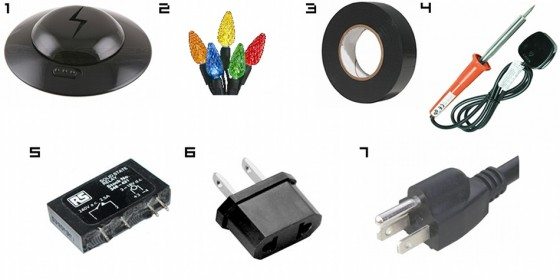
The Materials

Although there are a variety of ways to approach this project, a simple speaker hack seems to be the easiest and most affordable method. The beauty is that many of the required materials are both easy to find and often already on hand for the tech-savvy DJ. Here’s what you’ll need to get started:

1. Speaker: Don’t go taking apart your $700 sound system, any old speaker you have lying around will be perfectly fine here. A cheap set of computer speakers from the local goodwill will work perfectly.

2. Holiday Lights: You’ll be using one channel of lights in this setup. And remember, holiday lights tend to sell out really quickly during the season so try not to wait till the last minute to grab a set.

3. Electrical Tape & Solid Enclosure: Like most D.I.Y. projects, there is a bit of wiring involved so keeping safety as your top priority is incredibly important. These will be critical in damage control during those eggnog-induced accidents.

4. Soldering Iron & Wire Stripper: Very self-explanatory but also a necessity for sturdy and clean connections. If you don’t have an iron available, check out the end of this article for some ready to go kits that dont require any assembly.

5. Solid State Relay: A relay with a currency rating of at least 120 VAC is ideal. Solid states are preferable because they contain no moving parts, can better stand situations with heavy bass-induced vibrations and work quickly. Look for these online and make sure to call ahead to check on their availability before trekking to the hardware store.

6. Power Outlet Adapter: Virtually any adapter with at least two prongs will do although models with holes in the center of the prongs are nice for easy soldering.

7. Extra Power Cord

THE BREAKDOWN
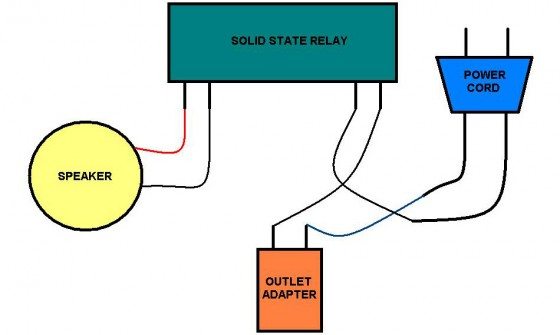
The Breakdown

Step 1: Open up your speaker and carefully remove the two wires running into the amplifier with the soldering iron. Solder them to the relay as per the image.

Step 2: Solder a wire from the outlet adapter to the relay. Any connections you make to the adapter can be tied to the center holes on the prong for a sturdier fit.

Step 3: Carefully cut the female end on the power cord to expose the wires. Solder one of the connections from the power cord to the outlet adapter. Solder the remaining wire from the power cord to the remaining coil on the relay.

here is a detailed video explaining the process


–


WRAPPING IT UP

As we mentioned earlier, there are some excellent alternatives floating around for other inexpensive means to set-up sound responsive lights. If you’re not into programming or basic circuitry, pre-made kits can easily be found online for under $50 although most are limited to preselected tracks like Mr. Christmas, other hardware such as Light-O-Rama allow for more flexibility. For the latter option, there are pre-written guides on the setup process which can be found here. However, if you are willing to work a little bit with solid state relays, the Arduino Christmas Light Controller is definitely worth checking out. My personal favorite is a Microsoft .NET-based project which is largely software dependent and requires no soldering.

Ona final note, keep in mind that creativity will pay off in the end! There are a wide variety of other ways to approach this DIY project without cracking open a speaker – one of the ideas we’ve been throwing around the office is to replace the speaker with an auxiliary cable that is connected directly to your dj mixer. This would be the perfect mobile addition to your dj bag without taking up too much space. In the spirit of the holiday season, let us know if you have any of your own tips and tricks for cool lighting displays to share!
Tags: DIY ProjectsLightssound reactive
Share1Tweet1Share
Previous Post

Block Rockin Beats Routine- Samples + Tutorial

Next Post

DJ Essentials- Gig Bag Check List

Related Posts

Standalone DDJ-400
DIY + Hacks

Building a standalone DDJ-400 with a Raspberry Pi and Mixxx

November 5, 2020
Audio Reactive DJ Projects
Controllerism

Fresh Audio-Reactive DJ Lighting Projects: LED Strips, Laptop Stickers

April 22, 2016
Standalone Technics DVS Mod
DIY + Hacks

Technics 1200 Mod: Standalone DVS Player

April 20, 2016
Load More
Next Post
DJ Essentials- Gig Bag Check List

DJ Essentials- Gig Bag Check List

Want to reach DJTT's audience here?

Shoot an email to advertising@djtechtools.com

DJTT ads
DJTT newsletter
Midi Fighter
Chat with us
  • ABOUT DJTT
  • CONTACT
  • PRIVACY
  • MIDI FIGHTER HELP
  • ABOUT DJTT
  • JOBS
  • CONTACT US
  • ADVERTISE
  • PRIVACY POLICY
  • ACCESSIBILITY STATEMENT

© 2024 DJ Techtools all rights reserved by DJ TechTools on all content unless otherwise noted.

No Result
View All Result
  • Blog
    • DJ Gear
      • DIY Projects
      • Gear Reviews
      • New Products
      • Controllerism
    • Techniques + Tips
      • Beginner DJ
      • Advanced DJ
      • Producer
      • Finger Drummer
    • News + Culture
      • Editorials + Opinions
      • Artist Interviews
      • Performances + Routines
      • How I Play
    • DJ Software Tutorials
      • Serato Tips
      • CDJ Tips
      • Ableton Live Tips
  • Store
    • Run by real DJs, not a corporation
    • DJ Controllers
      • Midi Fighter Twister
      • Midi Fighter Spectra
      • Midi Fighter 64
      • View All
    • Accessories
      • Chroma USB Drive for DJs
      • Chroma Caps
      • Chroma Cables Audio
      • Chroma Cables USB-A
      • Chroma Cables: USB-C
      • DJTT Gift Card
      • Midi Fighter T-Shirt
      • Keyboard Covers
      • Earplugs by V-Moda
    • Production Gear
    • Soundcards & Mixers
  • Community
    • Popular Forums
      • General Discussion
      • Buy & Sell
      • Reviews
      • Mixes
      • Music Production
      • Show Your Setup
      • Off Topic
    • Handy Links
      • New Posts
      • Private Messages
      • Register
      • Search
    • Midi Maps
      • Traktor
      • Ableton
      • Serato DJ
      • Midi Fighter 3D
      • Midi Fighter Twister
      • Midi Fighter Spectra
  • Midi Fighter
  • Chroma

© 2024 DJ Techtools all rights reserved by DJ TechTools on all content unless otherwise noted.

This website uses cookies. By continuing to use this website you are giving consent to cookies being used. Visit our Privacy and Cookie Policy.