DJ TechTools
  • Blog
    • DJ Gear
      • DIY Projects
      • Gear Reviews
      • New Products
      • Controllerism
    • Techniques + Tips
      • Beginner DJ
      • Advanced DJ
      • Producer
      • Finger Drummer
    • News + Culture
      • Editorials + Opinions
      • Artist Interviews
      • Performances + Routines
      • How I Play
    • DJ Software Tutorials
      • Serato Tips
        • Traktor Tips
      • CDJ Tips
      • Ableton Live Tips
  • Store
    • Run by real DJs, not a corporation
    • DJ Controllers
      • Midi Fighter Twister
      • Midi Fighter Spectra
      • Midi Fighter 64
      • View All
    • Accessories
      • Chroma USB Drive for DJs
      • Chroma Caps
      • Chroma Cables Audio
      • Chroma Cables USB-A
      • Chroma Cables: USB-C
      • DJTT Gift Card
      • Midi Fighter T-Shirt
      • Keyboard Covers
      • Earplugs by V-Moda
    • Production Gear
    • Soundcards & Mixers
  • Community
    • Popular Forums
      • General Discussion
      • Buy & Sell
      • Reviews
      • Mixes
      • Music Production
      • Show Your Setup
      • Off Topic
    • Handy Links
      • New Posts
      • Private Messages
      • Register
      • Search
    • Midi Maps
      • Traktor
      • Ableton
      • Serato DJ
      • Midi Fighter 3D
      • Midi Fighter Twister
      • Midi Fighter Spectra
  • Midi Fighter
  • Chroma
No Result
View All Result
DJ TechTools
  • Blog
    • DJ Gear
      • DIY Projects
      • Gear Reviews
      • New Products
      • Controllerism
    • Techniques + Tips
      • Beginner DJ
      • Advanced DJ
      • Producer
      • Finger Drummer
    • News + Culture
      • Editorials + Opinions
      • Artist Interviews
      • Performances + Routines
      • How I Play
    • DJ Software Tutorials
      • Serato Tips
        • Traktor Tips
      • CDJ Tips
      • Ableton Live Tips
  • Store
    • Run by real DJs, not a corporation
    • DJ Controllers
      • Midi Fighter Twister
      • Midi Fighter Spectra
      • Midi Fighter 64
      • View All
    • Accessories
      • Chroma USB Drive for DJs
      • Chroma Caps
      • Chroma Cables Audio
      • Chroma Cables USB-A
      • Chroma Cables: USB-C
      • DJTT Gift Card
      • Midi Fighter T-Shirt
      • Keyboard Covers
      • Earplugs by V-Moda
    • Production Gear
    • Soundcards & Mixers
  • Community
    • Popular Forums
      • General Discussion
      • Buy & Sell
      • Reviews
      • Mixes
      • Music Production
      • Show Your Setup
      • Off Topic
    • Handy Links
      • New Posts
      • Private Messages
      • Register
      • Search
    • Midi Maps
      • Traktor
      • Ableton
      • Serato DJ
      • Midi Fighter 3D
      • Midi Fighter Twister
      • Midi Fighter Spectra
  • Midi Fighter
  • Chroma
No Result
View All Result
DJ TechTools

Reading Wave Forms

Ean Golden by Ean Golden
January 5, 2010
in Basic DJ Tips, Serato Tips, Traktor Tips
Reading Time: 3 mins read
0
Reading Wave Forms
2k
VIEWS
Post on FacebookTweet thisUpvote on Reddit

Digital djing provides a wide set of tools that make your job better but one of the clearest benefits is the ability to see each songs waveform. A waveform is the play by play visual representation of the sonic action in a track.  By watching wave forms you get an effective  idea of what is currently happening and what is coming up  so smart mix decisions can easily be made on the fly. In this article we will demonstrate the basics of the waveforms and show how 2 of the top dj systems Traktor and Serato enhance that information to make your job even easier.
Wavepic

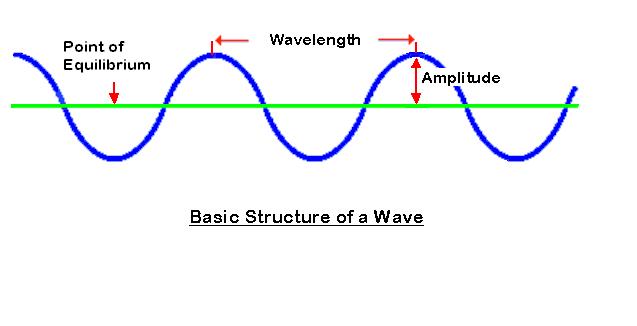
Its really quite amazing that music, something we are so effected by, is really such a simple thing.  The wave form you see above is expressing 2 fundamental things about one single sine wave, one of the most basic forms of sound.

1. Amplitude: How loud the signal is

2. Wavelength: What frequency it is. The wider or longer the the wave length, the lower the frequency.

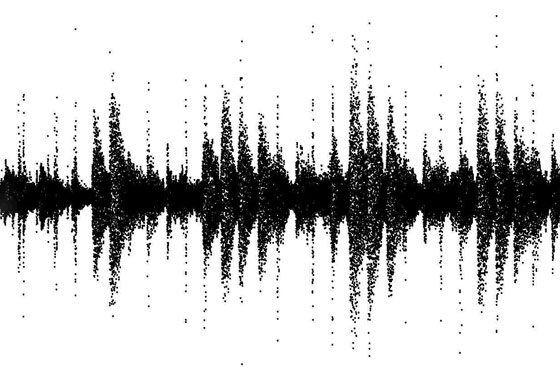
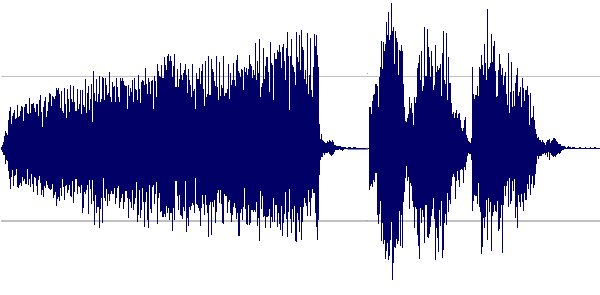
A song is made up of many, many  of these simple waves combined into one sonic image:
waveform_popeye

Its hard to separate the sounds visually from this view alone but with a little eye training you can begin to pick out some important trends and recognize various parts of the songs.

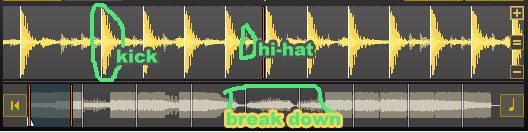
notice that in this first wave form the space between beats is sparse, this suggests minimal instrumentation and a good place to mix.
wave1

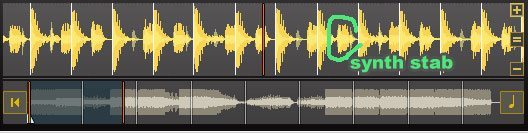
in this section a synth stab is added and the wave starts to get more busy
wave2

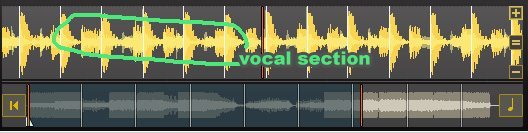
now that a vocal is added, the frequency spectrum really starts to fill up.
wave3

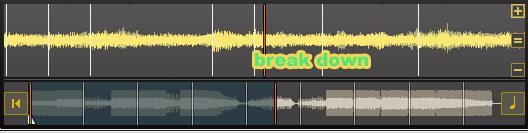
and here in the break down there is a complete absence of loud transients (beats)
wave4

A HELPING HAND

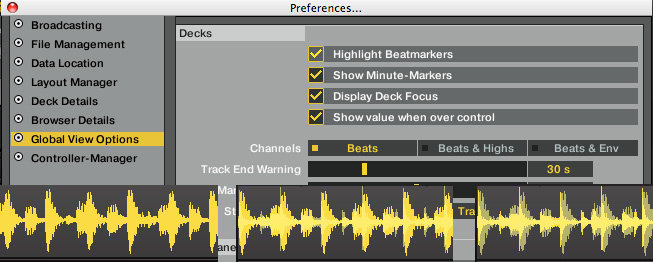
How a program visualizes the wave forms is entirely up to them so several dj programs enhance the wave form views to make it easier for us to recognize these various parts. You can also customize the wave view to suit your personal tastes. In Traktor you can choose how much of the wave form information is displayed to make the beats more defined and filter out non-rhythmic visuals.

in this image we are showing the same section using beats, beats & highs and beats + envelopes
traktor_waveforms

In Serato, they have colorized the wave forms to distinguish parts of the beat structure.

Red = BassBlue=TrebGreen=Mid

color wav

You can alter the wave form view in Serato as well but its less obvious. To zoom in on the wav, simply click the deck and use  + and -.
Another slightly hidden trick; by holding the control button and clicking on a deck you can remove the color coding of the wave form,  and split the view into 3 channels separate waves (hi, mid, lo) for an even more accurate picture into the mix.

Whitewav

Tags: digital djexplanationTutorialwaveforms
Share16Tweet10Share
Previous Post

DJ Etiquette

Next Post

Convert Serato collections to Traktor

Related Posts

A quick way to add stutter/cut FX in Ableton Live
Ableton Live Tips

A quick way to add stutter/cut FX in Ableton Live

August 13, 2020
Silent Discos: How to DJ in Silence
DJ Techniques / Tips

Silent Discos: How to DJ in Silence

August 29, 2017
DDJ to CDJs: Practicing For CDJs With A Pioneer DJ Controller
Basic DJ Tips

DDJ to CDJs: Practicing For CDJs With A Pioneer DJ Controller

July 23, 2017
Load More
Next Post
Convert Serato collections to Traktor

Convert Serato collections to Traktor

Want to reach DJTT's audience here?

Shoot an email to advertising@djtechtools.com

DJTT ads
DJTT newsletter
Midi Fighter
Chat with us
  • ABOUT DJTT
  • CONTACT
  • PRIVACY
  • MIDI FIGHTER HELP
  • ABOUT DJTT
  • JOBS
  • CONTACT US
  • ADVERTISE
  • PRIVACY POLICY
  • ACCESSIBILITY STATEMENT

© 2024 DJ Techtools all rights reserved by DJ TechTools on all content unless otherwise noted.

No Result
View All Result
  • Blog
    • DJ Gear
      • DIY Projects
      • Gear Reviews
      • New Products
      • Controllerism
    • Techniques + Tips
      • Beginner DJ
      • Advanced DJ
      • Producer
      • Finger Drummer
    • News + Culture
      • Editorials + Opinions
      • Artist Interviews
      • Performances + Routines
      • How I Play
    • DJ Software Tutorials
      • Serato Tips
      • CDJ Tips
      • Ableton Live Tips
  • Store
    • Run by real DJs, not a corporation
    • DJ Controllers
      • Midi Fighter Twister
      • Midi Fighter Spectra
      • Midi Fighter 64
      • View All
    • Accessories
      • Chroma USB Drive for DJs
      • Chroma Caps
      • Chroma Cables Audio
      • Chroma Cables USB-A
      • Chroma Cables: USB-C
      • DJTT Gift Card
      • Midi Fighter T-Shirt
      • Keyboard Covers
      • Earplugs by V-Moda
    • Production Gear
    • Soundcards & Mixers
  • Community
    • Popular Forums
      • General Discussion
      • Buy & Sell
      • Reviews
      • Mixes
      • Music Production
      • Show Your Setup
      • Off Topic
    • Handy Links
      • New Posts
      • Private Messages
      • Register
      • Search
    • Midi Maps
      • Traktor
      • Ableton
      • Serato DJ
      • Midi Fighter 3D
      • Midi Fighter Twister
      • Midi Fighter Spectra
  • Midi Fighter
  • Chroma

© 2024 DJ Techtools all rights reserved by DJ TechTools on all content unless otherwise noted.

This website uses cookies. By continuing to use this website you are giving consent to cookies being used. Visit our Privacy and Cookie Policy.