DJ TechTools
  • Blog
    • DJ Gear
      • DIY Projects
      • Gear Reviews
      • New Products
      • Controllerism
    • Techniques + Tips
      • Beginner DJ
      • Advanced DJ
      • Producer
      • Finger Drummer
    • News + Culture
      • Editorials + Opinions
      • Artist Interviews
      • Performances + Routines
      • How I Play
    • DJ Software Tutorials
      • Serato Tips
        • Traktor Tips
      • CDJ Tips
      • Ableton Live Tips
  • Store
    • Run by real DJs, not a corporation
    • DJ Controllers
      • Midi Fighter Twister
      • Midi Fighter Spectra
      • Midi Fighter 64
      • View All
    • Accessories
      • Chroma USB Drive for DJs
      • Chroma Caps
      • Chroma Cables Audio
      • Chroma Cables USB-A
      • Chroma Cables: USB-C
      • DJTT Gift Card
      • Midi Fighter T-Shirt
      • Keyboard Covers
      • Earplugs by V-Moda
    • Production Gear
    • Soundcards & Mixers
  • Community
    • Popular Forums
      • General Discussion
      • Buy & Sell
      • Reviews
      • Mixes
      • Music Production
      • Show Your Setup
      • Off Topic
    • Handy Links
      • New Posts
      • Private Messages
      • Register
      • Search
    • Midi Maps
      • Traktor
      • Ableton
      • Serato DJ
      • Midi Fighter 3D
      • Midi Fighter Twister
      • Midi Fighter Spectra
  • Midi Fighter
  • Chroma
No Result
View All Result
DJ TechTools
  • Blog
    • DJ Gear
      • DIY Projects
      • Gear Reviews
      • New Products
      • Controllerism
    • Techniques + Tips
      • Beginner DJ
      • Advanced DJ
      • Producer
      • Finger Drummer
    • News + Culture
      • Editorials + Opinions
      • Artist Interviews
      • Performances + Routines
      • How I Play
    • DJ Software Tutorials
      • Serato Tips
        • Traktor Tips
      • CDJ Tips
      • Ableton Live Tips
  • Store
    • Run by real DJs, not a corporation
    • DJ Controllers
      • Midi Fighter Twister
      • Midi Fighter Spectra
      • Midi Fighter 64
      • View All
    • Accessories
      • Chroma USB Drive for DJs
      • Chroma Caps
      • Chroma Cables Audio
      • Chroma Cables USB-A
      • Chroma Cables: USB-C
      • DJTT Gift Card
      • Midi Fighter T-Shirt
      • Keyboard Covers
      • Earplugs by V-Moda
    • Production Gear
    • Soundcards & Mixers
  • Community
    • Popular Forums
      • General Discussion
      • Buy & Sell
      • Reviews
      • Mixes
      • Music Production
      • Show Your Setup
      • Off Topic
    • Handy Links
      • New Posts
      • Private Messages
      • Register
      • Search
    • Midi Maps
      • Traktor
      • Ableton
      • Serato DJ
      • Midi Fighter 3D
      • Midi Fighter Twister
      • Midi Fighter Spectra
  • Midi Fighter
  • Chroma
No Result
View All Result
DJ TechTools

Multi-Colored Dicer LED Mapping

pilmat by pilmat
September 2, 2010
in Controllerism, DJ Equipment / Accessories, Video Posts
Reading Time: 2 mins read
0
Multi-Colored Dicer LED Mapping
191
VIEWS
Post on FacebookTweet thisUpvote on Reddit

The introduction of the Dicer may have heralded a new marriage of turntables and controllers, but as with all new marriages, there is a lot to be fully explored. The current rash of YouTube videos featuring the Dicer have only begun to skim the surface of the technical and creative possibilities. While mapping my own Dicers in Traktor Pro, I discovered a whole slew of LED color options, as well as the possibility to control the LED intensity. In this article we have a short video and matching color table that will demonstrate how to map your DJ software to various color outputs on the dicer or other multi-LED controllers.


A RAINBOW OF POSSIBILITIES
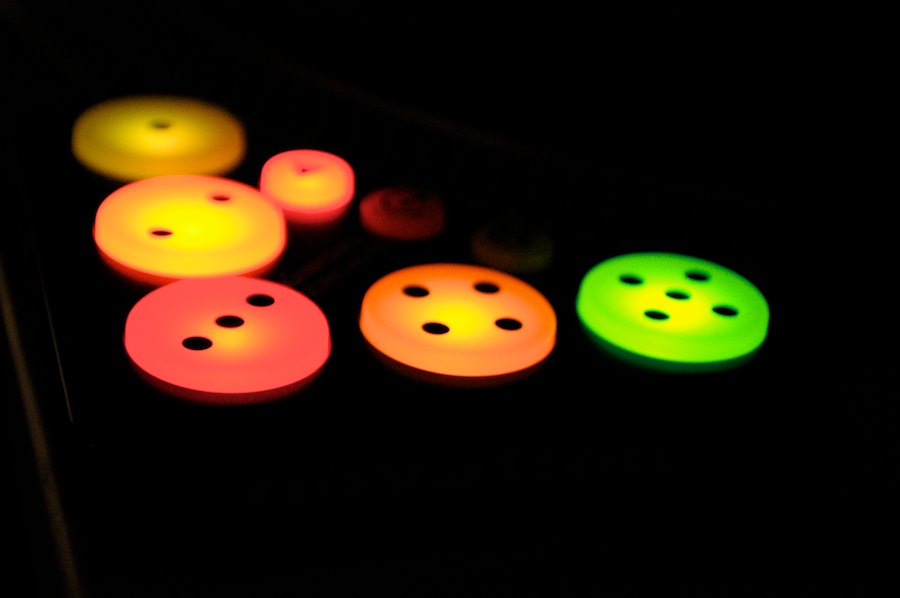
Mapping different LED colors is straight-forward.  After following our LED programming article, you should be familiar with the process. The only little twist at the end here is that the MIDI range needs to be tweaked to allow the color of your choosing to be displayed. The below table explains the range and the color.

Red: 0-15

Pink: 16-31

Rose: 32-47

Dark Orange: 48-63

Light Orange: 64-79

Yellow: 80-95

Lime: 96-111

Green: 112-127

How does the Dicer display different colors? It has two LED under each button, and changing the MIDI range tells it how much of each color to ‘turn on’. Mixing the two LED intensities changes the color.

A side note here is that, as BradCee mentions in the LED programming article, when mapping Hotcue State, the behavior is not as predictable with the Controller Range of MIN=0 and MAX=1. Depending on what type of cue is set (Load, Grid, Cue, Fade In/Out or Loop), the behavior is different, with some requiring the blend to be checked and others no blend.

NOT THE BRIGHTEST CANDLE…

Changing the intensity of the LED is as easy as lowering the MAX number from the above list.  Another possibility is to increase the MIN number so that the button is visible even with the output control ‘off’. Apart from the latter, I don’t really see the benefit of this, but I mention it as it exists.
Support this blog and purchase your dicers here.

Tags: brightnesscolorDicerfeedbackLEDMapnovation
Share2Tweet1Share
Previous Post

American Audio VMS4 Review

Next Post

Building Your Club Night and DJ Career with Guest DJs

Related Posts

Weird DJ Gear: the underrated, the odd, and the ones that made history.
DJ History

Weird DJ Gear: the underrated, the odd, and the ones that made history.

June 28, 2021
Review: Novation’s Circuit Tracks is an even better Circuit groovebox
DJ Gear

Review: Novation’s Circuit Tracks is an even better Circuit groovebox

May 27, 2021
NAMM 2017: Full Of Prototypes + Missing DJ Brands
Controllerism

NAMM 2017: Full Of Prototypes + Missing DJ Brands

January 23, 2017
Load More
Next Post
Building Your Club Night and DJ Career with Guest DJs

Building Your Club Night and DJ Career with Guest DJs

Want to reach DJTT's audience here?

Shoot an email to advertising@djtechtools.com

DJTT ads
DJTT newsletter
Midi Fighter
Chat with us
  • ABOUT DJTT
  • CONTACT
  • PRIVACY
  • MIDI FIGHTER HELP
  • ABOUT DJTT
  • JOBS
  • CONTACT US
  • ADVERTISE
  • PRIVACY POLICY
  • ACCESSIBILITY STATEMENT

© 2024 DJ Techtools all rights reserved by DJ TechTools on all content unless otherwise noted.

No Result
View All Result
  • Blog
    • DJ Gear
      • DIY Projects
      • Gear Reviews
      • New Products
      • Controllerism
    • Techniques + Tips
      • Beginner DJ
      • Advanced DJ
      • Producer
      • Finger Drummer
    • News + Culture
      • Editorials + Opinions
      • Artist Interviews
      • Performances + Routines
      • How I Play
    • DJ Software Tutorials
      • Serato Tips
      • CDJ Tips
      • Ableton Live Tips
  • Store
    • Run by real DJs, not a corporation
    • DJ Controllers
      • Midi Fighter Twister
      • Midi Fighter Spectra
      • Midi Fighter 64
      • View All
    • Accessories
      • Chroma USB Drive for DJs
      • Chroma Caps
      • Chroma Cables Audio
      • Chroma Cables USB-A
      • Chroma Cables: USB-C
      • DJTT Gift Card
      • Midi Fighter T-Shirt
      • Keyboard Covers
      • Earplugs by V-Moda
    • Production Gear
    • Soundcards & Mixers
  • Community
    • Popular Forums
      • General Discussion
      • Buy & Sell
      • Reviews
      • Mixes
      • Music Production
      • Show Your Setup
      • Off Topic
    • Handy Links
      • New Posts
      • Private Messages
      • Register
      • Search
    • Midi Maps
      • Traktor
      • Ableton
      • Serato DJ
      • Midi Fighter 3D
      • Midi Fighter Twister
      • Midi Fighter Spectra
  • Midi Fighter
  • Chroma

© 2024 DJ Techtools all rights reserved by DJ TechTools on all content unless otherwise noted.

This website uses cookies. By continuing to use this website you are giving consent to cookies being used. Visit our Privacy and Cookie Policy.