DJ TechTools
  • Blog
    • DJ Gear
      • DIY Projects
      • Gear Reviews
      • New Products
      • Controllerism
    • Techniques + Tips
      • Beginner DJ
      • Advanced DJ
      • Producer
      • Finger Drummer
    • News + Culture
      • Editorials + Opinions
      • Artist Interviews
      • Performances + Routines
      • How I Play
    • DJ Software Tutorials
      • Serato Tips
        • Traktor Tips
      • CDJ Tips
      • Ableton Live Tips
  • Store
    • Run by real DJs, not a corporation
    • DJ Controllers
      • Midi Fighter Twister
      • Midi Fighter Spectra
      • Midi Fighter 64
      • View All
    • Accessories
      • Chroma USB Drive for DJs
      • Chroma Caps
      • Chroma Cables Audio
      • Chroma Cables USB-A
      • Chroma Cables: USB-C
      • DJTT Gift Card
      • Midi Fighter T-Shirt
      • Keyboard Covers
      • Earplugs by V-Moda
    • Production Gear
    • Soundcards & Mixers
  • Community
    • Popular Forums
      • General Discussion
      • Buy & Sell
      • Reviews
      • Mixes
      • Music Production
      • Show Your Setup
      • Off Topic
    • Handy Links
      • New Posts
      • Private Messages
      • Register
      • Search
    • Midi Maps
      • Traktor
      • Ableton
      • Serato DJ
      • Midi Fighter 3D
      • Midi Fighter Twister
      • Midi Fighter Spectra
  • Midi Fighter
  • Chroma
No Result
View All Result
DJ TechTools
  • Blog
    • DJ Gear
      • DIY Projects
      • Gear Reviews
      • New Products
      • Controllerism
    • Techniques + Tips
      • Beginner DJ
      • Advanced DJ
      • Producer
      • Finger Drummer
    • News + Culture
      • Editorials + Opinions
      • Artist Interviews
      • Performances + Routines
      • How I Play
    • DJ Software Tutorials
      • Serato Tips
        • Traktor Tips
      • CDJ Tips
      • Ableton Live Tips
  • Store
    • Run by real DJs, not a corporation
    • DJ Controllers
      • Midi Fighter Twister
      • Midi Fighter Spectra
      • Midi Fighter 64
      • View All
    • Accessories
      • Chroma USB Drive for DJs
      • Chroma Caps
      • Chroma Cables Audio
      • Chroma Cables USB-A
      • Chroma Cables: USB-C
      • DJTT Gift Card
      • Midi Fighter T-Shirt
      • Keyboard Covers
      • Earplugs by V-Moda
    • Production Gear
    • Soundcards & Mixers
  • Community
    • Popular Forums
      • General Discussion
      • Buy & Sell
      • Reviews
      • Mixes
      • Music Production
      • Show Your Setup
      • Off Topic
    • Handy Links
      • New Posts
      • Private Messages
      • Register
      • Search
    • Midi Maps
      • Traktor
      • Ableton
      • Serato DJ
      • Midi Fighter 3D
      • Midi Fighter Twister
      • Midi Fighter Spectra
  • Midi Fighter
  • Chroma
No Result
View All Result
DJ TechTools

4 Ways to Set Up Controllers in a Club

Ean Golden by Ean Golden
December 3, 2010
in Advanced DJ Tips, Basic DJ Tips, Controllerism, DJ Equipment / Accessories
Reading Time: 4 mins read
0
4 Ways to Set Up Controllers in a Club
107
VIEWS
Post on FacebookTweet thisUpvote on Reddit

Setting up your controller rig at home is usually smooth as butter and seems to work perfectly every time. Confident in your set-up, you decide to bring it to the next gig and boom- 10 different complications pile up, your nerves go though the roof and the show does not go as planned. Sound familiar? Then continue reading as we have some solutions!


After over 7 years of setting up controllers in club environments, here are my 4  favorite methods for setting up controllers that result in the minimum stress and maximum respect to the other djs.  (listed in order of preference)

1) Sound check on your own table 5 hours in advance (before club opens)
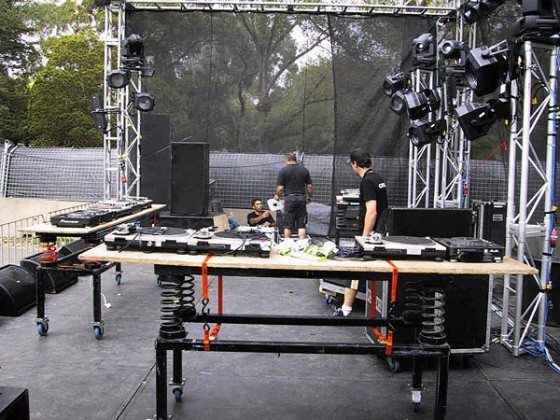
This is the ideal scenario for every controller dj with more than just one extra device. Show up to the club early and set up your gear well in advance in a CONTROLLED environment that will not change. Then when you show up to the club 30 minutes before your set you can just glide on with zero stress and maximum impact. In this scenario, everything you need is left on stage except for the laptop (which should never be left behind)

Advantages:

  • Set up is locked into place
  • Minimal pre-show stress
  • Hours to set up, tweak and solve bugs

Disadvantages:

  • Requires dialogue and coordination with sound techs (costs the venue money)
  • You’re officially “on the spot” and expected to put on a show!

2) Sound check in the booth 1-5 hours in advance
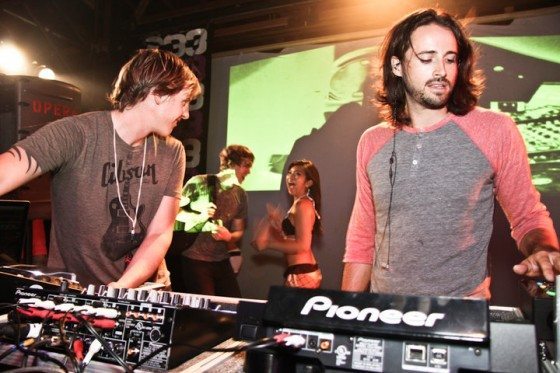

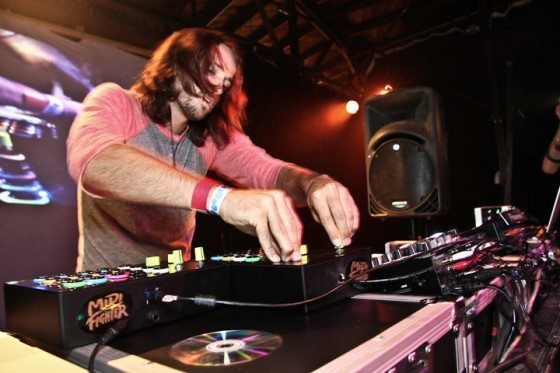
If you can’t get your own table/mixer/audio link to the mains then you may need to set up in the booth. This is the same as above except that your equipment may need to be moved into place just before playing. In the shot above, I started playing off to the side and then at the start of my set, equipment was moved and I got into the ideal ergonomic placement without disturbing the other dj. Here are the steps to follow:

Set-up all equipment in the most ideal positions possible- test as if you are djing then break down:

  • Tuck away sound card and leave it or RCA extension plugged into the mixer (mark the input if possible)
  • Leave the USB cable running to where your laptop will live
  • Tuck away controllers but keep USB cables running to eventual laptop position
  • Leave power cable plugged in

Just before your show

  • Connect controllers and sound card to computer off to the side (out of the way of the other dj)
  • Bring a long USB cable for the sound card in case your setup area is far from your eventual dj area
  • Boot up programs and test that audio signals are running into the mixer properly
  • Check to make sure your controllers are functioning properly
  • Close laptop if possible and place controllers on laptop

Once it’s time to switch

  • Move the laptop into position
  • Place the controllers in position
  • Everything should be connected and ready to go
  • Switch over to your input on the mixer
  • Plug in the headphones and rock it!

3) Set up during your timeslot (if you can afford to ease into the mix slowly)

  • Bring a record, mp3 player, CD, or anything available that is at least 20 minutes long
  • Mix into your pre-recorded mix in the least invasive way possible
  • CD’s off the CDJ’s are generally the easiest
  • Wait until the other dj has completely left the booth
  • Set up your gear rapidly but without stressing yourself


4) Super last minute
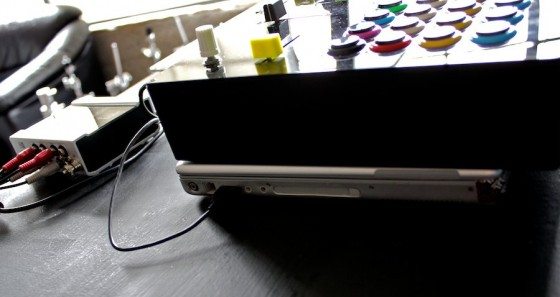
If an advance setup is not possible then absolutely give yourself a solid 30 minutes to complete the following tasks

  • Communicate to the opening dj “Hey, I am just casually setting up, no rush, you still have 30 minutes to play. I am going to be setting up a few things around you, please let me know if I get in your way”
  • Only make moves to plug things in and set up after the dj is done mixing, don’t come anywhere near the mixer during a blend
  • Take your time, be like Fonsie, and keep the vibe very relaxed

First Steps:

  • Connect controllers and sound card to computer off to the side (out of the way of the other dj)
  • Bring a long USB cable for the sound card in case your setup area is far from your eventual dj area
  • Boot up programs and test that audio signals are running into the mixer properly
  • Check to make sure controllers are functioning properly
  • Close laptop if possible and place controllers on laptop

Once it’s time to switch:

  • Move the laptop into position
  • Place the controllers in position
  • Everything should be connected and ready to go
  • Switch over to your input on the mixer
  • Plug in the headphones and rock it!

THE CASH $ TIPS

  • Remove CDJs when possible
  • Bring foam to set on turntables
  • Don’t use turntable covers unless they have the slide in tabs
  • Removing turntables is not as hard as you would think
  • Yes- you do need help from the sound tech
  • Staying relaxed and calm is top priority!

Tags: controllerdjhow to set up in a clubMidi FighterS4TipsTutorial
Share1Tweet1Share
Previous Post

Google BeatBox

Next Post

How to Launch a Club Night – Part 2

Related Posts

Use your Midi Fighter Twister as an Audio-Reactive Visualizer
Ableton Live Tips

Use your Midi Fighter Twister as an Audio-Reactive Visualizer

June 23, 2025
Control an entire studio with Midi Fighter Spectra (like Mad Zach)
Finger Drumming

Control an entire studio with Midi Fighter Spectra (like Mad Zach)

May 9, 2025
This is the DDJ-GRV6 by AlphaTheta: a 4-channel controller with the ability to live remix drum loops
Breaking News

This is the DDJ-GRV6 by AlphaTheta: a 4-channel controller with the ability to live remix drum loops

October 8, 2024
Load More
Next Post
How to Launch a Club Night – Part 2

How to Launch a Club Night - Part 2

Want to reach DJTT's audience here?

Shoot an email to advertising@djtechtools.com

DJTT ads
DJTT newsletter
Midi Fighter
Chat with us
  • ABOUT DJTT
  • CONTACT
  • PRIVACY
  • MIDI FIGHTER HELP
  • ABOUT DJTT
  • JOBS
  • CONTACT US
  • ADVERTISE
  • PRIVACY POLICY
  • ACCESSIBILITY STATEMENT

© 2024 DJ Techtools all rights reserved by DJ TechTools on all content unless otherwise noted.

No Result
View All Result
  • Blog
    • DJ Gear
      • DIY Projects
      • Gear Reviews
      • New Products
      • Controllerism
    • Techniques + Tips
      • Beginner DJ
      • Advanced DJ
      • Producer
      • Finger Drummer
    • News + Culture
      • Editorials + Opinions
      • Artist Interviews
      • Performances + Routines
      • How I Play
    • DJ Software Tutorials
      • Serato Tips
      • CDJ Tips
      • Ableton Live Tips
  • Store
    • Run by real DJs, not a corporation
    • DJ Controllers
      • Midi Fighter Twister
      • Midi Fighter Spectra
      • Midi Fighter 64
      • View All
    • Accessories
      • Chroma USB Drive for DJs
      • Chroma Caps
      • Chroma Cables Audio
      • Chroma Cables USB-A
      • Chroma Cables: USB-C
      • DJTT Gift Card
      • Midi Fighter T-Shirt
      • Keyboard Covers
      • Earplugs by V-Moda
    • Production Gear
    • Soundcards & Mixers
  • Community
    • Popular Forums
      • General Discussion
      • Buy & Sell
      • Reviews
      • Mixes
      • Music Production
      • Show Your Setup
      • Off Topic
    • Handy Links
      • New Posts
      • Private Messages
      • Register
      • Search
    • Midi Maps
      • Traktor
      • Ableton
      • Serato DJ
      • Midi Fighter 3D
      • Midi Fighter Twister
      • Midi Fighter Spectra
  • Midi Fighter
  • Chroma

© 2024 DJ Techtools all rights reserved by DJ TechTools on all content unless otherwise noted.

This website uses cookies. By continuing to use this website you are giving consent to cookies being used. Visit our Privacy and Cookie Policy.