Got an iPad and trying to figure out how to complement your DJ set rather than use it to DJ? There have been a lot of articles written (including one on this site) about using your iPad for digital DJing. While some of the apps that exist out there are pretty impressive (Mixr and djay are my favorite so far) most of them assume that you are going to use your iPad to control your whole set. While the portability and ease of use of this type of setup likely can’t be topped, if you already have a killer setup you probably want to use additional hardware to enhance your existing setup instead of replace it.
MIDI-TO ($4.99 – iTunes App Store)
The Good: iPad app that extends all the major features of Serato Scratch Live (promised support for Traktor in the future). Plus since it is portable you can pick it up and work the crowd while tweaking a filter.
The Bad: Some minor latency due to the fact that it transmits over wireless. Only supported on Mac OS X Snow Leopard.
The Bottom Line: Great app if you own an iPad and want quick access to all of Serato’s features without having to spend the whole time with your finger on the mousepad.
http://www.midi-to.com/
[youtube]http://www.youtube.com/watch?v=w3Zvw0ZCOog[/youtube]
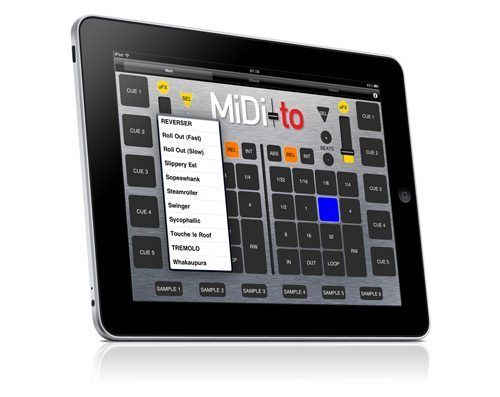
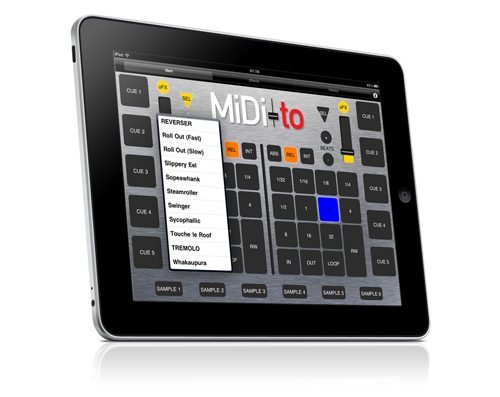
Created by a bunch of guys from Barcelona, this iPad app currently only supports Serato Scratch Live (although they are promising to support Traktor in a future release) and works over a private wireless connection which means no additional software or cables are needed. MiDi-to gives you control of practically every feature in SSL across three panels accessed from the top of the screen within the application. The Main panel accesses the 5 cue points of each deck, loop parameters, playback modes, the Ultraknob effects and 6 sample banks. The effects panel gives you access to all three DJ-FX presets per deck but you can’t get into the individual parameters to tweak the presets. The last panel gives very basic control of your library to allow you to tab through crates, select songs and load them onto a deck.
1. SETUP
Setup is pretty straight-forward although it does not equate to turning it on and rockin it out. Accessing the information panel gives you step by step instructions on connecting the iPad to SSL. The MIDI-to website also gives a friendly step-by-step video. I found myself watching this the first time I set it up because you have to set up an Audio MIDI Network on your Mac and a private network in your AirPort settings which are things the average user has probably not done before. The private network is handy though because it means you don’t have to have wireless access at the club for this to work. But this also becomes the app’s only drawback. There is a small but noticeable latency when triggering a button. This isn’t an issue for the effects or library panels but for the main panel where you need to trigger samples or cue points very quickly then you will start to notice the delay. I found I got used to it after a few sessions but do you really want to train yourself to work around a small flaw?
2. LAYOUT
The size of the iPad screen allows the buttons on the interface to be the perfect size and bright colors let you know when a feature is turned on. The only ones I found to be a bit small were the sample buttons across the bottom. If you find yourself doing fast mixes and want to trigger some samples in-between you might find yourself accidentally hitting a cue or loop button instead or just hitting the black bezel around the iPad screen (which is a much better outcome – believe me).
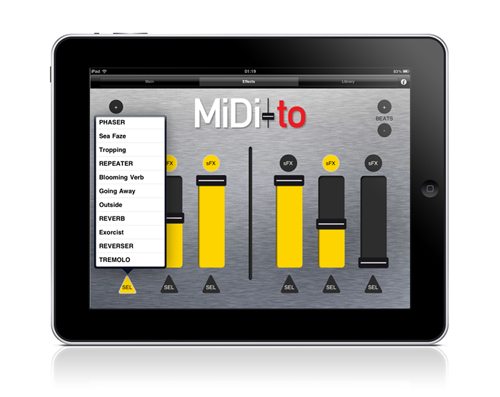
The effects panel is where I find myself spending most time during a set. I had never really played much with the DJ-FX panel in SSL because I didn’t have a controller to match and I try to avoid looking at my laptop as much as possible (more on this later). But with the easy-to-use sliders and a pull-down menu for each effects bank plus one-touch on/off buttons I’m now addicted. And since the iPad is so portable I can pick it up and go crazy with the effects while working the crowd at the same time. I could literally walk out in the crowd and start controlling anything in SSL. Not that I would ever do this, but just knowing that I could stroll back to the bar to get a drink and trigger a horn-flanger at the same time is pretty cool. Plus it is a lot easier to turn on an effect in the middle of a mix and push the effect slider up (say on a high-pass filter) all while keeping one hand on the fader. I find this hard to do on a standard mixer with built-in effects due to the closeness of my hands and even harder if I have one hand on my laptop mouse controlling the effect in the SSL software directly. I like being a little more spread out and having some space as well as having a large visual of what effect is turned on and the relative mix of the effect.
CONCLUSION: SOMEWHERE ELSE TO PUT YOUR HANDS
That is really where this app excels. I’m a visual guy. In a dark club I need constant visual feedback, with a very quick glance of what is turned on or off, be it a loop, sample or effect. I’m also prone to becoming stone-faced and glued to my laptop screen if I am not careful. This does nothing for the crowd. Anything that moves my focus away from the laptop and onto another surface causes me to remember there is an audience listening and a little interaction with them does me some good. And it never hurts for the crowd to actually see what you are doing, especially in clubs where DJ booths are elevated. Holding the iPad up and cranking an effect makes the crowd feel a little more involved and connected (as silly as that may sound to some).
CRITICAL DATA
- Reviewed: MiDi-to version 1.0.1
- Price: US street price ($4.99 – iTunes App Store)
- Communication (hardware) / Operating System (software): iPad and OSX for Mac only
- Available: Now
About the Author: Jeremy has been DJing for over 10 years as Kid Kardia in all different kinds of venues across the country and currently resides in Denver, CO.
TRAKTOR ALTERNATIVE:
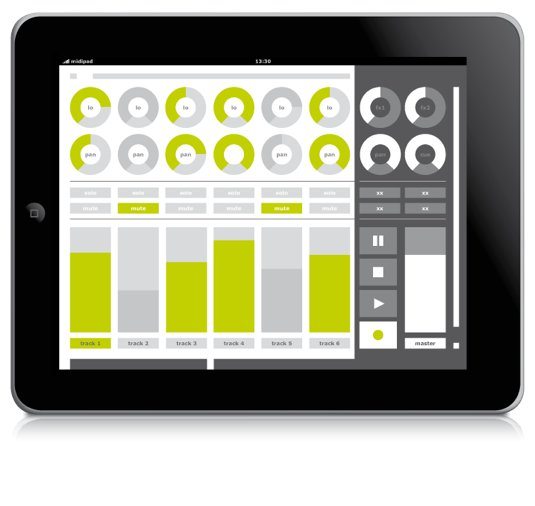
A similar app that is a more general controller for Traktor is the midi-pad. There is a great article on the software at CDM.