
DJ TechTools
  • Blog
    • DJ Gear
      • DIY Projects
      • Gear Reviews
      • New Products
      • Controllerism
    • Techniques + Tips
      • Beginner DJ
      • Advanced DJ
      • Producer
      • Finger Drummer
    • News + Culture
      • Editorials + Opinions
      • Artist Interviews
      • Performances + Routines
      • How I Play
    • DJ Software Tutorials
      • Serato Tips
        • Traktor Tips
      • CDJ Tips
      • Ableton Live Tips
  • Store
    • Run by real DJs, not a corporation
    • DJ Controllers
      • Midi Fighter Twister
      • Midi Fighter Spectra
      • Midi Fighter 64
      • View All
    • Accessories
      • Chroma USB Drive for DJs
      • Chroma Caps
      • Chroma Cables Audio
      • Chroma Cables USB-A
      • Chroma Cables: USB-C
      • DJTT Gift Card
      • Midi Fighter T-Shirt
      • Keyboard Covers
      • Earplugs by V-Moda
    • Production Gear
    • Soundcards & Mixers
  • Community
    • Popular Forums
      • General Discussion
      • Buy & Sell
      • Reviews
      • Mixes
      • Music Production
      • Show Your Setup
      • Off Topic
    • Handy Links
      • New Posts
      • Private Messages
      • Register
      • Search
    • Midi Maps
      • Traktor
      • Ableton
      • Serato DJ
      • Midi Fighter 3D
      • Midi Fighter Twister
      • Midi Fighter Spectra
  • Midi Fighter
  • Chroma
No Result
View All Result
DJ TechTools
  • Blog
    • DJ Gear
      • DIY Projects
      • Gear Reviews
      • New Products
      • Controllerism
    • Techniques + Tips
      • Beginner DJ
      • Advanced DJ
      • Producer
      • Finger Drummer
    • News + Culture
      • Editorials + Opinions
      • Artist Interviews
      • Performances + Routines
      • How I Play
    • DJ Software Tutorials
      • Serato Tips
        • Traktor Tips
      • CDJ Tips
      • Ableton Live Tips
  • Store
    • Run by real DJs, not a corporation
    • DJ Controllers
      • Midi Fighter Twister
      • Midi Fighter Spectra
      • Midi Fighter 64
      • View All
    • Accessories
      • Chroma USB Drive for DJs
      • Chroma Caps
      • Chroma Cables Audio
      • Chroma Cables USB-A
      • Chroma Cables: USB-C
      • DJTT Gift Card
      • Midi Fighter T-Shirt
      • Keyboard Covers
      • Earplugs by V-Moda
    • Production Gear
    • Soundcards & Mixers
  • Community
    • Popular Forums
      • General Discussion
      • Buy & Sell
      • Reviews
      • Mixes
      • Music Production
      • Show Your Setup
      • Off Topic
    • Handy Links
      • New Posts
      • Private Messages
      • Register
      • Search
    • Midi Maps
      • Traktor
      • Ableton
      • Serato DJ
      • Midi Fighter 3D
      • Midi Fighter Twister
      • Midi Fighter Spectra
  • Midi Fighter
  • Chroma
No Result
View All Result
DJ TechTools

Live Effects: Sugarbytes Turnado Review

Chris Cartledge by Chris Cartledge
June 12, 2011
in DJ Software
Reading Time: 3 mins read
0
Live Effects: Sugarbytes Turnado Review
174
VIEWS
Post on FacebookTweet thisUpvote on Reddit

With advanced effects getting more and more important for DJs to have in their arsenal, Sugarbytes’ Turnado thinks it has the answer by putting eight knobs of sound mauling and an omnipotent fader at your fingertips. Let’s see just how much mangling they can take.

Price: €139/$179

Out: Now

Compatibility: PC/Mac, Standalone/VST/AU

THE GOOD

  • Very easy to use.
  • Sounds great.
  • Masses of depth.

THE BAD

  • The price tag is a little on the dear side.

THE BOTTOM LINE

Turnado is a really good sounding, really easy to use effects unit. It’s that simple!


OPERATION
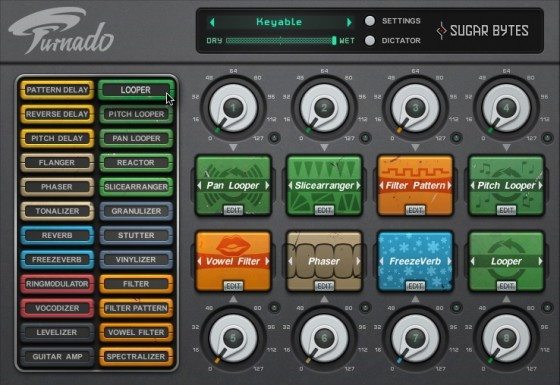
Turnado operates standalone and as a VST/AU plugin. This means that you can either integrate it with your mixer via its send/return effects or sit it directly inside a supporting host such as Torq 2.0 or Ableton Live. There are 24 effects modules in Turnado, and a single instance of the software is designed to load up to eight of them, each ready to be tweaked by their own large dial.

This ‘super knob’ concept that’s been banded around for a while in various guises is what Turnado’s based around; each effect conceals a deep editing panel underneath a single big knob which modulates all of the detailed parameters with a single motion. Further than that though, is the Dictator fader that then modulates the movement of each of the eight main dials along its travel. What this combination basically amounts to is to give a single fader the power to move every deep control in Turnado, which leads to absolutely wild and exciting (although if not thought through, somewhat jarring) effect transitions.
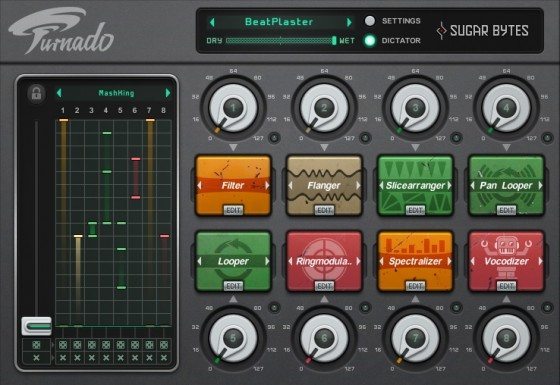
DEPTH

Of the 24 effects there are eight basic types: delay, phase, reverb, ring mod, distortion, loop, granulation, and filtering. Each has at least two variations, and all are controlled by four unique knobs – each of which can then be modulated by two LFOs and an envelope follower.  The shape of the LFO wave can be changed, as can the shape of the ramp for how every control is affected by the main knob. Of course, just as with any other music software, it’s not what it does but how it sounds when it’s doing it that will make or break its chances of ending up as part of your rig. The versatility of the effects combinations in Turnado make sure it always sounds interesting, but the basic effects themselves are very well featured too. There are multiple sounds for every type, like the comb, band, low, and high pass filters in three strengths, bit crushers with different modelling types, and an excellent sounding vowel filter section.
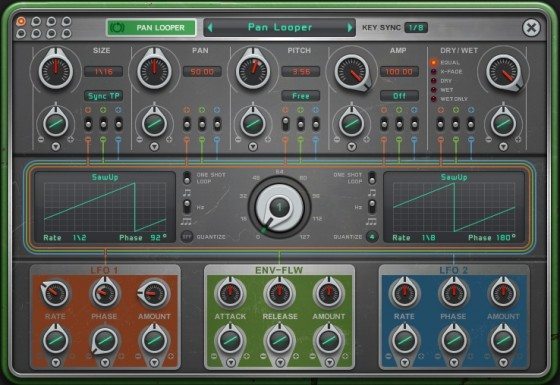
ROUTING

There are two options when it comes to routing the signal through the effects: going through each in series – from bank one to eight – or  Dynamic Signal Flow mode. Dynamic signal flow follows the order in which each effect is activated, and depending on which effects you use each method can be useful. Setting up the order of effects, is therefor an art in itself – and the ability to swap effects by dragging one onto another allows you to quickly audition how a different order can have a drastic effect on the overall sound. This option, as with the threshold for the knobs, the option to have the effect turn back off when the knob reaches full, and for the knobs to reset upon loading a new preset, can be set and saved on a per preset basis.

MIDI Learn is implemented really simply, with a right click on any parameter conjuring a Learn tab. Your learn settings can be saved inside the plugin too, which is handy for ensuring that assignments only have to be learned once in software whose workflow doesn’t revolve around saving an entire project – Torq 2.0, for instance. The combination of the easy yet powerful routing and effective MIDI learn makes Turnado more powerful and user friendly than navigating Traktor Pro’s complex mapping system or mixing and matching plugins in Ableton Live.

SUMMARY

If your software supports effects plugins, then Turnado will be right up your street. Its main virtue is its ease of use – a single unit/plugin that does so much and at the same time manages to distill its operation into the bare minimum of controls for an exciting, evolving sound – and this makes it a fantastic tool for performance. If you’re working with a closed box solution like Traktor or Scratch Live and use an external mixer with a send/return loop, you can also give Turnado a try in standalone mode. The price, when considering the amount of effects available and the versatility of Turnado, is also very fair.

Tags: aueffectspluginReviewstandaloneturnadovst
Share1Tweet1Share
Previous Post

Midi Fighter Pro Mappings

Next Post

Total Control! (almost)

Related Posts

Akai Launches MPC Live III Standalone With 8-Core Processor, Clip Matrix, Stems, and 3D Pads
Breaking News

Akai Launches MPC Live III Standalone With 8-Core Processor, Clip Matrix, Stems, and 3D Pads

October 2, 2025
Is Pioneer DJ’s PLX-CRSS12 the ultimate turntable for DJs?
DJ Controllers

Is Pioneer DJ’s PLX-CRSS12 the ultimate turntable for DJs?

March 29, 2024
ROLI’s Seaboard RISE 2: seamless integration into the expressive world of MPE [REVIEW]
DJ Gear

ROLI’s Seaboard RISE 2: seamless integration into the expressive world of MPE [REVIEW]

November 27, 2023
Load More
Next Post
Total Control! (almost)

Total Control! (almost)

Want to reach DJTT's audience here?

Shoot an email to advertising@djtechtools.com

DJTT ads
DJTT newsletter
Midi Fighter
Chat with us
  • ABOUT DJTT
  • CONTACT
  • PRIVACY
  • MIDI FIGHTER HELP
  • ABOUT DJTT
  • JOBS
  • CONTACT US
  • ADVERTISE
  • PRIVACY POLICY
  • ACCESSIBILITY STATEMENT

© 2024 DJ Techtools all rights reserved by DJ TechTools on all content unless otherwise noted.

No Result
View All Result
  • Blog
    • DJ Gear
      • DIY Projects
      • Gear Reviews
      • New Products
      • Controllerism
    • Techniques + Tips
      • Beginner DJ
      • Advanced DJ
      • Producer
      • Finger Drummer
    • News + Culture
      • Editorials + Opinions
      • Artist Interviews
      • Performances + Routines
      • How I Play
    • DJ Software Tutorials
      • Serato Tips
      • CDJ Tips
      • Ableton Live Tips
  • Store
    • Run by real DJs, not a corporation
    • DJ Controllers
      • Midi Fighter Twister
      • Midi Fighter Spectra
      • Midi Fighter 64
      • View All
    • Accessories
      • Chroma USB Drive for DJs
      • Chroma Caps
      • Chroma Cables Audio
      • Chroma Cables USB-A
      • Chroma Cables: USB-C
      • DJTT Gift Card
      • Midi Fighter T-Shirt
      • Keyboard Covers
      • Earplugs by V-Moda
    • Production Gear
    • Soundcards & Mixers
  • Community
    • Popular Forums
      • General Discussion
      • Buy & Sell
      • Reviews
      • Mixes
      • Music Production
      • Show Your Setup
      • Off Topic
    • Handy Links
      • New Posts
      • Private Messages
      • Register
      • Search
    • Midi Maps
      • Traktor
      • Ableton
      • Serato DJ
      • Midi Fighter 3D
      • Midi Fighter Twister
      • Midi Fighter Spectra
  • Midi Fighter
  • Chroma

© 2024 DJ Techtools all rights reserved by DJ TechTools on all content unless otherwise noted.

This website uses cookies. By continuing to use this website you are giving consent to cookies being used. Visit our Privacy and Cookie Policy.