DJ TechTools
  • Blog
    • DJ Gear
      • DIY Projects
      • Gear Reviews
      • New Products
      • Controllerism
    • Techniques + Tips
      • Beginner DJ
      • Advanced DJ
      • Producer
      • Finger Drummer
    • News + Culture
      • Editorials + Opinions
      • Artist Interviews
      • Performances + Routines
      • How I Play
    • DJ Software Tutorials
      • Serato Tips
        • Traktor Tips
      • CDJ Tips
      • Ableton Live Tips
  • Store
    • Run by real DJs, not a corporation
    • DJ Controllers
      • Midi Fighter Twister
      • Midi Fighter Spectra
      • Midi Fighter 64
      • View All
    • Accessories
      • Chroma USB Drive for DJs
      • Chroma Caps
      • Chroma Cables Audio
      • Chroma Cables USB-A
      • Chroma Cables: USB-C
      • DJTT Gift Card
      • Midi Fighter T-Shirt
      • Keyboard Covers
      • Earplugs by V-Moda
    • Production Gear
    • Soundcards & Mixers
  • Community
    • Popular Forums
      • General Discussion
      • Buy & Sell
      • Reviews
      • Mixes
      • Music Production
      • Show Your Setup
      • Off Topic
    • Handy Links
      • New Posts
      • Private Messages
      • Register
      • Search
    • Midi Maps
      • Traktor
      • Ableton
      • Serato DJ
      • Midi Fighter 3D
      • Midi Fighter Twister
      • Midi Fighter Spectra
  • Midi Fighter
  • Chroma
No Result
View All Result
DJ TechTools
  • Blog
    • DJ Gear
      • DIY Projects
      • Gear Reviews
      • New Products
      • Controllerism
    • Techniques + Tips
      • Beginner DJ
      • Advanced DJ
      • Producer
      • Finger Drummer
    • News + Culture
      • Editorials + Opinions
      • Artist Interviews
      • Performances + Routines
      • How I Play
    • DJ Software Tutorials
      • Serato Tips
        • Traktor Tips
      • CDJ Tips
      • Ableton Live Tips
  • Store
    • Run by real DJs, not a corporation
    • DJ Controllers
      • Midi Fighter Twister
      • Midi Fighter Spectra
      • Midi Fighter 64
      • View All
    • Accessories
      • Chroma USB Drive for DJs
      • Chroma Caps
      • Chroma Cables Audio
      • Chroma Cables USB-A
      • Chroma Cables: USB-C
      • DJTT Gift Card
      • Midi Fighter T-Shirt
      • Keyboard Covers
      • Earplugs by V-Moda
    • Production Gear
    • Soundcards & Mixers
  • Community
    • Popular Forums
      • General Discussion
      • Buy & Sell
      • Reviews
      • Mixes
      • Music Production
      • Show Your Setup
      • Off Topic
    • Handy Links
      • New Posts
      • Private Messages
      • Register
      • Search
    • Midi Maps
      • Traktor
      • Ableton
      • Serato DJ
      • Midi Fighter 3D
      • Midi Fighter Twister
      • Midi Fighter Spectra
  • Midi Fighter
  • Chroma
No Result
View All Result
DJ TechTools

Midi Fighter Pro Mappings

Ean Golden by Ean Golden
June 10, 2011
in Controllerism, DJ Equipment / Accessories, Midi Fighter, Video Posts
Reading Time: 4 mins read
0
Midi Fighter Pro Mappings
340
VIEWS
Post on FacebookTweet thisUpvote on Reddit


For your viewing pleasure I offer up a quick demo of two models from our new, sold out Midi Fighter Pro series. Instead of a technically complex routine, this video shows a improv exploration of the unit’s performance section that can be enjoyed by DJs and controllerists of all skill levels. The MF Pro series are built to be used as learned instruments and provide intuitive tools that can be unleashed at any moment when inspiration strikes. Just select the preset of your choice, and start working the faders to find a complex range of sounds and textures that can transform any track into your own personal sonic landscape.

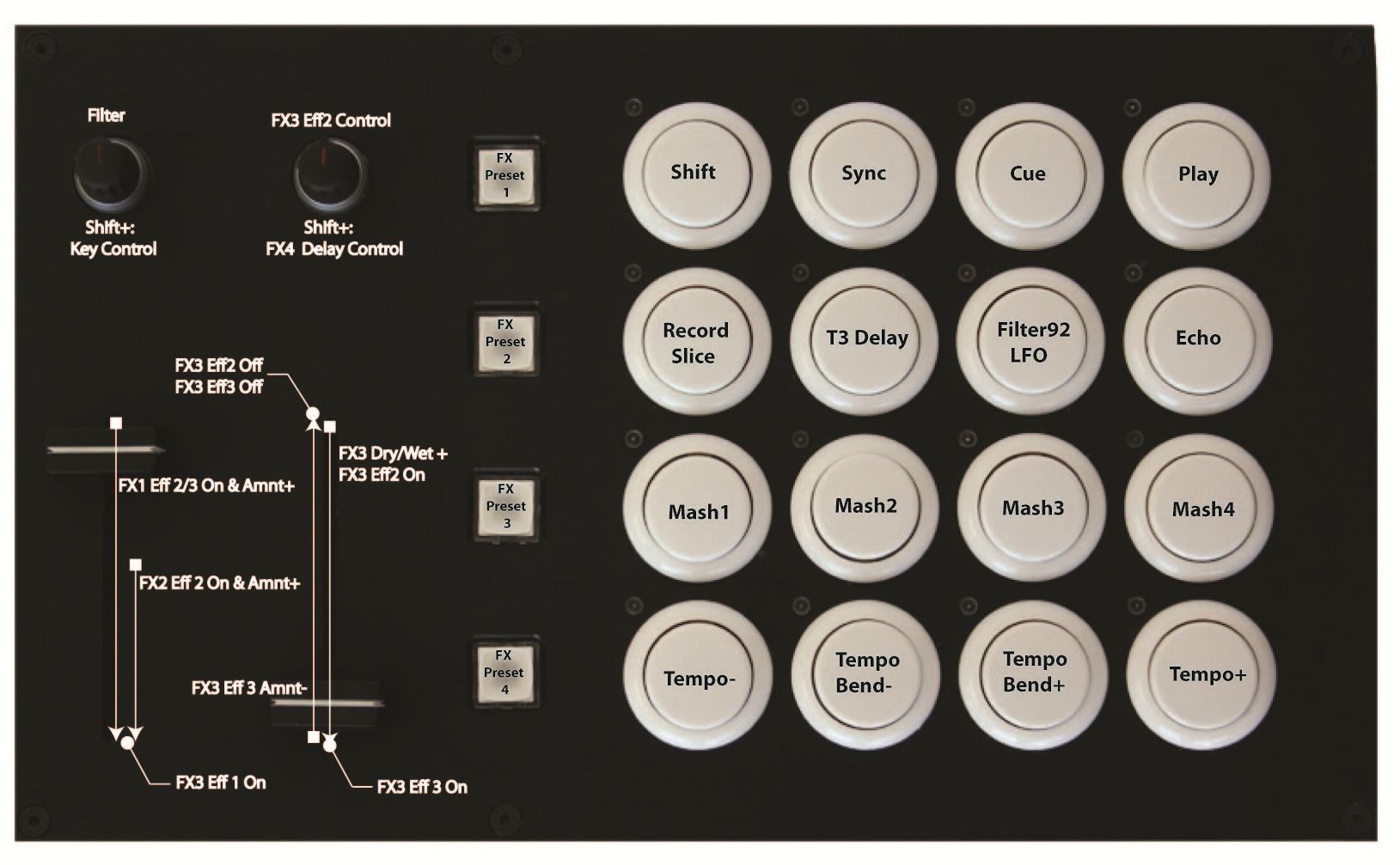
CUE MASTER

The Cue Master is my personal cue point weapon of choice. The idea is that the two faders modulate cue points in a very expressive way transforming them from repetitive samples into a fresh musical palette.  For this video I have loaded an accapella of Brittney Spears “Toxic”

  • The four small buttons activate presets, which load a specific group of effects that sound great together.
  • The super faders are then mapped to those effects across the full range of the fader producing a mind-bending array of sounds.
  • The absolute left knob is for the absolutely critical filter cranking.
  • The right knob modulates the value of the fader below it.

The arcade buttons contain a special combination of the Deckalized and Instant Gratification mappings with a few important modifications:

  • The lower buttons are tied to pitch bending and tempo nudge.
  • This allows a single MF Pro to be used as a complete deck solution.
  • I personally use two of them with a mixer for a next level digital DJ rig.

Download the mapping and provide feedback here

BEAT MASHER
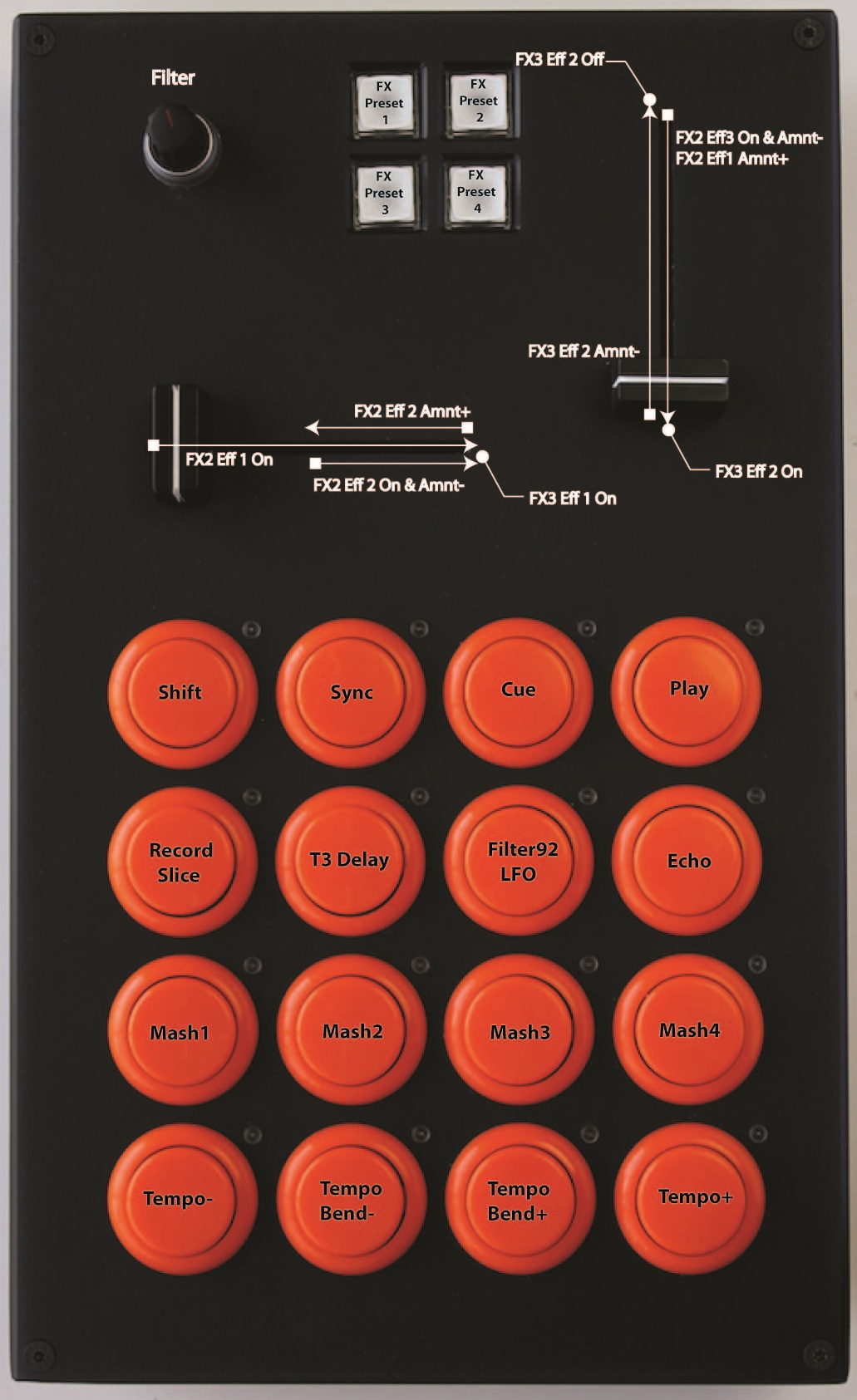
The Beat Masher was designed to take beat repeat effects into a new sonic territory and produce studio quality builds at any moment. In the example above, the crossfader engages a beat masher which is then modulated by a filter and gater on the line fader. As the two start to work in combination they play off each other producing unexpected fills and variations. Throwing the line fader to the bottom kicks in a fourth transform effect which can then be worked back up the full range of the fader!

  • Each of the four buttons load a specific group of effects that sound great together.
  • Each of the two faders are mapped to those effects across the range of the fader.
  • The faders are meant to be used at the same time with each hand.
  • They each interact with each other in relative and unpredictable ways.
  • The knob is tied to a filter for that deck.
  • Each fader automatically routes those effects to the selected deck.

The buttons contain a special combination of the Deckalized and Instant Gratification mappings with a few important modifications:

  • The lower buttons are tied to pitch bending and tempo nudge.
  • This allows a single MF Pro to be used as a complete deck solution.
  • I personally use two of them with a mixer for a next level digital DJ rig.

Download the mapping and provide feedback here

Even though both of these controllers are sold out at the moment, you can add yourself to a waiting list to be notified when they are available (in about four weeks)

OTHER MAPPINGS AND A DEEPER EXPLANATION

These mappings have taken months to develop and we plan on making several iterative changes from your suggestions over the coming month. We are also finalizing the XX Fader/Super knobs mapping as we speak and plan to release those in a few weeks time. Once all of these mappings are in a really stable, solid place, I will then shoot a detailed video explaining the final functions.  This should probably happen within a month, but don’t hold me to that time line as we wont stop until they are near perfection!

Tags: arcadebeat mashercue masterdeckDownloadeffectsmappingmasterMidi Fighterproremix
Share3Tweet2Share
Previous Post

Amon Tobin – The Worlds Most Amazing DJ Booth?

Next Post

Live Effects: Sugarbytes Turnado Review

Related Posts

Use your Midi Fighter Twister as an Audio-Reactive Visualizer
Ableton Live Tips

Use your Midi Fighter Twister as an Audio-Reactive Visualizer

June 23, 2025
Control an entire studio with Midi Fighter Spectra (like Mad Zach)
Finger Drumming

Control an entire studio with Midi Fighter Spectra (like Mad Zach)

May 9, 2025
Midi Fighter Utility 2.90
Finger Drumming

Midi Fighter Utility 2.90 Released

June 27, 2024
Load More
Next Post
Live Effects: Sugarbytes Turnado Review

Live Effects: Sugarbytes Turnado Review

Want to reach DJTT's audience here?

Shoot an email to advertising@djtechtools.com

DJTT ads
DJTT newsletter
Midi Fighter
Chat with us
  • ABOUT DJTT
  • CONTACT
  • PRIVACY
  • MIDI FIGHTER HELP
  • ABOUT DJTT
  • JOBS
  • CONTACT US
  • ADVERTISE
  • PRIVACY POLICY
  • ACCESSIBILITY STATEMENT

© 2024 DJ Techtools all rights reserved by DJ TechTools on all content unless otherwise noted.

No Result
View All Result
  • Blog
    • DJ Gear
      • DIY Projects
      • Gear Reviews
      • New Products
      • Controllerism
    • Techniques + Tips
      • Beginner DJ
      • Advanced DJ
      • Producer
      • Finger Drummer
    • News + Culture
      • Editorials + Opinions
      • Artist Interviews
      • Performances + Routines
      • How I Play
    • DJ Software Tutorials
      • Serato Tips
      • CDJ Tips
      • Ableton Live Tips
  • Store
    • Run by real DJs, not a corporation
    • DJ Controllers
      • Midi Fighter Twister
      • Midi Fighter Spectra
      • Midi Fighter 64
      • View All
    • Accessories
      • Chroma USB Drive for DJs
      • Chroma Caps
      • Chroma Cables Audio
      • Chroma Cables USB-A
      • Chroma Cables: USB-C
      • DJTT Gift Card
      • Midi Fighter T-Shirt
      • Keyboard Covers
      • Earplugs by V-Moda
    • Production Gear
    • Soundcards & Mixers
  • Community
    • Popular Forums
      • General Discussion
      • Buy & Sell
      • Reviews
      • Mixes
      • Music Production
      • Show Your Setup
      • Off Topic
    • Handy Links
      • New Posts
      • Private Messages
      • Register
      • Search
    • Midi Maps
      • Traktor
      • Ableton
      • Serato DJ
      • Midi Fighter 3D
      • Midi Fighter Twister
      • Midi Fighter Spectra
  • Midi Fighter
  • Chroma

© 2024 DJ Techtools all rights reserved by DJ TechTools on all content unless otherwise noted.

This website uses cookies. By continuing to use this website you are giving consent to cookies being used. Visit our Privacy and Cookie Policy.