DJ TechTools
  • Blog
    • DJ Gear
      • DIY Projects
      • Gear Reviews
      • New Products
      • Controllerism
    • Techniques + Tips
      • Beginner DJ
      • Advanced DJ
      • Producer
      • Finger Drummer
    • News + Culture
      • Editorials + Opinions
      • Artist Interviews
      • Performances + Routines
      • How I Play
    • DJ Software Tutorials
      • Serato Tips
        • Traktor Tips
      • CDJ Tips
      • Ableton Live Tips
  • Store
    • Run by real DJs, not a corporation
    • DJ Controllers
      • Midi Fighter Twister
      • Midi Fighter Spectra
      • Midi Fighter 64
      • View All
    • Accessories
      • Chroma USB Drive for DJs
      • Chroma Caps
      • Chroma Cables Audio
      • Chroma Cables USB-A
      • Chroma Cables: USB-C
      • DJTT Gift Card
      • Midi Fighter T-Shirt
      • Keyboard Covers
      • Earplugs by V-Moda
    • Production Gear
    • Soundcards & Mixers
  • Community
    • Popular Forums
      • General Discussion
      • Buy & Sell
      • Reviews
      • Mixes
      • Music Production
      • Show Your Setup
      • Off Topic
    • Handy Links
      • New Posts
      • Private Messages
      • Register
      • Search
    • Midi Maps
      • Traktor
      • Ableton
      • Serato DJ
      • Midi Fighter 3D
      • Midi Fighter Twister
      • Midi Fighter Spectra
  • Midi Fighter
  • Chroma
No Result
View All Result
DJ TechTools
  • Blog
    • DJ Gear
      • DIY Projects
      • Gear Reviews
      • New Products
      • Controllerism
    • Techniques + Tips
      • Beginner DJ
      • Advanced DJ
      • Producer
      • Finger Drummer
    • News + Culture
      • Editorials + Opinions
      • Artist Interviews
      • Performances + Routines
      • How I Play
    • DJ Software Tutorials
      • Serato Tips
        • Traktor Tips
      • CDJ Tips
      • Ableton Live Tips
  • Store
    • Run by real DJs, not a corporation
    • DJ Controllers
      • Midi Fighter Twister
      • Midi Fighter Spectra
      • Midi Fighter 64
      • View All
    • Accessories
      • Chroma USB Drive for DJs
      • Chroma Caps
      • Chroma Cables Audio
      • Chroma Cables USB-A
      • Chroma Cables: USB-C
      • DJTT Gift Card
      • Midi Fighter T-Shirt
      • Keyboard Covers
      • Earplugs by V-Moda
    • Production Gear
    • Soundcards & Mixers
  • Community
    • Popular Forums
      • General Discussion
      • Buy & Sell
      • Reviews
      • Mixes
      • Music Production
      • Show Your Setup
      • Off Topic
    • Handy Links
      • New Posts
      • Private Messages
      • Register
      • Search
    • Midi Maps
      • Traktor
      • Ableton
      • Serato DJ
      • Midi Fighter 3D
      • Midi Fighter Twister
      • Midi Fighter Spectra
  • Midi Fighter
  • Chroma
No Result
View All Result
DJ TechTools

Traktor Kontrol S2 – Exclusive Look

Ean Golden by Ean Golden
August 25, 2011
in Controllerism, DJ Controllers, Reviews
Reading Time: 6 mins read
0
Traktor Kontrol S2 – Exclusive Look
368
VIEWS
Post on FacebookTweet thisUpvote on Reddit

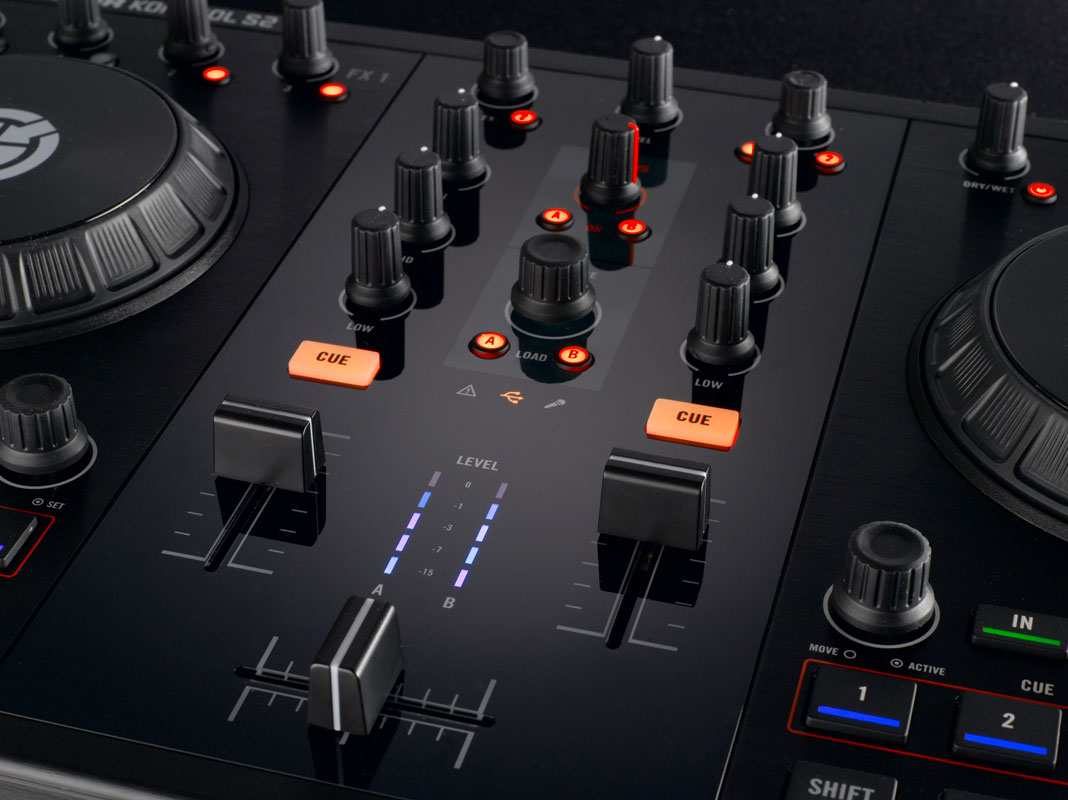
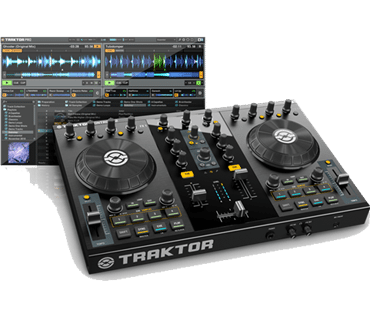
Today Native Instruments announced a new installment in their DJ line of products, the two channel all-in-one controller called Kontrol S2. This is a more portable and streamlined version of the popular Kontrol S4, which condenses a four deck workflow into a very compact form, using decks C and D as always available sample/loop players. Since I shot the S2 promo video for NI last week (video after the jump), we got the exclusive chance to really dig in and test the unit fully.

DETAILS
  • Product: Native Instruments Kontrol S2
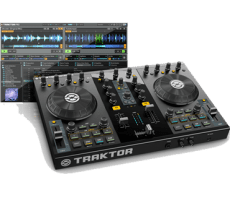
  • Price: $699 (MSRP), $599 (Expected Retail Price)
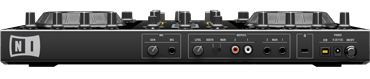
  • Communication: MIDI over USB
  • Available Now : Exclusive Traktor S2 Bundle Deals for Dj TechTools Readers 
  • Ships with: Traktor Pro S2, loop collection, international power adapter, USB 2.0 cable, Traktor Pro 2
  • Weight: 6 pounds (3.4 kg)
  • Dimensions: 17.25 x 11.5 x 1.75 inches
Good

  • Very simple loop workflow involves 4 decks without bloating controls.
  • Maintains the same professional mixer spacing of the S4 while trimming size.
  • Can run without a power supply (USB powered).
  • Separate loop/sample volume knob provides dedicated volume for decks C/D.

Bad

  • The filter knobs are gone.
  • Missing DVS/Audio inputs.
  • Lacks control over effects units 3 and 4.
Bottom Line

Simple and straight forward, the S2 provides a clear interface for mixing two tracks and a group of loops. Without a lot of controls you are forced to find creative ways to mix and interact with the music, which was a welcome change from increasingly complex DJ controllers today. Price at $599 (including Traktor Pro 2), this is going to be a hard package to beat for new DJ’s looking to get into DJing or established DJs that want a smaller controller without all the bells and whistles.

LIVE IN ACTION

The video above is a live remix I put together of Depeche Mode’s “Enjoy the Silence” for this release. Rather than random controllerism madness, the focus was on creating something musically compelling that would work well on a dance floor. If you like the mix, follow my sound cloud page where we will be posting a longer DJ version soon.

  • In the left deck is a dubstep instrumental I worked up for the song.
  • In the right deck I triggered the acapella using cue points.
  • each of the 2 jog wheels are sampling and effecting the instrumental and accapella to create fills.
  • In each loop deck is a different loop that I drop over various sections and effect individually.

HARDWARE
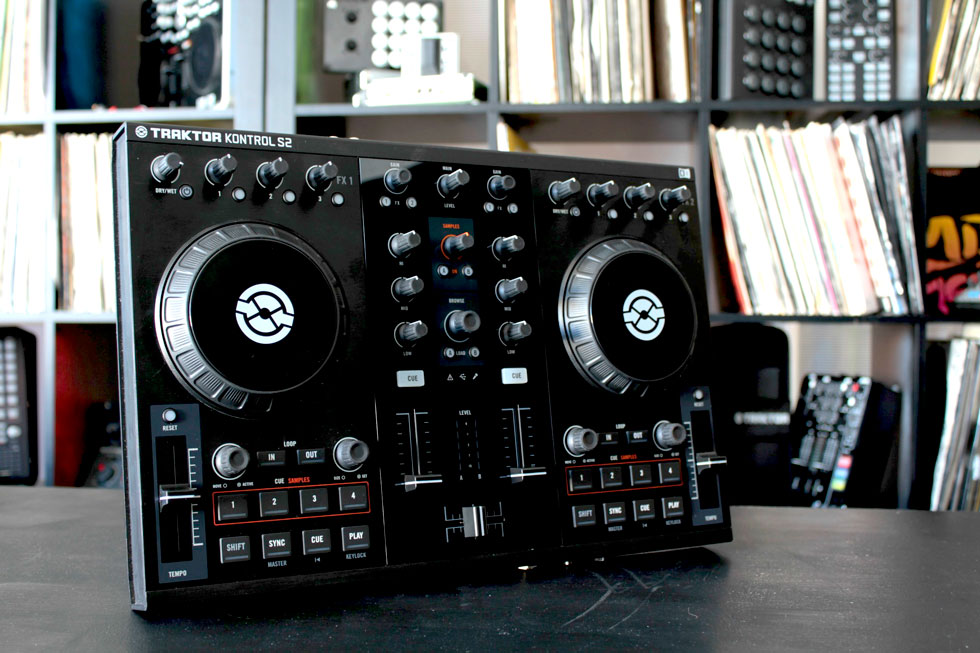
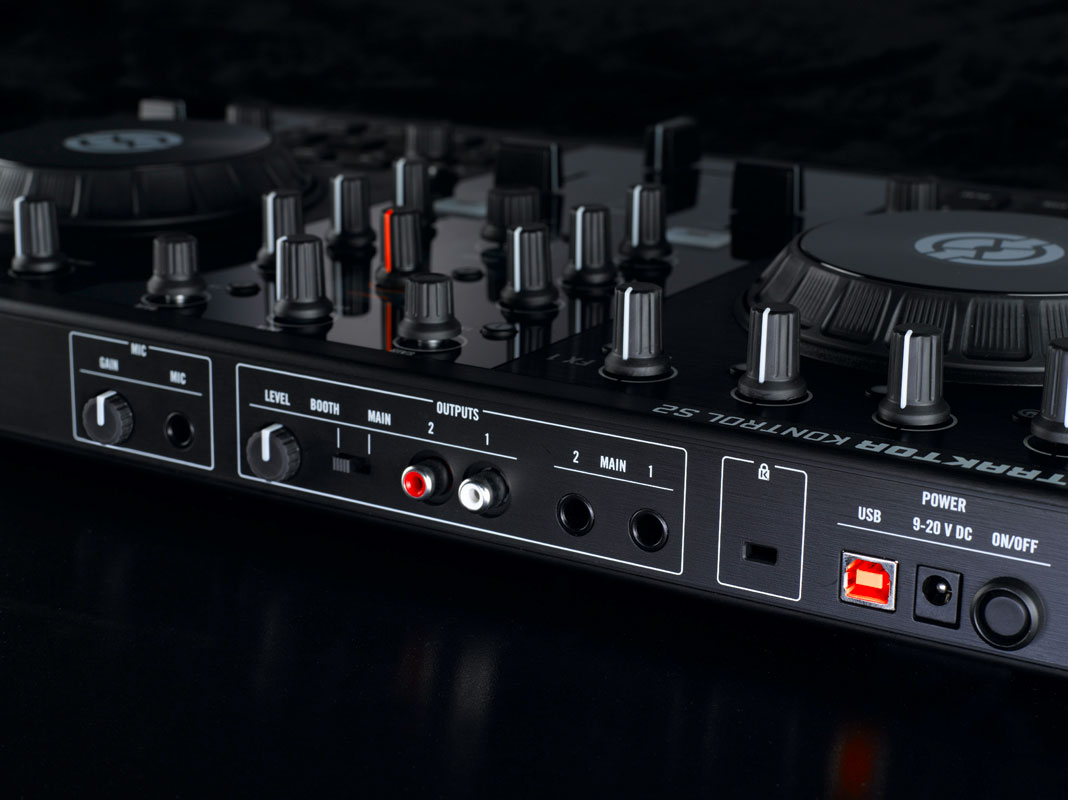
The hardware is largely the same as the S4, but stripped down to the essentials. There are a few things missing that you might care about:

  • Dedicated filters.
  • Ability to switch decks (platters and faders).
  • Loop length indicators.
  • Cue points 5-8.
  • Loop recorder.
  • Phono inputs (for DVS control).

While some DJs may feel that these are necessary, the reality is that most of the mentioned controls are extraneous to most common mixing scenarios (except filters, which are a legitimate gripe). The S2 does provide all of the essential controls you need for basic mixing and layering loops and samples over two tracks including:

  • Transport controls.
  • Four cue points/ loop deck launching.
  • Dedicated loop volume control (similar to an aux channel input).
  • Effects routing and control over FX units 1 and 2.

The VCI-100 kicked off this wild controller interface trend and now the S2 circles back to that form factor – providing a more affordable and portable controller in the classic two deck format. We have certainly found in our own testing and conversations with artists that mixing four full decks is rarely actually used – what people really want is a simple way of layering extra sounds.
 

SOFTWARE
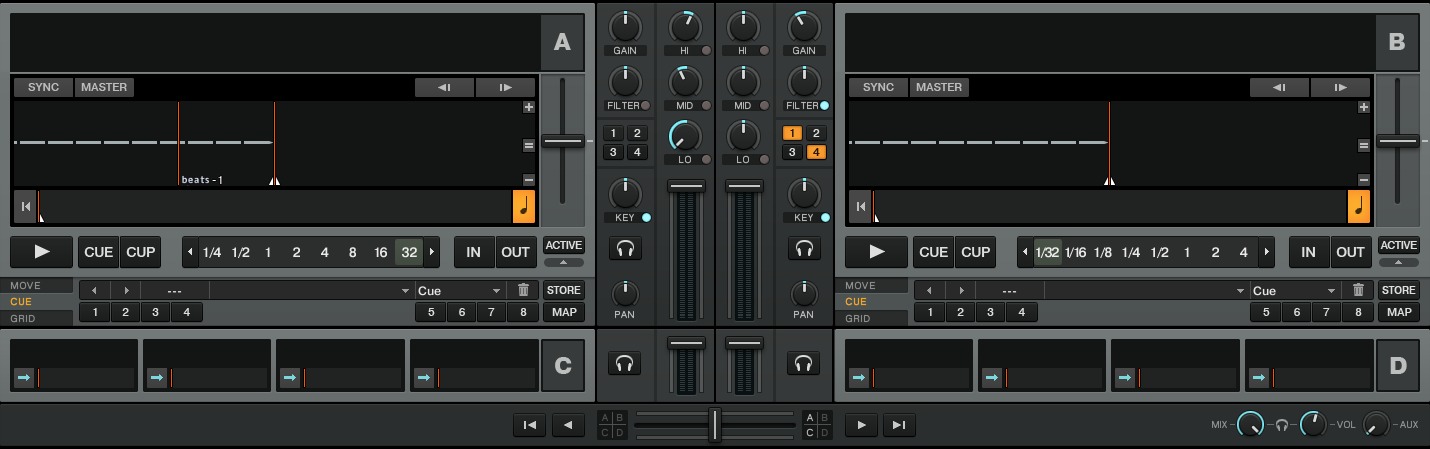

The S2 controller comes bundled with Traktor Pro 2 and does not have its own software. Instead, a new update for Traktor Pro 2 will include a custom panel in which you can configure the s2 to your personal taste.
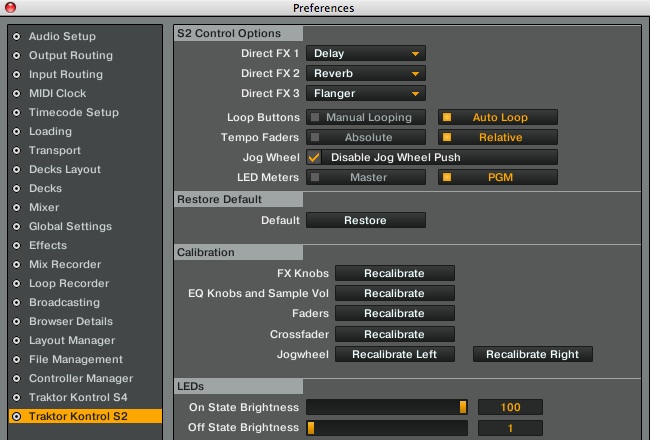
This panel is missing the level of configuration found with the S4 (jog wheel effects are gone for example) but NI did bring one new feature to the table that more than makes up for that. They have improved the S2’s custom user mapping, so you can modify and change the way your controller works without losing all of the resolution offered by the native HID connection. This is a step up from the s4, which would only allow removal of functions by turning the controller into MIDI mode, which limited it’s functionality.

For my Depeche mode video, I built a custom mapping which added the option for FX control through the jog wheels without losing a high resolution connection. This custom mapping was based on our old Fader FX mode, allowing access to FX units 3/4, which dont have dedicated controls.

RELEASE INFORMATION

Click here to check out our exclusive Traktor S2 Deals for Dj TechTools Readers 

FINAL THOUGHTS
The S2 may not have any ground-breaking new features or design elements but it does do the intended task of mixing tracks and loops very well. This controller, augmented by a more performance-oriented controller could provide a great centerpiece to your DJ arsenal. My staff and I were all lamenting the lack of a filter knob but it was really nice to have a NI controller that takes up less space and has a focus on the basic mixing controls. The S4 is great, but it does end up being a bit large, and at $899 the price is simply out of some DJ’s reach. This new piece strikes a nice balance and offers a good value without scrimping too much on functionality.

Check back in with us in a month when we will have a comprehensive review of the brand new Kontrol S2.


Tags: controllerdjinterfaceKontrolkontrol s2midi controllerNative InstrumentsReviews2S4Traktor s2Traktor Tips
Share3Tweet2Share
Previous Post

How Big Do You Like Your Platter, Sir?

Next Post

PocoPoco – The Motorized Controller

Related Posts

A screenshot of the 2.91 version of the Midi Fighter Utility software in Dark Mode
Midi Fighter

Midi Fighter Utility 2.91 Is Out; Our Biggest Update in Years

June 1, 2026
A Prime 4+ and a Kontrol S3 intercut against eachother over a black background
Breaking News

InMusic just bought Native Instruments. So what now for Traktor?

May 8, 2026
Traktor MX2: Native Instruments’ New 2-Channel Controller
DJ Gear Announcements

Traktor MX2: Native Instruments’ New 2-Channel Controller

October 8, 2025
Load More
Next Post
PocoPoco – The Motorized Controller

PocoPoco - The Motorized Controller

Want to reach DJTT's audience here?

Shoot an email to advertising@djtechtools.com

DJTT ads
DJTT newsletter
Midi Fighter
Chat with us
  • ABOUT DJTT
  • CONTACT
  • PRIVACY
  • MIDI FIGHTER HELP
  • ABOUT DJTT
  • JOBS
  • CONTACT US
  • ADVERTISE
  • PRIVACY POLICY
  • ACCESSIBILITY STATEMENT

© 2024 DJ Techtools all rights reserved by DJ TechTools on all content unless otherwise noted.

No Result
View All Result
  • Blog
    • DJ Gear
      • DIY Projects
      • Gear Reviews
      • New Products
      • Controllerism
    • Techniques + Tips
      • Beginner DJ
      • Advanced DJ
      • Producer
      • Finger Drummer
    • News + Culture
      • Editorials + Opinions
      • Artist Interviews
      • Performances + Routines
      • How I Play
    • DJ Software Tutorials
      • Serato Tips
      • CDJ Tips
      • Ableton Live Tips
  • Store
    • Run by real DJs, not a corporation
    • DJ Controllers
      • Midi Fighter Twister
      • Midi Fighter Spectra
      • Midi Fighter 64
      • View All
    • Accessories
      • Chroma USB Drive for DJs
      • Chroma Caps
      • Chroma Cables Audio
      • Chroma Cables USB-A
      • Chroma Cables: USB-C
      • DJTT Gift Card
      • Midi Fighter T-Shirt
      • Keyboard Covers
      • Earplugs by V-Moda
    • Production Gear
    • Soundcards & Mixers
  • Community
    • Popular Forums
      • General Discussion
      • Buy & Sell
      • Reviews
      • Mixes
      • Music Production
      • Show Your Setup
      • Off Topic
    • Handy Links
      • New Posts
      • Private Messages
      • Register
      • Search
    • Midi Maps
      • Traktor
      • Ableton
      • Serato DJ
      • Midi Fighter 3D
      • Midi Fighter Twister
      • Midi Fighter Spectra
  • Midi Fighter
  • Chroma

© 2024 DJ Techtools all rights reserved by DJ TechTools on all content unless otherwise noted.

This website uses cookies. By continuing to use this website you are giving consent to cookies being used. Visit our Privacy and Cookie Policy.