DJ TechTools
  • Blog
    • DJ Gear
      • DIY Projects
      • Gear Reviews
      • New Products
      • Controllerism
    • Techniques + Tips
      • Beginner DJ
      • Advanced DJ
      • Producer
      • Finger Drummer
    • News + Culture
      • Editorials + Opinions
      • Artist Interviews
      • Performances + Routines
      • How I Play
    • DJ Software Tutorials
      • Serato Tips
        • Traktor Tips
      • CDJ Tips
      • Ableton Live Tips
  • Store
    • Run by real DJs, not a corporation
    • DJ Controllers
      • Midi Fighter Twister
      • Midi Fighter Spectra
      • Midi Fighter 64
      • View All
    • Accessories
      • Chroma USB Drive for DJs
      • Chroma Caps
      • Chroma Cables Audio
      • Chroma Cables USB-A
      • Chroma Cables: USB-C
      • DJTT Gift Card
      • Midi Fighter T-Shirt
      • Keyboard Covers
      • Earplugs by V-Moda
    • Production Gear
    • Soundcards & Mixers
  • Community
    • Popular Forums
      • General Discussion
      • Buy & Sell
      • Reviews
      • Mixes
      • Music Production
      • Show Your Setup
      • Off Topic
    • Handy Links
      • New Posts
      • Private Messages
      • Register
      • Search
    • Midi Maps
      • Traktor
      • Ableton
      • Serato DJ
      • Midi Fighter 3D
      • Midi Fighter Twister
      • Midi Fighter Spectra
  • Midi Fighter
  • Chroma
No Result
View All Result
DJ TechTools
  • Blog
    • DJ Gear
      • DIY Projects
      • Gear Reviews
      • New Products
      • Controllerism
    • Techniques + Tips
      • Beginner DJ
      • Advanced DJ
      • Producer
      • Finger Drummer
    • News + Culture
      • Editorials + Opinions
      • Artist Interviews
      • Performances + Routines
      • How I Play
    • DJ Software Tutorials
      • Serato Tips
        • Traktor Tips
      • CDJ Tips
      • Ableton Live Tips
  • Store
    • Run by real DJs, not a corporation
    • DJ Controllers
      • Midi Fighter Twister
      • Midi Fighter Spectra
      • Midi Fighter 64
      • View All
    • Accessories
      • Chroma USB Drive for DJs
      • Chroma Caps
      • Chroma Cables Audio
      • Chroma Cables USB-A
      • Chroma Cables: USB-C
      • DJTT Gift Card
      • Midi Fighter T-Shirt
      • Keyboard Covers
      • Earplugs by V-Moda
    • Production Gear
    • Soundcards & Mixers
  • Community
    • Popular Forums
      • General Discussion
      • Buy & Sell
      • Reviews
      • Mixes
      • Music Production
      • Show Your Setup
      • Off Topic
    • Handy Links
      • New Posts
      • Private Messages
      • Register
      • Search
    • Midi Maps
      • Traktor
      • Ableton
      • Serato DJ
      • Midi Fighter 3D
      • Midi Fighter Twister
      • Midi Fighter Spectra
  • Midi Fighter
  • Chroma
No Result
View All Result
DJ TechTools

Beatport Launches Mashbox, an iOS “Mobile Mashup Machine”

Dan White by Dan White
December 9, 2011
in DJ Controllers, DJ Software, Editorials and Opinions, News, News + Culture, Reviews
Reading Time: 4 mins read
0
Beatport Launches Mashbox, an iOS “Mobile Mashup Machine”
248
VIEWS
Post on FacebookTweet thisUpvote on Reddit

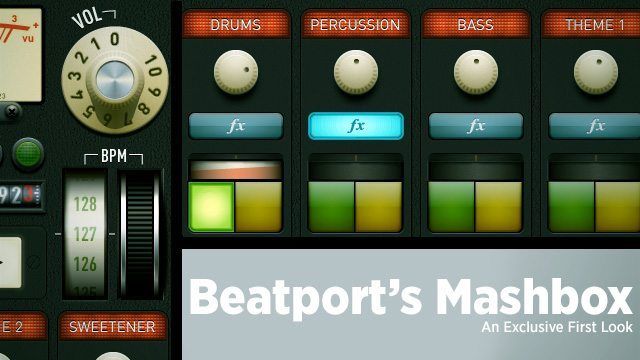
What happens when the largest internet music store for DJs decides to make an iOS app? This morning, Beatport announced a new iOS application for mashup enthusiasts, Mashbox. We take a closer look at how good the application is for performing and playing around, and Ean has his own editorial perspective to share on what this means for the future of stems and mashups. 
The Basic Overview

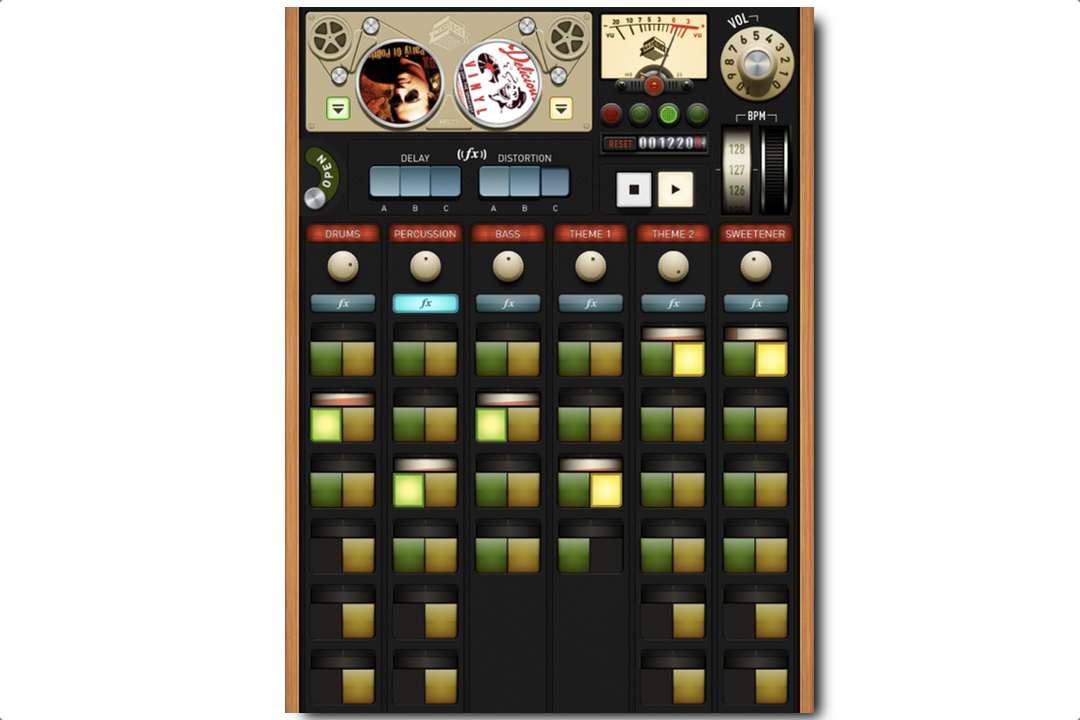
Mashbox is a surprisingly simple workflow, allowing the user to load and mash up loop packs of various popular tracks. The loop packs are divided into six different channels, “Drums”, “Percussion”, “Bass”, “Theme 1”, “Theme 2”, and “Sweetener”. Each channel can have a maximum single loop playing on it at a time, and is controlled with an awkward volume knob at the top of each one.  All of the loop triggering is quantized and completely synced, so (for better or for worse  your mashups will always sound clean and on-tempo.
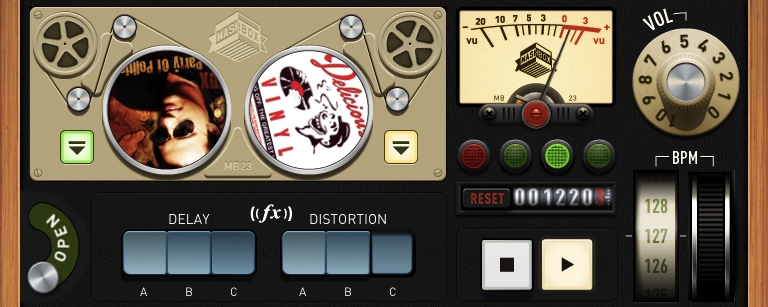
In addition, there is a single FX unit that can be applied to one or many of the channels concurrently – we found that the delay was nice, but the distortion often overpowered a number of the samples and needed a significant volume decrease.

The interface essentially comes off as an extremely stripped-down Ableton Live styled in a cute-but-frustrating analog design. You can’t do anywhere near as much as in a real DJ program or DAW, but it does do what it claims to – building mashups on the fly – very well.


The application is free until December 31st, and then .99¢ after that – but it’s clear that Beatport isn’t expecting to make money off of app sales, but rather of loop pack sales. The application comes with just three tracks to mess around with- “Funky Cold Medina”, “C’Mon”, and “Party of Politics”. Each new pack (there are 12 to purchase at the moment) in the built-in marketplace costs $1.99.

What We Like

  • Free!
  • Wide Music Variety: while the selection is limited to 12 tracks at the moment, they’re from a number of genres – and Beatport is promising many, many more tracks.
  • Analog Interface Design: from the clever downbeat lights to the odometer-style beat counter
  • BPM Dial: makes this potentially a tool to mix in with other production work

What Needs Work

  • Design Defeats Function: As classic as it looks to have knobs over every channel, knobs suck on a touchscreen. Also, closing the marketplace window requires you to flip an awkward switch.
  • Track Player Design: Why put ugly spinning album art in a cool looking analoge interface?
  • Limited Playability: Only one clip active per channel may keep the mashups clean, but we get that feeling that we’re all just making the same combinations as everyone else in the world.
  • Single FX Unit: We want to use our effects intelligently and diversely, and only one FX unit limits that.
  • No follow Actions: It’s really challenging to create a steady progression through the loops.
  • iPad only: show some love for the other devices out there!

Even though the UI and general usability of Mashbox leaves a lot to be desired, Beatport’s new app is a very interesting development for the industry. Right now it’s arguably a novelty, but there is clear long-term potential for something bigger.

This is the first time a content provider of this size has attempted to produce a content interaction app in the DJ space. There are many examples of apps that allow you to remix songs or albums, notably Major Lazer and Richie Hawtin’s Plastikman app. However, no one has attempted to bring songs from various sources together in a seamless manner.

If anyone has the artist connections and library to make a stem based mashup tool actually relevant, it’s Beatport. If they can manage to gain traction, build a decent interaction experience, and build a large library of relevant song material, then it will be a very powerful platform. Beatport faces some significant obstacles to success:

  1. Many artists do not feel comfortable providing stems and parts to their songs fearing countless bad versions and bootlegs may pop up all over the net. In today’s MP3-hype-world, that fear may be counterproductive but it still remains.
  2. Beatport has a hard enough time getting labels to submit songs with proper tags and artwork. Imagine the trouble in trying to collect stems in a consistent format and then converting them down to a standard that always mixes each stem perfectly together.  At $1.99 and 30% to the Apple Store, is it even profitable?
  3. Is it worth all of the effort to bounce out and create these files when many artists can make more off their 2 track mixes in MP3 form on the old Beatport?  Possibly, especially given that the walled garden effect of  building this app for Apple’s iPad makes piracy non-existent.
  4. Do DJs really want to mute and unmute each part? Does the effort required create a result that is better than the sum of its parts? Most Ableton DJs I know use a significantly simpler layout  when playing live, so it can easily be understood and mastered. I wonder if DJs really want to remix songs at this level. Let us know below!

Ean’s bottom line: The app has some room for growth but the new format is what we have all been waiting for. The major question we’re wondering- when can everyone else get this content and use it with a great controller?

Let us know what you think about Mashbox in the comments below. Download your own free copy here. 
Tags: beatportbeatport mashboxIOSios djingipad dj appsLoopsmashbox
Share2Tweet1Share
Previous Post

Lemur Remade For iOS devices!

Next Post

A Gift For Our Younger Readers and Some Great Gifts For You.

Related Posts

Beatport Streaming adds lossless audio ability to play FLAC files
News

Beatport Streaming adds lossless audio ability to play FLAC files

October 9, 2024
Stream directly from Beatport on CDJ-3000s with the new StreamingDirectPlay feature
DJ Gear

Stream directly from Beatport on CDJ-3000s with the new StreamingDirectPlay feature

June 27, 2023
Beatport teams up with Polkadot to launch Beatport.io, a Web3 marketplace; announces plans to release NFTs
News

Beatport teams up with Polkadot to launch Beatport.io, a Web3 marketplace; announces plans to release NFTs

March 16, 2023
Load More
Next Post
A Gift For Our Younger Readers and Some Great Gifts For You.

A Gift For Our Younger Readers and Some Great Gifts For You.

Want to reach DJTT's audience here?

Shoot an email to advertising@djtechtools.com

DJTT ads
DJTT newsletter
Midi Fighter
Chat with us
  • ABOUT DJTT
  • CONTACT
  • PRIVACY
  • MIDI FIGHTER HELP
  • ABOUT DJTT
  • JOBS
  • CONTACT US
  • ADVERTISE
  • PRIVACY POLICY
  • ACCESSIBILITY STATEMENT

© 2024 DJ Techtools all rights reserved by DJ TechTools on all content unless otherwise noted.

No Result
View All Result
  • Blog
    • DJ Gear
      • DIY Projects
      • Gear Reviews
      • New Products
      • Controllerism
    • Techniques + Tips
      • Beginner DJ
      • Advanced DJ
      • Producer
      • Finger Drummer
    • News + Culture
      • Editorials + Opinions
      • Artist Interviews
      • Performances + Routines
      • How I Play
    • DJ Software Tutorials
      • Serato Tips
      • CDJ Tips
      • Ableton Live Tips
  • Store
    • Run by real DJs, not a corporation
    • DJ Controllers
      • Midi Fighter Twister
      • Midi Fighter Spectra
      • Midi Fighter 64
      • View All
    • Accessories
      • Chroma USB Drive for DJs
      • Chroma Caps
      • Chroma Cables Audio
      • Chroma Cables USB-A
      • Chroma Cables: USB-C
      • DJTT Gift Card
      • Midi Fighter T-Shirt
      • Keyboard Covers
      • Earplugs by V-Moda
    • Production Gear
    • Soundcards & Mixers
  • Community
    • Popular Forums
      • General Discussion
      • Buy & Sell
      • Reviews
      • Mixes
      • Music Production
      • Show Your Setup
      • Off Topic
    • Handy Links
      • New Posts
      • Private Messages
      • Register
      • Search
    • Midi Maps
      • Traktor
      • Ableton
      • Serato DJ
      • Midi Fighter 3D
      • Midi Fighter Twister
      • Midi Fighter Spectra
  • Midi Fighter
  • Chroma

© 2024 DJ Techtools all rights reserved by DJ TechTools on all content unless otherwise noted.

This website uses cookies. By continuing to use this website you are giving consent to cookies being used. Visit our Privacy and Cookie Policy.