DJ TechTools
  • Blog
    • DJ Gear
      • DIY Projects
      • Gear Reviews
      • New Products
      • Controllerism
    • Techniques + Tips
      • Beginner DJ
      • Advanced DJ
      • Producer
      • Finger Drummer
    • News + Culture
      • Editorials + Opinions
      • Artist Interviews
      • Performances + Routines
      • How I Play
    • DJ Software Tutorials
      • Serato Tips
        • Traktor Tips
      • CDJ Tips
      • Ableton Live Tips
  • Store
    • Run by real DJs, not a corporation
    • DJ Controllers
      • Midi Fighter Twister
      • Midi Fighter Spectra
      • Midi Fighter 64
      • View All
    • Accessories
      • Chroma USB Drive for DJs
      • Chroma Caps
      • Chroma Cables Audio
      • Chroma Cables USB-A
      • Chroma Cables: USB-C
      • DJTT Gift Card
      • Midi Fighter T-Shirt
      • Keyboard Covers
      • Earplugs by V-Moda
    • Production Gear
    • Soundcards & Mixers
  • Community
    • Popular Forums
      • General Discussion
      • Buy & Sell
      • Reviews
      • Mixes
      • Music Production
      • Show Your Setup
      • Off Topic
    • Handy Links
      • New Posts
      • Private Messages
      • Register
      • Search
    • Midi Maps
      • Traktor
      • Ableton
      • Serato DJ
      • Midi Fighter 3D
      • Midi Fighter Twister
      • Midi Fighter Spectra
  • Midi Fighter
  • Chroma
No Result
View All Result
DJ TechTools
  • Blog
    • DJ Gear
      • DIY Projects
      • Gear Reviews
      • New Products
      • Controllerism
    • Techniques + Tips
      • Beginner DJ
      • Advanced DJ
      • Producer
      • Finger Drummer
    • News + Culture
      • Editorials + Opinions
      • Artist Interviews
      • Performances + Routines
      • How I Play
    • DJ Software Tutorials
      • Serato Tips
        • Traktor Tips
      • CDJ Tips
      • Ableton Live Tips
  • Store
    • Run by real DJs, not a corporation
    • DJ Controllers
      • Midi Fighter Twister
      • Midi Fighter Spectra
      • Midi Fighter 64
      • View All
    • Accessories
      • Chroma USB Drive for DJs
      • Chroma Caps
      • Chroma Cables Audio
      • Chroma Cables USB-A
      • Chroma Cables: USB-C
      • DJTT Gift Card
      • Midi Fighter T-Shirt
      • Keyboard Covers
      • Earplugs by V-Moda
    • Production Gear
    • Soundcards & Mixers
  • Community
    • Popular Forums
      • General Discussion
      • Buy & Sell
      • Reviews
      • Mixes
      • Music Production
      • Show Your Setup
      • Off Topic
    • Handy Links
      • New Posts
      • Private Messages
      • Register
      • Search
    • Midi Maps
      • Traktor
      • Ableton
      • Serato DJ
      • Midi Fighter 3D
      • Midi Fighter Twister
      • Midi Fighter Spectra
  • Midi Fighter
  • Chroma
No Result
View All Result
DJ TechTools

A Digital DJs Wish List to Santa: Better Software

Dan White by Dan White
December 24, 2011
in Editorials and Opinions, News + Culture
Reading Time: 3 mins read
0
A Digital DJs Wish List to Santa: Better Software
30
VIEWS
Post on FacebookTweet thisUpvote on Reddit

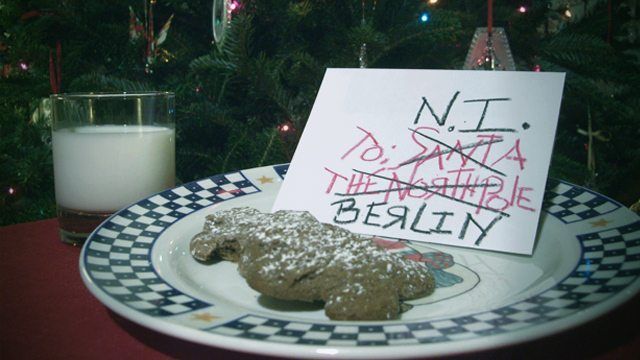
Dear Native Instruments (and Serato Audio Research, Atomix Productions, M-Audio, Ableton AG, etc): It’s the holiday season again, and this year, we wanted to write you a letter to ask for something special – software updates!  We’ve been very good this year: practicing regularly, trying out near gear, playing gigs, buying controllers, making mappings, recording mix tapes, so we feel like it’s time for some solid presents.

Our Top Wishlist For Traktor Pro 2

Cue Point Names and Colors – Earlier this year, Serato started allowing users to name and label their cue points. Our Serato using friends love this – imagine being able to add specific markup to your tracks with personal notes like “baseline starts here”, “mix out by this point”, or “epic drop!” – and even color coding them (you could make them match your arcade button colors!).
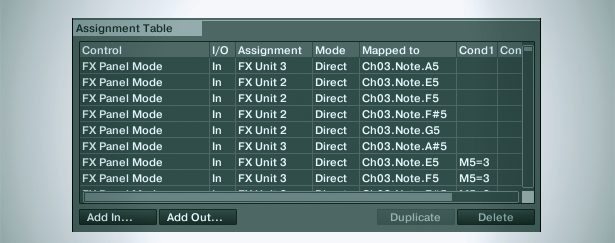
Resizing this window would be a Christmas Miracle!

Fix Mapping in Traktor – We’ve got complete respect for how intelligent Traktor’s mapping system is already- especially compared to Serato and Ableton. That being said, it remains one of the most frustrating experiences in Traktor. Specifically, we’d like to be able to resize the controller editor window, use additional numbers of modifiers and conditions, and use more conditional statements (?, ?, and ? are some interesting additions…)

Better iTunes Integration – This one might take some working with Apple to get it right, but we want to edit iTunes playlists and ID3 tags in Traktor, as well as a true iTunes playlist import/sync feature. We’ve been asking for this for a while, because so many of us use iTunes to organize our stuff and not Traktor’s collection setup. See this full thread  on the Traktor forums for some intelligent discussion on the matter.
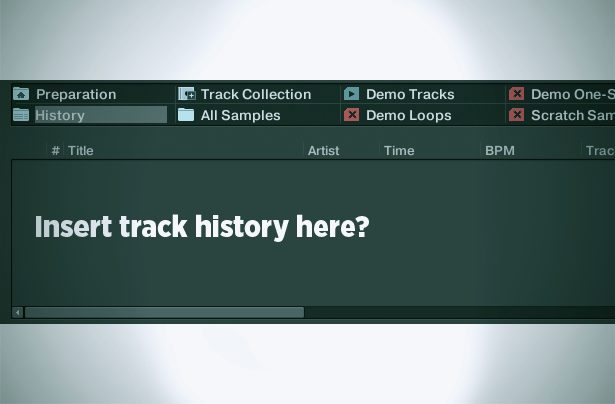
Fix History – Last week at the DJ TechTools holiday party, I played a great set of Tech and Electro House. Today, I went to go and look at what tracks I played, when I mixed in and out, what BPM I was at – but couldn’t. Traktor’s history feature has been broken for some time now, with only the less-helpful track “Archive” folder in the Traktor Explorer.

Traktor Bridge / ReWire support – Serato’s Bridge is pretty cool and works relatively flawlessly. We want the ability to run Traktor through other programs without having to hope that we can get a very complicated system of internal routing working correctly.
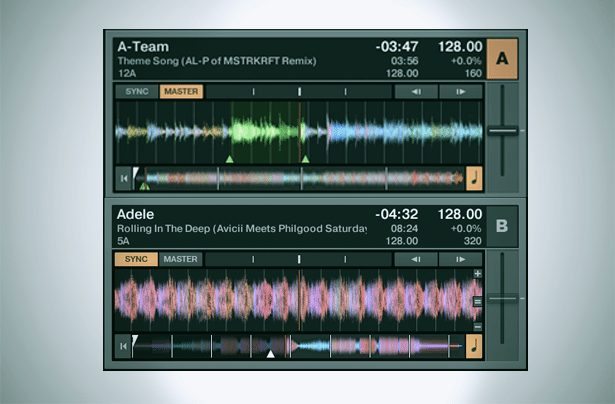
Look, it’s Santa’s sleigh! I mean, parallel waveforms!

Alternate Layouts and Views – No one is a big fan of user-skinning, but we think that being able to change around how the layout of the track decks would be a no-brainer for Traktor. Imagine a Traktor with parallel waveforms!

Key Detection and Relative Adjustment – Mixing in key is awesome, and can make for incredible final results when done right. Traktor should take a leaf from Virtual DJ’s book and add key detection to song analysis. One of the best parts about this is that Virtual DJ then dynamically updates the key field (which can be displayed in standard keys or Camelot keys) when you turn the key change knob.

Author’s Note: A few weeks ago we asked our Forums, our Facebook Fans, and our Twitter followers what they thought would be the best additions to DJ software – thanks for your input to making this article possible! Who would you write your wish list letter to, and what would you wish for? Let us know in the comments below – and have a great holiday! 

ABLETON, SERATO, TORQ, VDJ…

We felt qualified making a Traktor-focused wish list, but what about the other major DJ software? It’s time for your voice to be heard!

Add a comment to this article with your feature requests listed like this: 

  • Ableton – DJ-Style Pitch bends for each loop (additional details on the feature welcome, but only one feature per comment, please.)

Next, vote on the features you want the most by using the comment like button!

The highly popular features will rise to the top and we will publish them in this article. DJ companies actually do pay attention to these types of chances for our audience to provide feedback, so tell them what you really want for Christmas!

Your Highest Voted Ideas So Far:

Traktor:

  • “different beatgrids per song. like if a song changes from 140 to 174, i should be able to actually set a 2nd beatgrid in the same song” – Nolan Cook
  • “video integration for traktor” – Glen
Tags: controller editorcue point namingedit id3itunes integrationkey detectionmappingtraktor bridgetraktor historytraktor layoutstraktor wishlist
ShareTweetShare
Previous Post

DJ TechTools Traktor Kontrol S4 Mapping

Next Post

Custom In-Ear Monitors: What You’ve Been Missing

Related Posts

Mixed In Key Live can analyze tracks from streaming platforms, DAWs, and any audio on your Mac
DJ Software

Mixed In Key Live can analyze tracks from streaming platforms, DAWs, and any audio on your Mac

November 5, 2021
Mixed In Key 10: improved key detection, cue point exporting, & a UI update
DJ Gear

Mixed In Key 10: improved key detection, cue point exporting, & a UI update

May 6, 2021
Cue Points That DJs Should Set On Every Track: DJ Fundamentals
Basic DJ Tips

Cue Points That DJs Should Set On Every Track: DJ Fundamentals

December 30, 2019
Load More
Next Post
Custom In-Ear Monitors: What You’ve Been Missing

Custom In-Ear Monitors: What You've Been Missing

Want to reach DJTT's audience here?

Shoot an email to advertising@djtechtools.com

DJTT ads
DJTT newsletter
Midi Fighter
Chat with us
  • ABOUT DJTT
  • CONTACT
  • PRIVACY
  • MIDI FIGHTER HELP
  • ABOUT DJTT
  • JOBS
  • CONTACT US
  • ADVERTISE
  • PRIVACY POLICY
  • ACCESSIBILITY STATEMENT

© 2024 DJ Techtools all rights reserved by DJ TechTools on all content unless otherwise noted.

No Result
View All Result
  • Blog
    • DJ Gear
      • DIY Projects
      • Gear Reviews
      • New Products
      • Controllerism
    • Techniques + Tips
      • Beginner DJ
      • Advanced DJ
      • Producer
      • Finger Drummer
    • News + Culture
      • Editorials + Opinions
      • Artist Interviews
      • Performances + Routines
      • How I Play
    • DJ Software Tutorials
      • Serato Tips
      • CDJ Tips
      • Ableton Live Tips
  • Store
    • Run by real DJs, not a corporation
    • DJ Controllers
      • Midi Fighter Twister
      • Midi Fighter Spectra
      • Midi Fighter 64
      • View All
    • Accessories
      • Chroma USB Drive for DJs
      • Chroma Caps
      • Chroma Cables Audio
      • Chroma Cables USB-A
      • Chroma Cables: USB-C
      • DJTT Gift Card
      • Midi Fighter T-Shirt
      • Keyboard Covers
      • Earplugs by V-Moda
    • Production Gear
    • Soundcards & Mixers
  • Community
    • Popular Forums
      • General Discussion
      • Buy & Sell
      • Reviews
      • Mixes
      • Music Production
      • Show Your Setup
      • Off Topic
    • Handy Links
      • New Posts
      • Private Messages
      • Register
      • Search
    • Midi Maps
      • Traktor
      • Ableton
      • Serato DJ
      • Midi Fighter 3D
      • Midi Fighter Twister
      • Midi Fighter Spectra
  • Midi Fighter
  • Chroma

© 2024 DJ Techtools all rights reserved by DJ TechTools on all content unless otherwise noted.

This website uses cookies. By continuing to use this website you are giving consent to cookies being used. Visit our Privacy and Cookie Policy.