DJ TechTools
  • Blog
    • DJ Gear
      • DIY Projects
      • Gear Reviews
      • New Products
      • Controllerism
    • Techniques + Tips
      • Beginner DJ
      • Advanced DJ
      • Producer
      • Finger Drummer
    • News + Culture
      • Editorials + Opinions
      • Artist Interviews
      • Performances + Routines
      • How I Play
    • DJ Software Tutorials
      • Serato Tips
        • Traktor Tips
      • CDJ Tips
      • Ableton Live Tips
  • Store
    • Run by real DJs, not a corporation
    • DJ Controllers
      • Midi Fighter Twister
      • Midi Fighter Spectra
      • Midi Fighter 64
      • View All
    • Accessories
      • Chroma USB Drive for DJs
      • Chroma Caps
      • Chroma Cables Audio
      • Chroma Cables USB-A
      • Chroma Cables: USB-C
      • DJTT Gift Card
      • Midi Fighter T-Shirt
      • Keyboard Covers
      • Earplugs by V-Moda
    • Production Gear
    • Soundcards & Mixers
  • Community
    • Popular Forums
      • General Discussion
      • Buy & Sell
      • Reviews
      • Mixes
      • Music Production
      • Show Your Setup
      • Off Topic
    • Handy Links
      • New Posts
      • Private Messages
      • Register
      • Search
    • Midi Maps
      • Traktor
      • Ableton
      • Serato DJ
      • Midi Fighter 3D
      • Midi Fighter Twister
      • Midi Fighter Spectra
  • Midi Fighter
  • Chroma
No Result
View All Result
DJ TechTools
  • Blog
    • DJ Gear
      • DIY Projects
      • Gear Reviews
      • New Products
      • Controllerism
    • Techniques + Tips
      • Beginner DJ
      • Advanced DJ
      • Producer
      • Finger Drummer
    • News + Culture
      • Editorials + Opinions
      • Artist Interviews
      • Performances + Routines
      • How I Play
    • DJ Software Tutorials
      • Serato Tips
        • Traktor Tips
      • CDJ Tips
      • Ableton Live Tips
  • Store
    • Run by real DJs, not a corporation
    • DJ Controllers
      • Midi Fighter Twister
      • Midi Fighter Spectra
      • Midi Fighter 64
      • View All
    • Accessories
      • Chroma USB Drive for DJs
      • Chroma Caps
      • Chroma Cables Audio
      • Chroma Cables USB-A
      • Chroma Cables: USB-C
      • DJTT Gift Card
      • Midi Fighter T-Shirt
      • Keyboard Covers
      • Earplugs by V-Moda
    • Production Gear
    • Soundcards & Mixers
  • Community
    • Popular Forums
      • General Discussion
      • Buy & Sell
      • Reviews
      • Mixes
      • Music Production
      • Show Your Setup
      • Off Topic
    • Handy Links
      • New Posts
      • Private Messages
      • Register
      • Search
    • Midi Maps
      • Traktor
      • Ableton
      • Serato DJ
      • Midi Fighter 3D
      • Midi Fighter Twister
      • Midi Fighter Spectra
  • Midi Fighter
  • Chroma
No Result
View All Result
DJ TechTools

Midi Fighter Ableton Mode + Limited Edition Controllers

Dan White by Dan White
July 2, 2012
in Controllerism, DJ Gear Announcements, DJTT Gear, Midi Fighter Pro, News
Reading Time: 2 mins read
0
Midi Fighter Ableton Mode + Limited Edition Controllers
103
VIEWS
Post on FacebookTweet thisUpvote on Reddit

When the original Midi Fighter Pros were designed, we wanted to give every DJ a chance to use the units as versatile performance tools that flourish in live performance settings. Today, we’re announcing a limited edition of the Pros, with a clean white design to match Mad Zach’s Ableton packs for plug and play fun. Additionally, all Midi Fighter units now have an Ableton Mode allowing for more intuitive mapping – read on for a video demo and full details.


ABLETON MODE FOR ALL MIDI FIGHTERS
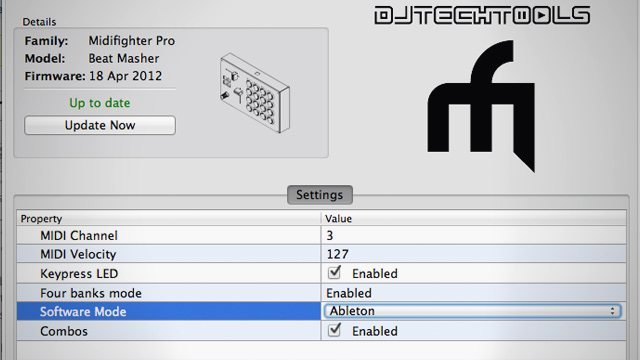
Software Mode: Ableton!

Mapping controllers in Ableton Live is significantly different than mapping in traditional DJ softwares, so we’ve developed a firmware setting that optimizes the MIDI messages sent by stripping down unnecessary additional notes sent. The new firmware setting also allows the user to use momentary mode with controls on their Midi Fighter unit – meaning that the triggered clip or effects will only play while the button is being held down. This is a basic but essential setting that really allows intelligent performance, and after developing this mode for the Midi Fighter 3D, we knew it needed to be mirrored in all of the other parts of the Midi Fighter line.

Getting a unit into Ableton Mode is simple – just start up the Midi Fighter Utility (download here if you haven’t already: OSX or Windows), plug in a Midi Fighter, and select “Ableton” under the Software Mode section. Remember that every time you want to switch software, you’ll need to change this setting!

MIDI FIGHTER PRO LIMITED EDITIONS
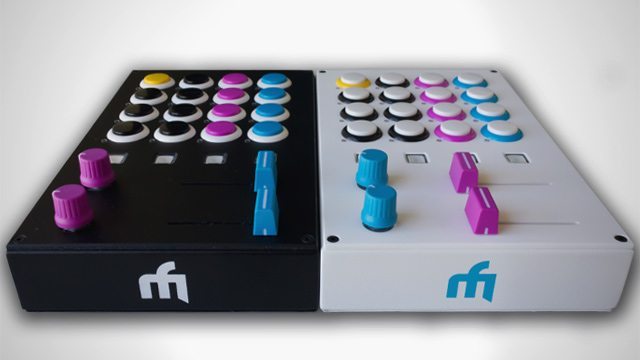
The limited edition Midi Fighter Pro Cue Masters are on sale starting today for $350. What makes them special?

  • Truly limited with only 50 units (25 in black, 25 in white) in existence
  • The weapon of choice for Ean Golden and Mad Zach, each unit will be handsigned and numbered by them both.
  • Each unit comes with the pictured button color layout in either black or white, designed to intuitively match Mad Zach’s Ableton template that he uses in our weekly soundpacks. (If you’ve been subscribing to our weekly emails, you’ll know that each week Mad Zach has been crafting up an incredible free soundpack that we give out for free in the newsletter.)

Interested in these limited edition models? They’re available now on our webstore.
Tags: ableton liveableton modecue masterean goldenmad zachmidi controllermidi fighter firmwaremidi fighter promidi fighter pro limited edition
Share1Tweet1Share
Previous Post

Is Deadmau5 Right? The “We All Hit Play” Debate

Next Post

Review: Algoriddim Vjay for iPad

Related Posts

Ableton launches Live 12 Suite rent-to-own plan – and it’s not a subscription
Ableton

Ableton launches Live 12 Suite rent-to-own plan – and it’s not a subscription

October 1, 2025
Use your Midi Fighter Twister as an Audio-Reactive Visualizer
Ableton Live Tips

Use your Midi Fighter Twister as an Audio-Reactive Visualizer

June 23, 2025
Control an entire studio with Midi Fighter Spectra (like Mad Zach)
Finger Drumming

Control an entire studio with Midi Fighter Spectra (like Mad Zach)

May 9, 2025
Load More
Next Post
Review: Algoriddim Vjay for iPad

Review: Algoriddim Vjay for iPad

Want to reach DJTT's audience here?

Shoot an email to advertising@djtechtools.com

DJTT ads
DJTT newsletter
Midi Fighter
Chat with us
  • ABOUT DJTT
  • CONTACT
  • PRIVACY
  • MIDI FIGHTER HELP
  • ABOUT DJTT
  • JOBS
  • CONTACT US
  • ADVERTISE
  • PRIVACY POLICY
  • ACCESSIBILITY STATEMENT

© 2024 DJ Techtools all rights reserved by DJ TechTools on all content unless otherwise noted.

No Result
View All Result
  • Blog
    • DJ Gear
      • DIY Projects
      • Gear Reviews
      • New Products
      • Controllerism
    • Techniques + Tips
      • Beginner DJ
      • Advanced DJ
      • Producer
      • Finger Drummer
    • News + Culture
      • Editorials + Opinions
      • Artist Interviews
      • Performances + Routines
      • How I Play
    • DJ Software Tutorials
      • Serato Tips
      • CDJ Tips
      • Ableton Live Tips
  • Store
    • Run by real DJs, not a corporation
    • DJ Controllers
      • Midi Fighter Twister
      • Midi Fighter Spectra
      • Midi Fighter 64
      • View All
    • Accessories
      • Chroma USB Drive for DJs
      • Chroma Caps
      • Chroma Cables Audio
      • Chroma Cables USB-A
      • Chroma Cables: USB-C
      • DJTT Gift Card
      • Midi Fighter T-Shirt
      • Keyboard Covers
      • Earplugs by V-Moda
    • Production Gear
    • Soundcards & Mixers
  • Community
    • Popular Forums
      • General Discussion
      • Buy & Sell
      • Reviews
      • Mixes
      • Music Production
      • Show Your Setup
      • Off Topic
    • Handy Links
      • New Posts
      • Private Messages
      • Register
      • Search
    • Midi Maps
      • Traktor
      • Ableton
      • Serato DJ
      • Midi Fighter 3D
      • Midi Fighter Twister
      • Midi Fighter Spectra
  • Midi Fighter
  • Chroma

© 2024 DJ Techtools all rights reserved by DJ TechTools on all content unless otherwise noted.

This website uses cookies. By continuing to use this website you are giving consent to cookies being used. Visit our Privacy and Cookie Policy.