DJ TechTools
  • Blog
    • DJ Gear
      • DIY Projects
      • Gear Reviews
      • New Products
      • Controllerism
    • Techniques + Tips
      • Beginner DJ
      • Advanced DJ
      • Producer
      • Finger Drummer
    • News + Culture
      • Editorials + Opinions
      • Artist Interviews
      • Performances + Routines
      • How I Play
    • DJ Software Tutorials
      • Serato Tips
        • Traktor Tips
      • CDJ Tips
      • Ableton Live Tips
  • Store
    • Run by real DJs, not a corporation
    • DJ Controllers
      • Midi Fighter Twister
      • Midi Fighter Spectra
      • Midi Fighter 64
      • View All
    • Accessories
      • Chroma USB Drive for DJs
      • Chroma Caps
      • Chroma Cables Audio
      • Chroma Cables USB-A
      • Chroma Cables: USB-C
      • DJTT Gift Card
      • Midi Fighter T-Shirt
      • Keyboard Covers
      • Earplugs by V-Moda
    • Production Gear
    • Soundcards & Mixers
  • Community
    • Popular Forums
      • General Discussion
      • Buy & Sell
      • Reviews
      • Mixes
      • Music Production
      • Show Your Setup
      • Off Topic
    • Handy Links
      • New Posts
      • Private Messages
      • Register
      • Search
    • Midi Maps
      • Traktor
      • Ableton
      • Serato DJ
      • Midi Fighter 3D
      • Midi Fighter Twister
      • Midi Fighter Spectra
  • Midi Fighter
  • Chroma
No Result
View All Result
DJ TechTools
  • Blog
    • DJ Gear
      • DIY Projects
      • Gear Reviews
      • New Products
      • Controllerism
    • Techniques + Tips
      • Beginner DJ
      • Advanced DJ
      • Producer
      • Finger Drummer
    • News + Culture
      • Editorials + Opinions
      • Artist Interviews
      • Performances + Routines
      • How I Play
    • DJ Software Tutorials
      • Serato Tips
        • Traktor Tips
      • CDJ Tips
      • Ableton Live Tips
  • Store
    • Run by real DJs, not a corporation
    • DJ Controllers
      • Midi Fighter Twister
      • Midi Fighter Spectra
      • Midi Fighter 64
      • View All
    • Accessories
      • Chroma USB Drive for DJs
      • Chroma Caps
      • Chroma Cables Audio
      • Chroma Cables USB-A
      • Chroma Cables: USB-C
      • DJTT Gift Card
      • Midi Fighter T-Shirt
      • Keyboard Covers
      • Earplugs by V-Moda
    • Production Gear
    • Soundcards & Mixers
  • Community
    • Popular Forums
      • General Discussion
      • Buy & Sell
      • Reviews
      • Mixes
      • Music Production
      • Show Your Setup
      • Off Topic
    • Handy Links
      • New Posts
      • Private Messages
      • Register
      • Search
    • Midi Maps
      • Traktor
      • Ableton
      • Serato DJ
      • Midi Fighter 3D
      • Midi Fighter Twister
      • Midi Fighter Spectra
  • Midi Fighter
  • Chroma
No Result
View All Result
DJ TechTools

Rapidly Slice A Track To A Traktor Remix Deck

Dan White by Dan White
July 15, 2013
in Advanced DJ Tips, Breaking News, DJ Software Tips, News, News + Culture, Traktor Tips
Reading Time: 2 mins read
0
Rapidly Slice A Track To A Traktor Remix Deck
78
VIEWS
Post on FacebookTweet thisUpvote on Reddit

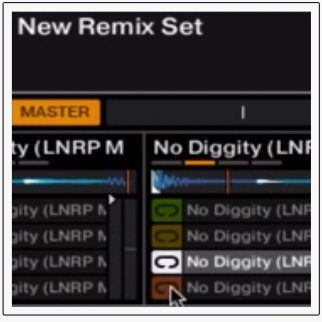
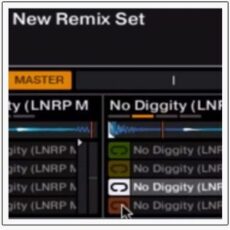
We keep spotting awesome new concepts on the DJTT forum community, and this concept video adds to the list with a Midi Pipe script being used to take a song and rapidly create a sliced-up Remix Deck out of 16 counts of a track. Big ups to rdej47 for working on this (all night!) and building an awesome feature that should get incorporated into Traktor!

Watch his overview in the video below, and read/download the instructions beneath that to try it out for yourself (you’ll need a Novation Dicer to use it right away):

I was up till 5am working on this concept. After reading the old DJTT “String Theory” I got inspired to pursue an idea I have had for a while. The idea is to be able to chop a track like an MPC into 16 individual hits that can be drummed out and rearranged on the fly. I know you can do this with a Twitch or a properly placed cue points but I wanted to the freedom do it anytime and then save the kit if I liked it. Another concept I wished to implement was the ability to chop a bunch of cells but alter the pitch so you could play different melodies. Unfortunately this functionality is still locked for the Remix Decks.

If you’d like to test this out here is what you need.

  • Traktor 2.6.2 + Midi Pipe (free download for Mac) + Novation Dicer
  • Dicer midi pipe file and Dicer Remix Deck.tsi
  • Open Dicer midi pipe file and go to midi in on the right menu, make sure dicer is selected as the input
  • Import the Dicer Remix Deck.tsi and in the controller manager for your input select midi port
  • Make sure Deck B is Track Deck and Deck D is a Remix Deck
  • Go to the Move menu in the advanced tab of Deck B and ensure that Move is set to BeatJump (not Loop, Loop in or Loop out)
  • Now you should be able to load track into Deck B, hold button 2 (2 dots) on the Dicer, press button 1 (1 dot) and it should slice your track to the remix deck.

Let me know if you have any questions. This is still a working concept but i’ll try help as much as possible and i’m going to work on getting compatibility for other controllers as well.

Read the full forum thread here and offer your feedback!
Tags: djtt forumsremix decksslicing to remix decksTraktor Tips
Share1Tweet1Share
Previous Post

Native Instruments Traktor Kontrol X1 MK2: Not A Hoax!

Next Post

Logic Pro X Announced: A Quick Look at What’s New

Related Posts

traktor-pro plus 3.8 pattern player controls
Dj and Production Tutorials

Review: Traktor Pro Plus 3.8 – After 8 months, is the subscription worth it?

April 20, 2023
Traktor Pro 3.6 releases, as well as a feature roadmap…
Breaking News

Traktor Pro 3.6 releases, as well as a feature roadmap…

August 19, 2022
Traktor Pro 3.6 beta and iZotope's Ozone Maximizer side by side
NAMM 2022

Traktor’s new beta cycle has begun: 3.6 to include iZotope products, maybe NKS support?

May 30, 2022
Load More
Next Post
Logic Pro X Announced: A Quick Look at What’s New

Logic Pro X Announced: A Quick Look at What's New

Want to reach DJTT's audience here?

Shoot an email to advertising@djtechtools.com

DJTT ads
DJTT newsletter
Midi Fighter
Chat with us
  • ABOUT DJTT
  • CONTACT
  • PRIVACY
  • MIDI FIGHTER HELP
  • ABOUT DJTT
  • JOBS
  • CONTACT US
  • ADVERTISE
  • PRIVACY POLICY
  • ACCESSIBILITY STATEMENT

© 2024 DJ Techtools all rights reserved by DJ TechTools on all content unless otherwise noted.

No Result
View All Result
  • Blog
    • DJ Gear
      • DIY Projects
      • Gear Reviews
      • New Products
      • Controllerism
    • Techniques + Tips
      • Beginner DJ
      • Advanced DJ
      • Producer
      • Finger Drummer
    • News + Culture
      • Editorials + Opinions
      • Artist Interviews
      • Performances + Routines
      • How I Play
    • DJ Software Tutorials
      • Serato Tips
      • CDJ Tips
      • Ableton Live Tips
  • Store
    • Run by real DJs, not a corporation
    • DJ Controllers
      • Midi Fighter Twister
      • Midi Fighter Spectra
      • Midi Fighter 64
      • View All
    • Accessories
      • Chroma USB Drive for DJs
      • Chroma Caps
      • Chroma Cables Audio
      • Chroma Cables USB-A
      • Chroma Cables: USB-C
      • DJTT Gift Card
      • Midi Fighter T-Shirt
      • Keyboard Covers
      • Earplugs by V-Moda
    • Production Gear
    • Soundcards & Mixers
  • Community
    • Popular Forums
      • General Discussion
      • Buy & Sell
      • Reviews
      • Mixes
      • Music Production
      • Show Your Setup
      • Off Topic
    • Handy Links
      • New Posts
      • Private Messages
      • Register
      • Search
    • Midi Maps
      • Traktor
      • Ableton
      • Serato DJ
      • Midi Fighter 3D
      • Midi Fighter Twister
      • Midi Fighter Spectra
  • Midi Fighter
  • Chroma

© 2024 DJ Techtools all rights reserved by DJ TechTools on all content unless otherwise noted.

This website uses cookies. By continuing to use this website you are giving consent to cookies being used. Visit our Privacy and Cookie Policy.