DJ TechTools
  • Blog
    • DJ Gear
      • DIY Projects
      • Gear Reviews
      • New Products
      • Controllerism
    • Techniques + Tips
      • Beginner DJ
      • Advanced DJ
      • Producer
      • Finger Drummer
    • News + Culture
      • Editorials + Opinions
      • Artist Interviews
      • Performances + Routines
      • How I Play
    • DJ Software Tutorials
      • Serato Tips
        • Traktor Tips
      • CDJ Tips
      • Ableton Live Tips
  • Store
    • Run by real DJs, not a corporation
    • DJ Controllers
      • Midi Fighter Twister
      • Midi Fighter Spectra
      • Midi Fighter 64
      • View All
    • Accessories
      • Chroma USB Drive for DJs
      • Chroma Caps
      • Chroma Cables Audio
      • Chroma Cables USB-A
      • Chroma Cables: USB-C
      • DJTT Gift Card
      • Midi Fighter T-Shirt
      • Keyboard Covers
      • Earplugs by V-Moda
    • Production Gear
    • Soundcards & Mixers
  • Community
    • Popular Forums
      • General Discussion
      • Buy & Sell
      • Reviews
      • Mixes
      • Music Production
      • Show Your Setup
      • Off Topic
    • Handy Links
      • New Posts
      • Private Messages
      • Register
      • Search
    • Midi Maps
      • Traktor
      • Ableton
      • Serato DJ
      • Midi Fighter 3D
      • Midi Fighter Twister
      • Midi Fighter Spectra
  • Midi Fighter
  • Chroma
No Result
View All Result
DJ TechTools
  • Blog
    • DJ Gear
      • DIY Projects
      • Gear Reviews
      • New Products
      • Controllerism
    • Techniques + Tips
      • Beginner DJ
      • Advanced DJ
      • Producer
      • Finger Drummer
    • News + Culture
      • Editorials + Opinions
      • Artist Interviews
      • Performances + Routines
      • How I Play
    • DJ Software Tutorials
      • Serato Tips
        • Traktor Tips
      • CDJ Tips
      • Ableton Live Tips
  • Store
    • Run by real DJs, not a corporation
    • DJ Controllers
      • Midi Fighter Twister
      • Midi Fighter Spectra
      • Midi Fighter 64
      • View All
    • Accessories
      • Chroma USB Drive for DJs
      • Chroma Caps
      • Chroma Cables Audio
      • Chroma Cables USB-A
      • Chroma Cables: USB-C
      • DJTT Gift Card
      • Midi Fighter T-Shirt
      • Keyboard Covers
      • Earplugs by V-Moda
    • Production Gear
    • Soundcards & Mixers
  • Community
    • Popular Forums
      • General Discussion
      • Buy & Sell
      • Reviews
      • Mixes
      • Music Production
      • Show Your Setup
      • Off Topic
    • Handy Links
      • New Posts
      • Private Messages
      • Register
      • Search
    • Midi Maps
      • Traktor
      • Ableton
      • Serato DJ
      • Midi Fighter 3D
      • Midi Fighter Twister
      • Midi Fighter Spectra
  • Midi Fighter
  • Chroma
No Result
View All Result
DJ TechTools

First Look: Beatport Pro DJ Library-Management Software

Ean Golden by Ean Golden
April 14, 2014
in DJ Music Library Tips, DJ Software Tips, DJ Techniques / Tips
Reading Time: 4 mins read
0
First Look: Beatport Pro DJ Library-Management Software
205
VIEWS
Post on FacebookTweet thisUpvote on Reddit

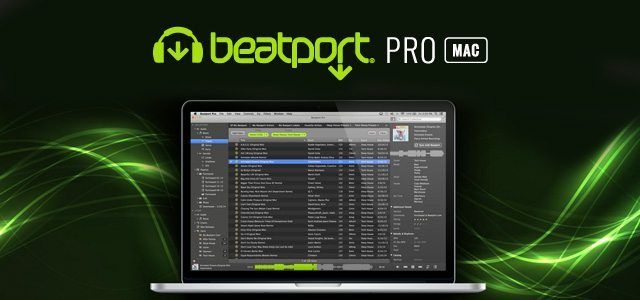
Most DJs these days manage their music collections in iTunes, good old-fashioned folders, or even DJ software. According to Beatport, up to 90% of DJs that manage a music library use iTunes, and based on most feedback, no one really loves it.. Fortunately, the new version of Beatport Pro provides a good alternative with a dedicated music manager for DJs and producers.


The first version of Beatport Pro was released nearly a year ago and enabled advanced users to browse the popular dance music retailer through their desktop with features not available in the online store. Now, after many months of hard work, Beatport has added full-blown music file management, offering a full package for those wanting to find and organize electronic music in one place.

Why would you want a dedicated program for managing your DJ music collection?

Advanced-Playlists-Beatport-Pro

BETTER PLAYLIST MANAGEMENT

  •    Always present in the left-hand side
  •    Nested playlists and easy re-ordering
  •    Automatic integration with Beatport purchases
  •    Downside is that they lack “smart” playlists for now

BETTER EXPERIENCE FOR WORKING WITH DJ MUSIC

  •    Full-length waveform preview for songs allows easier digging
  •    Automatic separation of files by type (tracks, mixes, parts, etc.)
  •    DJ music-specific tagging fields (feel, room, set time, etc.)
  •    Powerful multi-filters parse down massive collections quickly

MANAGE YOUR MEGA DATA
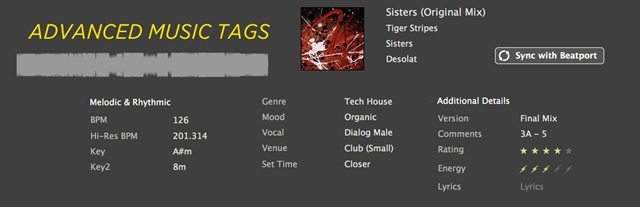
Advanced-Music-Tags

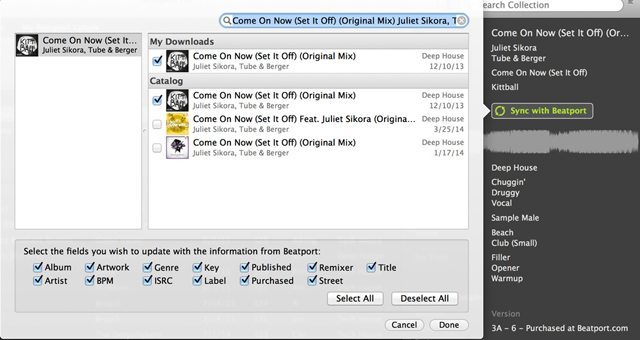
Meta tags are the fields in MP3s and other music files that allow us to store information about that file. If they’re accurate, meta-tags provide the opportunity to dig into a deep collection and find the music you want quickly. If inaccurate, they can be misleading and worthless. Pro provides the ability to sync up your songs with their extensive online database and get accurate information on each track including:

  •    Cover art
  •    Accurate release date
  •    Correct genre
  •    The key of the song
  •    The correct names
  •    Even suggested tags like mood and style from other Pro users
beatport-pro-sync

After syncing up a song or entering new tags, all metadata is written permanently to the file including WAVs and AIFFs in open ID3 spec. Right now, there is not any software on the market that will natively read “special” tags like set time or mood, but Serato and Native Instruments have indicated a desire to roll that out later this year. In the meantime, Beatport Pro for Mac allows you to write everything to the comments field.

Additionally, it has a metadata manager, which can move pieces of info in bulk from one field to the other. For example, if your key info was stored in the comments, it can be quickly moved over to the correct location or appended to a different area.

LOOK FOR NEW RELEASES IN THE SAME TOOLpowerFilters
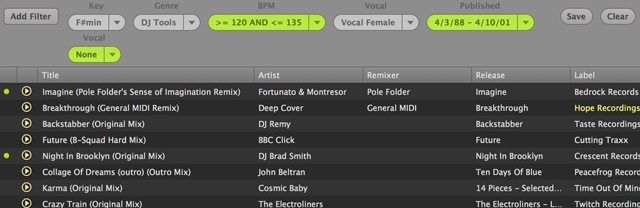
The biggest benefit of Pro remains an alternative way to churn through the million-plus songs on Beatport today. Through clever filters and tagging, it’s possible to quickly reveal songs that might otherwise be buried in a pile of new releases.

Negative and positive filters allow you to parse the collection quickly; for example, you can ask it to only show you house tracks, or not to show you anything that’s hip-hop or breaks. You can filter and browse by key, BPM, mood, and even release date.

ALSO GREAT FOR THE PRODUCER
SAMPLE-MANAGER

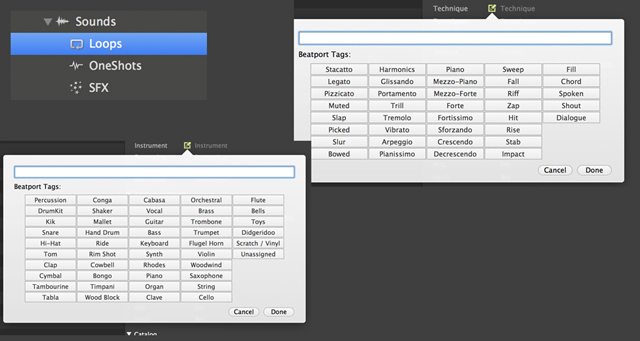
For those of us who have countless loops, samples, and one-shots floating around the hard drive, Beatport Pro also attempts to provide a central organizer with tags specific to production files. With a few basic tricks, it’s fairly easy to round up your samples, apply basic category tags, and make it easy to find that elusive growling bassline in F# minor that was hiding in a folder with Game of Thrones Season 3.

DJ SOFTWARE INTEGRATION
Export File

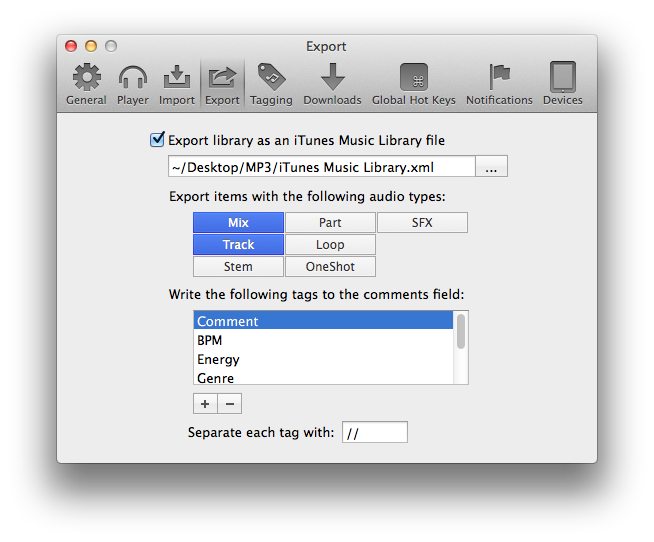
After spending hours taming your wild collection into submission – what about putting those playlists in your dj software of choice? While not offering direct “integration” per-se, Pro does have a reasonable work around. Under settings you can choose to export the collection as an iTunes playlist that is updated with any changes. Then, it’s possible to point your dj software towards this file instead of the real iTunes collection. This will break the iTunes connection but it will accomplish the goal of updated Pro playlists in any dj software that supports iTunes.

OUR TAKE?

I have been working with Beatport Pro for Mac for about a month now, and it’s starting to really grow on me. At first, the idea of tagging and organizing my entire music collection runs a close second to filing taxes as the least appealing things to do on the planet. That being said, if taken in small doses, it’s possible to make a significant dent fairly quickly.

One thing we know for sure: this beats iTunes for music management hands down. I would still advise using a program like iTunes to hold all your music (especially in order to copy those files to a single place on the hard drive), but for building playlists and managing a smaller collection of your favorite dance tracks, it might be time to leave the land of apples and explore something new.

Beatport Pro for Mac launches on April 16. Check out more of its features here.


Further Reading: Sorting Your DJ Music Library and Genre Tagging for Music Libraries


Tags: beatportbeatport probeatport pro 2dj toolfirst lookiTuneslibrarymusic managementnewproreplacementReview
Share2Tweet1Share
Previous Post

Artist Spotlight: Twin Producers Two Fresh

Next Post

InMusic Brands (Akai, M-Audio, Numark) Buys Denon Product Lines

Related Posts

A shutdown farewell message from Juno Download on their website posted this week
DJ Music Library Tips

Farewell, Juno Download

June 2, 2026
Beatport Streaming adds lossless audio ability to play FLAC files
News

Beatport Streaming adds lossless audio ability to play FLAC files

October 9, 2024
Is Pioneer DJ’s PLX-CRSS12 the ultimate turntable for DJs?
DJ Controllers

Is Pioneer DJ’s PLX-CRSS12 the ultimate turntable for DJs?

March 29, 2024
Load More
Next Post
InMusic Brands (Akai, M-Audio, Numark) Buys Denon Product Lines

InMusic Brands (Akai, M-Audio, Numark) Buys Denon Product Lines

Want to reach DJTT's audience here?

Shoot an email to advertising@djtechtools.com

DJTT ads
DJTT newsletter
Midi Fighter
Chat with us
  • ABOUT DJTT
  • CONTACT
  • PRIVACY
  • MIDI FIGHTER HELP
  • ABOUT DJTT
  • JOBS
  • CONTACT US
  • ADVERTISE
  • PRIVACY POLICY
  • ACCESSIBILITY STATEMENT

© 2024 DJ Techtools all rights reserved by DJ TechTools on all content unless otherwise noted.

No Result
View All Result
  • Blog
    • DJ Gear
      • DIY Projects
      • Gear Reviews
      • New Products
      • Controllerism
    • Techniques + Tips
      • Beginner DJ
      • Advanced DJ
      • Producer
      • Finger Drummer
    • News + Culture
      • Editorials + Opinions
      • Artist Interviews
      • Performances + Routines
      • How I Play
    • DJ Software Tutorials
      • Serato Tips
      • CDJ Tips
      • Ableton Live Tips
  • Store
    • Run by real DJs, not a corporation
    • DJ Controllers
      • Midi Fighter Twister
      • Midi Fighter Spectra
      • Midi Fighter 64
      • View All
    • Accessories
      • Chroma USB Drive for DJs
      • Chroma Caps
      • Chroma Cables Audio
      • Chroma Cables USB-A
      • Chroma Cables: USB-C
      • DJTT Gift Card
      • Midi Fighter T-Shirt
      • Keyboard Covers
      • Earplugs by V-Moda
    • Production Gear
    • Soundcards & Mixers
  • Community
    • Popular Forums
      • General Discussion
      • Buy & Sell
      • Reviews
      • Mixes
      • Music Production
      • Show Your Setup
      • Off Topic
    • Handy Links
      • New Posts
      • Private Messages
      • Register
      • Search
    • Midi Maps
      • Traktor
      • Ableton
      • Serato DJ
      • Midi Fighter 3D
      • Midi Fighter Twister
      • Midi Fighter Spectra
  • Midi Fighter
  • Chroma

© 2024 DJ Techtools all rights reserved by DJ TechTools on all content unless otherwise noted.

This website uses cookies. By continuing to use this website you are giving consent to cookies being used. Visit our Privacy and Cookie Policy.