DJ TechTools
  • Blog
    • DJ Gear
      • DIY Projects
      • Gear Reviews
      • New Products
      • Controllerism
    • Techniques + Tips
      • Beginner DJ
      • Advanced DJ
      • Producer
      • Finger Drummer
    • News + Culture
      • Editorials + Opinions
      • Artist Interviews
      • Performances + Routines
      • How I Play
    • DJ Software Tutorials
      • Serato Tips
        • Traktor Tips
      • CDJ Tips
      • Ableton Live Tips
  • Store
    • Run by real DJs, not a corporation
    • DJ Controllers
      • Midi Fighter Twister
      • Midi Fighter Spectra
      • Midi Fighter 64
      • View All
    • Accessories
      • Chroma USB Drive for DJs
      • Chroma Caps
      • Chroma Cables Audio
      • Chroma Cables USB-A
      • Chroma Cables: USB-C
      • DJTT Gift Card
      • Midi Fighter T-Shirt
      • Keyboard Covers
      • Earplugs by V-Moda
    • Production Gear
    • Soundcards & Mixers
  • Community
    • Popular Forums
      • General Discussion
      • Buy & Sell
      • Reviews
      • Mixes
      • Music Production
      • Show Your Setup
      • Off Topic
    • Handy Links
      • New Posts
      • Private Messages
      • Register
      • Search
    • Midi Maps
      • Traktor
      • Ableton
      • Serato DJ
      • Midi Fighter 3D
      • Midi Fighter Twister
      • Midi Fighter Spectra
  • Midi Fighter
  • Chroma
No Result
View All Result
DJ TechTools
  • Blog
    • DJ Gear
      • DIY Projects
      • Gear Reviews
      • New Products
      • Controllerism
    • Techniques + Tips
      • Beginner DJ
      • Advanced DJ
      • Producer
      • Finger Drummer
    • News + Culture
      • Editorials + Opinions
      • Artist Interviews
      • Performances + Routines
      • How I Play
    • DJ Software Tutorials
      • Serato Tips
        • Traktor Tips
      • CDJ Tips
      • Ableton Live Tips
  • Store
    • Run by real DJs, not a corporation
    • DJ Controllers
      • Midi Fighter Twister
      • Midi Fighter Spectra
      • Midi Fighter 64
      • View All
    • Accessories
      • Chroma USB Drive for DJs
      • Chroma Caps
      • Chroma Cables Audio
      • Chroma Cables USB-A
      • Chroma Cables: USB-C
      • DJTT Gift Card
      • Midi Fighter T-Shirt
      • Keyboard Covers
      • Earplugs by V-Moda
    • Production Gear
    • Soundcards & Mixers
  • Community
    • Popular Forums
      • General Discussion
      • Buy & Sell
      • Reviews
      • Mixes
      • Music Production
      • Show Your Setup
      • Off Topic
    • Handy Links
      • New Posts
      • Private Messages
      • Register
      • Search
    • Midi Maps
      • Traktor
      • Ableton
      • Serato DJ
      • Midi Fighter 3D
      • Midi Fighter Twister
      • Midi Fighter Spectra
  • Midi Fighter
  • Chroma
No Result
View All Result
DJ TechTools

Maschine 2.1 Update: A Video Walkthrough

Markkus Rovito by Markkus Rovito
May 20, 2014
in Gear Videos, Maschine, Native Instruments, Production Hardware, Production Tips, Videos
Reading Time: 3 mins read
0
Maschine 2.1 Update: A Video Walkthrough
38
VIEWS
Post on FacebookTweet thisUpvote on Reddit

With Native Instruments’ recent Maschine 2.1 software update, there’s never been a better time for experienced Maschine-ists to work—or for curious newcomers to explore the Maschine world. There’s some very cool new Drumsynth features, like the Grit Kick and Shaker Performer mode. Many workflow enhancements also help you make your music faster and smarter. Check out our videos to see what you need to know.

Native Instruments recently issued the Maschine 2.1 software upgrade, a free update for registered Maschine 2 users, and of course included with any Maschine hardware controller purchase. For an incremental update, Maschine 2.1 drops off a grip of helpful workflow improvements—many of them common user requests (see the list and second video below).

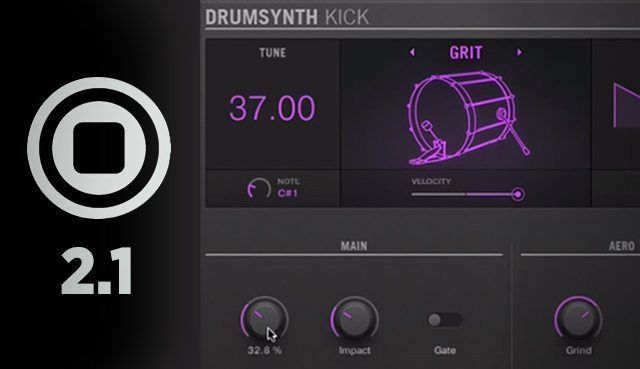
To keep it fun, NI also tacked on some new Drumsynth engine abilities. In the first video below, we walk you through the new Drumsynth Grit Kick, a deep and airy electronic kick boom that when gated also packs a tight punch. Its signature Grind control adds a bitcrush-style effect that lets you throw some dirt on your productions. There’s also the new Shaker Performer mode added to the Percussion Drumsynth. With this, every Drumsynth Shaker patch comes with its own rhythmically gifted digital assistant. The Performer mode plays funky shaker patterns when you hold down a single note, with plenty of adjustable swing, accent, timing, and fill controls for you to customize the feel.

Now for the power-user features for true Maschine heads. The second video shows you a checklist of mostly workflow features that Maschine-philes have desired. Beginners will enjoy them as well, without knowing just how good they have it.

  • A Preferences setting that only turns the metronome on when the Record button is enabled.
  • An input quantize option that will quantize notes in real time as you play them live on the pads (also in Preferences).
  • A batch function to set all sounds in a group to the same MIDI channel. MIDI export is available on the Group and Sound levels.
  • Scenes can be selected/triggered via MIDI input when Maschine is running standalone.
  • Volume and pan knobs for Sounds and Groups are only displayed when you hover over them.
  • Instantiating the first plug-in on an empty Sound updates the name of that sound to the plug-in name.
  • CNTRL +Drag (PC) or OPT + Drag (Mac) copy-pastes single elements (patterns, scenes, plug-ins, notes, etc.) in the Groups / Sounds lists and the plug-in chain.
  • Native Instruments plug-in windows can be pinned to remain active when not in focus.
  • The hardware Shift button enables fast-scroll browsing, 20 items at a time.
  • Real-time group erase function by holding down the hardware Erase + Group buttons.

BUT WAIT, THERE’S MORE

Maschine 2.1 includes various bug fixes, performance, and stability improvements, such as Browser performance improvements. Also, when you’re on the sample recording screen, you’ll still have access to the sounds on the Maschine’s pads.

A couple of last items to mention involve enhancements to the hardware controller screens brought about with the Maschine 2.1 update. All Maschine and Maschine MK2 controllers now include access to level and pan settings for Groups and Sounds from the Mix page. And from Maschine and Maschine Studio controllers, you can now toggle the Browser, Mixer, and Mod sections of the software on and off from the Navigate page of the hardware display. 
Interested in Maschine 2.1? Now through May 31, 2014, all Maschine hardware is discounted in the DJ TechTools store. 

Tags: Drumsynthmaschinemaschine 2Maschine 2.1maschine mikromaschine mk 2maschine studioNative Instrumentsoverviewupdatevideoworkflow
ShareTweetShare
Previous Post

Video: Pioneer DJ History – The Evolution of the CDJ

Next Post

Video: Jamie Lidell and the Qkids on iMaschine 1.1 for iPad

Related Posts

A Prime 4+ and a Kontrol S3 intercut against eachother over a black background
Breaking News

InMusic just bought Native Instruments. So what now for Traktor?

May 8, 2026
Traktor MX2: Native Instruments’ New 2-Channel Controller
DJ Gear Announcements

Traktor MX2: Native Instruments’ New 2-Channel Controller

October 8, 2025
How I Play: Hybrasil’s DAWless live techno setup
How I Play

How I Play: Hybrasil’s DAWless live techno setup

October 3, 2024
Load More
Next Post
Video: Jamie Lidell and the Qkids on iMaschine 1.1 for iPad

Video: Jamie Lidell and the Qkids on iMaschine 1.1 for iPad

Want to reach DJTT's audience here?

Shoot an email to advertising@djtechtools.com

DJTT ads
DJTT newsletter
Midi Fighter
Chat with us
  • ABOUT DJTT
  • CONTACT
  • PRIVACY
  • MIDI FIGHTER HELP
  • ABOUT DJTT
  • JOBS
  • CONTACT US
  • ADVERTISE
  • PRIVACY POLICY
  • ACCESSIBILITY STATEMENT

© 2024 DJ Techtools all rights reserved by DJ TechTools on all content unless otherwise noted.

No Result
View All Result
  • Blog
    • DJ Gear
      • DIY Projects
      • Gear Reviews
      • New Products
      • Controllerism
    • Techniques + Tips
      • Beginner DJ
      • Advanced DJ
      • Producer
      • Finger Drummer
    • News + Culture
      • Editorials + Opinions
      • Artist Interviews
      • Performances + Routines
      • How I Play
    • DJ Software Tutorials
      • Serato Tips
      • CDJ Tips
      • Ableton Live Tips
  • Store
    • Run by real DJs, not a corporation
    • DJ Controllers
      • Midi Fighter Twister
      • Midi Fighter Spectra
      • Midi Fighter 64
      • View All
    • Accessories
      • Chroma USB Drive for DJs
      • Chroma Caps
      • Chroma Cables Audio
      • Chroma Cables USB-A
      • Chroma Cables: USB-C
      • DJTT Gift Card
      • Midi Fighter T-Shirt
      • Keyboard Covers
      • Earplugs by V-Moda
    • Production Gear
    • Soundcards & Mixers
  • Community
    • Popular Forums
      • General Discussion
      • Buy & Sell
      • Reviews
      • Mixes
      • Music Production
      • Show Your Setup
      • Off Topic
    • Handy Links
      • New Posts
      • Private Messages
      • Register
      • Search
    • Midi Maps
      • Traktor
      • Ableton
      • Serato DJ
      • Midi Fighter 3D
      • Midi Fighter Twister
      • Midi Fighter Spectra
  • Midi Fighter
  • Chroma

© 2024 DJ Techtools all rights reserved by DJ TechTools on all content unless otherwise noted.

This website uses cookies. By continuing to use this website you are giving consent to cookies being used. Visit our Privacy and Cookie Policy.