DJ TechTools
  • Blog
    • DJ Gear
      • DIY Projects
      • Gear Reviews
      • New Products
      • Controllerism
    • Techniques + Tips
      • Beginner DJ
      • Advanced DJ
      • Producer
      • Finger Drummer
    • News + Culture
      • Editorials + Opinions
      • Artist Interviews
      • Performances + Routines
      • How I Play
    • DJ Software Tutorials
      • Serato Tips
        • Traktor Tips
      • CDJ Tips
      • Ableton Live Tips
  • Store
    • Run by real DJs, not a corporation
    • DJ Controllers
      • Midi Fighter Twister
      • Midi Fighter Spectra
      • Midi Fighter 64
      • View All
    • Accessories
      • Chroma USB Drive for DJs
      • Chroma Caps
      • Chroma Cables Audio
      • Chroma Cables USB-A
      • Chroma Cables: USB-C
      • DJTT Gift Card
      • Midi Fighter T-Shirt
      • Keyboard Covers
      • Earplugs by V-Moda
    • Production Gear
    • Soundcards & Mixers
  • Community
    • Popular Forums
      • General Discussion
      • Buy & Sell
      • Reviews
      • Mixes
      • Music Production
      • Show Your Setup
      • Off Topic
    • Handy Links
      • New Posts
      • Private Messages
      • Register
      • Search
    • Midi Maps
      • Traktor
      • Ableton
      • Serato DJ
      • Midi Fighter 3D
      • Midi Fighter Twister
      • Midi Fighter Spectra
  • Midi Fighter
  • Chroma
No Result
View All Result
DJ TechTools
  • Blog
    • DJ Gear
      • DIY Projects
      • Gear Reviews
      • New Products
      • Controllerism
    • Techniques + Tips
      • Beginner DJ
      • Advanced DJ
      • Producer
      • Finger Drummer
    • News + Culture
      • Editorials + Opinions
      • Artist Interviews
      • Performances + Routines
      • How I Play
    • DJ Software Tutorials
      • Serato Tips
        • Traktor Tips
      • CDJ Tips
      • Ableton Live Tips
  • Store
    • Run by real DJs, not a corporation
    • DJ Controllers
      • Midi Fighter Twister
      • Midi Fighter Spectra
      • Midi Fighter 64
      • View All
    • Accessories
      • Chroma USB Drive for DJs
      • Chroma Caps
      • Chroma Cables Audio
      • Chroma Cables USB-A
      • Chroma Cables: USB-C
      • DJTT Gift Card
      • Midi Fighter T-Shirt
      • Keyboard Covers
      • Earplugs by V-Moda
    • Production Gear
    • Soundcards & Mixers
  • Community
    • Popular Forums
      • General Discussion
      • Buy & Sell
      • Reviews
      • Mixes
      • Music Production
      • Show Your Setup
      • Off Topic
    • Handy Links
      • New Posts
      • Private Messages
      • Register
      • Search
    • Midi Maps
      • Traktor
      • Ableton
      • Serato DJ
      • Midi Fighter 3D
      • Midi Fighter Twister
      • Midi Fighter Spectra
  • Midi Fighter
  • Chroma
No Result
View All Result
DJ TechTools

Serato DJ 1.7 Released with Flip and Other Features

Ean Golden by Ean Golden
September 1, 2014
in News + Culture, Serato, Serato DJ, Serato Tips
Reading Time: 2 mins read
0
Serato DJ 1.7 Released with Flip and Other Features
246
VIEWS
Post on FacebookTweet thisUpvote on Reddit

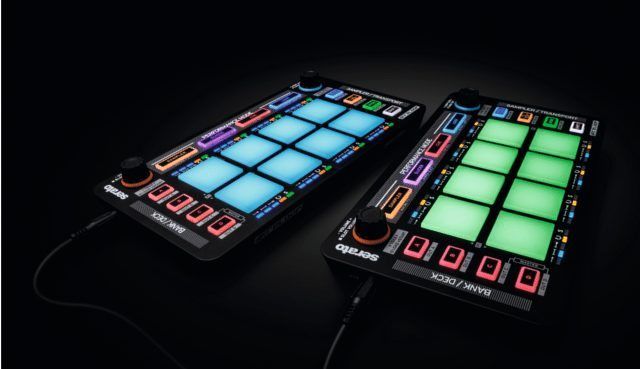
Serato DJ comes out with another strong release today that provides new functionality like Flip mode, along with some older loved features missing from Scratch Live such as AM mode (hide your tracks) and Chronological cues. A new MIDI Map panel also promises to provide deeper control over the software for those who may wish to dive deeper into the realm of customization. Serato DJ 1.7 is available now from serato.com/dj.

Serato DJ 1.7

Here are some of the more notable new functions that rolled out with 1.7 that our feature-craving readers might enjoy!

SERATO FLIP
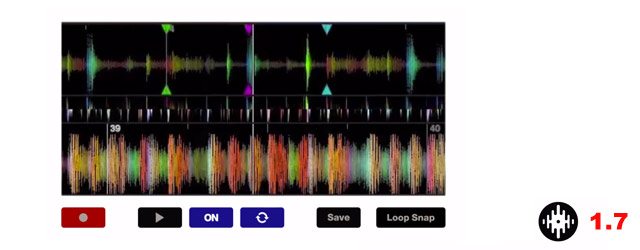
Serato-1.7-FLIP

The much talked about cue point juggle saving feature saves you a trip to the DAW by providing real-time play back of non-linear edits on the fly. In a new detailed video from the Serato DJ team, P-money talks about how he uses the new feature for more than just edits:

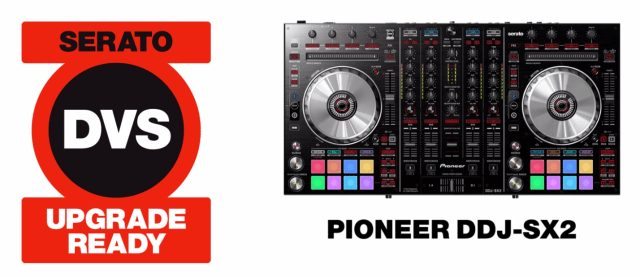
SERATO DVS Expansion Pack 
Screen Shot 2014-09-01 at 4.53.45 PM

Now owners of a few specific controllers including, Denon DJ MC6000MK2, Numark N4 and Pioneer DDJ-SX2, can upgrade to get full DVS control on a budget. (that’s turntables via timecode for the non-scratchers out there). The update allows use of the controllers’ internal soundcards for the software – something that for a long time was limited to just a few licensed soundcards and mixers.

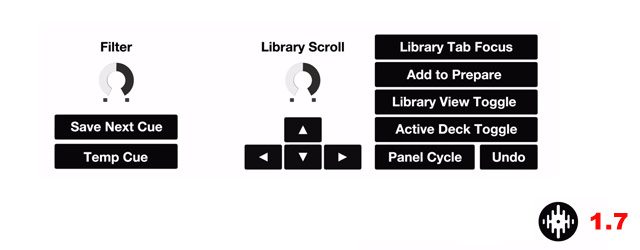
NEW MIDI MAPPING PANEL
Serato1.7_mapping

A new MIDI panel inside Serato DJ that allows you to MIDI map additional software features such as Library Scroll, Loop Rolls, Instant Doubles, Loop Shift, a dedicated combo HP / LP filter for each channel + much more.

OTHER UPDATES

  • AM Mode: Hide the artist and track information displayed in the Virtual Deck area (this was previously an easter egg in the software, but is now a real feature!)
  • Chronological Cue Points: A highly popular Scratch Live feature, now available in Serato DJ
  • Rearrange Cues
  • Smaller Quantize Values
  • Library Optimization

Now let’s turn it over to our Serato DJ readers out there. Help us fill in the gaps in the comments with your thoughts and observations. 

  1. What new features are exposed in the MIDI Map Panel?
  2. How do you feel about the prices for the new expansion packs (Flip and DVS)?
  3. What Quantize Values are now possible  – do they work well?
Tags: 1.7flip modemidi mappingmidi panelserato DJupdate
Share2Tweet1Share
Previous Post

Video: Native Instruments Komplete Teases New Production Controller

Next Post

Reloop Neon: Dedicated Effects Management for Serato DJ

Related Posts

“No Deal”: New Zealand’s ComCom denies clearance for AlphaTheta’s Serato acquisition
Breaking News

“No Deal”: New Zealand’s ComCom denies clearance for AlphaTheta’s Serato acquisition

July 17, 2024
Midi Fighter Twister controlling Traktor Pro 4 Stem decks
DJ Techniques / Tips

Ean’s powerful Midi Fighter Twister mapping for Traktor Pro 4’s Stems + Pattern Player

July 17, 2024
TIDAL blocked DJs from using Stems – but the next generation of DJ gear will likely make that irrelevant
DJ Gear

TIDAL blocked DJs from using Stems – but the next generation of DJ gear will likely make that irrelevant

January 18, 2024
Load More
Next Post
Reloop Neon: Dedicated Effects Management for Serato DJ

Reloop Neon: Dedicated Effects Management for Serato DJ

Want to reach DJTT's audience here?

Shoot an email to advertising@djtechtools.com

DJTT ads
DJTT newsletter
Midi Fighter
Chat with us
  • ABOUT DJTT
  • CONTACT
  • PRIVACY
  • MIDI FIGHTER HELP
  • ABOUT DJTT
  • JOBS
  • CONTACT US
  • ADVERTISE
  • PRIVACY POLICY
  • ACCESSIBILITY STATEMENT

© 2024 DJ Techtools all rights reserved by DJ TechTools on all content unless otherwise noted.

No Result
View All Result
  • Blog
    • DJ Gear
      • DIY Projects
      • Gear Reviews
      • New Products
      • Controllerism
    • Techniques + Tips
      • Beginner DJ
      • Advanced DJ
      • Producer
      • Finger Drummer
    • News + Culture
      • Editorials + Opinions
      • Artist Interviews
      • Performances + Routines
      • How I Play
    • DJ Software Tutorials
      • Serato Tips
      • CDJ Tips
      • Ableton Live Tips
  • Store
    • Run by real DJs, not a corporation
    • DJ Controllers
      • Midi Fighter Twister
      • Midi Fighter Spectra
      • Midi Fighter 64
      • View All
    • Accessories
      • Chroma USB Drive for DJs
      • Chroma Caps
      • Chroma Cables Audio
      • Chroma Cables USB-A
      • Chroma Cables: USB-C
      • DJTT Gift Card
      • Midi Fighter T-Shirt
      • Keyboard Covers
      • Earplugs by V-Moda
    • Production Gear
    • Soundcards & Mixers
  • Community
    • Popular Forums
      • General Discussion
      • Buy & Sell
      • Reviews
      • Mixes
      • Music Production
      • Show Your Setup
      • Off Topic
    • Handy Links
      • New Posts
      • Private Messages
      • Register
      • Search
    • Midi Maps
      • Traktor
      • Ableton
      • Serato DJ
      • Midi Fighter 3D
      • Midi Fighter Twister
      • Midi Fighter Spectra
  • Midi Fighter
  • Chroma

© 2024 DJ Techtools all rights reserved by DJ TechTools on all content unless otherwise noted.

This website uses cookies. By continuing to use this website you are giving consent to cookies being used. Visit our Privacy and Cookie Policy.