DJ TechTools
  • Blog
    • DJ Gear
      • DIY Projects
      • Gear Reviews
      • New Products
      • Controllerism
    • Techniques + Tips
      • Beginner DJ
      • Advanced DJ
      • Producer
      • Finger Drummer
    • News + Culture
      • Editorials + Opinions
      • Artist Interviews
      • Performances + Routines
      • How I Play
    • DJ Software Tutorials
      • Serato Tips
        • Traktor Tips
      • CDJ Tips
      • Ableton Live Tips
  • Store
    • Run by real DJs, not a corporation
    • DJ Controllers
      • Midi Fighter Twister
      • Midi Fighter Spectra
      • Midi Fighter 64
      • View All
    • Accessories
      • Chroma USB Drive for DJs
      • Chroma Caps
      • Chroma Cables Audio
      • Chroma Cables USB-A
      • Chroma Cables: USB-C
      • DJTT Gift Card
      • Midi Fighter T-Shirt
      • Keyboard Covers
      • Earplugs by V-Moda
    • Production Gear
    • Soundcards & Mixers
  • Community
    • Popular Forums
      • General Discussion
      • Buy & Sell
      • Reviews
      • Mixes
      • Music Production
      • Show Your Setup
      • Off Topic
    • Handy Links
      • New Posts
      • Private Messages
      • Register
      • Search
    • Midi Maps
      • Traktor
      • Ableton
      • Serato DJ
      • Midi Fighter 3D
      • Midi Fighter Twister
      • Midi Fighter Spectra
  • Midi Fighter
  • Chroma
No Result
View All Result
DJ TechTools
  • Blog
    • DJ Gear
      • DIY Projects
      • Gear Reviews
      • New Products
      • Controllerism
    • Techniques + Tips
      • Beginner DJ
      • Advanced DJ
      • Producer
      • Finger Drummer
    • News + Culture
      • Editorials + Opinions
      • Artist Interviews
      • Performances + Routines
      • How I Play
    • DJ Software Tutorials
      • Serato Tips
        • Traktor Tips
      • CDJ Tips
      • Ableton Live Tips
  • Store
    • Run by real DJs, not a corporation
    • DJ Controllers
      • Midi Fighter Twister
      • Midi Fighter Spectra
      • Midi Fighter 64
      • View All
    • Accessories
      • Chroma USB Drive for DJs
      • Chroma Caps
      • Chroma Cables Audio
      • Chroma Cables USB-A
      • Chroma Cables: USB-C
      • DJTT Gift Card
      • Midi Fighter T-Shirt
      • Keyboard Covers
      • Earplugs by V-Moda
    • Production Gear
    • Soundcards & Mixers
  • Community
    • Popular Forums
      • General Discussion
      • Buy & Sell
      • Reviews
      • Mixes
      • Music Production
      • Show Your Setup
      • Off Topic
    • Handy Links
      • New Posts
      • Private Messages
      • Register
      • Search
    • Midi Maps
      • Traktor
      • Ableton
      • Serato DJ
      • Midi Fighter 3D
      • Midi Fighter Twister
      • Midi Fighter Spectra
  • Midi Fighter
  • Chroma
No Result
View All Result
DJ TechTools

Bridging The Gap: Interview with DJ Enferno

Matthew Freter by Matthew Freter
December 9, 2014
in Ableton, Ableton Live Tips, Advanced DJ Tips, Controllerism, DJ Techniques / Tips, Live 9, Production Tips, Serato Tips
Reading Time: 4 mins read
0
Bridging The Gap: Interview with DJ Enferno
58
VIEWS
Post on FacebookTweet thisUpvote on Reddit

As DJ technology continues to evolve, the division between controller DJs and turntable DJs seems to be getting bigger. Both styles of DJing have their advantages and ultimately try to achieve the same result. Even A-Trak commented on this subject saying DJing is about taking risks and not just what you use at the club.

But what about DJs that use both? Many DJs are experimenting with controllers, like the Midi Fighter 3D or the Native Instruments Maschine, for their live sets. Few DJs have been able to incorporate both elements into one complete ecosystem. Even more rare are those DJs who are able to combine live production instruments with controllers and turntables. DJ Enferno is one of those rare breeds able to turn a typical DJ set into a live music performance. We reached out to DJ Enferno and talked about the future of DJ technology, his creative process, and what it takes to bridge the gap.

The Setup


DJ Enferno’s setup has changed a lot over the years since he first started experimenting with live instruments in 2006. He has since reduced his setup to the essentials, “I had two big Pelican cases full of stuff, which was very hard to travel with. Over time I figured out how to trim down while making the rig more powerful.”

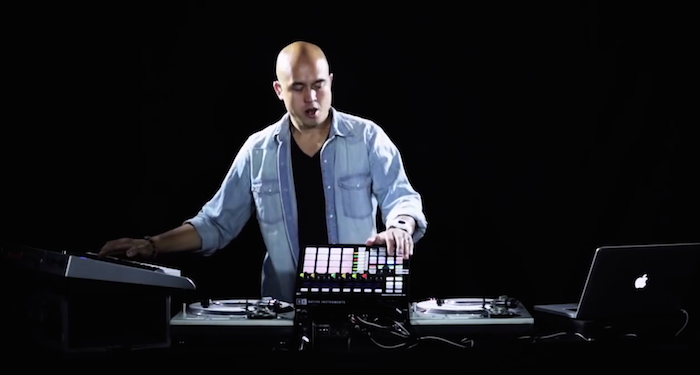
A typical club set up for DJ Enferno includes:

  • 2 Technics 1200s
  • Pioneer DJM 900 Nexus mixer
  • Maschine MK2
  • Midi-keyboard controlling VST synths in Ableton Live
  • Ableton Live 9 (for drum racks, VST synths, loop triggering, and loop recording
  • Serato Scratch Live (The latest 3005 video I used Serato DJ for the 8 cue points)
  • Macbook Pro
  • Video Rig: 3 Logitech c920 webcams, thunderbolt hub, Modul8 software (Running 3 live camera feeds and visuals from the same Macbook Pro)

Live Performances
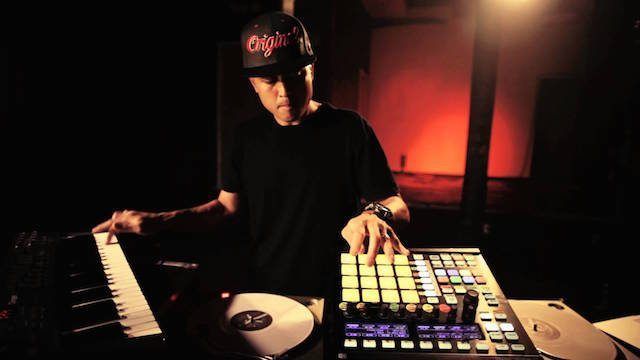
DJ Enferno Live Performance

To define his performance, DJ Enferno called his sets part DJing and part live music performance. “The DJ side is about keeping the dance floor moving, while the live performance side is about keeping an audience entertained, similar to what a band does,” said DJ Enferno. The term “performance” admittedly has a lot of meanings in the DJ world but he sees song selection, mixing, using live instruments, and using turntables as instruments the most important parts of his performances.

The Creative Process
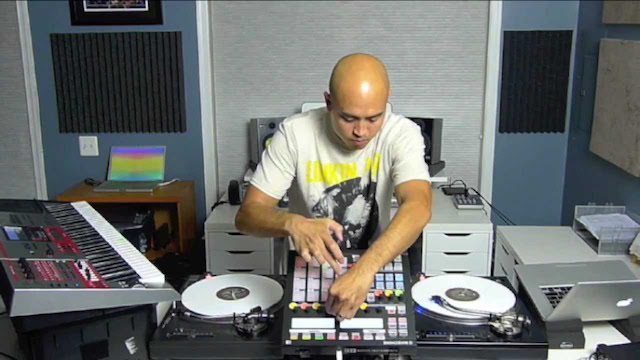
DJ Enferno Creative Process

The creative process begins with building a traditional remix in the studio, with the goal of it being played live. “Then I bounce individual parts and save synth presets and create a kit. I then open Ableton Live and Serato and build my instrument around the track to recreate it,” said DJ Enferno. After breaking up the remix into parts the creative process takes shape. He continues, “Sometimes I play almost all the notes in a routine using Ableton drum racks for samples, and instrument racks for synths. Sometimes I’ll create a backing track and use that in the routine, while I play a few elements on top.”

Bridging the Gap
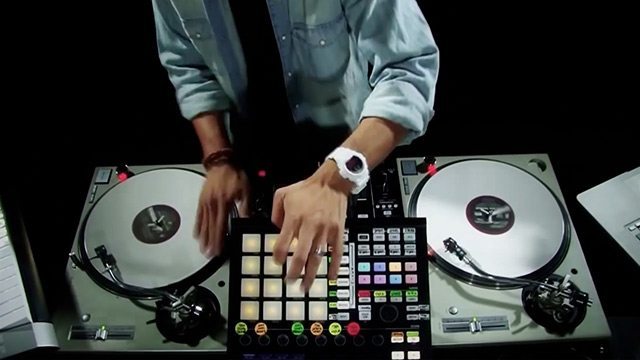
DJ Enferno Maschine

Serato controlled turntables are the backbone of his setup with a Maschine controlling other elements through Ableton. Bomes Midi Translator is used to flip between routines on the Maschine with a turn of a knob. “I have been on Bomes, learning and programming, since 2008. I can now turn the big Maschine knob and select up to 20 loop-based routines, and also select an additional 107 drum rack banks,” he said.

Ableton runs through the audio interface in the DJM 900 Nexus mixer, however, the main out is routed to the first channel on the mixer. “I use channel four to send my metronome from Ableton, which I can monitor with the cue button, but which the audience can’t hear. That helps me keep some of my drumming in time. It also lets me do live looping with no apparent beat to the audience,” he explains.

The midi keyboard, which controls synths, is mapped in many different ways depending on the situation. “I sometimes split the keyboard using Ableton Instrument racks. Sometimes I’ll have Sylenth and Massive running at the same time, or multiple Sylenths and an Ableton Sampler instrument running. I use Bomes to activate the correct Instrument rack,” he said.

All of this is done without using the Bridge so there is no sync between his turntables and Ableton. He said he does the beat matching manually but not without help, “One trick is to edit the Serato tracks for routine to already be the same BPM as the Ableton session. Otherwise, I’ll just remember where to put the pitch adjustment.”

The Future of DJ Technology
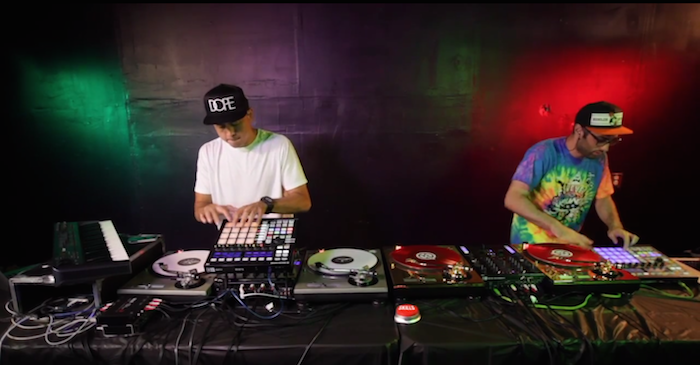
E.A.S.Y. Live Performance

DJ Enferno is hopeful for the future of DJ technology. “DJ technology will continue to break down barriers-to-entry for aspiring DJ’s. My hope is that more people will take advantage of technology to do creative things with performance. But it’s really up to everyone individually,” he said.

He also mentioned that technology should not dictate what is possible saying, “The creativity is in your head.  You just need to work hard to learn the things that will allow you to express your creativity.”

For more DJ Enferno, check out his official website and subscribe to his Youtube channel.


Want more awesome interviews?
Check out all of these artist features and interviews! 
Tags: Abletonableton live 9Bomesdj enfernodjingfutureinterviewlive performancemaschineseratoserato DJserato scratch livetechnology
ShareTweetShare
Previous Post

touchAble 3: Turn iOS Devices into USB Controllers

Next Post

Vestax Officially Bankrupt; Who Could Buy The Brand?

Related Posts

A Prime 4+ and a Kontrol S3 intercut against eachother over a black background
Breaking News

InMusic just bought Native Instruments. So what now for Traktor?

May 8, 2026
The DJM-V5 from AlphaTheta: 3 channels, 4-band EQ, V10 sound – no Beat FX or crossfader.
Breaking News

The DJM-V5 from AlphaTheta: 3 channels, 4-band EQ, V10 sound – no Beat FX or crossfader.

January 20, 2026
Ableton launches Live 12 Suite rent-to-own plan – and it’s not a subscription
Ableton

Ableton launches Live 12 Suite rent-to-own plan – and it’s not a subscription

October 1, 2025
Load More
Next Post
Vestax Officially Bankrupt; Who Could Buy The Brand?

Vestax Officially Bankrupt; Who Could Buy The Brand?

Want to reach DJTT's audience here?

Shoot an email to advertising@djtechtools.com

DJTT ads
DJTT newsletter
Midi Fighter
Chat with us
  • ABOUT DJTT
  • CONTACT
  • PRIVACY
  • MIDI FIGHTER HELP
  • ABOUT DJTT
  • JOBS
  • CONTACT US
  • ADVERTISE
  • PRIVACY POLICY
  • ACCESSIBILITY STATEMENT

© 2024 DJ Techtools all rights reserved by DJ TechTools on all content unless otherwise noted.

No Result
View All Result
  • Blog
    • DJ Gear
      • DIY Projects
      • Gear Reviews
      • New Products
      • Controllerism
    • Techniques + Tips
      • Beginner DJ
      • Advanced DJ
      • Producer
      • Finger Drummer
    • News + Culture
      • Editorials + Opinions
      • Artist Interviews
      • Performances + Routines
      • How I Play
    • DJ Software Tutorials
      • Serato Tips
      • CDJ Tips
      • Ableton Live Tips
  • Store
    • Run by real DJs, not a corporation
    • DJ Controllers
      • Midi Fighter Twister
      • Midi Fighter Spectra
      • Midi Fighter 64
      • View All
    • Accessories
      • Chroma USB Drive for DJs
      • Chroma Caps
      • Chroma Cables Audio
      • Chroma Cables USB-A
      • Chroma Cables: USB-C
      • DJTT Gift Card
      • Midi Fighter T-Shirt
      • Keyboard Covers
      • Earplugs by V-Moda
    • Production Gear
    • Soundcards & Mixers
  • Community
    • Popular Forums
      • General Discussion
      • Buy & Sell
      • Reviews
      • Mixes
      • Music Production
      • Show Your Setup
      • Off Topic
    • Handy Links
      • New Posts
      • Private Messages
      • Register
      • Search
    • Midi Maps
      • Traktor
      • Ableton
      • Serato DJ
      • Midi Fighter 3D
      • Midi Fighter Twister
      • Midi Fighter Spectra
  • Midi Fighter
  • Chroma

© 2024 DJ Techtools all rights reserved by DJ TechTools on all content unless otherwise noted.

This website uses cookies. By continuing to use this website you are giving consent to cookies being used. Visit our Privacy and Cookie Policy.