DJ TechTools
  • Blog
    • DJ Gear
      • DIY Projects
      • Gear Reviews
      • New Products
      • Controllerism
    • Techniques + Tips
      • Beginner DJ
      • Advanced DJ
      • Producer
      • Finger Drummer
    • News + Culture
      • Editorials + Opinions
      • Artist Interviews
      • Performances + Routines
      • How I Play
    • DJ Software Tutorials
      • Serato Tips
        • Traktor Tips
      • CDJ Tips
      • Ableton Live Tips
  • Store
    • Run by real DJs, not a corporation
    • DJ Controllers
      • Midi Fighter Twister
      • Midi Fighter Spectra
      • Midi Fighter 64
      • View All
    • Accessories
      • Chroma USB Drive for DJs
      • Chroma Caps
      • Chroma Cables Audio
      • Chroma Cables USB-A
      • Chroma Cables: USB-C
      • DJTT Gift Card
      • Midi Fighter T-Shirt
      • Keyboard Covers
      • Earplugs by V-Moda
    • Production Gear
    • Soundcards & Mixers
  • Community
    • Popular Forums
      • General Discussion
      • Buy & Sell
      • Reviews
      • Mixes
      • Music Production
      • Show Your Setup
      • Off Topic
    • Handy Links
      • New Posts
      • Private Messages
      • Register
      • Search
    • Midi Maps
      • Traktor
      • Ableton
      • Serato DJ
      • Midi Fighter 3D
      • Midi Fighter Twister
      • Midi Fighter Spectra
  • Midi Fighter
  • Chroma
No Result
View All Result
DJ TechTools
  • Blog
    • DJ Gear
      • DIY Projects
      • Gear Reviews
      • New Products
      • Controllerism
    • Techniques + Tips
      • Beginner DJ
      • Advanced DJ
      • Producer
      • Finger Drummer
    • News + Culture
      • Editorials + Opinions
      • Artist Interviews
      • Performances + Routines
      • How I Play
    • DJ Software Tutorials
      • Serato Tips
        • Traktor Tips
      • CDJ Tips
      • Ableton Live Tips
  • Store
    • Run by real DJs, not a corporation
    • DJ Controllers
      • Midi Fighter Twister
      • Midi Fighter Spectra
      • Midi Fighter 64
      • View All
    • Accessories
      • Chroma USB Drive for DJs
      • Chroma Caps
      • Chroma Cables Audio
      • Chroma Cables USB-A
      • Chroma Cables: USB-C
      • DJTT Gift Card
      • Midi Fighter T-Shirt
      • Keyboard Covers
      • Earplugs by V-Moda
    • Production Gear
    • Soundcards & Mixers
  • Community
    • Popular Forums
      • General Discussion
      • Buy & Sell
      • Reviews
      • Mixes
      • Music Production
      • Show Your Setup
      • Off Topic
    • Handy Links
      • New Posts
      • Private Messages
      • Register
      • Search
    • Midi Maps
      • Traktor
      • Ableton
      • Serato DJ
      • Midi Fighter 3D
      • Midi Fighter Twister
      • Midi Fighter Spectra
  • Midi Fighter
  • Chroma
No Result
View All Result
DJ TechTools

touchAble 3: Turn iOS Devices into USB Controllers

Dean Zulueta by Dean Zulueta
December 9, 2014
in Ableton, Controllerism, DJ Gear Announcements, News, News + Culture
Reading Time: 3 mins read
0
touchAble 3: Turn iOS Devices into USB Controllers
43
VIEWS
Post on FacebookTweet thisUpvote on Reddit

Touch devices for DJs and producers continue to pop up and the market of touch apps is growing even faster. Touch apps are a great way for artists to create unique controller units using a touch device they already have however, many of these apps either use WiFi or require a camera kit to connect directly to the software. The problem with WiFi is finding/creating a stable connection that will sustain a connection with low latency and camera kits can be a little expensive considering the fact most of these apps run only $5 or $10. The folks at ZerOdebug have announced the release of the latest version of their touchAble 3 app. This app is a major improvement from touchAble 2 considering both the functionality and design of the app. Read more inside about the new features of touchAble 3 and how it can be used as a USB MIDI controller.
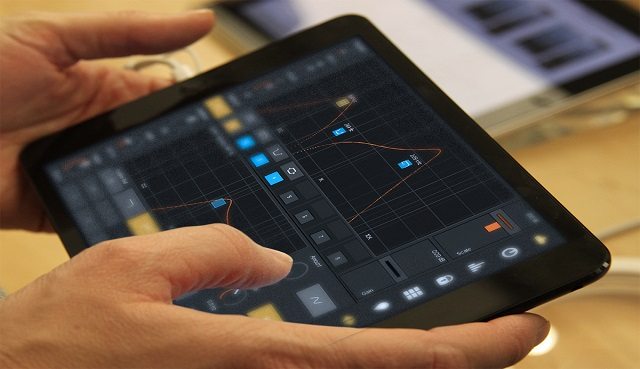
touchAble 3 brings the power of USB MIDI to iOS devices.

Extended Ableton Control and Stability

Last year we reviewed touchAble 2 and found that the app created the definitive Ableton touch controller. There’s very little this controller can’t do. With touchAble 3, the improvements made make the app even stronger than it was before. TouchAble 3 now supports Devices in Racks which adds more ways for the controller to navigate through Ableton with ease. One tap opens the selected rack and unveils the chains of a device. By tapping the rack again the user obtains access to every Device contained in the selected chain. Also, the controller can become an editor using the MIDI Clip Editor to choose and assign different MIDI channels for Drum Pads, Keyboard, Isomorphic
Keyboard and Piano Roll. touchAble 3 uses  seven different modules (Clips, Mixer, Devices, Keys, Pads, XY Pad, Template Editor) and the MDI Clip Editor to control every element of Live’s session view. What is also nice is that Live devices appear on the iPad just as they do in the software.

Along with expanding the amount of control touchAble has, the developers also improved the stability of the app using the new Server. Where as before the Server had to be started manually, now users can experience automated connections which makes using the app wirelessly even more stable. Also, development improvements allowed for iPad and iPhone link modes. Multiple devices running touchAble 3 can now be linked together and used as one giant controller unit for Ableton.

touchAble + USB

touchAble also has responded to their customers request for USB connectivity between the software and the iPad. Wireless ad-hoc networks are fine for home or studio use but when someone wants to use the app on the go, wireless networks become less stable. Therefore, touchAble 3 supports USB connectivity by using the standard cable that comes with a user’s iOS device. There is no need to buy a camera kit or special adapters. Just plug in a USB cable and the user is ready to go.

touchAble 3 is a polished version of touchAble 2 that addresses major bugs and concerns with stable programming along with great new features. Ableton is continually being used in live performances which means artists are always looking for controllers to help them play out. touchAble 3 not only has the capability of mimicking functions of other top controllers but it also goes where most other controllers have trouble going. For less than $30, the device gives you complete control over Ableton where as buying a Push is going to run you $600.
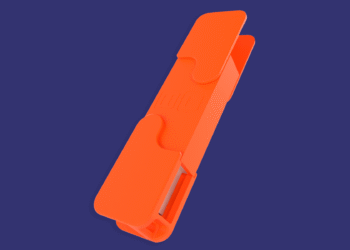
touchAble 3 is compatible with all versions of the iPad and is on sale for $28.99 which is bundled with the iPhone/iPod version, touchAble Mini.


Tags: AbletonappleControllerismdj gearIOSipadIphoneiPodmidi controllerproducer gearPushtouch devicestouchable 2touchable 3touchable miniusb controllerusb MIDI
ShareTweetShare
Previous Post

FL Studio 12 Coming to Mac OS X

Next Post

Bridging The Gap: Interview with DJ Enferno

Related Posts

Traktor MX2: Native Instruments’ New 2-Channel Controller
DJ Gear Announcements

Traktor MX2: Native Instruments’ New 2-Channel Controller

October 8, 2025
Akai Launches MPC Live III Standalone With 8-Core Processor, Clip Matrix, Stems, and 3D Pads
Breaking News

Akai Launches MPC Live III Standalone With 8-Core Processor, Clip Matrix, Stems, and 3D Pads

October 2, 2025
Ableton launches Live 12 Suite rent-to-own plan – and it’s not a subscription
Ableton

Ableton launches Live 12 Suite rent-to-own plan – and it’s not a subscription

October 1, 2025
Load More
Next Post
Bridging The Gap: Interview with DJ Enferno

Bridging The Gap: Interview with DJ Enferno

Want to reach DJTT's audience here?

Shoot an email to advertising@djtechtools.com

DJTT ads
DJTT newsletter
Midi Fighter
Chat with us
  • ABOUT DJTT
  • CONTACT
  • PRIVACY
  • MIDI FIGHTER HELP
  • ABOUT DJTT
  • JOBS
  • CONTACT US
  • ADVERTISE
  • PRIVACY POLICY
  • ACCESSIBILITY STATEMENT

© 2024 DJ Techtools all rights reserved by DJ TechTools on all content unless otherwise noted.

No Result
View All Result
  • Blog
    • DJ Gear
      • DIY Projects
      • Gear Reviews
      • New Products
      • Controllerism
    • Techniques + Tips
      • Beginner DJ
      • Advanced DJ
      • Producer
      • Finger Drummer
    • News + Culture
      • Editorials + Opinions
      • Artist Interviews
      • Performances + Routines
      • How I Play
    • DJ Software Tutorials
      • Serato Tips
      • CDJ Tips
      • Ableton Live Tips
  • Store
    • Run by real DJs, not a corporation
    • DJ Controllers
      • Midi Fighter Twister
      • Midi Fighter Spectra
      • Midi Fighter 64
      • View All
    • Accessories
      • Chroma USB Drive for DJs
      • Chroma Caps
      • Chroma Cables Audio
      • Chroma Cables USB-A
      • Chroma Cables: USB-C
      • DJTT Gift Card
      • Midi Fighter T-Shirt
      • Keyboard Covers
      • Earplugs by V-Moda
    • Production Gear
    • Soundcards & Mixers
  • Community
    • Popular Forums
      • General Discussion
      • Buy & Sell
      • Reviews
      • Mixes
      • Music Production
      • Show Your Setup
      • Off Topic
    • Handy Links
      • New Posts
      • Private Messages
      • Register
      • Search
    • Midi Maps
      • Traktor
      • Ableton
      • Serato DJ
      • Midi Fighter 3D
      • Midi Fighter Twister
      • Midi Fighter Spectra
  • Midi Fighter
  • Chroma

© 2024 DJ Techtools all rights reserved by DJ TechTools on all content unless otherwise noted.

This website uses cookies. By continuing to use this website you are giving consent to cookies being used. Visit our Privacy and Cookie Policy.