DJ TechTools
  • Blog
    • DJ Gear
      • DIY Projects
      • Gear Reviews
      • New Products
      • Controllerism
    • Techniques + Tips
      • Beginner DJ
      • Advanced DJ
      • Producer
      • Finger Drummer
    • News + Culture
      • Editorials + Opinions
      • Artist Interviews
      • Performances + Routines
      • How I Play
    • DJ Software Tutorials
      • Serato Tips
        • Traktor Tips
      • CDJ Tips
      • Ableton Live Tips
  • Store
    • Run by real DJs, not a corporation
    • DJ Controllers
      • Midi Fighter Twister
      • Midi Fighter Spectra
      • Midi Fighter 64
      • View All
    • Accessories
      • Chroma USB Drive for DJs
      • Chroma Caps
      • Chroma Cables Audio
      • Chroma Cables USB-A
      • Chroma Cables: USB-C
      • DJTT Gift Card
      • Midi Fighter T-Shirt
      • Keyboard Covers
      • Earplugs by V-Moda
    • Production Gear
    • Soundcards & Mixers
  • Community
    • Popular Forums
      • General Discussion
      • Buy & Sell
      • Reviews
      • Mixes
      • Music Production
      • Show Your Setup
      • Off Topic
    • Handy Links
      • New Posts
      • Private Messages
      • Register
      • Search
    • Midi Maps
      • Traktor
      • Ableton
      • Serato DJ
      • Midi Fighter 3D
      • Midi Fighter Twister
      • Midi Fighter Spectra
  • Midi Fighter
  • Chroma
No Result
View All Result
DJ TechTools
  • Blog
    • DJ Gear
      • DIY Projects
      • Gear Reviews
      • New Products
      • Controllerism
    • Techniques + Tips
      • Beginner DJ
      • Advanced DJ
      • Producer
      • Finger Drummer
    • News + Culture
      • Editorials + Opinions
      • Artist Interviews
      • Performances + Routines
      • How I Play
    • DJ Software Tutorials
      • Serato Tips
        • Traktor Tips
      • CDJ Tips
      • Ableton Live Tips
  • Store
    • Run by real DJs, not a corporation
    • DJ Controllers
      • Midi Fighter Twister
      • Midi Fighter Spectra
      • Midi Fighter 64
      • View All
    • Accessories
      • Chroma USB Drive for DJs
      • Chroma Caps
      • Chroma Cables Audio
      • Chroma Cables USB-A
      • Chroma Cables: USB-C
      • DJTT Gift Card
      • Midi Fighter T-Shirt
      • Keyboard Covers
      • Earplugs by V-Moda
    • Production Gear
    • Soundcards & Mixers
  • Community
    • Popular Forums
      • General Discussion
      • Buy & Sell
      • Reviews
      • Mixes
      • Music Production
      • Show Your Setup
      • Off Topic
    • Handy Links
      • New Posts
      • Private Messages
      • Register
      • Search
    • Midi Maps
      • Traktor
      • Ableton
      • Serato DJ
      • Midi Fighter 3D
      • Midi Fighter Twister
      • Midi Fighter Spectra
  • Midi Fighter
  • Chroma
No Result
View All Result
DJ TechTools

Xtreme Mapping 1.5.1 Adds Traktor 2.7.0 support

Ryan Dejaegher by Ryan Dejaegher
January 7, 2015
in Advanced DJ Tips, Breaking News, DJ Software Tips, DJ Techniques / Tips, Native Instruments, News, Traktor Tips
Reading Time: 2 mins read
0
Xtreme Mapping 1.5.1 Adds Traktor 2.7.0 support
81
VIEWS
Post on FacebookTweet thisUpvote on Reddit

Xtreme Mapping is back! For a brief time the popular mapping software was absent from the Mac App Store. It appeared that development had stopped and that the software was no longer available to purchase. Thankfully that wasn’t the case. Vincenzo Pietropaolo has added Traktor 2.7.0 support to Xtreme Mapping. If you’re not familiar with Xtreme Mapping, it’s a Mac only software designed to speed up your mapping workflow for Traktor. Read on for what’s been added.

Freeze Mode and Mapping Wizard
slicedwaveform

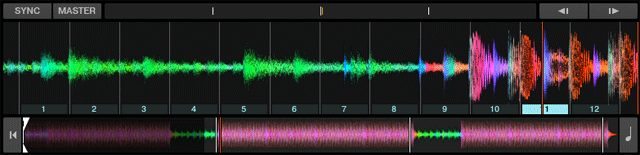
Last October, Native Instruments released Traktor Pro 2.7 alongside the Kontrol S8 (check out our overview of the Kontrol S8). Traktor Pro 2.7 added a popular feature, Freeze Mode, which was previously available only in Traktor DJ (iOS) and Serato DJ.

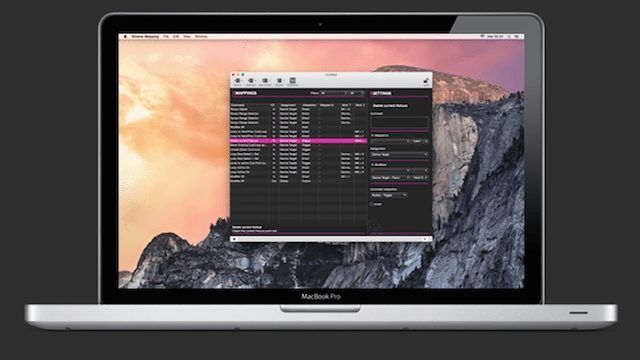
The latest version of Xtreme Mapping has the freeze mode commands available to map. While you can map freeze mode through Traktor’s Controller Manager, the process can be time consuming. Xtreme Mapping helps speed up the process through a helpful mapping wizard.
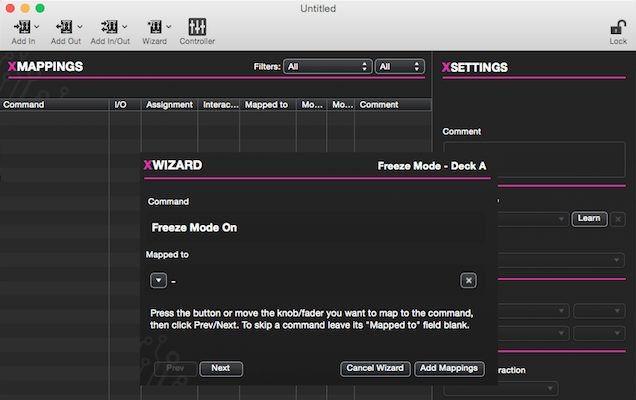
Xtreme Mapping

The mapping wizard lets you choose a feature (in this case Freeze mode) and then choose the deck you want to map it to. It will guide you through all the commands and let you map it to your control of choice. Once you’re finished, click “add mappings” and Xtreme Mapping will add the commands to your mapping.

Xtreme Mapping also makes it really easy to modify commands. For example lets say you wanted to map all the commands to Deck B, just highlight the commands and assign them to Deck B. In Traktor you’d have to change the deck assignments for commands one at a time.

How to Update Xtreme Mapping

Although Xtreme Mapping is available again in the Mac App Store, it’s not the latest version. You’ll need to purchase Xtreme Mapping from the app store then go to the Xtreme Mapping site to enter your name and email. Once you’ve done that you’ll receive instructions on how to update to the latest version of Xtreme Mapping.

Do you use Xtreme Mapping? How has it helped your mapping workflow?
Tags: freeze modekontrol s8Mac App StoreNative InstrumentsTraktor Pro 2.7Traktor Tipsxtreme mapping
Share1Tweet1Share
Previous Post

How To Start A Mobile DJ Business As A Teen

Next Post

Routine: Tim Murray on Midi Fighter Twister + 3D; Free Soundpack Download

Related Posts

A Prime 4+ and a Kontrol S3 intercut against eachother over a black background
Breaking News

InMusic just bought Native Instruments. So what now for Traktor?

May 8, 2026
Traktor MX2: Native Instruments’ New 2-Channel Controller
DJ Gear Announcements

Traktor MX2: Native Instruments’ New 2-Channel Controller

October 8, 2025
How I Play: Hybrasil’s DAWless live techno setup
How I Play

How I Play: Hybrasil’s DAWless live techno setup

October 3, 2024
Load More
Next Post
Routine: Tim Murray on Midi Fighter Twister + 3D; Free Soundpack Download

Routine: Tim Murray on Midi Fighter Twister + 3D; Free Soundpack Download

Want to reach DJTT's audience here?

Shoot an email to advertising@djtechtools.com

DJTT ads
DJTT newsletter
Midi Fighter
Chat with us
  • ABOUT DJTT
  • CONTACT
  • PRIVACY
  • MIDI FIGHTER HELP
  • ABOUT DJTT
  • JOBS
  • CONTACT US
  • ADVERTISE
  • PRIVACY POLICY
  • ACCESSIBILITY STATEMENT

© 2024 DJ Techtools all rights reserved by DJ TechTools on all content unless otherwise noted.

No Result
View All Result
  • Blog
    • DJ Gear
      • DIY Projects
      • Gear Reviews
      • New Products
      • Controllerism
    • Techniques + Tips
      • Beginner DJ
      • Advanced DJ
      • Producer
      • Finger Drummer
    • News + Culture
      • Editorials + Opinions
      • Artist Interviews
      • Performances + Routines
      • How I Play
    • DJ Software Tutorials
      • Serato Tips
      • CDJ Tips
      • Ableton Live Tips
  • Store
    • Run by real DJs, not a corporation
    • DJ Controllers
      • Midi Fighter Twister
      • Midi Fighter Spectra
      • Midi Fighter 64
      • View All
    • Accessories
      • Chroma USB Drive for DJs
      • Chroma Caps
      • Chroma Cables Audio
      • Chroma Cables USB-A
      • Chroma Cables: USB-C
      • DJTT Gift Card
      • Midi Fighter T-Shirt
      • Keyboard Covers
      • Earplugs by V-Moda
    • Production Gear
    • Soundcards & Mixers
  • Community
    • Popular Forums
      • General Discussion
      • Buy & Sell
      • Reviews
      • Mixes
      • Music Production
      • Show Your Setup
      • Off Topic
    • Handy Links
      • New Posts
      • Private Messages
      • Register
      • Search
    • Midi Maps
      • Traktor
      • Ableton
      • Serato DJ
      • Midi Fighter 3D
      • Midi Fighter Twister
      • Midi Fighter Spectra
  • Midi Fighter
  • Chroma

© 2024 DJ Techtools all rights reserved by DJ TechTools on all content unless otherwise noted.

This website uses cookies. By continuing to use this website you are giving consent to cookies being used. Visit our Privacy and Cookie Policy.