DJ TechTools
  • Blog
    • DJ Gear
      • DIY Projects
      • Gear Reviews
      • New Products
      • Controllerism
    • Techniques + Tips
      • Beginner DJ
      • Advanced DJ
      • Producer
      • Finger Drummer
    • News + Culture
      • Editorials + Opinions
      • Artist Interviews
      • Performances + Routines
      • How I Play
    • DJ Software Tutorials
      • Serato Tips
        • Traktor Tips
      • CDJ Tips
      • Ableton Live Tips
  • Store
    • Run by real DJs, not a corporation
    • DJ Controllers
      • Midi Fighter Twister
      • Midi Fighter Spectra
      • Midi Fighter 64
      • View All
    • Accessories
      • Chroma USB Drive for DJs
      • Chroma Caps
      • Chroma Cables Audio
      • Chroma Cables USB-A
      • Chroma Cables: USB-C
      • DJTT Gift Card
      • Midi Fighter T-Shirt
      • Keyboard Covers
      • Earplugs by V-Moda
    • Production Gear
    • Soundcards & Mixers
  • Community
    • Popular Forums
      • General Discussion
      • Buy & Sell
      • Reviews
      • Mixes
      • Music Production
      • Show Your Setup
      • Off Topic
    • Handy Links
      • New Posts
      • Private Messages
      • Register
      • Search
    • Midi Maps
      • Traktor
      • Ableton
      • Serato DJ
      • Midi Fighter 3D
      • Midi Fighter Twister
      • Midi Fighter Spectra
  • Midi Fighter
  • Chroma
No Result
View All Result
DJ TechTools
  • Blog
    • DJ Gear
      • DIY Projects
      • Gear Reviews
      • New Products
      • Controllerism
    • Techniques + Tips
      • Beginner DJ
      • Advanced DJ
      • Producer
      • Finger Drummer
    • News + Culture
      • Editorials + Opinions
      • Artist Interviews
      • Performances + Routines
      • How I Play
    • DJ Software Tutorials
      • Serato Tips
        • Traktor Tips
      • CDJ Tips
      • Ableton Live Tips
  • Store
    • Run by real DJs, not a corporation
    • DJ Controllers
      • Midi Fighter Twister
      • Midi Fighter Spectra
      • Midi Fighter 64
      • View All
    • Accessories
      • Chroma USB Drive for DJs
      • Chroma Caps
      • Chroma Cables Audio
      • Chroma Cables USB-A
      • Chroma Cables: USB-C
      • DJTT Gift Card
      • Midi Fighter T-Shirt
      • Keyboard Covers
      • Earplugs by V-Moda
    • Production Gear
    • Soundcards & Mixers
  • Community
    • Popular Forums
      • General Discussion
      • Buy & Sell
      • Reviews
      • Mixes
      • Music Production
      • Show Your Setup
      • Off Topic
    • Handy Links
      • New Posts
      • Private Messages
      • Register
      • Search
    • Midi Maps
      • Traktor
      • Ableton
      • Serato DJ
      • Midi Fighter 3D
      • Midi Fighter Twister
      • Midi Fighter Spectra
  • Midi Fighter
  • Chroma
No Result
View All Result
DJ TechTools

djay Pro Introduces Force Touch, Beatpad 2, and Slip Mode

Dean Zulueta by Dean Zulueta
June 12, 2015
in DJ Gear Announcements, News, News + Culture
Reading Time: 2 mins read
0
djay Pro Introduces Force Touch, Beatpad 2, and Slip Mode
37
VIEWS
Post on FacebookTweet thisUpvote on Reddit

With Apple’s WWDC coming to an end a lot of new gear is coming out, and it follows that some of it applies to the DJ world. One of the companies we feature pretty regularly on the blog is Algoriddim, the folks behind djay Pro (Mac) and djay 2 (mobile). Here’s some of the new features forthcoming in djay Pro:

Force Touch for DJing

Force Touch is a new feature that will be available in 2015 MacBooks that replaces the old trackpads. Instead of the user clicking down on a mechanism to control the software, a click is initiated by the software according to the level of force applied to the trackpad. (On the Mac you don’t click the mouse, the mouse clicks you!)

So what does this do for DJs? In the latest update for djay Pro DJs can utilize this feature to trigger additional actions with one click. These actions include previewing tracks, activating cue play, killing EQs, engaging a high pass filter, and resetting sliders. All of these features will only be available on the 2015 MacBooks with Force Touch trackpad.

Support for the Beatpad 2 and Slip Mode
Djay Pro Updates2

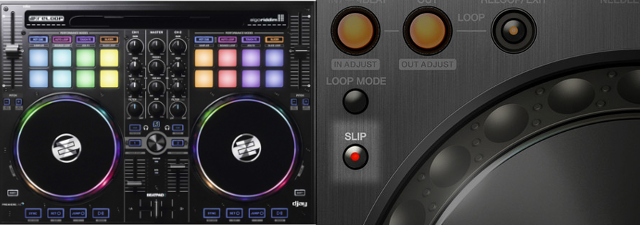
Additionally, the djay Pro software has added support for the Reloop Beatpad 2, a cross platform 2 deck controller that is compatible with Android, iOS, and PCs. A prominent feature of the controller is the eight hot pads that will have the ability to be utilized as a beat slicer in the djay Pro software, much like other DJ softwares on the market. This will also allow for mapping MIDI aftertouch messages and the beat slicer can be translated into other controllers besides the Beatpad 2.

Along with the ability to slice up beats the software has added the popular slip mode feature which most DJs can find in CDJs and other software ecosystems. This will allow users who aren’t as familiar with djay Pro to become more comfortable with the software by being able to continue mixing within their current workflow. The slip mode can be activated by holding the CMD button whilst scratching or clicking play/pause, cue jump, or loop buttons.

More Features = Better Software

djay Pro continues to step up their software game with new features in every update. What was once just an app for a DJs phone is now a full software solution for more than just 2 channel mixing. Along with this update DJs will find that bugs have been fixed, improved performance with video files, and an improved library system.

At only $49.99, djay Pro is an affordable software solution for DJs looking for something that differentiates off the beaten path.
Tags: algoriddimandroidapplebeatpad 2cdjsdj appsDJ Softwaredjaydjay Proforce touchIOSkarim morsymacmac book promidi controllernew featuresnew softwarepcreloopslip modesoftware featuressoftware update
ShareTweetShare
Previous Post

What DJ Gear/Production Would DJTT Members Design?

Next Post

Setting up Midi Maps in Traktor

Related Posts

CDJ-3000x player by AlphaTheta
Breaking News

The CDJ-3000X is here: an iterative upgrade of the media player for $3,000 / £2,399

September 9, 2025
Use your Midi Fighter Twister as an Audio-Reactive Visualizer
Ableton Live Tips

Use your Midi Fighter Twister as an Audio-Reactive Visualizer

June 23, 2025
Midi Fighter Utility 2.90
Finger Drumming

Midi Fighter Utility 2.90 Released

June 27, 2024
Load More
Next Post
Setting up Midi Maps in Traktor

Setting up Midi Maps in Traktor

Want to reach DJTT's audience here?

Shoot an email to advertising@djtechtools.com

DJTT ads
DJTT newsletter
Midi Fighter
Chat with us
  • ABOUT DJTT
  • CONTACT
  • PRIVACY
  • MIDI FIGHTER HELP
  • ABOUT DJTT
  • JOBS
  • CONTACT US
  • ADVERTISE
  • PRIVACY POLICY
  • ACCESSIBILITY STATEMENT

© 2024 DJ Techtools all rights reserved by DJ TechTools on all content unless otherwise noted.

No Result
View All Result
  • Blog
    • DJ Gear
      • DIY Projects
      • Gear Reviews
      • New Products
      • Controllerism
    • Techniques + Tips
      • Beginner DJ
      • Advanced DJ
      • Producer
      • Finger Drummer
    • News + Culture
      • Editorials + Opinions
      • Artist Interviews
      • Performances + Routines
      • How I Play
    • DJ Software Tutorials
      • Serato Tips
      • CDJ Tips
      • Ableton Live Tips
  • Store
    • Run by real DJs, not a corporation
    • DJ Controllers
      • Midi Fighter Twister
      • Midi Fighter Spectra
      • Midi Fighter 64
      • View All
    • Accessories
      • Chroma USB Drive for DJs
      • Chroma Caps
      • Chroma Cables Audio
      • Chroma Cables USB-A
      • Chroma Cables: USB-C
      • DJTT Gift Card
      • Midi Fighter T-Shirt
      • Keyboard Covers
      • Earplugs by V-Moda
    • Production Gear
    • Soundcards & Mixers
  • Community
    • Popular Forums
      • General Discussion
      • Buy & Sell
      • Reviews
      • Mixes
      • Music Production
      • Show Your Setup
      • Off Topic
    • Handy Links
      • New Posts
      • Private Messages
      • Register
      • Search
    • Midi Maps
      • Traktor
      • Ableton
      • Serato DJ
      • Midi Fighter 3D
      • Midi Fighter Twister
      • Midi Fighter Spectra
  • Midi Fighter
  • Chroma

© 2024 DJ Techtools all rights reserved by DJ TechTools on all content unless otherwise noted.

This website uses cookies. By continuing to use this website you are giving consent to cookies being used. Visit our Privacy and Cookie Policy.