DJ TechTools
  • Blog
    • DJ Gear
      • DIY Projects
      • Gear Reviews
      • New Products
      • Controllerism
    • Techniques + Tips
      • Beginner DJ
      • Advanced DJ
      • Producer
      • Finger Drummer
    • News + Culture
      • Editorials + Opinions
      • Artist Interviews
      • Performances + Routines
      • How I Play
    • DJ Software Tutorials
      • Serato Tips
        • Traktor Tips
      • CDJ Tips
      • Ableton Live Tips
  • Store
    • Run by real DJs, not a corporation
    • DJ Controllers
      • Midi Fighter Twister
      • Midi Fighter Spectra
      • Midi Fighter 64
      • View All
    • Accessories
      • Chroma USB Drive for DJs
      • Chroma Caps
      • Chroma Cables Audio
      • Chroma Cables USB-A
      • Chroma Cables: USB-C
      • DJTT Gift Card
      • Midi Fighter T-Shirt
      • Keyboard Covers
      • Earplugs by V-Moda
    • Production Gear
    • Soundcards & Mixers
  • Community
    • Popular Forums
      • General Discussion
      • Buy & Sell
      • Reviews
      • Mixes
      • Music Production
      • Show Your Setup
      • Off Topic
    • Handy Links
      • New Posts
      • Private Messages
      • Register
      • Search
    • Midi Maps
      • Traktor
      • Ableton
      • Serato DJ
      • Midi Fighter 3D
      • Midi Fighter Twister
      • Midi Fighter Spectra
  • Midi Fighter
  • Chroma
No Result
View All Result
DJ TechTools
  • Blog
    • DJ Gear
      • DIY Projects
      • Gear Reviews
      • New Products
      • Controllerism
    • Techniques + Tips
      • Beginner DJ
      • Advanced DJ
      • Producer
      • Finger Drummer
    • News + Culture
      • Editorials + Opinions
      • Artist Interviews
      • Performances + Routines
      • How I Play
    • DJ Software Tutorials
      • Serato Tips
        • Traktor Tips
      • CDJ Tips
      • Ableton Live Tips
  • Store
    • Run by real DJs, not a corporation
    • DJ Controllers
      • Midi Fighter Twister
      • Midi Fighter Spectra
      • Midi Fighter 64
      • View All
    • Accessories
      • Chroma USB Drive for DJs
      • Chroma Caps
      • Chroma Cables Audio
      • Chroma Cables USB-A
      • Chroma Cables: USB-C
      • DJTT Gift Card
      • Midi Fighter T-Shirt
      • Keyboard Covers
      • Earplugs by V-Moda
    • Production Gear
    • Soundcards & Mixers
  • Community
    • Popular Forums
      • General Discussion
      • Buy & Sell
      • Reviews
      • Mixes
      • Music Production
      • Show Your Setup
      • Off Topic
    • Handy Links
      • New Posts
      • Private Messages
      • Register
      • Search
    • Midi Maps
      • Traktor
      • Ableton
      • Serato DJ
      • Midi Fighter 3D
      • Midi Fighter Twister
      • Midi Fighter Spectra
  • Midi Fighter
  • Chroma
No Result
View All Result
DJ TechTools

Stem Creator Tool: Build Your Own Stem Decks Now

Dan White by Dan White
August 24, 2015
in Breaking News, Native Instruments, News, Stems
Reading Time: 2 mins read
0
Stem Creator Tool: Build Your Own Stem Decks Now
274
VIEWS
Post on FacebookTweet thisUpvote on Reddit

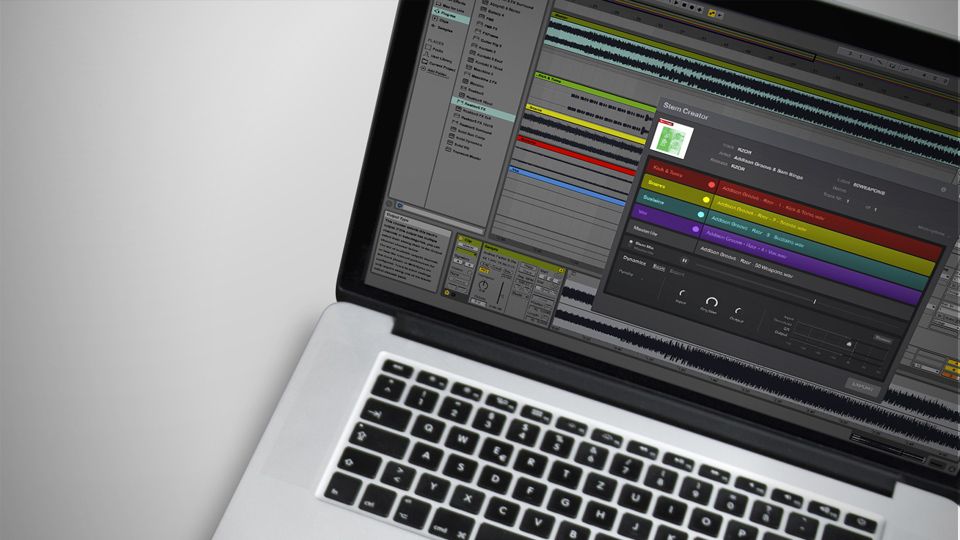
Native Instruments has released a beta version of the Stem Creator Tool, allowing producers and DJs to craft and create their own Stems for playback in Traktor’s Stem Decks. Read on to get the download and learn how the process works.

Download Stems Creator Tool

Jumping right in – the download is available now here for Mac and PC (note that for the beta Windows users the app will only run on 64-bit systems for now). The tool is completely free for anyone to use, but you’ll need to have four musical elements of a single track ready to export from your DAW into the tool to make use of it.

Stem Creator Tool: How To Get Started

Native Instruments has created the above walkthrough video – but in short the steps that happen for each Stem file are:

  • Isolate your track into four individual groups of similar elements (usually Drums, Bass, Main Instrumentation, and Vocals)
  • Time-align all of your audio tracks to ensure they will all stay synced and in time when playing back as a Stem
  • Load into Stem Creator tool + label your tracks – be sure to give a good descriptor of what exactly you’re loading. You can also choose a color for each Stem and add as much metadata as needed.
  • Set Real-Time Dynamics – this is the real-time compression / limiting that the individual Stems go through. The goal is to make sure that your individual stems sound good against the original track – and NI has included both beginner and advanced settings here to give a high level of control to producers that want to make sure their audio sounds just as good when split out into Stems as it does in a final mixdown.
  • Export the Stem file into the final .mp4 product, which can be tested right away in Traktor.

On Mastering Stem Decks
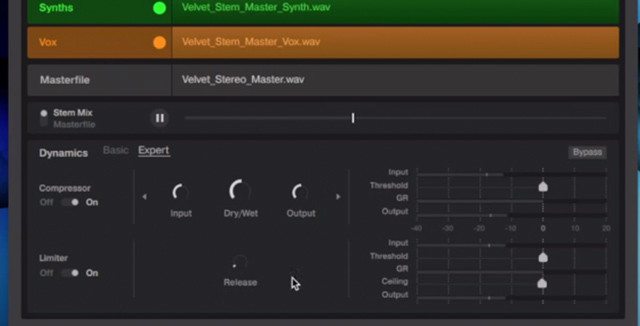
The Real Time Dynamics section of the Stem Creator Tool

One of the biggest questions that many producers and DJs have had about Stem Decks has been “How will mastering work?” The Stem Creator Tool’s Real Time Dynamics section seems to be aiming to put at least some mastering tools right there in the Stem creation process for easy quality control. Here’s NI’s official suggestions for how to create a Stem Deck that sounds as good as a studio master:

“When preparing the four stems in your DAW, they should be processed using the same mastering toolchain as the stereo retail master. You can do this by preparing the four stem parts before the mastering session, and then having the Mastering Engineer master the final mix as well as the four stems all in the same session. This will ensure the four stem parts have the same mastering tweaks as the stereo retail master, such as EQ changes, harmonic exciting, additional reverb, etc. Within the Stem Creator Tool, the Stem Master Dynamics should be used to replicate the final stage of compression and limiting applied to the stereo retail master.”

Anyone had a chance to build their first Stems yet? Let us know how the experience was in the comments. 
Tags: stem creator toolstem decksTraktor Tips
Share2Tweet1Share
Previous Post

Sinden on Pioneer DDJ-SX2: Routine + Interview

Next Post

Voclr.it: Soundcloud for EDM Acapellas?

Related Posts

Midi Fighter Twister controlling Traktor Pro 4 Stem decks
DJ Techniques / Tips

Ean’s powerful Midi Fighter Twister mapping for Traktor Pro 4’s Stems + Pattern Player

July 17, 2024
Serato Stems mixes
Serato DJ

Serato Stems: what DJs are doing with real-time stem separation added to Serato DJ

October 11, 2022
Traktor Pro 3.1
Breaking News

Traktor Pro 3.1 Released: Parallel Waveform Layouts, S8 + D2 Overmapping

February 20, 2019
Load More
Next Post
Voclr.it: Soundcloud for EDM Acapellas?

Voclr.it: Soundcloud for EDM Acapellas?

Want to reach DJTT's audience here?

Shoot an email to advertising@djtechtools.com

DJTT ads
DJTT newsletter
Midi Fighter
Chat with us
  • ABOUT DJTT
  • CONTACT
  • PRIVACY
  • MIDI FIGHTER HELP
  • ABOUT DJTT
  • JOBS
  • CONTACT US
  • ADVERTISE
  • PRIVACY POLICY
  • ACCESSIBILITY STATEMENT

© 2024 DJ Techtools all rights reserved by DJ TechTools on all content unless otherwise noted.

No Result
View All Result
  • Blog
    • DJ Gear
      • DIY Projects
      • Gear Reviews
      • New Products
      • Controllerism
    • Techniques + Tips
      • Beginner DJ
      • Advanced DJ
      • Producer
      • Finger Drummer
    • News + Culture
      • Editorials + Opinions
      • Artist Interviews
      • Performances + Routines
      • How I Play
    • DJ Software Tutorials
      • Serato Tips
      • CDJ Tips
      • Ableton Live Tips
  • Store
    • Run by real DJs, not a corporation
    • DJ Controllers
      • Midi Fighter Twister
      • Midi Fighter Spectra
      • Midi Fighter 64
      • View All
    • Accessories
      • Chroma USB Drive for DJs
      • Chroma Caps
      • Chroma Cables Audio
      • Chroma Cables USB-A
      • Chroma Cables: USB-C
      • DJTT Gift Card
      • Midi Fighter T-Shirt
      • Keyboard Covers
      • Earplugs by V-Moda
    • Production Gear
    • Soundcards & Mixers
  • Community
    • Popular Forums
      • General Discussion
      • Buy & Sell
      • Reviews
      • Mixes
      • Music Production
      • Show Your Setup
      • Off Topic
    • Handy Links
      • New Posts
      • Private Messages
      • Register
      • Search
    • Midi Maps
      • Traktor
      • Ableton
      • Serato DJ
      • Midi Fighter 3D
      • Midi Fighter Twister
      • Midi Fighter Spectra
  • Midi Fighter
  • Chroma

© 2024 DJ Techtools all rights reserved by DJ TechTools on all content unless otherwise noted.

This website uses cookies. By continuing to use this website you are giving consent to cookies being used. Visit our Privacy and Cookie Policy.