DJ TechTools
  • Blog
    • DJ Gear
      • DIY Projects
      • Gear Reviews
      • New Products
      • Controllerism
    • Techniques + Tips
      • Beginner DJ
      • Advanced DJ
      • Producer
      • Finger Drummer
    • News + Culture
      • Editorials + Opinions
      • Artist Interviews
      • Performances + Routines
      • How I Play
    • DJ Software Tutorials
      • Serato Tips
        • Traktor Tips
      • CDJ Tips
      • Ableton Live Tips
  • Store
    • Run by real DJs, not a corporation
    • DJ Controllers
      • Midi Fighter Twister
      • Midi Fighter Spectra
      • Midi Fighter 64
      • View All
    • Accessories
      • Chroma USB Drive for DJs
      • Chroma Caps
      • Chroma Cables Audio
      • Chroma Cables USB-A
      • Chroma Cables: USB-C
      • DJTT Gift Card
      • Midi Fighter T-Shirt
      • Keyboard Covers
      • Earplugs by V-Moda
    • Production Gear
    • Soundcards & Mixers
  • Community
    • Popular Forums
      • General Discussion
      • Buy & Sell
      • Reviews
      • Mixes
      • Music Production
      • Show Your Setup
      • Off Topic
    • Handy Links
      • New Posts
      • Private Messages
      • Register
      • Search
    • Midi Maps
      • Traktor
      • Ableton
      • Serato DJ
      • Midi Fighter 3D
      • Midi Fighter Twister
      • Midi Fighter Spectra
  • Midi Fighter
  • Chroma
No Result
View All Result
DJ TechTools
  • Blog
    • DJ Gear
      • DIY Projects
      • Gear Reviews
      • New Products
      • Controllerism
    • Techniques + Tips
      • Beginner DJ
      • Advanced DJ
      • Producer
      • Finger Drummer
    • News + Culture
      • Editorials + Opinions
      • Artist Interviews
      • Performances + Routines
      • How I Play
    • DJ Software Tutorials
      • Serato Tips
        • Traktor Tips
      • CDJ Tips
      • Ableton Live Tips
  • Store
    • Run by real DJs, not a corporation
    • DJ Controllers
      • Midi Fighter Twister
      • Midi Fighter Spectra
      • Midi Fighter 64
      • View All
    • Accessories
      • Chroma USB Drive for DJs
      • Chroma Caps
      • Chroma Cables Audio
      • Chroma Cables USB-A
      • Chroma Cables: USB-C
      • DJTT Gift Card
      • Midi Fighter T-Shirt
      • Keyboard Covers
      • Earplugs by V-Moda
    • Production Gear
    • Soundcards & Mixers
  • Community
    • Popular Forums
      • General Discussion
      • Buy & Sell
      • Reviews
      • Mixes
      • Music Production
      • Show Your Setup
      • Off Topic
    • Handy Links
      • New Posts
      • Private Messages
      • Register
      • Search
    • Midi Maps
      • Traktor
      • Ableton
      • Serato DJ
      • Midi Fighter 3D
      • Midi Fighter Twister
      • Midi Fighter Spectra
  • Midi Fighter
  • Chroma
No Result
View All Result
DJ TechTools

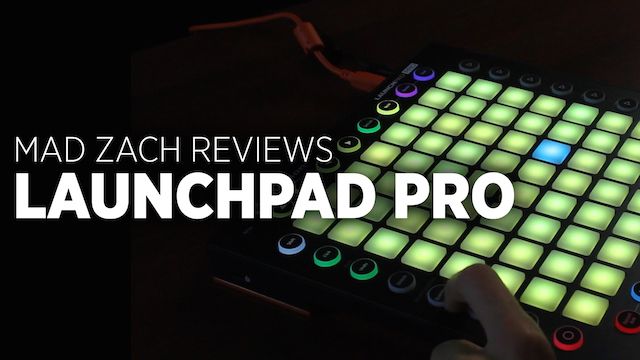
Mad Zach Reviews Launchpad Pro

Mad Zach by Mad Zach
September 1, 2015
in Ableton, Ableton Live Tips, DJ Controllers, Live 9, Reviews
Reading Time: 4 mins read
0
Mad Zach Reviews Launchpad Pro
108
VIEWS
Post on FacebookTweet thisUpvote on Reddit

Novation had enormous success with the original Launchpad thanks in large part to viral Youtube performances from artists like M4SONIC and Madeon. However the Launchpad started to show it’s age with the release of the AKAI APC40 MK2 and Ableton Push. Novation has finally released a true successor to the original launchpad, the Launchpad Pro with RGB velocity sensitive pads, note mode, and several new mode buttons for extra control. Is it worth the upgrade? Mad Zach puts the Launchpad Pro to the test.


Launchpad Pro Review

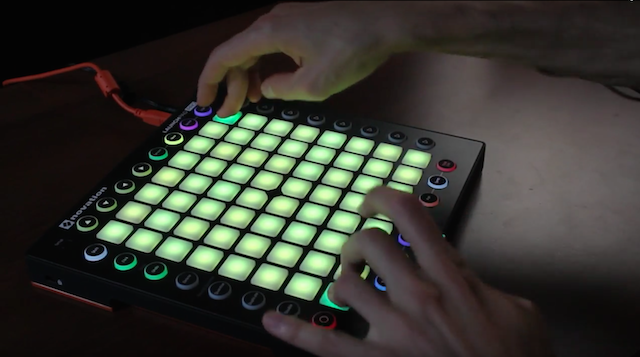
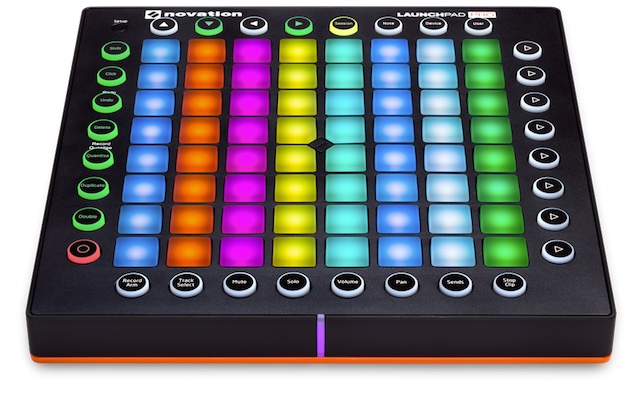
The new Launchpad Pro is basically the same as the original launchpad, with some substantial improvements to quality and feel of the pads, a few new function buttons, an orange bottom plate, and an array of ravey RGB leds. Its larger than the original, and also features an optional power supply, and midi in/out ports for use with hardware.

Overall it would be an improvement over the original for finger drummers. However, they implemented (rather thoughtlessly IMO) a row of buttons at the bottom which contain train wreck buttons like “stop clip” and “volume” which – if accidentally pressed during a live moment at a show – could VERY easily result in an absolute trainwreck. These function buttons are positioned directly next to some of the most critical pads which I typically use for the drums and core bass sounds.

New And Improved Pads
Launchpad Pro Pads

The main improvement here is the texture, density, and elasticity of the buttons, which are not only way more playable, but also now offer velocity sensitivity and aftertouch. As a button connoisseur, I can say with confidence that these buttons kick ass in terms of feel. However, they are still much too small for me. I’d love to see buttons with this same feel, but on a slightly larger scale (think midi fighter sized buttons with a slight rectangular shape ala the Push).

Personally I don’t really use velocity or aftertouch, but the feel and playability of these buttons is great. They’ve also added RGB Led’s to each button – which can be programmed from Ableton or Max/MSP. You could use this feature to make some flashy colorful light shows if you’re into that.

New Launchpad Pro Features
Launchpad Pro mode buttons

I like the new buttons on the left as they make recording and looping live stuff really hands on and much more “live” than before. Its an improved workflow if you want to record a clip, layer some stuff over it, make new clips, switch instruments, and build up a song idea on just the controller. Buttons like record quantization, undo, delete, and record could keep you pretty focused on the controller vs. constantly having to go back to the computer.

I also dug the velocity sensitive sliding for parameter adjustments, but I can’t say I’d use the launchpad to control parameters. Device mode could be fun and useful IF you set up good macro’s in advance, but in terms of the automap for this view I found it to be kind of useless. My biggest complaint is definitely the placement of the bottom row of function buttons as mentioned before. These bottom row function buttons would be pretty useful if they weren’t in the way and potentially dangerous for a performance.

Software Integration

Launchpad Pro Ableton

I found it to be truly plug n’ play. The Launchpad Pro worked smoothly without any installations. I also thought the velocity sensitive parameter change speed thing was cool but – I would never use it for that purpose. I also experienced several “freezes” where everything would freeze and stop working until I unplugged and plugged back in. This was disturbing to say the least, and made me skeptical of using it in a high pressure situation.

Final Word

At $299 compared to $169 for the original launchpad, I’m not sure its worth the extra money. The buttons are better, yes, but if you’re after the nice buttons, then you’re probably wanting to finger drum, and if you’re finger drumming, the row of show stopping function buttons at the bottom would potentially negatively outweigh the gain of the nicer pads. I also found the orange theme to be tasteless.

Furthermore, if you’re traveling for gigs – its a bit larger and heavier than the basic model. The midi port is cool but if you already have a midi port on your audio interface then that won’t really be a big deal.

Thinking of buying the Launchpad Pro? Please support DJTT and purchase it in our store. 

Tags: AbletonlaunchpadLaunchpad Pro Reviewmad zachMad Zach ReviewnovationNovation Launchpad Pro
Share1Tweet1Share
Previous Post

How To Get More Money For Used DJ Gear

Next Post

Beat Repeat: Throwback Thursday DJ Technique

Related Posts

Ableton launches Live 12 Suite rent-to-own plan – and it’s not a subscription
Ableton

Ableton launches Live 12 Suite rent-to-own plan – and it’s not a subscription

October 1, 2025
Control an entire studio with Midi Fighter Spectra (like Mad Zach)
Finger Drumming

Control an entire studio with Midi Fighter Spectra (like Mad Zach)

May 9, 2025
Mad Zach playing soundpacks on a Midi Fighter Spectra
Finger Drumming

Mad Zach Returns: Playing soundpacks in 2025

March 25, 2025
Load More
Next Post
Beat Repeat: Throwback Thursday DJ Technique

Beat Repeat: Throwback Thursday DJ Technique

Want to reach DJTT's audience here?

Shoot an email to advertising@djtechtools.com

DJTT ads
DJTT newsletter
Midi Fighter
Chat with us
  • ABOUT DJTT
  • CONTACT
  • PRIVACY
  • MIDI FIGHTER HELP
  • ABOUT DJTT
  • JOBS
  • CONTACT US
  • ADVERTISE
  • PRIVACY POLICY
  • ACCESSIBILITY STATEMENT

© 2024 DJ Techtools all rights reserved by DJ TechTools on all content unless otherwise noted.

No Result
View All Result
  • Blog
    • DJ Gear
      • DIY Projects
      • Gear Reviews
      • New Products
      • Controllerism
    • Techniques + Tips
      • Beginner DJ
      • Advanced DJ
      • Producer
      • Finger Drummer
    • News + Culture
      • Editorials + Opinions
      • Artist Interviews
      • Performances + Routines
      • How I Play
    • DJ Software Tutorials
      • Serato Tips
      • CDJ Tips
      • Ableton Live Tips
  • Store
    • Run by real DJs, not a corporation
    • DJ Controllers
      • Midi Fighter Twister
      • Midi Fighter Spectra
      • Midi Fighter 64
      • View All
    • Accessories
      • Chroma USB Drive for DJs
      • Chroma Caps
      • Chroma Cables Audio
      • Chroma Cables USB-A
      • Chroma Cables: USB-C
      • DJTT Gift Card
      • Midi Fighter T-Shirt
      • Keyboard Covers
      • Earplugs by V-Moda
    • Production Gear
    • Soundcards & Mixers
  • Community
    • Popular Forums
      • General Discussion
      • Buy & Sell
      • Reviews
      • Mixes
      • Music Production
      • Show Your Setup
      • Off Topic
    • Handy Links
      • New Posts
      • Private Messages
      • Register
      • Search
    • Midi Maps
      • Traktor
      • Ableton
      • Serato DJ
      • Midi Fighter 3D
      • Midi Fighter Twister
      • Midi Fighter Spectra
  • Midi Fighter
  • Chroma

© 2024 DJ Techtools all rights reserved by DJ TechTools on all content unless otherwise noted.

This website uses cookies. By continuing to use this website you are giving consent to cookies being used. Visit our Privacy and Cookie Policy.