DJ TechTools
  • Blog
    • DJ Gear
      • DIY Projects
      • Gear Reviews
      • New Products
      • Controllerism
    • Techniques + Tips
      • Beginner DJ
      • Advanced DJ
      • Producer
      • Finger Drummer
    • News + Culture
      • Editorials + Opinions
      • Artist Interviews
      • Performances + Routines
      • How I Play
    • DJ Software Tutorials
      • Serato Tips
        • Traktor Tips
      • CDJ Tips
      • Ableton Live Tips
  • Store
    • Run by real DJs, not a corporation
    • DJ Controllers
      • Midi Fighter Twister
      • Midi Fighter Spectra
      • Midi Fighter 64
      • View All
    • Accessories
      • Chroma USB Drive for DJs
      • Chroma Caps
      • Chroma Cables Audio
      • Chroma Cables USB-A
      • Chroma Cables: USB-C
      • DJTT Gift Card
      • Midi Fighter T-Shirt
      • Keyboard Covers
      • Earplugs by V-Moda
    • Production Gear
    • Soundcards & Mixers
  • Community
    • Popular Forums
      • General Discussion
      • Buy & Sell
      • Reviews
      • Mixes
      • Music Production
      • Show Your Setup
      • Off Topic
    • Handy Links
      • New Posts
      • Private Messages
      • Register
      • Search
    • Midi Maps
      • Traktor
      • Ableton
      • Serato DJ
      • Midi Fighter 3D
      • Midi Fighter Twister
      • Midi Fighter Spectra
  • Midi Fighter
  • Chroma
No Result
View All Result
DJ TechTools
  • Blog
    • DJ Gear
      • DIY Projects
      • Gear Reviews
      • New Products
      • Controllerism
    • Techniques + Tips
      • Beginner DJ
      • Advanced DJ
      • Producer
      • Finger Drummer
    • News + Culture
      • Editorials + Opinions
      • Artist Interviews
      • Performances + Routines
      • How I Play
    • DJ Software Tutorials
      • Serato Tips
        • Traktor Tips
      • CDJ Tips
      • Ableton Live Tips
  • Store
    • Run by real DJs, not a corporation
    • DJ Controllers
      • Midi Fighter Twister
      • Midi Fighter Spectra
      • Midi Fighter 64
      • View All
    • Accessories
      • Chroma USB Drive for DJs
      • Chroma Caps
      • Chroma Cables Audio
      • Chroma Cables USB-A
      • Chroma Cables: USB-C
      • DJTT Gift Card
      • Midi Fighter T-Shirt
      • Keyboard Covers
      • Earplugs by V-Moda
    • Production Gear
    • Soundcards & Mixers
  • Community
    • Popular Forums
      • General Discussion
      • Buy & Sell
      • Reviews
      • Mixes
      • Music Production
      • Show Your Setup
      • Off Topic
    • Handy Links
      • New Posts
      • Private Messages
      • Register
      • Search
    • Midi Maps
      • Traktor
      • Ableton
      • Serato DJ
      • Midi Fighter 3D
      • Midi Fighter Twister
      • Midi Fighter Spectra
  • Midi Fighter
  • Chroma
No Result
View All Result
DJ TechTools

How Apple’s 3D Touch Could Benefit iOS DJs/Performers

Dan White by Dan White
September 10, 2015
in iOS DJ Tips, News
Reading Time: 3 mins read
0
How Apple’s 3D Touch Could Benefit iOS DJs/Performers
83
VIEWS
Post on FacebookTweet thisUpvote on Reddit

With the announcement of the brand new iPhone 6S and 6S+, Apple has also introduced a brand new technology – 3D Touch – that allows users to control their phones with the strength and depth of their touches. As we watched the Apple Keynote, it became clear that one subset of users and app developers could stand to seriously benefit from 3D Touch: music app users. Read on for an overview of the technology and how we imagine it will quickly become integrated into iOS music apps.

What Is 3D Touch?

This new technology goes beyond the limited other touch-sensitive feedback ideas that came before with Apple’s Force Touch and Taptic Engine. Many DJs and producers already know about two analogous technologies to the in the MIDI controller world: velocity sensitivity and MIDI aftertouch. The parallels are significant in that Apple’s 3D Touch is not only designed to detect how hard you touch the screen, but if you increase the pressure on the screen after the initial touch.
3d-touch-types

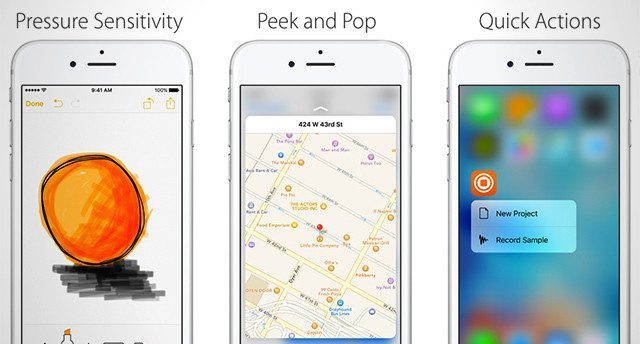
So far we’ve only seen three Apple-defined types of 3D Touch interactions documented in the media that has come out on the feature so far:

  • Pressure Sensitivity – this is the basic “press harder to get more of a result” type of touch. The most common example is a paintbrush thickness directly corresponding to how hard you’re pressing the screen
  • “Peek” and “Pop” – these are two stages of a deeply-integrated type of touch that Apple has defined in iOS 9 for easy use – allowing a user to click an object lightly to get a look at what it contains, and then press harder to pop into a deeper view of the content.
  • Quick Actions – think of this as the “right-click” of 3D Touch – a press (often from the Home screen) that allows a user to quickly select a common action to happen. Notably in the image above, Apple indicates that Native Instruments has already started building Quick Actions into iMaschine.

How 3D Touch Could Show Up In Music Apps

The implications for 3D Touch for iOS music makers are very clear – and we suspect they’ll roll out fairly quickly assuming that app developers are on their game.
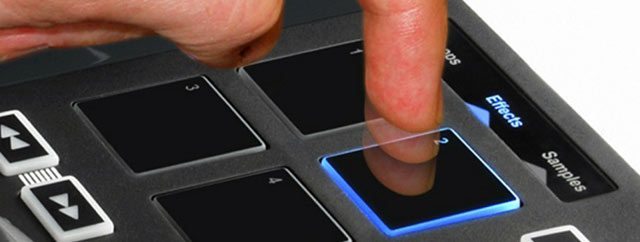
Velocity sensitivity - not just for Pads anymore
Velocity sensitivity – not just for pads anymore.

For the pressure sensitivity, we suspect that almost every synthesizer and beat machine app will immediately incorporate velocity-sensitive pads/keys. Press harder on a pad and you’ll get a louder kick on your drum machine or sharper attack on your synth. It’s basic stuff, but something that until now has been impossible on iOS. Expect to see apps like Animoog and iMaschine be the first to integrate this functionality.

For Peek and Pop, we expect we’ll see app developers like Algoriddim quickly add these features to make the use of their apps even more efficient – want to view the full waveform or metadata for a playing track in djay? Give it a light touch to see more – or press harder to open those details. Within the same idea, you might expect these interactions to also drive quick selection process – like loading in a new track to a deck or a preset into a synth.
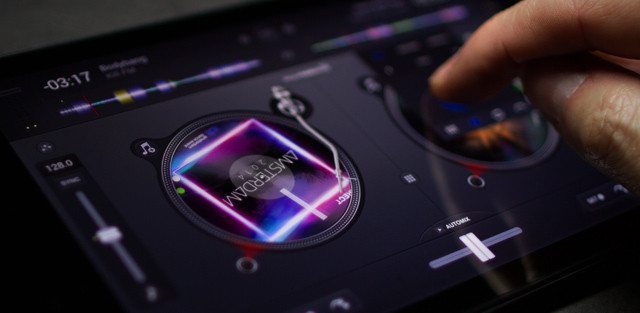
All bets are on Algoriddim's djay having 3D Touch functionality in the next update...
All bets are on Algoriddim’s djay having 3D Touch functionality in the next update…

Undoubtedly we’ll also see a number of now layered controls on iOS music making apps – somewhat like when we first started adding shift buttons to MIDI controller mappings to allow a whole new level of control. Instead of a normal filter control, press deeply on a filter to select a new filter curve to apply to the control. Want to access your second layer of cue points or select new FX? Just press deeply on these controls and select them from a contextual menu.

3D Touch Is About Workflow

We’ve seen plenty of media touting 3D Touch as being the “next big thing” on smart devices, but the truth is that for people familiar with aftertouch and velocity sensitivity, 3D Touch is just bringing iPhones (and before too long, iPads) to the same level of tactile control as high-end MIDI instruments.

Integrating this technology right into the software is a big deal – but primarily we’re hoping that it makes music making and DJing on an iOS device less of a pain and more of a pleasure. Ideally 3D touch in a music app is intuitive, and instead of being something that gets in the way, it adds concise and efficient control for the user:

“on a device this thin, you want to detect force. I mean, you think you want to detect force, but really what you’re trying to do is sense intent. You’re trying to read minds.” – Apple’s Craig Federighi in this Bloomberg article

Tags: 3d touchappleIOSios music appsmusic appsNewspeekpoppressure sensitivityquick actionsvelocity sensitivity
Share1Tweet1Share
Previous Post

Traktor Kontrol S5: New Native Instruments DJ Controller

Next Post

Routine: DJ Shiftee on Z2, D2s, and Technics to rock NI Stems

Related Posts

The DJM-V5 from AlphaTheta: 3 channels, 4-band EQ, V10 sound – no Beat FX or crossfader.
Breaking News

The DJM-V5 from AlphaTheta: 3 channels, 4-band EQ, V10 sound – no Beat FX or crossfader.

January 20, 2026
Ableton launches Live 12 Suite rent-to-own plan – and it’s not a subscription
Ableton

Ableton launches Live 12 Suite rent-to-own plan – and it’s not a subscription

October 1, 2025
Meet the TR-1000: Roland’s new analog/digital drum machine with built-in sampling
Breaking News

Meet the TR-1000: Roland’s new analog/digital drum machine with built-in sampling

October 1, 2025
Load More
Next Post
Routine: DJ Shiftee on Z2, D2s, and Technics to rock NI Stems

Routine: DJ Shiftee on Z2, D2s, and Technics to rock NI Stems

Want to reach DJTT's audience here?

Shoot an email to advertising@djtechtools.com

DJTT ads
DJTT newsletter
Midi Fighter
Chat with us
  • ABOUT DJTT
  • CONTACT
  • PRIVACY
  • MIDI FIGHTER HELP
  • ABOUT DJTT
  • JOBS
  • CONTACT US
  • ADVERTISE
  • PRIVACY POLICY
  • ACCESSIBILITY STATEMENT

© 2024 DJ Techtools all rights reserved by DJ TechTools on all content unless otherwise noted.

No Result
View All Result
  • Blog
    • DJ Gear
      • DIY Projects
      • Gear Reviews
      • New Products
      • Controllerism
    • Techniques + Tips
      • Beginner DJ
      • Advanced DJ
      • Producer
      • Finger Drummer
    • News + Culture
      • Editorials + Opinions
      • Artist Interviews
      • Performances + Routines
      • How I Play
    • DJ Software Tutorials
      • Serato Tips
      • CDJ Tips
      • Ableton Live Tips
  • Store
    • Run by real DJs, not a corporation
    • DJ Controllers
      • Midi Fighter Twister
      • Midi Fighter Spectra
      • Midi Fighter 64
      • View All
    • Accessories
      • Chroma USB Drive for DJs
      • Chroma Caps
      • Chroma Cables Audio
      • Chroma Cables USB-A
      • Chroma Cables: USB-C
      • DJTT Gift Card
      • Midi Fighter T-Shirt
      • Keyboard Covers
      • Earplugs by V-Moda
    • Production Gear
    • Soundcards & Mixers
  • Community
    • Popular Forums
      • General Discussion
      • Buy & Sell
      • Reviews
      • Mixes
      • Music Production
      • Show Your Setup
      • Off Topic
    • Handy Links
      • New Posts
      • Private Messages
      • Register
      • Search
    • Midi Maps
      • Traktor
      • Ableton
      • Serato DJ
      • Midi Fighter 3D
      • Midi Fighter Twister
      • Midi Fighter Spectra
  • Midi Fighter
  • Chroma

© 2024 DJ Techtools all rights reserved by DJ TechTools on all content unless otherwise noted.

This website uses cookies. By continuing to use this website you are giving consent to cookies being used. Visit our Privacy and Cookie Policy.